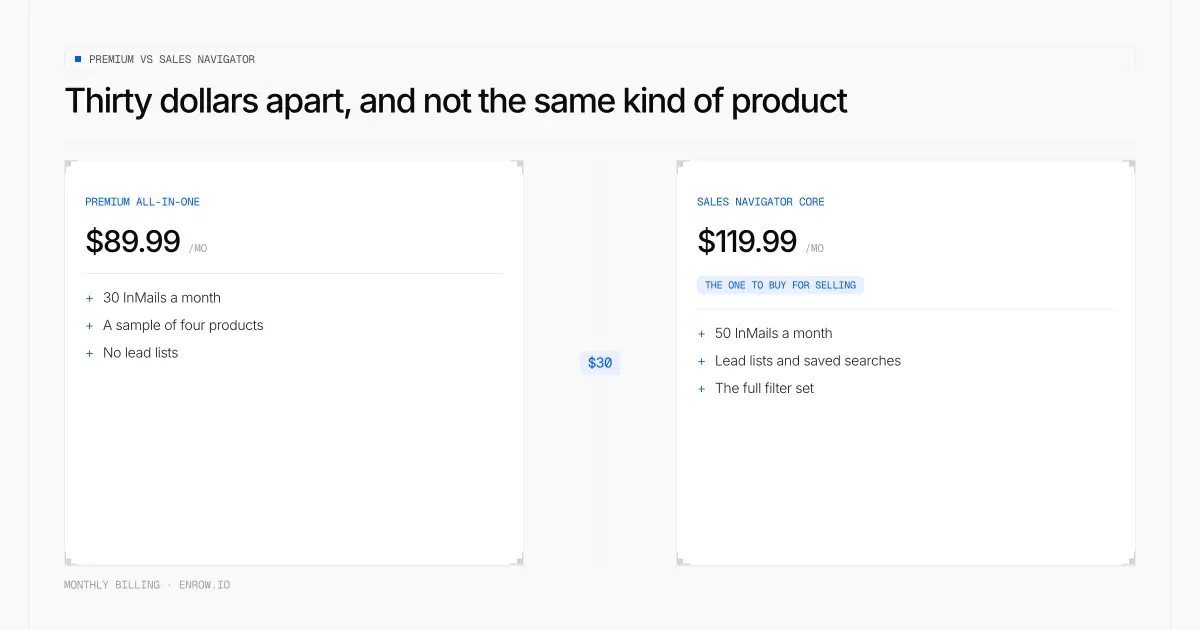
Thirty dollars, and not the same kind of product.
Key takeaway Search LinkedIn Premium vs Sales Navigator and you'll be told they're different products for different people. True, and useless. Here's the decision. If you sell, buy Sales Navigator Core at $119.99 a month. If you sell through your own profile and never build a list, Premium Business at $69.99 covers you. Everything else in the range is a thinner version of one of those two. The number that settles it: Premium All-in-One costs $89.99 a month, and Sales Navigator Core paid annually costs $89.99 a month. Same figure, to the cent, for a far better tool. Priced monthly against monthly, an InMail runs $2.40 on Sales Navigator Core and $9.00 on a second Recruiter Lite seat. Same envelope, nearly four times the price. Factor in annual billing and the full ladder stretches from $1.80 to $9.00. And none of LinkedIn's eleven paid tiers returns an email address or a phone number.
Most LinkedIn Premium vs Sales Navigator articles stack features in two columns and stop. That's a menu, not a decision.
This one does the arithmetic. Every price below was read off LinkedIn's own pages on September 1, 2026, which matters more than it should: plenty of results ranking for this query still quote Sales Navigator at $99.99. Nobody dates their numbers. I do.
Disclosure. I run Enrow, which finds and verifies the work emails and direct dials LinkedIn withholds by design. That makes me LinkedIn's customer, not its rival.
Every LinkedIn price on one page
| Plan | Monthly | Annual | Annual per month | Annual discount | InMails/mo |
|---|---|---|---|---|---|
| Premium Career | $39.99 | $239.88 | $19.99 | 50% | 5 |
| Premium Business | $69.99 | $539.88 | $44.99 | 35.7% | 15 |
| Premium All-in-One | $89.99 | $899.88 | $74.99 | 16.7% | 30 |
| Premium Company Page | $99.99 | $839.88 | $69.99 | 30% | not published |
| Sales Navigator Core | $119.99 | $1,079.88 | $89.99 | 25% | 50 |
| Sales Navigator Advanced | $159.99 | $1,799.88 | $149.99 | 6.3% | 50 |
| Sales Navigator Advanced Plus | quote only | quote only | — | — | 50 |
| Recruiter Lite (1 licence) | $170 | $1,680 | $140 | 17.6% | 30 |
| Recruiter Lite (licences 2–5) | $270 per licence | $2,670 per licence | $222.50 | 17.6% | 30 |
| Recruiter RPS / RPS+ / Corporate | quote only | quote only | — | — | 100 / 140 / 150 |
Prices are exactly as LinkedIn publishes them, excluding VAT and GST and any promotional discount. LinkedIn also warns the figure can shift slightly by device type. Annual monthly-equivalents and every percentage below are computed from those published numbers, not copied from another blog.
Per-product detail sits in the LinkedIn pricing hub, the Sales Navigator pricing article, the Premium pricing article, the Recruiter pricing article and the Premium Company Page breakdown.
The $30 gap that decides the whole comparison
Premium All-in-One sits at $89.99. Sales Navigator Core sits at $119.99. Thirty dollars between them.
| Comparison | Monthly gap | Over a year, paid monthly | Over a year, paid annually |
|---|---|---|---|
| All-in-One → Sales Nav Core | $30.00 | $360.00 | $180.00 |
| Premium Business → Sales Nav Core | $50.00 | $600.00 | $540.00 |
| Premium Career → Premium Business | $30.00 | $360.00 | $300.00 |
| Sales Nav Core → Sales Nav Advanced | $40.00 | $480.00 | $720.00 |
| Sales Nav Core → Recruiter Lite | $50.01 more for Lite | $600.12 | $600.12 |
Now the line I'd put on a billboard. Sales Navigator Core billed annually works out at $89.99 a month, which is precisely what Premium All-in-One costs billed monthly. Nobody writes that down, and it kills the argument for All-in-One if your goal is pipeline.
Read the last row too, because it inverts expectations. Recruiter Lite, the plan sold to people whose whole job is contacting strangers, costs $600.12 a year more than Sales Navigator Core and hands you twenty fewer messages a month.
What an InMail actually costs
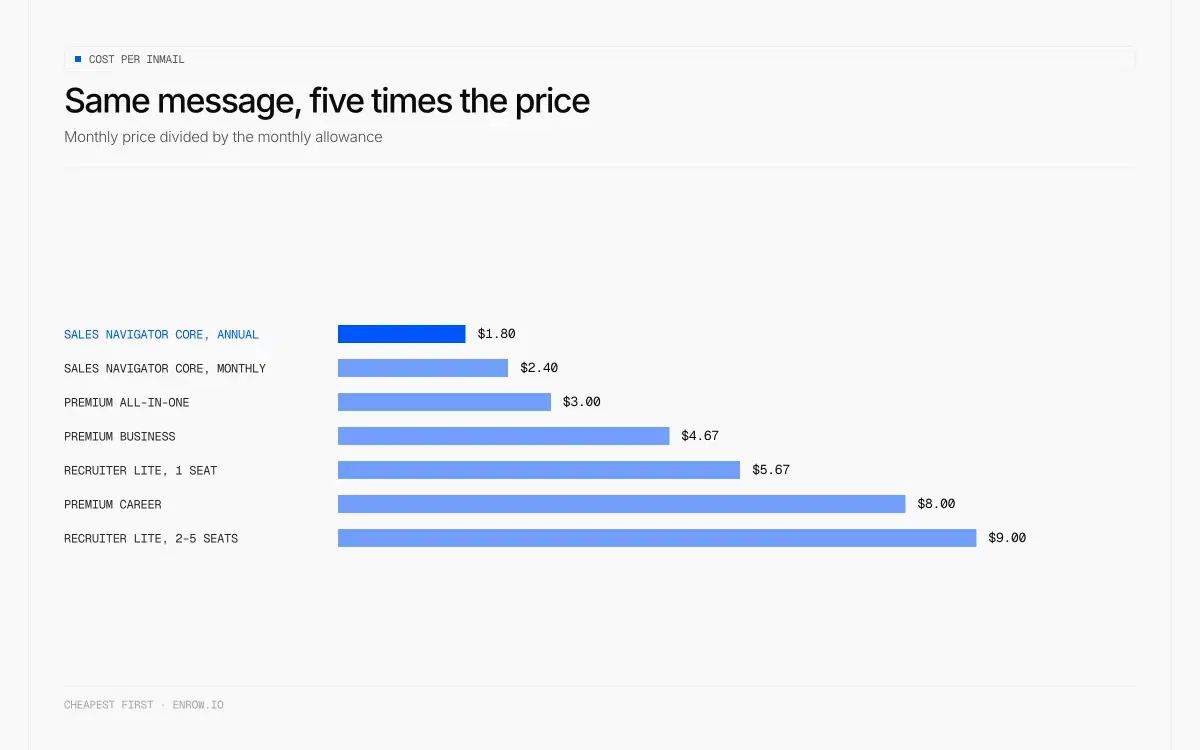
Same message, five times the price.
LinkedIn sells tiers on features. Buyers experience them as a message allowance. So price the allowance.
| Plan | Monthly price | InMails | Cost per InMail, monthly | Cost per InMail, annual |
|---|---|---|---|---|
| Sales Navigator Core | $119.99 | 50 | $2.40 | $1.80 |
| Premium All-in-One | $89.99 | 30 | $3.00 | $2.50 |
| Sales Navigator Advanced | $159.99 | 50 | $3.20 | $3.00 |
| Premium Business | $69.99 | 15 | $4.67 | $3.00 |
| Recruiter Lite (1 licence) | $170 | 30 | $5.67 | $4.67 |
| Premium Career | $39.99 | 5 | $8.00 | $4.00 |
| Recruiter Lite (licences 2–5) | $270 | 30 | $9.00 | $7.42 |
The priciest line in the published catalogue buys the worst message rate in it. And the cheapest message sits on the plan a salesperson wants anyway.
Credits roll to a ceiling: 15 banked on Premium Career, 45 on Premium Business, 150 on Sales Navigator, 120 per seat on Recruiter Lite. Renewal dates differ by product: Premium tops you up on the first day of your billing cycle, Sales Navigator on the first of the calendar month in UTC "regardless of your billing cycle". Either way a credit expires 90 days after it is issued. The InMail breakdown has the full accrual table. LinkedIn also words its rebate carefully: a credit comes back "for every InMail message that receives a response within 90 days of the date sent". A decline counts. Silence doesn't.
One caution, since I'm the one telling you to buy the plan with 50 of them. I don't recommend InMail. It stamps your first contact as overtly commercial before the person reads a word, and a plain connection invitation beats it in my experience. The allowance is the cleanest way to price the tiers, not the reason to use them.
LinkedIn Premium vs Sales Navigator: what actually differs
LinkedIn's own positioning page is unusually blunt. Premium Business is for "professionals seeking a generalist tool to grow their network or business." Sales Navigator is for "sales professionals and teams seeking a specialized, tailor-made tool to build relationships, acquire new accounts, and grow existing opportunities."
Six capabilities appear on the Sales Navigator side of that page and nowhere else: real-time alerts, account prioritization through Account Hub, lead and account recommendations, Relationship Map, Relationship Explorer, CRM integration. The search row is the one to read twice. Premium Business gets "Limited". Sales Navigator gets "50+ advanced lead and account search filters" — a current figure, worth knowing because plenty of articles still print 40+, which belongs to Recruiter's upper tiers.
Then the fact that answers the most common question here, buried in a help page LinkedIn stamps "Last updated: 1 year ago": "Sales Navigator Core edition users now have access to Premium Career Subscription features at no additional cost." Two exclusions, verbatim: "Access to LinkedIn Learning/Lynda and Premium Career InMail credits aren't included with your free Premium Career subscription."
So the stacking question runs backwards from how people ask it. Premium doesn't include Sales Navigator. Sales Navigator quietly includes most of Premium Career. What you can't do is run Sales Navigator and Recruiter Lite together: "You can't switch your Sales Navigator subscription to Recruiter Lite or the other way around."
Is Sales Navigator worth it, honestly
Yes for Core, no for Advanced, and I'll show my working.
Core earns it on one structural advantage. The data is maintained by the people in it. Someone changes job and updates their own profile that afternoon. Every tool built on a proprietary contact database serves you a snapshot 45 days old at best, six months old in normal practice. For working out who currently does what, nothing is close. The company-level signals are underrated too: recent hires, quiet internal moves, headcount swings, and who just opened an office somewhere. LinkedIn barely markets that side and it's the best ABM input available. A paid subscription also lets you browse privately while still seeing who viewed your own profile.
Advanced does not earn its $720 a seat per year. All three Sales Navigator editions get 50 InMails a month, so the extra spend buys zero additional messages. Team reporting tells you nothing actionable. Buyer Intent doesn't work well enough to plan around. TeamLink is dead weight. Smart Links are the only watchable item, and watchable is doing heavy lifting there. Two things justify the tier: pushing a CSV account list in, and reassigning licences across a team, where LinkedIn documents no limit on how often you can do it. Ten reps who use the tool in bursts are better served by five rotated Advanced seats than ten Core seats.
Note the hedge on CSV, because it's live. LinkedIn's compare-plans table as read today lists "CSV upload" on Core and "CSV upload and CRM import" on Advanced. My own field notes have account-list import as Advanced-only. Both can't be right, and I'd rather flag the disagreement than pick the flattering version. Check it in-product before upgrading for that reason.
Two more things before you sign. Sales Navigator has its own inbox, separate from normal LinkedIn messaging, so replies land somewhere you don't live and sit unread for a week. Send from regular LinkedIn. And read the footnote under any ROI percentage LinkedIn publishes for the product before you quote it at your CFO. Those figures come from research LinkedIn paid for. Marketing material with a citation, not independent evidence, which is why no percentage from that source appears anywhere on this page.
LinkedIn Premium Career vs Business
| Premium Career | Premium Business | |
|---|---|---|
| Monthly | $39.99 | $69.99 |
| Annual | $239.88 ($19.99/mo) | $539.88 ($44.99/mo) |
| Annual discount | 50% | 35.7% |
| Duo price | $59.98/mo, $359.88/yr | $118.98/mo, $917.98/yr |
| InMails/month | 5 | 15 |
| Cost per InMail | $8.00 | $4.67 |
| InMail bank cap | 15 | 45 |
| Named by LinkedIn as lifting the commercial use limit | absent from the list | yes |
| Profile viewer history | 365 days | "up to 365 days" in the feature list, "the past 90 days" in the FAQ on the same page |
| Custom call-to-action button | no | yes |
| Business insights (growth, hiring activity) | no | yes |
| Gives you an email or a phone number | no | no |
One row decides this. LinkedIn's help page on the commercial use limit names the plans that raise your search and view allowance: Premium Business, Recruiter Lite, Sales Navigator. Premium Career is not on that list. LinkedIn never says Career fails to lift the limit; it simply never names it among the plans that do. Buying Career to search more means buying the wrong subscription, and the Premium Career pricing article goes deeper.
Career's 50% annual discount is the best in the range, which incidentally answers the "how do I get 50% off LinkedIn Premium" question people keep asking. No trick, no coupon hunt. It's published. Two of its AI features carry restrictions most reviews skip, and they are not the same restriction. The AI message and post drafts are "Currently available in English and in the US only." The AI profile writing assistant is "Not available globally for Career and Business plans."
Sales Navigator vs Recruiter Lite
| Sales Navigator Core | Recruiter Lite | |
|---|---|---|
| Monthly | $119.99 | $170 |
| Annual | $1,079.88 | $1,680 |
| InMails/month | 50 | 30 |
| Cost per InMail | $2.40 | $5.67 |
| InMail bank cap | 150 | 120 |
| Search filters | 50+ | 20+ |
| Network reach | extended | 3rd degree only |
| Volume ceiling | 2,500 leads / 1,000 accounts per search | 2,000 unique profile views per day |
| Seats | single | up to 5, at $270 each from the second |
| ATS integration | not applicable | none |
| Data ownership | the subscriber | the Purchaser Admin, not the company |
| Includes Premium Career features | yes, at no extra cost | not stated |
| Available in China | — | no |
| Gives you an email or a phone number | no | no |
For a solo recruiter who searches and messages, Sales Navigator Core wins on money and tooling: $600.12 a year cheaper, 20 more messages a month, more than twice the filters. Recruiter Lite's real advantage is pipeline management: candidate stages and notes, tied to job posts on the seat. Don't need that machinery, and you're paying $600 a year for it.
The 2,000-profile-views-a-day figure appears on LinkedIn's business product-comparison page and not in the help centre, so treat it as single-sourced.
LinkedIn Recruiter vs Recruiter Lite
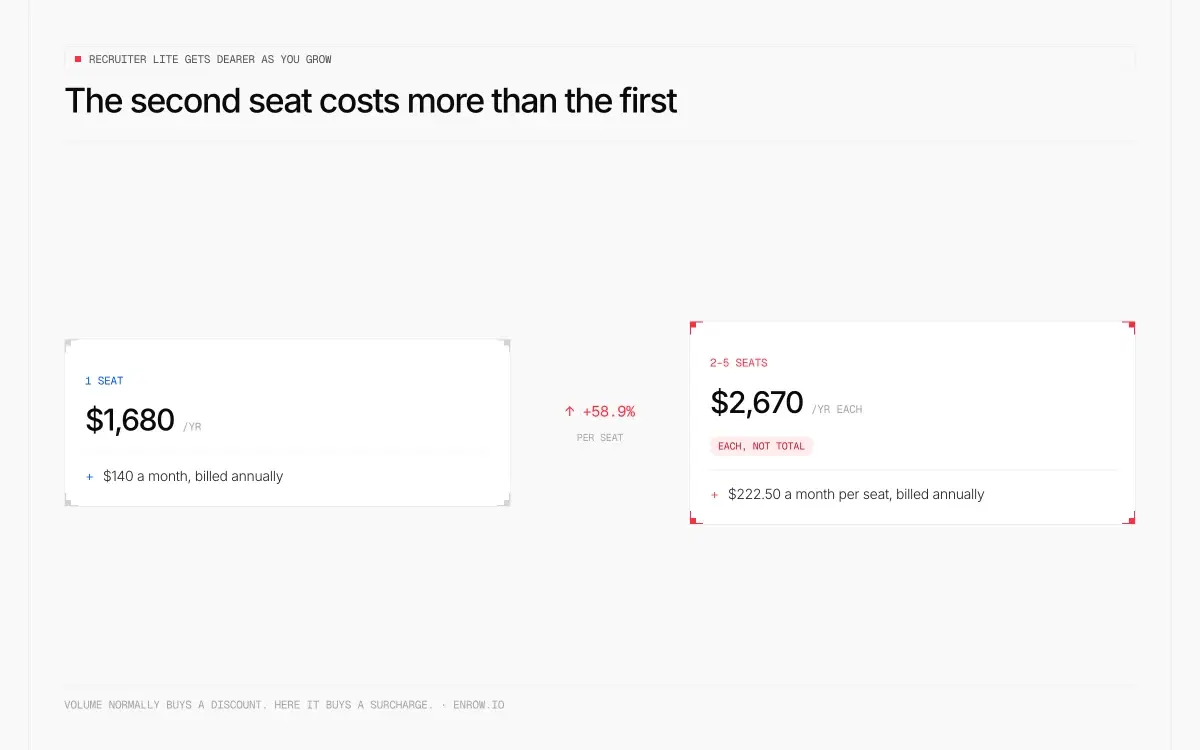
Volume normally buys a discount. Here it buys a surcharge.
Here LinkedIn's pricing gets genuinely strange.
| Seats | Price per licence/mo | Total/mo | Total/year | Per seat/year |
|---|---|---|---|---|
| 1 | $170 | $170 | $1,680 | $1,680 |
| 2 | $270 | $540 | $5,340 | $2,670 |
| 3 | $270 | $810 | $8,010 | $2,670 |
| 5 | $270 | $1,350 | $13,350 | $2,670 |
Volume discounts run downward everywhere in software. This one runs upward. Adding a colleague raises your cost per seat by 58.9%, and two seats end up costing more than three single seats. A caveat I won't gloss: LinkedIn's table never states whether licence one re-prices to $270 when you add a second, or holds at $170. The wording reads as a tier price across all licences, which is how the table above is built. Confirm at checkout before budgeting.
Above Lite, everything is quote-only. LinkedIn writes "Contact our Sales team" in all three cells for RPS, RPS+ and Corporate. What that money buys, in LinkedIn's own words: 100, 140 and 150 InMails per seat per month against Lite's 30; "40+ filters" against Lite's "20+"; connections to "28+ ATS partners" where Lite has none; and reach that climbs from Lite's "Up to your 3rd-degree connections" to "Full access to entire network".
The row that should worry a procurement team has nothing to do with price. On Recruiter Lite, LinkedIn states "Data is owned by the Purchaser Admin". On every tier above it, "Recruiter data is owned by and stays with your company." One person leaves and the pipeline leaves with them. Lite also caps at five seats and isn't sold to members in China.
My read: buy Lite for one person, and get a Recruiter quote before you buy a second seat.
The caps nobody prints
| Cap | Value | Plan |
|---|---|---|
| Lead results viewable per search | 2,500 across 100 pages | all Sales Navigator |
| Account results viewable per search | 1,000 across 40 pages | all Sales Navigator |
| Total saved leads | 10,000 | Sales Navigator |
| Saved leads per custom list | 1,000 | Sales Navigator |
| Leads saved at once from results | 25 | Sales Navigator |
| Saved searches | 50 lead + 50 account | Sales Navigator |
| InMail bank ceiling | 150 | Sales Navigator |
| InMail bank ceiling | 45 | Premium Business |
| InMail bank ceiling | 15 | Premium Career |
| InMail bank ceiling | 120 per seat | Recruiter Lite |
| Extra InMails purchasable | 70 per seat/month | Recruiter Lite |
| Unique profile views per day | 2,000 | Recruiter Lite |
| Seats | 5 | Recruiter Lite |
| Commercial use limit | no number published | free accounts |
The full set of platform ceilings, invitations and connection caps included, sits in the LinkedIn limits breakdown. That last row deserves noise. LinkedIn refuses to publish a figure and says so outright: "We are not able to display the exact number of searches or views you have left and we also cannot lift the limit upon request." Every article quoting a specific commercial-use-limit number invented it. What LinkedIn does document is what counts against you (profile searches, browsing through "People Also Viewed", viewing members on a Page's People tab) and when it resets, at midnight PST on the first of each calendar month.
Two other freshness signals. LinkedIn's standalone "unlimited search" marketing page is gone, 301-redirecting to the commercial use limit article with a parameter that literally reads "deprecated-unlimited-search-page". And LinkedIn contradicts itself on free trials across two official pages. Compare-plans says trials go to members who "have not used a LinkedIn free trial in the past 365 days". A help article says you "may not be eligible for any further free Premium subscriptions, even if it has been more than 12 months since your previous free trial." Both are LinkedIn. I won't pick a winner for you.
Buy this if you are
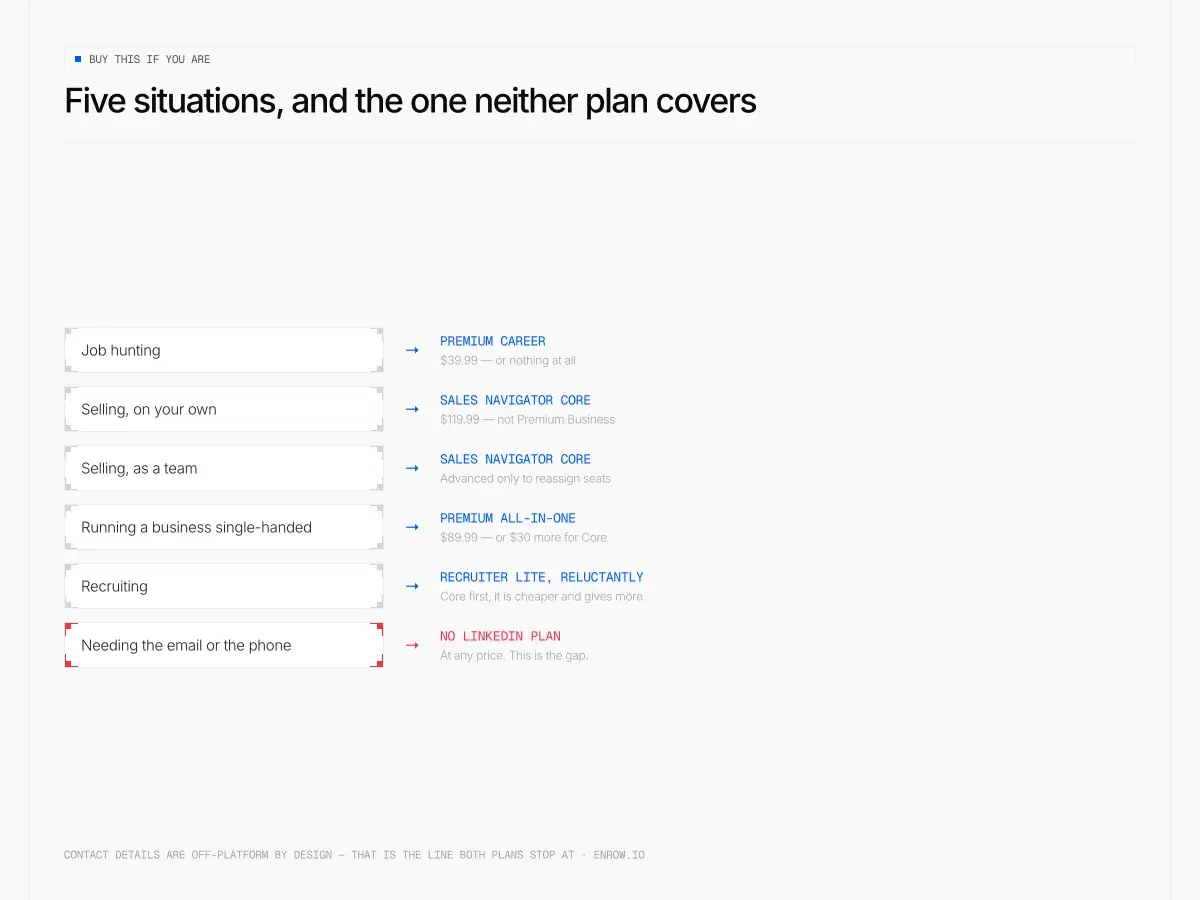
The last row is the one neither plan covers, at any price.
| You are | Buy | Monthly | Why |
|---|---|---|---|
| A salesperson or founder doing outbound | Sales Navigator Core | $119.99 | Cheapest cost per message in the range, 50+ filters, and it quietly includes Premium Career features |
| A consultant selling through your own profile | Premium Business | $69.99 | The custom CTA button and the commercial-use-limit lift are the two things you'll use |
| A small-business owner who sells, hires and posts | Premium All-in-One | $89.99 | Only if you spend the $50 boost credit every month. Otherwise $30 more buys a real tool |
| A job seeker | none of them | $0 | Career isn't on LinkedIn's list of plans that lift the search limit, its messages cost $8 each, and its AI drafting is English-and-US-only |
| A solo recruiter searching and messaging | Sales Navigator Core, not Recruiter Lite | $119.99 | $600.12 a year cheaper, 20 more messages a month |
| A recruiting team of 2 to 5 | get a Recruiter quote first | — | Lite bills $270 for each licence from the second, and Lite data belongs to the Purchaser Admin |
| On Core, wondering about Advanced | stay on Core | $119.99 | $720 a seat per year buys zero extra InMails |
| Anyone who needs the email or the phone number | none of them | — | No LinkedIn subscription at any price returns a contact detail |
What none of them gives you
Every plan above answers the same question: who. None of them tells you how to reach that person off-platform.
One caveat before the numbers, because the comparison isn't like-for-like. An InMail is a message delivered inside LinkedIn. A verified email is a contact detail you then send yourself, with your own tool. Different objects. What follows is cost per person reached.
| Monthly | What you can reach | Cost per person reached | |
|---|---|---|---|
| Premium Career | $39.99 | 5 InMails | $8.00 |
| Premium Business | $69.99 | 15 InMails | $4.67 |
| Sales Navigator Core | $119.99 | 50 InMails | $2.40 |
| Recruiter Lite | $170 | 30 InMails | $5.67 |
| Enrow Start | $17 | 1,000 verified emails | $0.017 |
| Enrow Pro | $87 | 10,000 verified emails, or 250 direct dials | $0.0087, phones $0.35 |
One Sales Navigator InMail costs what roughly 275 verified email addresses cost on Enrow Pro. One Premium Career InMail costs about 920 of them. And Enrow Pro sits $32.99 a month under Sales Navigator Core while returning ten thousand contactable addresses against fifty messages.
Enrow finds and verifies in real time instead of serving rows off a stored list, and bills only on a valid result, so a miss costs nothing. Every address clears 10+ verification checks. Observed bounce sits under 1%, an average I've measured rather than a guarantee I'd put in a contract. Catch-all addresses get verified and delivered instead of flagged risky and dropped, and on European direct dials we aren't blocked by GDPR.
The part that matters here: the Chrome extension runs inside LinkedIn and Sales Navigator. Open a profile you found through those 50+ filters and the full verified contact card exports into HubSpot, Salesforce or Pipedrive in one click. Every field, native integration, no copy-paste. There's an API for bulk lists and an MCP server (github.com/EnrowAPI/enrow-mcp) for AI workflows. No per-seat fee on Pro or Scale, which is an odd sentence to write on a page about LinkedIn's seat pricing.
Where Enrow won't help you. There's no searchable database, deliberately: stored databases refresh every three to nine months and you end up mailing people who moved jobs last spring. That's precisely why Sales Navigator sits above Enrow rather than against it, and sourcing stays on LinkedIn. Sequencing isn't ours either and never will be, so that goes to Emelia, La Growth Machine or lemlist. The $17 Start tier also has no rollover and no annual billing, which bites if your volume is uneven.
The stack I'd run: Sales Navigator Core for the who, Enrow for the address and the direct dial, a sequencer for the sending. Free tier is 50 credits every month, recurring, no card.
ready to stop wasting time?
Connected in minutes.
Verified data in seconds.
FAQ
Should I get LinkedIn Premium or Sales Navigator?
If you prospect, Sales Navigator Core at $119.99. It carries 50+ search filters against Premium Business's "Limited", plus lead and account lists, saved searches, and 50 InMails against 15. Premium Business at $69.99 fits only if you sell through your own profile and never build target lists.
Does LinkedIn Premium include Sales Navigator?
No, and the relationship runs the other way. LinkedIn states that Sales Navigator Core users "have access to Premium Career Subscription features at no additional cost", excluding LinkedIn Learning and Premium Career InMail credits. Buying Premium gets you nothing from Sales Navigator.
How much does a LinkedIn InMail actually cost?
$1.80 at best, $9.00 at worst, once you allow for billing cycle. Compared cycle for cycle: billed monthly, Sales Navigator Core is $2.40 a message against $9.00 on a second Recruiter Lite licence; billed annually, $1.80 against $7.42. The floor of $1.80 is Sales Navigator Core paid up front, the ceiling of $9.00 is a second Recruiter Lite seat paid monthly.
Is LinkedIn Recruiter Lite worth it compared with Sales Navigator?
For a solo recruiter, Sales Navigator Core is $600.12 a year cheaper with 20 more messages a month and more than twice the filters. Recruiter Lite earns its price only for candidate pipeline tooling. Lite has no ATS integration, caps at five seats, and LinkedIn states its data "is owned by the Purchaser Admin" rather than by your company.
Why does Recruiter Lite cost more per seat when I add a recruiter?
LinkedIn prices one licence at $170 a month and licences two to five at $270 each. Your per-seat cost rises 58.9%, and two seats cost more than three times a single seat. LinkedIn's table doesn't state whether licence one re-prices, so confirm at checkout.
Is Sales Navigator Advanced worth the extra $40 a month?
For most teams, no. All three Sales Navigator editions get 50 InMail credits a month, so $720 per seat per year buys no extra messages. Licence reassignment across a team and account-list import are the only features that justify it.
Does Premium Career lift the LinkedIn commercial use limit?
LinkedIn names Premium Business, Recruiter Lite and Sales Navigator as the plans that raise your search and view allowance. Premium Career is absent from that list. LinkedIn also declines to publish the limit's value, stating it cannot display how many searches you have left or lift the limit on request.
Does any LinkedIn plan give you someone's email address or phone number?
No. Not Premium Career, Business, All-in-One, Company Page, Sales Navigator at any tier, or Recruiter at any tier. Contact details are a separate layer, and that's where Enrow sits.
How we verified this
Nothing here came from another article, which matters on this query given how much of page one still quotes 2023 prices.
Sales Navigator figures: LinkedIn's compare-plans page, read September 1, 2026. Premium prices: the individual plan pages at premium.linkedin.com, each stamped "April 20, 2026 (pricing and plan details)". Recruiter pricing, filter counts, seat ceilings and the data-ownership wording: LinkedIn's Recruiter help table. Search and saved-lead ceilings: the Sales Navigator help centre. The commercial use limit: help article a564226.
Every monthly-equivalent, percentage and cost-per-InMail is computed from those published figures. Where two official LinkedIn pages disagree, both are quoted and neither is treated as settled.