Key takeaway A LinkedIn InMail is a rationed, paid message. You get 5 a month on Premium Career, 15 on Premium Business, 30 on Premium All-in-One, 50 on every Sales Navigator plan, and 30 on Recruiter Lite. Divide the plan price by the allowance and one InMail costs between $2.40 and $9.00 on monthly billing. The cheapest message in the range comes from one of the most expensive plans. The most expensive message comes from Recruiter Lite at 2–5 seats, at $9.00, worse than Premium Career's $8.00, which most articles call the ceiling. Credits roll over, but into a ceiling: 3× the allowance on Premium Career, Premium Business and Sales Navigator, 4× across the Recruiter family. They expire after 90 days, come back if the recipient replies, and drop to zero the day you cancel. You cannot buy more, except on Recruiter Lite. There is one free route: an InMail to an Open Profile member costs no credit at all. LinkedIn says so in writing.
LinkedIn tells you how many InMails your plan includes. It never divides the price of the plan by that number.
So I did. Every plan with a published price, every published allowance, read off LinkedIn's own pages on September 7, 2026. The arithmetic below is the whole reason this page exists, because the top of this search result is owned by LinkedIn's own help centre, and LinkedIn has no interest in telling you what a message costs.
Disclosure first. I run Enrow, which finds and verifies the work emails and direct phone numbers that LinkedIn deliberately keeps out of the product. That makes me a LinkedIn customer with an opinion, not a neutral party, and there's a section near the end where I try to sell you something. Everything before it is arithmetic you can redo yourself.
What an InMail actually is
LinkedIn's own definition, verbatim: "InMail messages is a premium feature, and it allows you to directly message another LinkedIn member that you're not connected to." The same help page adds the part that matters: "If you have a Basic (free) account, then you can only directly message LinkedIn members that you're connected to."
That's the entire mechanic. Message a connection, it's free and it's a normal message. Message a stranger, it's an InMail and it costs a credit.
Sales Navigator states it slightly differently on its own help page: "private messages that allow you to contact anyone on LinkedIn without an introduction or their contact information". It also adds a detail nobody quotes. InMails can only be sent from inside Sales Navigator, not from LinkedIn.com. Attachments go up to 200 MB.
There's a free alternative sitting right next to it, and it's the one I'd reach for. A personalised connection invitation. LinkedIn's comparison page gives Basic accounts five of them at 200 characters and Premium accounts an unlimited number at 300. Treat the five as soft: that page carries a "Last updated: 2 years ago" stamp, never states the period the five are counted over, and a fresher LinkedIn page puts the free-account figure at three a month. Our LinkedIn limits rundown tracks that one.
What one InMail really costs
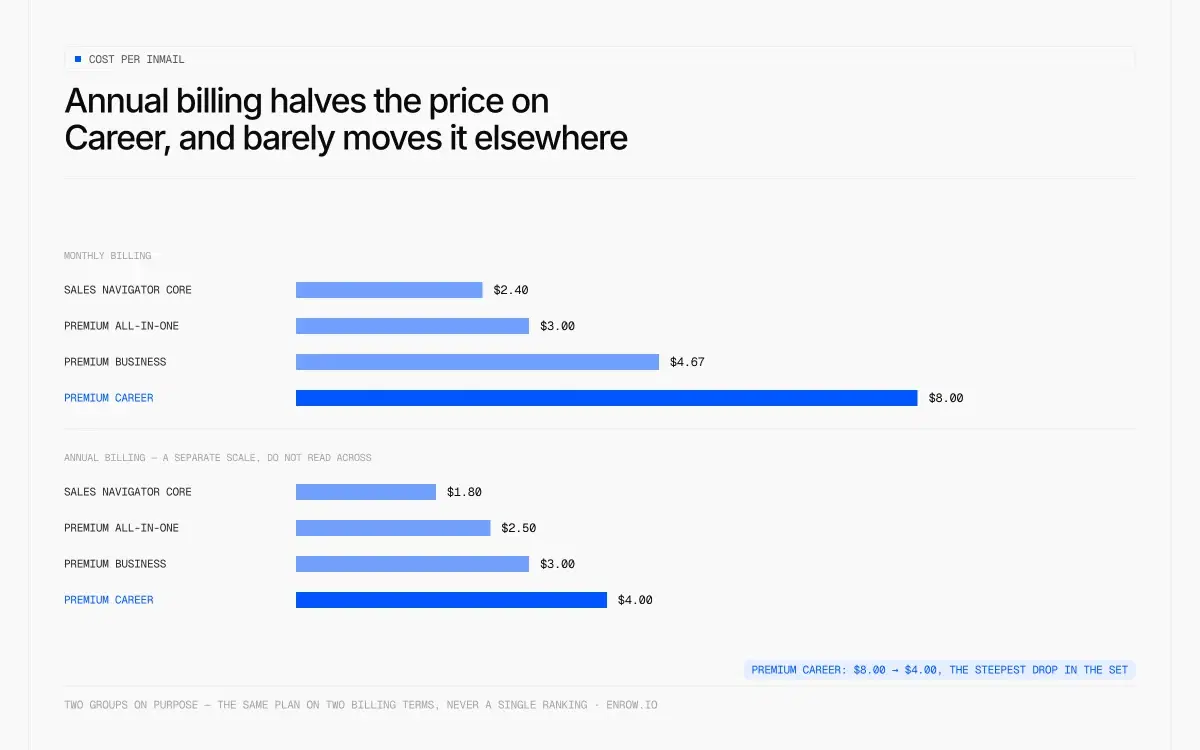
Annual billing halves the price on Career and barely moves it elsewhere.
Every price and every allowance in this table is published by LinkedIn. The bolded column is division.
Table 1 — Monthly billing
| Plan | Monthly price | InMails/mo | Real cost per InMail |
|---|---|---|---|
| Sales Navigator Core | $119.99 | 50 | $2.40 |
| Premium All-in-One | $89.99 | 30 | $3.00 |
| Sales Navigator Advanced | $159.99 | 50 | $3.20 |
| Premium Business | $69.99 | 15 | $4.67 |
| Recruiter Lite, 1 seat | $170.00 | 30 | $5.67 |
| Premium Career | $39.99 | 5 | $8.00 |
| Recruiter Lite, 2–5 seats (per seat) | $270.00 | 30 | $9.00 |
| Premium Company Page | $99.99 | none | n/a |
| LinkedIn Basic (free) | $0 | 0 | n/a |
A few things fall out of that table.
The cheapest message comes from a plan near the top of the price list. Sales Navigator Core costs three times what Premium Career costs and delivers a message for less than a third of the price, because 50 credits against 5 swamps the difference in sticker.
The worst rate LinkedIn publishes anywhere is Recruiter Lite at 2–5 seats. Nine dollars a message. Most articles on this topic name Premium Career's $8.00 as the ceiling; it isn't. And a single Recruiter Lite seat at $170 buys 30 InMails against Sales Navigator Core's 50 at $119.99. Fifty dollars more a month for twenty fewer messages.
The one plan with no InMail line at all is the dearest of the four Premium plans. Premium Company Page runs $99.99 a month and mentions InMail nowhere on its product page.
Every sticker price in that table is broken down plan by plan in the full LinkedIn pricing rundown, including the currencies where LinkedIn charges a different number for the same thing.
Table 2 — Annual billing, monthly-equivalent
| Plan | Annual price | Monthly equivalent | InMails/mo | Cost per InMail | vs monthly |
|---|---|---|---|---|---|
| Sales Navigator Core | $1,079.88 | $89.99 | 50 | $1.80 | −25% |
| Premium All-in-One | $899.88 | $74.99 | 30 | $2.50 | −17% |
| Premium Business | $539.88 | $44.99 | 15 | $3.00 | −36% |
| Sales Navigator Advanced | $1,799.88 | $149.99 | 50 | $3.00 | −6% |
| Premium Career | $239.88 | $19.99 | 5 | $4.00 | −50% |
| Recruiter Lite, 1 seat | $1,680 | $140.00 | 30 | $4.67 | −18% |
| Recruiter Lite, 2–5 seats (per seat) | $2,670 | $222.50 | 30 | $7.42 | −18% |
The annual toggle reshuffles the whole ranking. Premium Career halves, $8.00 down to $4.00, the biggest move in the set because its 50% annual discount is the steepest LinkedIn publishes anywhere. Read against Premium Business on the same billing mode it still loses, $4.00 against $3.00. Sales Navigator Advanced barely moves, because its annual discount is 6% against Core's 25%. That oddity is documented in the Sales Navigator pricing breakdown, and it is why paying a year up front for Advanced is close to pointless.
Never compare a row in Table 1 against a row in Table 2. Monthly against monthly, annual against annual.
One more line for the Sales Navigator buyer. Core, Advanced and Advanced Plus all get 50 InMails a month. Identical. LinkedIn confirms all three rows on the compare-plans page, the same page that markets Sales Navigator as giving you "the most InMails of any LinkedIn product". Paid annually, the upgrade from Core to Advanced costs $720 per seat per year and buys exactly zero extra messages. Paid monthly it costs $480 a year, for the same nothing.
The quote-only Recruiter tiers publish allowances but no price: Recruiter Professional Services at 100 InMails per seat per month, RPS Plus at 140, Recruiter Corporate at 150. No price means no division, so those rows stay blank rather than estimated. Third-party sites quote seat prices in the thousands. None of it is sourced to LinkedIn, so I'm not repeating it as fact.
How the credits actually work
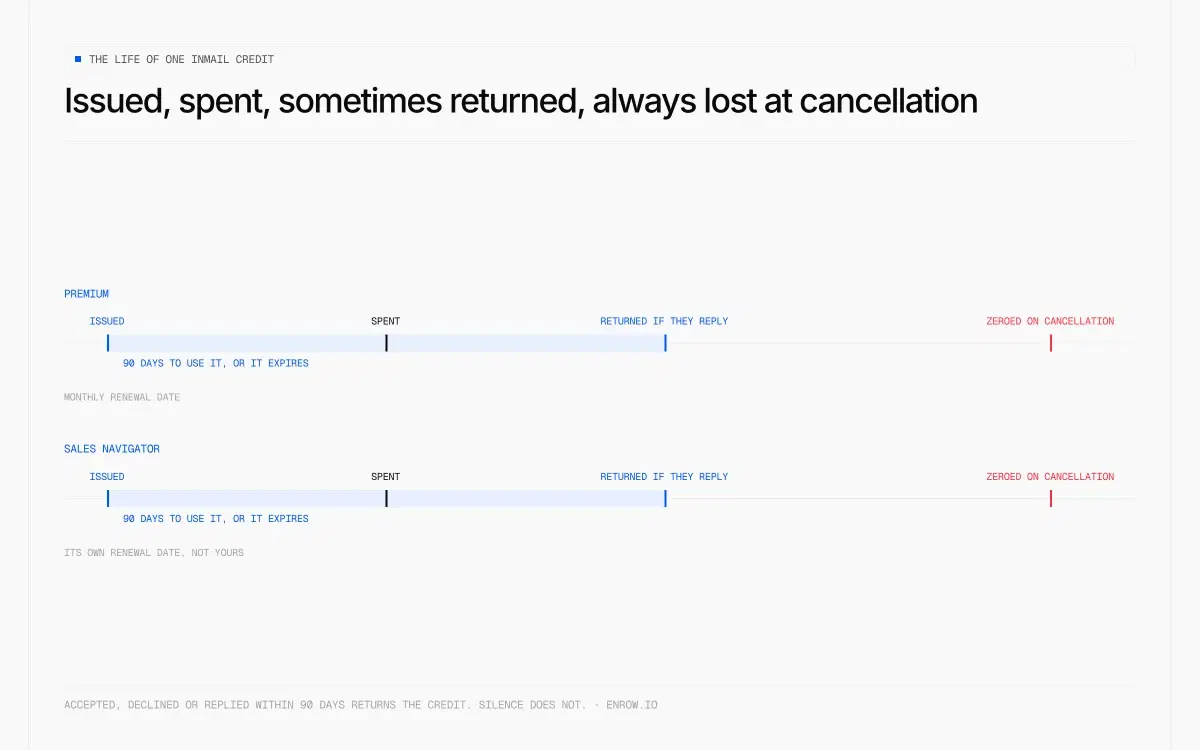
Issued, spent, sometimes returned — always lost at cancellation.
This is where most articles go vague, and where LinkedIn is surprisingly precise if you read four separate help pages.
Table 3 — Accrual, rollover, expiry, refund
| Premium Career | Premium Business | Premium All-in-One | Sales Navigator (all 3) | Recruiter Lite | Recruiter / RPS | |
|---|---|---|---|---|---|---|
| Credits/month | 5 | 15 | 30 | 50 | 30 | 150 / 100 |
| Accumulation cap | 15 | 45 | not published | 150 | 120 | 4× allotment |
| Cap as multiple of allowance | 3× | 3× | not published | 3× | 4× | 4× |
| Unused credits roll over? | Yes, to the cap | Yes, to the cap | not published | Yes — "unused credits will transfer to the following month" | Yes, to 120 | Yes; anything above the cap "do not roll over and will expire" |
| Renewal date | First day of your billing cycle, based on sign-up date | Same | Same | First day of the calendar month, UTC, regardless of billing cycle | First day of billing cycle | Monthly from account creation date |
| Expiry | 90 days | 90 days | not published | Must be used within 90 days | 90 days | Anything over the cap expires on refresh |
| Credit back on reply | Accepted, declined or replied to within 90 days | Same | Same | Response within 90 days, credited immediately; auto-replies count | Accepts, Declines, Replies including Quick Replies | Same |
| Can you buy more? | No | No | No | No | Yes — packs of 10, max +70/seat, contract cap 120/seat | Contract-dependent |
| Balance on cancellation | Zero | Zero | Zero | Zero | — | — |
Four mechanics deserve to be pulled out of that grid.
The renewal date is not the same across products. Premium refreshes on the anniversary of your sign-up: "You'll receive a new allotment of InMail message credits every month, on the first day of your billing cycle." Sales Navigator ignores that entirely: "InMail message credits renew on the first day of every month, regardless of your billing cycle", in UTC. If you subscribed to Sales Navigator on the 28th, your first month is three days long as far as credits are concerned.
Credits are also siloed. LinkedIn's wording is flat: "Premium InMail message credits can't be used to send InMail messages on Sales Navigator or LinkedIn Recruiter." You cannot move a balance between two Premium subscriptions either. Hold Premium Business and Sales Navigator at once and you hold two wallets that never speak to each other.
Topping up is not an option. "It's not possible to purchase additional InMail message credits outside of the monthly allotment." Recruiter Lite is the one exception: packs of 10, up to 70 extra per seat, hard contract ceiling of 120 per seat. LinkedIn publishes no price for those packs, so the cost per InMail on a topped-up Recruiter Lite seat cannot be computed at all. I left it blank rather than guess.
The refund rule reads better than most people assume. You get the credit back if the recipient accepts, declines or replies inside 90 days. On Sales Navigator, auto-replies count, out-of-office included, and LinkedIn says so in as many words. A campaign timed into a holiday period recovers a slice of its own budget.
And there is no unlimited plan. LinkedIn states it twice, on two different pages: "We currently don't offer a subscription plan with unlimited InMail message credits."
The Open Profile exception: the free InMail
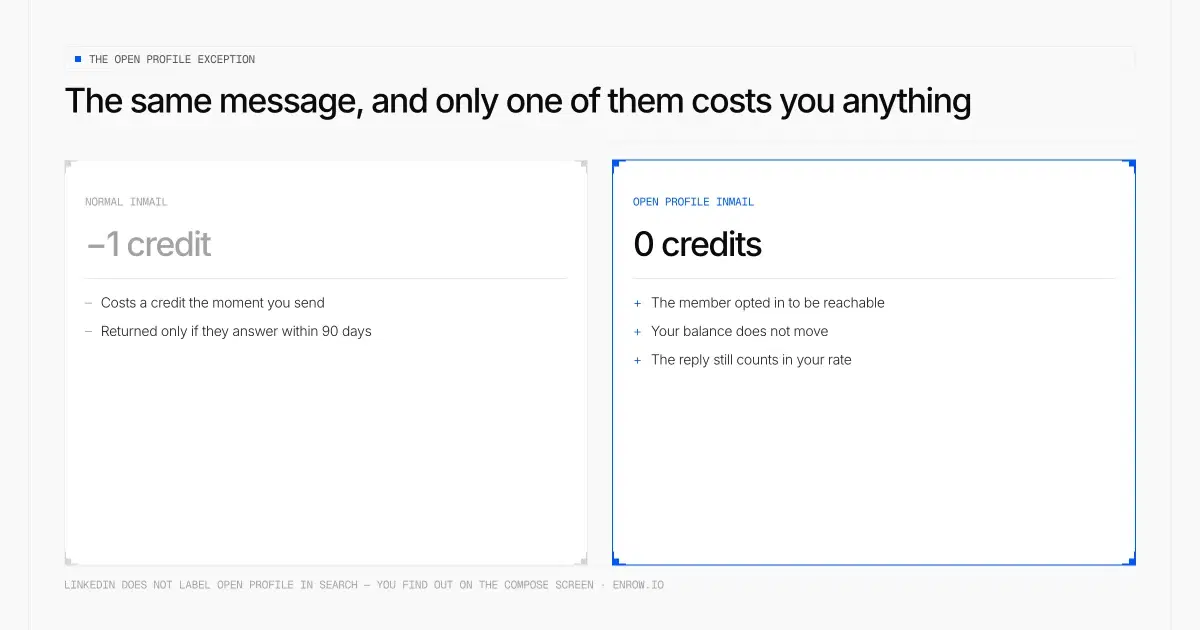
The same message, and only one of them costs you a credit.
This is the part worth knowing, and it is the answer to "how do I send an InMail without Premium".
Table 4 — Open Profile, in LinkedIn's own words
| Question | Official answer |
|---|---|
| Does an InMail to an Open Profile use a credit? | No. "the message is sent as a free InMail. Sending a free InMail message doesn't use an InMail credit." |
| Does a normal InMail use a credit? | Yes. "When you message someone you're not connected with, it will be sent as an InMail. Sending an InMail message uses an InMail credit." |
| Does the free one still count against you? | Statistically, yes. "it's calculated as part of your InMail response rate." |
| Who can be an Open Profile? | "In order to be an Open Profile, you must have a Premium subscription." |
| Who can message them? | "anyone on LinkedIn… for free, even if they're not in the sender's network" |
| Confirmed from the recipient's side? | "Open Profile feature allows other LinkedIn members to message you for free, without using InMail messages." |
| Is it unlimited? | No. Recruiter Lite: 100/month. Recruiter and RPS: 350 per calendar month. Free accounts: "a limited number", figure unpublished. |
Read the fourth row again. Open Profile is a Premium feature that makes its owner cheaper to reach. Somebody paying $39.99 a month to look serious about their job search has, in the process, made themselves free to contact for every recruiter on the platform. Both of those things are true at once and LinkedIn markets neither of them clearly.
The practical use: before you spend a credit, check whether the person is an Open Profile. If they are, the message is free and you keep the credit.
Every InMail limit LinkedIn publishes
Table 5 — The caps
| Cap | Value | Applies to |
|---|---|---|
| Monthly allowance | 5 / 15 / 30 / 50 / 30 / 100 / 140 / 150 | by plan, see Table 3 |
| Accumulated balance ceiling | 15 / 45 / 150 / 120 / 4× allotment | by plan |
| Credit lifetime | 90 days | all products |
| Daily sending cap | 1,000 InMails per day, per seat | Recruiter, RPS, Recruiter Lite |
| First-week cap | 200 InMails | Recruiter family |
| Same-person cooldown | wait 24 hours before a second InMail, unless they reply sooner | Recruiter family |
| Open Profile messages/month | 100 (Recruiter Lite) · 350 (Recruiter, RPS) | Recruiter family |
| Open Profile messages, free accounts | "a limited number" — no figure published | Basic accounts |
| Subject line | 200 characters | all |
| Message body | 2,000 (InMail FAQ) · 1,900 (Recruiter Lite, and a third help page says 1,900 for every plan) | LinkedIn contradicts itself |
| Attachment size | 200 MB | Sales Navigator |
| Recipient opt-out | members can switch InMail off; the send button disappears | all |
| Personalised connection note | Basic: 5 invitations at 200 chars (a fresher page says 3 a month) · Premium: unlimited at 300 chars | all |
Two gaps I could not close. LinkedIn publishes a 1,000-per-day-per-seat ceiling for the Recruiter family and nothing equivalent for Sales Navigator, so do not assume the same number applies there. And the number of free Open Profile messages a Basic account may send is described only as "a limited number". I've put no figure on either, because LinkedIn gives none.
The opt-out row is the quiet one. A recipient can turn InMail off completely, and then no amount of credit reaches them.
How to send one, and how to check your balance
Nothing complicated, and LinkedIn's steps are short enough to reproduce.
On desktop: open the person's profile, click More, choose Message [Name], add a subject if you want one, write the body, send. On mobile: profile, tap Message, subject optional, body, send. A Basic account has to upgrade first. If the person has Open Profile enabled, the same flow costs nothing.
To see what's left: click the Me icon, go to Premium features, then See all features, and open the dropdown in the InMail section. It reads "Credits available: [number]". The balance lives on the My Premium page and refreshes at the start of your billing cycle.
Worth knowing before you write: the subject line is optional on Premium and described as required in Recruiter Lite. Body length differs too. LinkedIn's InMail FAQ says 2,000 characters, the Recruiter Lite FAQ says 1,900, and a third help page gives 1,900 for every plan. All three are LinkedIn's own pages. The contradiction is theirs, not the internet's, which is why you'll see the figure quoted both ways everywhere.
What I actually think about InMail
Blunt version: I don't recommend it, and I don't buy plans for it.
An InMail arrives flagged as a paid, sponsored-looking message from a stranger. It announces the commercial intent before the first line is read. A normal connection request with a 300-character note lands as a person doing a person thing, costs nothing, and on my own lists performs better. Premium gives you unlimited personalised invitations. That's the feature I'd use the plan for.
The economics reinforce it. At $2.40 in the best case and $9.00 in the worst, you are paying real money per message and the allowance caps you at 5, 15, 30 or 50 attempts a month. No amount of budget fixes that, because you cannot buy more credits on Premium or Sales Navigator. The ceiling is the product.
LinkedIn's own evidence has also softened. The Premium Business page today reads "You're 4.6x more likely to hear back with LinkedIn InMail than with cold email", attributed to "Linkedin data (Nov. 2022)". Two notes on that. Almost every article quoting this line says 6x, sourced to July 2024, and our own LinkedIn Premium pricing page said the same until I re-read the live URL: LinkedIn swapped both the number and the date there without flagging it. And the study underneath is nearly four years old, self-run, and measured against an unspecified cold-email baseline.
Where InMail does earn its keep: the handful of people whose address genuinely can't be found, and the ones where the LinkedIn context is the message. Executives sitting behind a gatekeeper. Candidates who publish no work address anywhere. Five a month is about the right size for that job. It's the wrong size for anything you'd call a campaign.
What LinkedIn never gives you
Now the pitch. You've had the disclosure, discount me accordingly.
An InMail credit is a permission. You rent it by the month, you lose it if it goes unused for 90 days, and the balance goes to zero the day you cancel. LinkedIn's words: "Any InMail messages balance will become zero when a Premium subscription is canceled." A verified email address behaves nothing like that. You buy it once, it sits in your CRM, and nobody resets it on the first of the month.
That's the business I'm in. Enrow looks up a work email or a direct dial at the moment you ask for it, then bills you only if what comes back is usable. A failed lookup costs nothing. Every address clears 10+ verification checks before it reaches you, and bounce across our traffic sits under 1%, which is a number we measure rather than a promise we sell. Catch-all domains get resolved and delivered instead of written off as risky.
Table 7 — A capped credit against a verified address
| LinkedIn InMail | Enrow verified email | |
|---|---|---|
| Unit price | $2.40 best case, $9.00 worst | $0.017 at Start, $0.0087 on Pro, about $0.006 at the largest annual tier |
| Ratio | — | an InMail costs 141× to 529× an Enrow Start email; 276× to 1,034× a Pro email |
| Monthly ceiling | 5 to 50 messages, hard-capped | no message quota — you buy credits, not permissions |
| Does it reset? | Yes. Expiry at 90 days, balance zeroed on cancellation | credits roll over on Pro and Scale; annual credits stay valid 12 months |
| Billed on failure? | Yes, a credit is spent whether or not it's read | No. No valid result, no charge |
| Free tier | 0 InMails on a Basic account | 50 credits every month, recurring, no card |
| What a comparable monthly budget buys | $119.99 buys 50 InMails on Sales Navigator Core | $87 buys up to 10,000 valid emails on Pro |
That ratio is real and it is not a fair fight, so let me say it before you do. An InMail is a delivered message inside a product your prospect already has open. A verified email address is a string of text. You still have to write the mail and send it from something, and Enrow sends nothing. For that, Emelia, La Growth Machine or lemlist, in that order of my preference. We won't build sequencing.
Two more limits, stated plainly because you'll hit them otherwise. Enrow has no searchable database, on purpose: stored databases decay, and by the time you export one, a slice of it has already changed jobs. Sourcing therefore stays where it belongs, on LinkedIn and Sales Navigator, which remain the freshest people-data layer anyone has built, for the blunt reason that the people in it maintain their own records. And no technographics. Company data at the level you'd read off a LinkedIn page, nothing beneath that.
The join between the two products is the Chrome extension. It sits on top of a LinkedIn or Sales Navigator profile you already had open, surfaces the person's verified email and direct dial in place, and drops the entire contact card, every field, into HubSpot, Salesforce or Pipedrive on one click. That push is a create-or-update, not a blind insert. If the person is already in your CRM, the extension fills the gaps on the record you have; if they aren't, it opens one. So the activity history stays in one place, rather than splitting across two half-records that each hold part of the story. Native connections, not a relay of automation tools. Whole lists go through the API, and there's an MCP server (github.com/EnrowAPI/enrow-mcp) for pulling the same data into an AI assistant.
Pricing starts at $17 a month for 1,000 credits. One email is one credit, one direct phone is 40, and the free tier is 50 credits every month with no card. Monthly, recurring, not a one-shot trial.
So the arrangement I'd run: Sales Navigator for the who, Enrow for the address and the phone, your sequencer for the sending. InMail held back for the few people who have no findable address at all. At 5 a month on Premium Career, LinkedIn has already decided that's a few.
ready to stop wasting time?
Connected in minutes.
Verified data in seconds.
FAQ
What is an InMail on LinkedIn?
A paid message to someone you're not connected to. LinkedIn calls it "a premium feature" and restricts it to paid accounts. A Basic account can only message existing connections. Each one costs a credit from a monthly allowance.
How much does a LinkedIn InMail cost?
Between $2.40 and $9.00 on monthly billing, depending on the plan. Sales Navigator Core is the cheapest at $119.99 ÷ 50 credits. Recruiter Lite at 2–5 seats is the most expensive at $270 ÷ 30. Premium Career, often cited as the worst rate, sits at $8.00. Annual billing brings the range down to $1.80–$7.42.
Do unused InMail credits roll over, and do they expire?
Both. Unused credits carry into the next month up to a ceiling of three times your monthly allowance — 15 on Premium Career, 45 on Premium Business, 150 on Sales Navigator — and four times on Recruiter, where Recruiter Lite caps at 120. Every credit expires 90 days after it's issued. And the whole balance drops to zero if you cancel.
Can you buy extra InMail credits?
Not on Premium or Sales Navigator. LinkedIn's wording: "It's not possible to purchase additional InMail message credits outside of the monthly allotment." Recruiter Lite is the exception: a Purchaser Admin can buy packs of 10, up to 70 extra per seat, with a contract ceiling of 120 per seat. LinkedIn publishes no price for those packs.
Can you send an InMail without Premium?
Yes, in one situation. If the recipient has Open Profile switched on, anyone can message them for free and no credit is used. LinkedIn confirms it from both sides: "Sending a free InMail message doesn't use an InMail credit", and "Open Profile feature allows other LinkedIn members to message you for free". Open Profile itself requires the recipient to hold a Premium subscription, and free accounts are limited to an unpublished number of these messages per month.
When do InMail credits renew?
It depends on the product, which is the detail almost everyone gets wrong. Premium credits renew on the first day of your billing cycle, based on your original sign-up date. Sales Navigator credits renew on the first day of the calendar month in UTC, regardless of when you subscribed.
Do I get the credit back if someone replies?
Yes, if they respond within 90 days. LinkedIn credits you back for an InMail that is accepted, declined or replied to, Quick Replies included. On Sales Navigator the refund lands immediately, and auto-replies such as out-of-office count as a response.
How many InMails can you send in a day?
LinkedIn publishes 1,000 per day per seat for Recruiter, Recruiter Professional Services and Recruiter Lite, with a 200-message cap in the first week and a 24-hour cooldown before messaging the same person twice. No equivalent daily figure is published for Sales Navigator or Premium, so don't assume the Recruiter number applies there.
Which LinkedIn plan gives the most InMails for the money?
Sales Navigator Core. $2.40 per message on monthly billing, $1.80 on annual, and the allowance is identical on Advanced and Advanced Plus, so the upgrade buys none — $720 per seat per year on annual billing, $480 on monthly, for the same fifty messages. If InMail volume is the only reason you're comparing plans, Core is the answer and the tiers above it are not.
How I verified this
Every allowance, cap and rule above came off a LinkedIn page I opened on September 7, 2026, not out of another article. Allowances and accumulation caps come from the InMail credits and renewal page, cross-checked against each product page: Premium Career, Business, All-in-One and Company Page all carry LinkedIn's April 20, 2026 stamp, and Sales Navigator compare-plans is stamped August 1, 2026. Recruiter figures were verified August 28 and stored in linkedin.com. Expiry, refund and transfer rules needed four more help pages, because those rules differ by product and no single page states all of them.
Every cost-per-InMail figure is division done here, on LinkedIn's published price and LinkedIn's published allowance. Where LinkedIn publishes an allowance but no price, as with Recruiter Professional Services, RPS Plus and Recruiter Corporate, the division was left undone rather than estimated. Enrow's figures come from our pricing page, last checked June 2026.