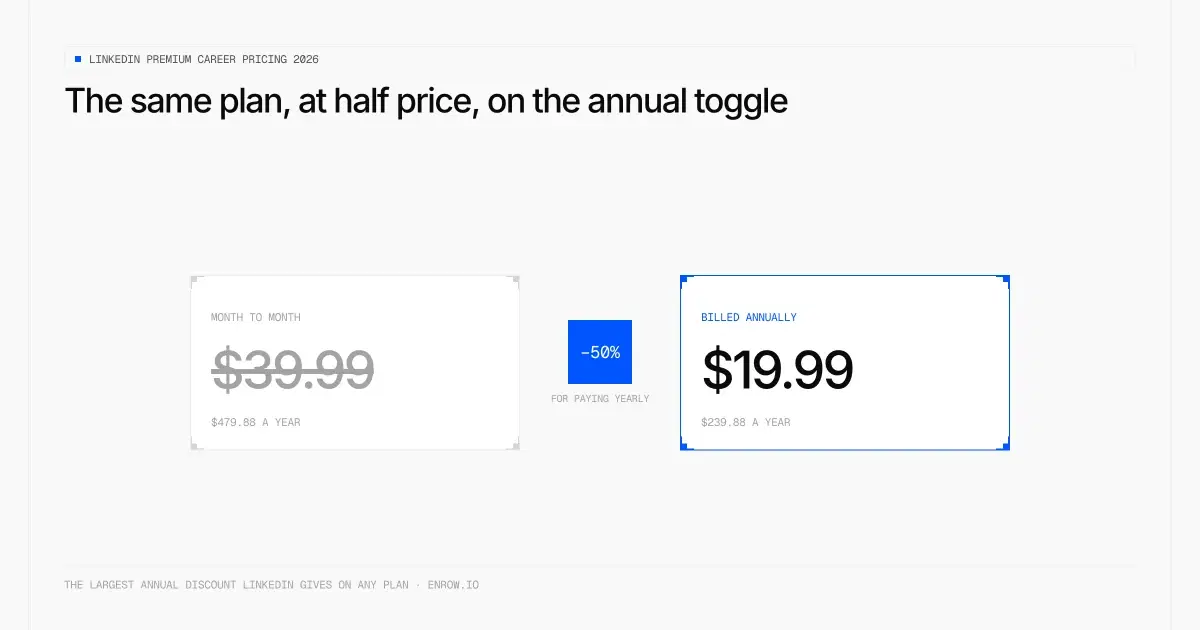
The largest annual discount LinkedIn gives on any plan.
Prices verified August 28, 2026 on LinkedIn's own Premium Career page, which LinkedIn stamps "Last updated: April 20, 2026". Figures are USD unless a row says otherwise, and they exclude VAT/GST.
Key takeaway Premium Career is $39.99 a month, or $239.88 a year. That annual price is a 50% discount, the steepest in LinkedIn's entire product line. There's also a "duo" option almost nobody writes about: two licences for $359.88 a year. The second seat costs $120 for the year, a few cents over half price. On value, I'll be direct. This subscription buys you a better experience of LinkedIn, not access to anything new. No extra database, no hidden job listings. One feature is genuinely useful, most of the rest is atmosphere, and two of the AI features aren't even available outside the US. The free month is worth taking. Read the cancellation section before you do, because the obvious move loses you the trial.
This is the LinkedIn subscription I have the strongest opinion about, and it isn't a flattering one.
Premium Career is sold to people looking for work. That audience is often anxious, often under time pressure, and rarely in a position to judge whether a $39.99 monthly product will change their odds. LinkedIn markets it with hiring statistics. I'll get to those statistics, because they don't say what the page implies they say.
First, the prices, read off LinkedIn's own Premium Career page on August 28, 2026. LinkedIn stamps that page "Last updated: April 20, 2026", which is useful given how much stale pricing is floating around.
Quick disclosure. I run Enrow, a B2B sales data tool. It isn't a job-hunting product and I'm not going to pretend it is. There's a short section near the end where it's genuinely relevant, and you can skip it.
What Premium Career costs
Billed monthly, Premium Career costs $39.99/mo. Billed annually it costs $239.88/yr, which is $19.99/mo — half the monthly rate. The two-licence duo lands at $359.88/yr, pricing the second seat at $120.00 for the year.
| Plan | Monthly | Annual | Annual, per month | Annual discount vs monthly | Verified |
|---|---|---|---|---|---|
| Career (1 licence) | $39.99/mo | $239.88/yr | $19.99/mo | 50% off the monthly rate | LinkedIn, Aug 28, 2026 |
| Career duo (2 licences) | $59.98/mo | $359.88/yr | $29.99/mo | 50% off the monthly rate | LinkedIn, Aug 28, 2026 |
Source: the pricing accordion on premium.linkedin.com/careers/career, read August 28, 2026, page stamped "Last updated: April 20, 2026". LinkedIn adds two lines of small print worth reading: the prices exclude VAT/GST, and they "may vary slightly" by device type.
Fifty percent is a lot. It's double the discount LinkedIn gives on Sales Navigator Core and eight times what it gives on Sales Navigator Advanced. If you're going to buy this at all, monthly billing is close to indefensible: you'd pay $479.88 across a year for something priced at $239.88.
The duo option
LinkedIn sells a two-licence version of Premium Career and mentions it in a single line inside a pricing accordion. I've never seen it covered anywhere.
The maths are better than the headline suggests. A single licence is $239.88 a year. Two are $359.88. So the second licence costs $120 for the year, half price give or take six cents. Per person, the duo annual plan works out to $14.99 a month, which is 63% below the $39.99 monthly sticker.
If you and a partner or a friend are both job hunting, that's the cheapest legitimate route into Premium Career by some distance.
In other currencies
These are local list prices, not conversions, and the 50% annual discount survives all five of them — which is not true elsewhere in the range. Sales Navigator Core's annual discount swings from 15.8% off the monthly rate in GBP to 31% in CAD, same product, same month.
| Currency | Monthly | Annual | Annual, per month | Annual discount vs monthly | Verified |
|---|---|---|---|---|---|
| USD | $39.99/mo | $239.88/yr | $19.99/mo | 50% | LinkedIn, Aug 28, 2026 |
| EUR | €29,98/mo | €179,88/yr | €14,99/mo | 50% | LinkedIn, Aug 28, 2026 |
| GBP | £29.99/mo | £179.88/yr | £14.99/mo | 50% | LinkedIn, Aug 28, 2026 |
| CAD | C$49.99/mo | C$299.88/yr | C$24.99/mo | 50% | LinkedIn, Aug 28, 2026 |
| AUD | A$54.99/mo | A$323.88/yr | A$26.99/mo | 50.9% | LinkedIn, Aug 28, 2026 |
The only wobble is Australian dollars, where LinkedIn's rounding pushes the annual saving to 50.9% rather than a flat 50%.
What you get
Straight from LinkedIn's page, without editorial:
- Top applicant jobs
- Top choice jobs
- Advanced job search filters
- Who's viewed your profile, with 365 days of viewers, trends and insights
- 5 InMails per month
- LinkedIn Learning, 25,000+ courses
- AI-powered coaching with LinkedIn Learning
- AI profile writing assistant
- AI message and post drafts
- The Premium badge on your profile
Two of those carry footnotes on LinkedIn's own page, and the footnotes matter a great deal.
The AI profile writing assistant is marked "Not available globally for Career and Business plans." The AI message and post drafts feature is marked "Currently available in English and in the US only."
So if you're in Paris or Berlin or Madrid paying €29.98 a month, two of the headline AI features are either restricted or entirely unavailable to you, and LinkedIn discloses this in superscript at the bottom of the page. That's worth knowing before you pay.
My honest verdict, feature by feature
Start with Top applicant jobs, where the signal is dead. So many profiles get pushed at every LinkedIn job posting now that knowing you're a "top applicant" tells you very little about your actual odds. It reads as reassurance rather than information.
Top choice jobs has the same problem, worse. The whole mechanism depends on the marker being scarce. Everybody with Premium ticks the box, so hirers see it constantly, and a signal that everyone sends is not a signal.
The advanced search filters are weak value. Boolean operators in the ordinary LinkedIn search bar get you further, and they cost nothing. Learning to write a decent boolean query is a better investment than the subscription.
Any general-purpose AI writes a better profile than the built-in assistant does. Spend ten minutes talking to ChatGPT or Claude about your experience and you'll get a stronger profile than the built-in assistant produces. Same for your banner image, which an image model will handle. And remember the footnote: this feature isn't available everywhere anyway.
Then the AI insights on job posts, which is the one I'd push back on hardest. The model is tuned to be encouraging. Put a software engineer in front of a construction site manager posting and it will find something positive to say about the fit. Feedback that can't be negative isn't feedback.
Five InMails a month isn't much. Sales Navigator gives 50 a month for $119.99. And in my experience a well-written connection request lands better than an InMail anyway, because it doesn't announce that you paid to skip the queue.
LinkedIn Learning is Lynda.com, bought in 2015 and rebranded. The catalogue shows it. Much of the material is dated and pitched at a beginner level, and the AI coaching layer on top is thin. A free ChatGPT or Claude conversation gets you more useful career advice than the coaching module does.
The Premium badge is vanity, and the market knows it.
Which leaves who's viewed your profile, the one real feature here. 365 days of viewer history with trends is genuinely useful, especially when you can tell that someone at a company you applied to looked you up. Whether it's worth $39.99 a month on its own is a different question, and I don't think it is at monthly pricing. At $19.99 annually, it becomes arguable.
And the thing that frames all of it: Premium Career gives you no additional database and no hidden jobs. Every posting you can see with it, you could see without it. This is a better interface to the same LinkedIn, not access to a different one.
Pros
- 50% annual discount, the steepest LinkedIn offers on anything
- Duo option puts a second licence at practically half price
- 365 days of profile-view history, the one feature I'd genuinely miss
- Free month, with eligibility returning after 12 months
Cons
- No additional database and no hidden job listings
- Top Applicant and Top Choice signals diluted by volume
- AI profile assistant restricted by region; AI message drafts are US-English only
- LinkedIn Learning is the ageing Lynda.com catalogue
- 5 InMails a month, at $8.00 each, the worst rate in the range
Best for: almost nobody at monthly pricing. At $19.99 annually, someone who specifically wants profile-view history.
About those hiring statistics
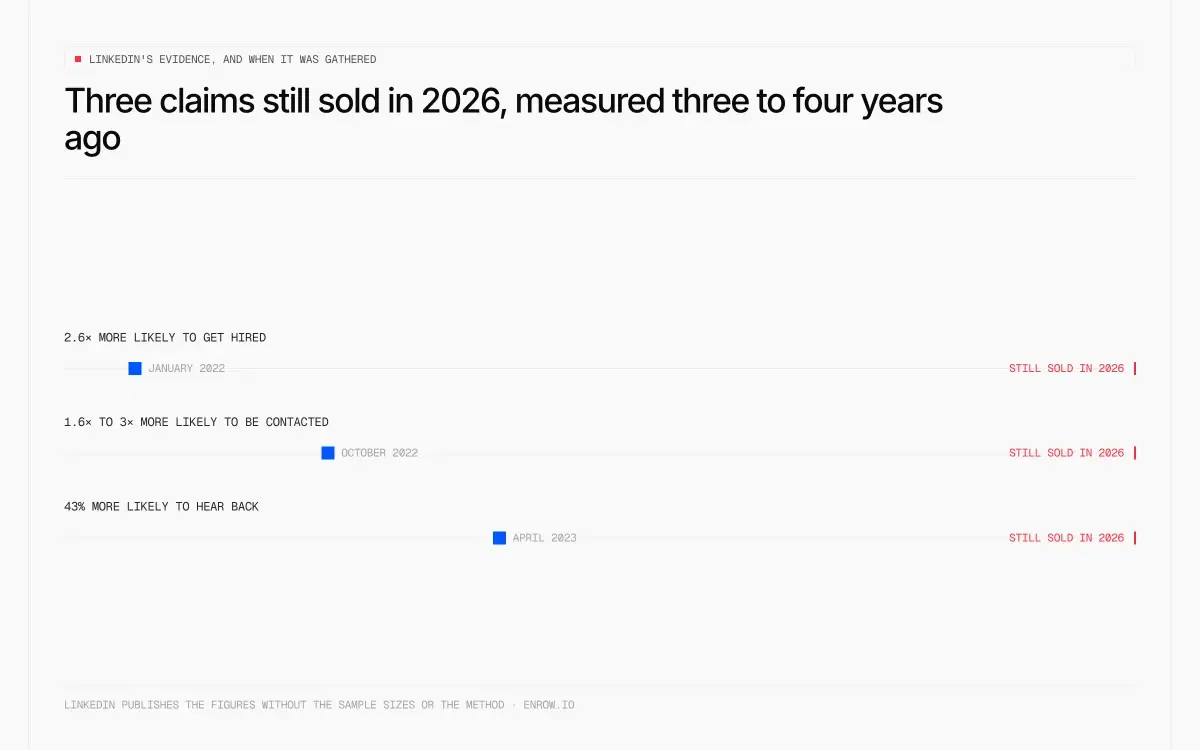
Still sold in 2026, measured three to four years earlier.
LinkedIn's Premium Career page carries three numbers, and they're the reason a lot of people buy. All three are LinkedIn's own internal data, and the freshest of them was gathered in April 2023 — three years and four months before the date at the top of this page. Here they are exactly as published, with LinkedIn's own sourcing:
| Claim, as published on the Premium Career page | LinkedIn's source line | Age of that data at Aug 28, 2026 |
|---|---|---|
| "Premium members are 2.6x more likely to get hired on average on LinkedIn" | LinkedIn data, Jan. 2022 | 4 years 7 months |
| "Applicants who sent InMails to job posters were 1.6x more likely to hear back and 3x more likely to get hired" | LinkedIn data, Oct. 2022 | 3 years 10 months |
| "Premium subscribers who've applied using Top choice jobs are on average 43% more likely to receive a message back from a recruiter" | LinkedIn data, April 2023 | 3 years 4 months |
Three things stand out.
They measure correlation and present it as causation. People who pay for a job-search subscription are, by definition, searching harder than people who don't. They apply more, they polish their profiles, they follow up. Of course that group gets hired more often. The statistic doesn't isolate the product at all.
Every source is LinkedIn. There's no third-party study behind any of the three.
And the data is old. January 2022, October 2022, April 2023. LinkedIn is selling a 2026 subscription on figures gathered three and four years ago, in a job market that has changed enormously since — including the saturation that broke Top Applicant and Top Choice in the first place. The numbers describing why those features work are older than the problem that stopped them working.
What I'd do instead
Go to sector-specific job boards. Niche boards for your industry consistently beat the LinkedIn feed for signal-to-noise. That's free.
Contact the recruiter directly. Most LinkedIn job posts show you who posted them. A well-judged connection request with a short note to that person will outperform anything Premium gives you, and it costs nothing. This is the single highest-leverage move on the list.
Put the money into skills that aren't from 2015. If you were going to spend $240 on LinkedIn Learning, spend it on a current course elsewhere.
If you want a real upgrade, buy a different product. Sales Navigator Core at $119.99 is a far more capable search tool than Premium Career, with 50 InMails instead of 5. It's more expensive, and it's aimed at salespeople, but at least you're paying for capability rather than atmosphere.
One way to genuinely pay less
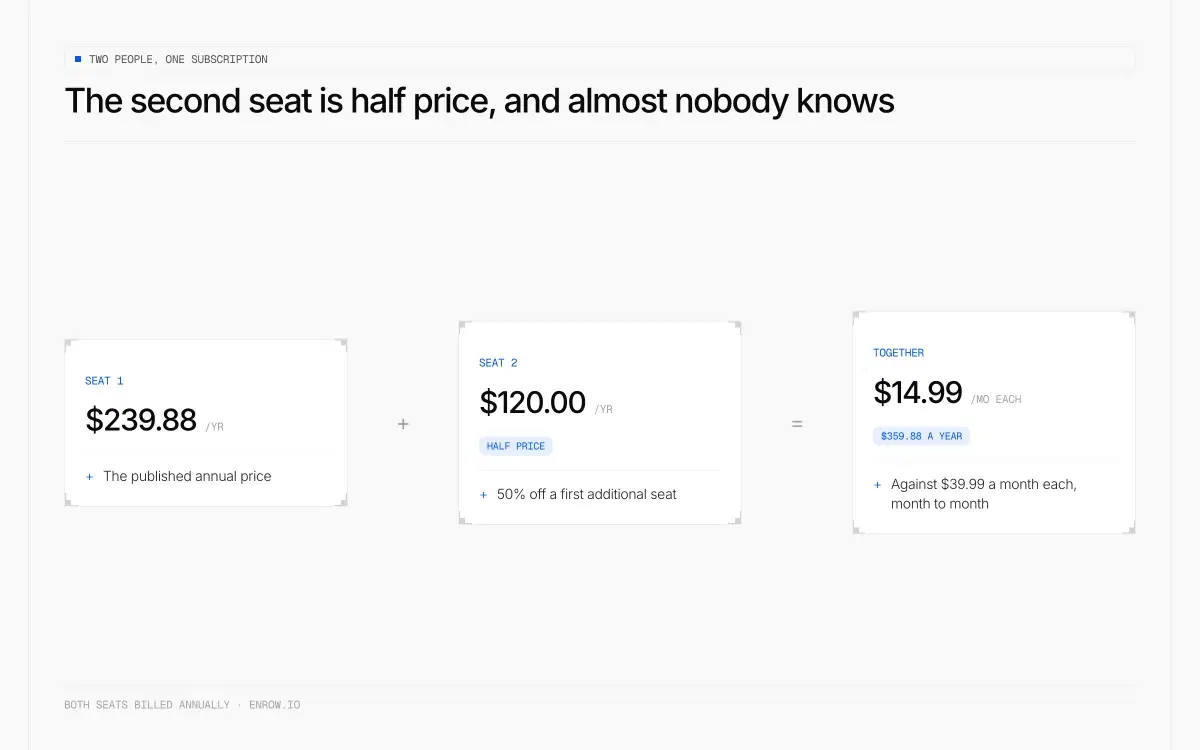
$14.99 a month each, and almost nobody knows the offer exists.
If you're buying anyway, the currency you're billed in matters more than the plan you pick.
LinkedIn sells self-serve subscriptions in 57 currencies, and your price locks to whichever one you signed up in. When that currency slides against the euro or the dollar, your real cost falls at every renewal, and LinkedIn's re-pricing of a market only applies to new subscribers. A price frozen in Argentine pesos two years ago costs 37.3% less in dollar terms today. In Turkish lira, 28.9% less.
Switching later isn't easy: LinkedIn requires you to cancel and wait out your billing cycle before you can be billed in a different currency, so it's a decision you make once. And there's a real account risk, because LinkedIn's User Agreement requires accurate profile information. I've written the method, the counter-examples and the risk out in full in the Sales Navigator pricing article — the same mechanism applies to every LinkedIn subscription.
The free month, and how not to lose it
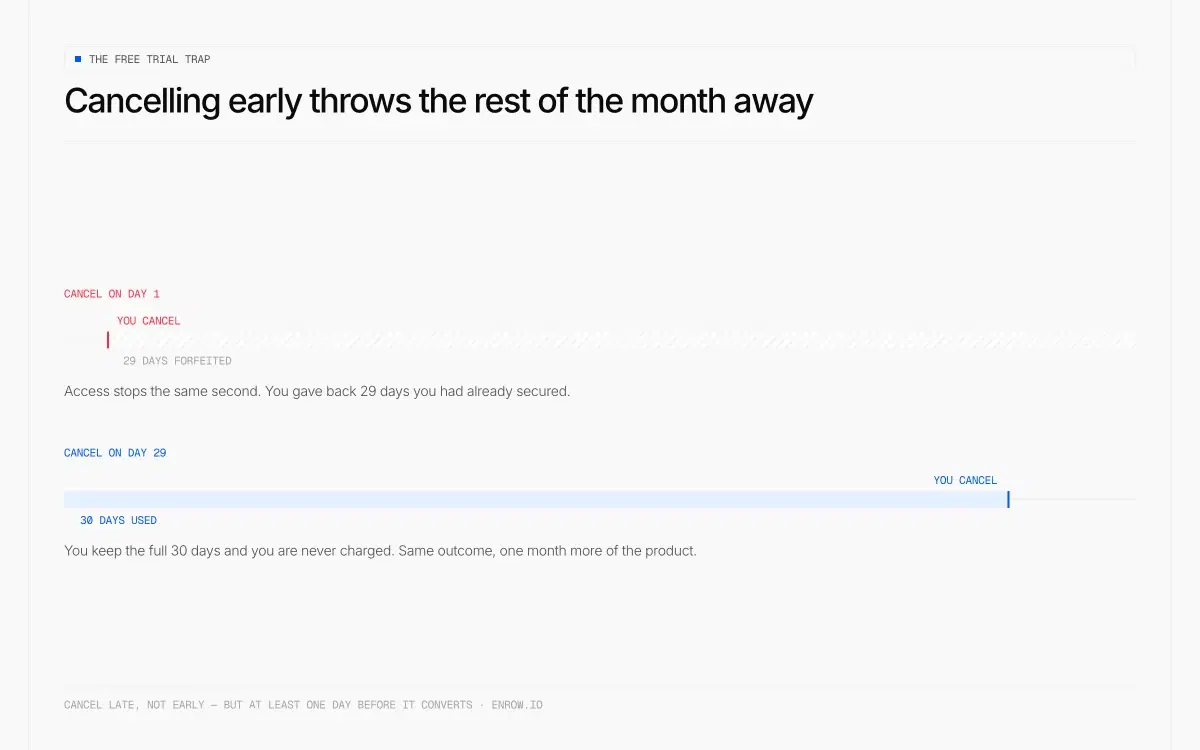
Cancel late, not early — the trial ends the second you confirm.
LinkedIn gives new subscribers a free month, and eligibility comes back: LinkedIn states that cancelling a free Premium trial makes you ineligible for another one for at least 12 months, which means it resets annually. Take it. There's nothing to lose.
But there's a trap, and it's the opposite of how most subscriptions work.
Do not cancel immediately after signing up. LinkedIn's help page is explicit: "If you choose to end your free trial early, you will immediately lose access to Premium features." Cancelling the trial kills it on the spot. You don't keep the remaining days.
That rule is different from a paid subscription, where cancelling leaves your access running to the end of the billing cycle. On a trial, early cancellation ends it there and then.
So the correct move is to set a calendar reminder and cancel one day before the trial converts. You get all 30 days, and no charge. It's a small distinction that costs people three weeks of access.
One more thing worth knowing: switching Premium plans during a trial forfeits the trial benefits of the original plan, and billing starts immediately on the day you switch.
Where this touches what I do
Short section, and it only applies to one piece of advice above.
If you take the "contact the recruiter directly" route, you'll sometimes want to reach that person by email rather than through a connection request that may sit unread. That's the problem my company solves: Enrow finds and verifies work emails and direct phone numbers in real time rather than pulling them from a stored list, and only charges when a result comes back valid. Each address runs through 10+ verification checks, with observed bounce under 1%.
The way it works is a Chrome extension that lives on the LinkedIn profile. You're already looking at the hiring manager's page; the extension surfaces their verified email and direct phone right there, without sending you to another window. For anyone who does this repeatedly it syncs natively into HubSpot, Salesforce or Pipedrive, and the write is a create-or-update: a contact you already have gets completed, a name you don't gets created. Nobody has to search the CRM first to work out which of the two applies.
Being straight with you: Enrow is built for B2B sales teams, not job seekers. If you're hunting for a role, this is a marginal use case, and the free tier of 50 credits a month covers it comfortably.
If you're reading this as a recruiter or a salesperson rather than a candidate, that's a different conversation and the Sales Navigator side of our writing will be more use to you.
ready to stop wasting time?
Connected in minutes.
Verified data in seconds.
FAQ
How much is LinkedIn Premium Career per month?
LinkedIn Premium Career costs $39.99/mo billed monthly, or $239.88/yr billed annually, which works out at $19.99/mo. The annual plan is a 50% saving on the monthly rate. A two-licence duo option costs $359.88/yr, putting the second seat at $120.00 for the year. Verified on LinkedIn's Premium Career page, August 28, 2026.
Is LinkedIn Premium Career worth it?
Rarely, in my view. Premium Career gives you no additional database and no hidden job listings at $39.99/mo, so you're paying for a better interface to the same LinkedIn. Top Applicant and Top Choice have been diluted by volume, the AI features are restricted outside the US, and LinkedIn Learning is dated. The genuinely useful feature is 365 days of profile-view history. If that alone appeals, buy it annually at $19.99 a month rather than monthly.
Does LinkedIn Premium help you get hired?
LinkedIn says Premium members are 2.6x more likely to get hired, sourced to its own data from January 2022. That figure compares people who bought a job-search subscription with people who didn't, so it measures how hard someone is job hunting at least as much as it measures the product. Treat it as correlation.
How do I get LinkedIn Premium Career for free?
New subscribers get one month of Premium Career free, and eligibility returns after 12 months. Cancel one day before it converts to avoid a charge. Do not cancel immediately after signing up: LinkedIn ends trial access the moment you cancel, so you'd forfeit the remaining weeks.
What's the difference between Premium Career and Premium Business?
Premium Career costs $39.99/mo and is built around job hunting: top applicant signals, job-search filters, 5 InMails/mo. Premium Business costs $69.99/mo and is built around networking and prospecting, with more InMails and company insights. Neither gives you anyone's email address.
Is LinkedIn Premium Career better than Sales Navigator?
Premium Career and Sales Navigator are built for different people. Sales Navigator Core costs $119.99/mo and is a far stronger search tool, with 50 InMails/mo against Career's 5. For finding and contacting people at scale, Sales Navigator wins easily. For job hunting specifically, neither is essential.
How we verified this
Prices, the duo grid and the currency table were read from LinkedIn's Premium Career page on 28 August 2026. LinkedIn stamps that page "Last updated: April 20, 2026".
The feature list is LinkedIn's own, including both superscript footnotes, which are reproduced word for word because they materially change what a non-US subscriber receives.
The three hiring statistics are quoted exactly as LinkedIn publishes them, each with the source attribution and date LinkedIn itself supplies. I haven't disputed the numbers. The argument is about what a correlation between paying for a job-search subscription and getting hired can actually demonstrate.
The trial rules are the part most worth checking, because getting them wrong costs you weeks of access. They come from LinkedIn's own help pages on trial eligibility and on cancellation, including the sentence quoted in full in the body.