Key takeaway You can export your LinkedIn contacts for free, in six clicks: Me icon → Settings & Privacy → Data privacy → Get a copy of your data → Download larger data archive → Request archive. LinkedIn emails you a download link. Connections sit in the slow bucket, and the link expires after 72 hours. The file gives you first and last name, public profile URL, company, position and connection date. The email column is conditional. LinkedIn's own help page: "You will only see email addresses for connections who have allowed their connections to see or download their email address." Sales Navigator gives you less. LinkedIn states in writing that no CSV or XLS lead export exists — at any price. The only official way data leaves Sales Navigator is CRM Sync, and that is Advanced Plus only, which has no published price. So you end up with names and companies and no way to reach anyone on the list. Closing that gap is what the back half of this page is about.
You can export LinkedIn contacts in about six clicks. Anyone who goes looking for the how braces for a wall somewhere, and there is one, but not where they expect it. The export itself works: free, official, properly documented, in your inbox inside two days.
The wall shows up when you open the file. You scroll to the email column and a lot of it is empty, with no pattern and no error message. That behaviour is documented. It is deliberate. And it is the most useful thing to know before you plan a campaign around this file.
Everything below was read off LinkedIn's help centre on September 10, 2026, with the URL and LinkedIn's own "last updated" stamp attached to each claim. Almost nothing ranking for this keyword carries a date, and LinkedIn's two export pages don't even agree with each other.
Disclosure up front. I run Enrow, which finds and verifies the addresses this export doesn't give you. That's a conflict, so the LinkedIn half of this page is quotes you can check yourself, and my product gets one marked section near the end, plus a single line further down where the scraping question makes it unavoidable.
Export LinkedIn contacts: the exact click path
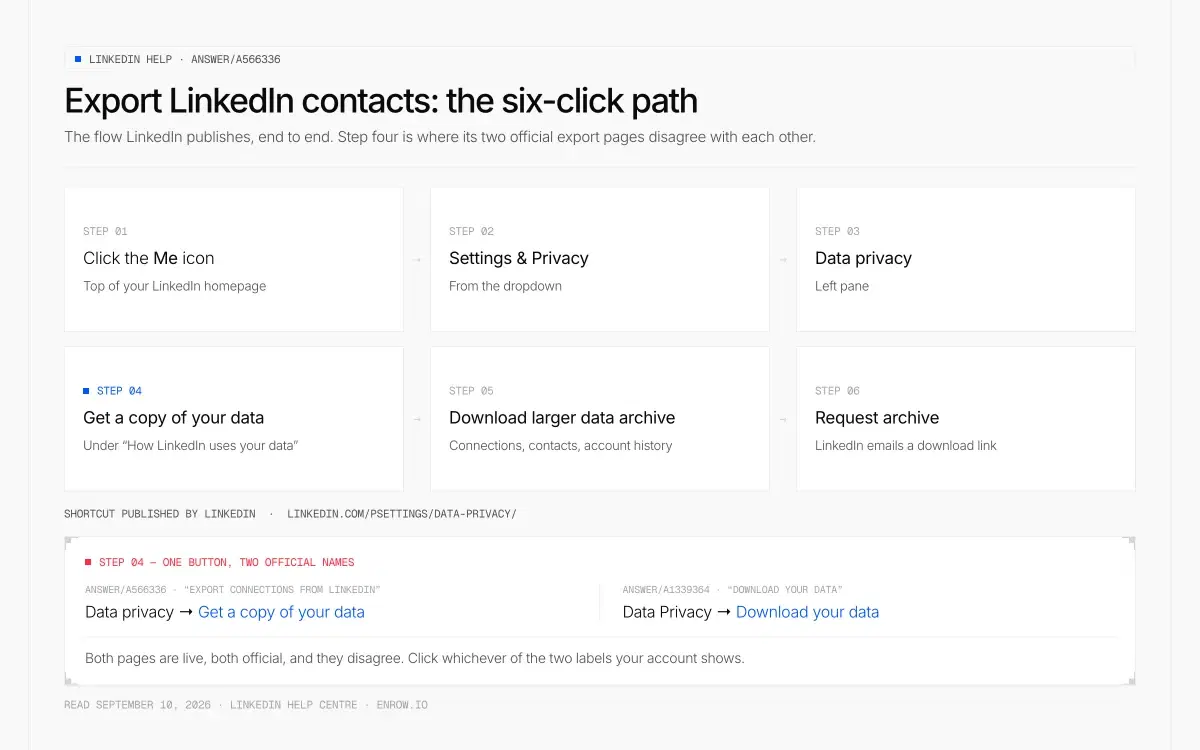
LinkedIn's own six-click path — and step four, where its two official help pages call the same button by two different names.
Straight from LinkedIn's "Export connections from LinkedIn" page, which LinkedIn stamps "Last updated: 1 year ago":
- Click the Me icon at the top of your LinkedIn homepage.
- Select Settings & Privacy from the dropdown.
- Click Data privacy on the left pane.
- Under How LinkedIn uses your data, click Get a copy of your data.
- Select Download larger data archive, including connections, verifications, contacts, account history, and information we infer about you based on your profile and activity.
- Select Request archive.
- LinkedIn: "You'll receive an email to your Primary Email address which will include a link where you can download your data."
Shortcut, published by LinkedIn itself on its second help page: linkedin.com/psettings/data-privacy/.
One thing that will save you five minutes of hunting. LinkedIn's other export page, "Download your data", describes the same flow with a different button: left rail item Data Privacy, button Download your data. Both pages are live, both official, and they disagree. Click whichever of the two labels your account shows.
What the connections file actually contains
LinkedIn documents the field list in prose, not as column headers. Here is that list, quoted, with my read on what each one buys you.
| Field (LinkedIn's wording) | Usable for outbound? | Note |
|---|---|---|
| First and last name | Yes | Always present |
| Public profile URL | Yes | Always present |
| Email address | Conditional | Present only "for connections who have allowed their connections to see or download their email address" |
| Company | Yes | As stated on the profile at export time |
| Position | Yes | As stated on the profile at export time |
| Connection date | Marginal | Useful for sorting, not for reaching anyone |
| Phone number | Absent | Not in the Connections category at all |
Field list quoted from the "Connections" entry on linkedin.com/help/linkedin/answer/a1339364, read September 10, 2026. The email caveat is quoted from answer/a566336.
Two notes, because precision matters more than confidence here.
The literal column headers are not documented anywhere official. Articles will tell you the file opens with First Name, Last Name, URL, Email Address, Company, Position, Connected On, and that matches my own exports, but LinkedIn publishes the fields as a sentence, never as headers. Same for the preamble rows people report above the real header row. Folklore until you open your own file.
The phone row isn't an oversight. LinkedIn ships a Phone Numbers category, and it holds your numbers. No phone field for anyone else exists in the Connections data.
The email column is conditional, and LinkedIn says so in writing
This is the part that breaks the plan.
"When you're exporting your connection data, you may notice that some of the email addresses are missing. You will only see email addresses for connections who have allowed their connections to see or download their email address." — LinkedIn Help, "Export connections from LinkedIn", answer/a566336, read September 10, 2026
Read it twice. The address isn't withheld by a plan restriction or a rate limit. It's withheld by the other person's setting. Nothing you buy changes it.
The setting has a name. Email visibility, and LinkedIn's page for it carries a much fresher stamp than the export pages: "Last updated: 3 weeks ago". You'll find it at Me icon → Settings & Privacy → Visibility → under Visibility of your profile & network, click Change next to Who can see or download your email address.
The wording on the toggle is unambiguous:
"Change the toggle to Yes to allow your connections to download your primary email address in your connections' data exports." — LinkedIn Help, "Email visibility", read September 10, 2026
The same page states that "by default, the primary email address you've registered with LinkedIn is only visible to your direct connections". Members pick from four options: only visible to me, 1st-degree, 1st and 2nd-degree, or anyone on LinkedIn.
Here's the finding, and it took longer to establish than anything else on this page. LinkedIn publishes no default value for the download toggle. Visibility has a documented default. The switch that decides whether your address lands in someone else's CSV does not. Every article telling you it's "off by default" is stating something LinkedIn has never said. I won't guess it, and I won't put a percentage on how much of your file comes back filled — no credible figure exists. LinkedIn says "some". So do I.
Contacts is a different category from Connections, and it does carry phones
This is the one part of the archive that behaves the way people expect the whole thing to.
The archive splits your network in two. Connections is your 1st-degree network, with the conditional email column above. Contacts is separate, and LinkedIn describes it as "contacts imported on LinkedIn, including name, phone numbers, and email addresses."
Those are contacts you uploaded, from a phone address book or a synced mail account. You supplied the data, so LinkedIn hands it back with the phone numbers attached. If you ever ran the "sync your contacts" flow, that's probably the most useful file in the whole archive, and nobody writing about LinkedIn exports mentions it.
How long the export takes (LinkedIn contradicts itself on one page)
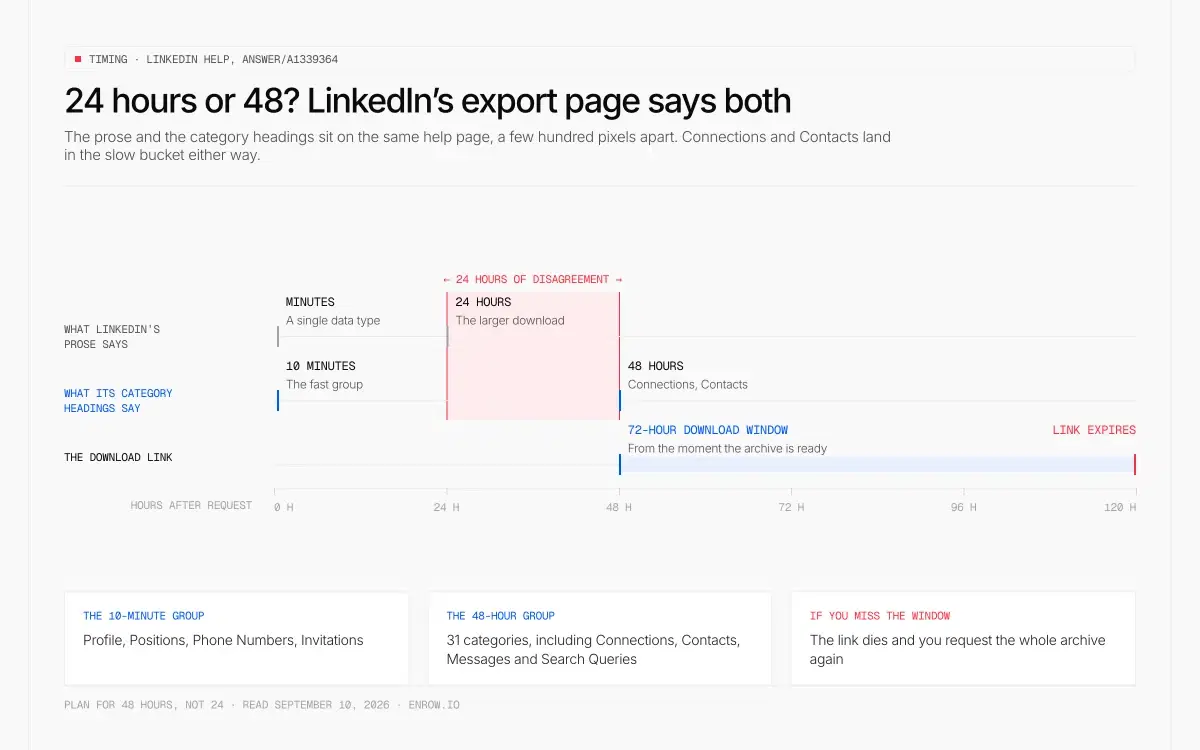
Same help page, two answers: 24 hours in the prose, 48 in the category heading that holds Connections and Contacts. Then the link dies after 72 hours.
| What LinkedIn says | Where it says it | Applies to |
|---|---|---|
| "If you select a specific type of data, we'll email you within minutes." | Prose, answer/a1339364 | The fast picks |
| "Available within 10 minutes" | Category heading, answer/a1339364 | The fast group, incl. Profile, Positions, Phone Numbers, Invitations |
| "If you select the larger download, you'll receive an email within 24 hours." | Prose, answer/a1339364 | The full archive |
| "Available within 48 hours" | Category heading, answer/a1339364 | 31 categories incl. Connections, Contacts, Messages, Search Queries |
| "The data will be available for download for 72 hours." | Prose, answer/a1339364 | The download link |
Read September 10, 2026. The 24-hour promise and the 48-hour heading sit on the same page, a few hundred pixels apart.
Plan for 48 hours, not 24. And the obvious workaround — request only the Connections category so it comes back "within minutes" — is exactly what the page contradicts itself about, since Connections sits under the 48-hour heading. I can't resolve that from the outside, so I'm reporting it. It's the difference between a list you promised for tomorrow morning and one you can actually deliver.
Respect the 72-hour window. Miss it and you request the whole thing again.
Export Sales Navigator leads: LinkedIn's answer is no
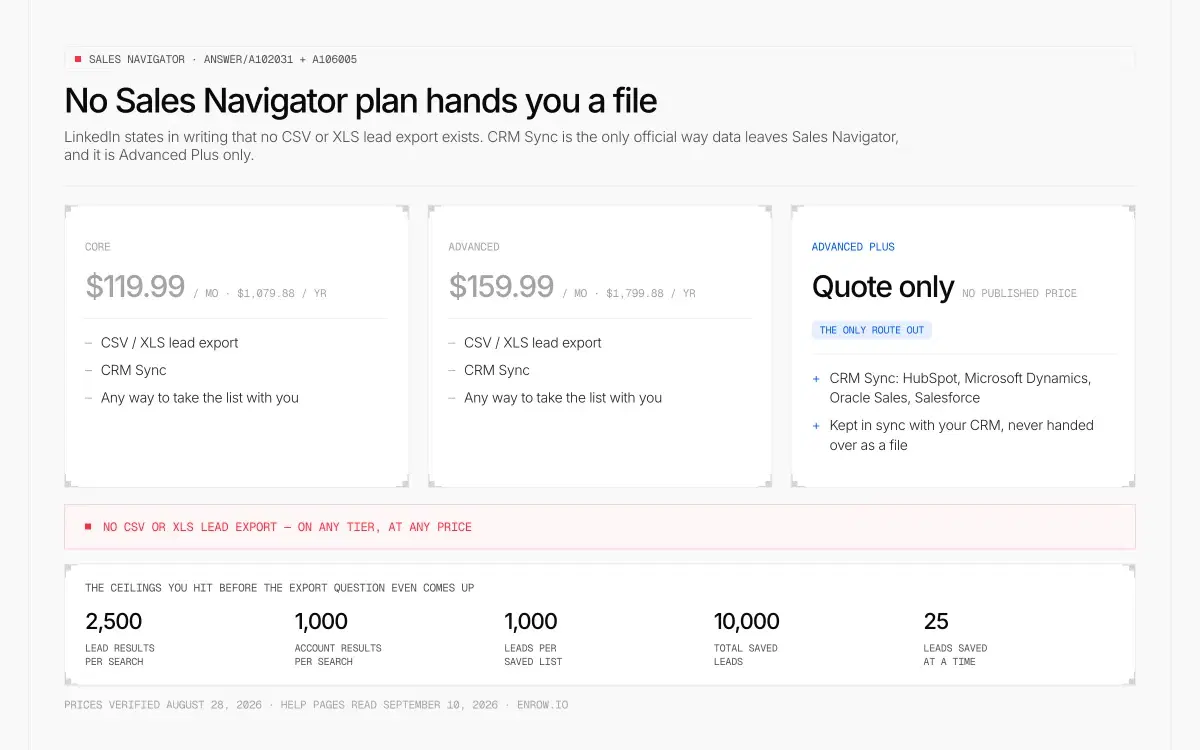
Up to $1,799.88 a year at published prices, and no tier hands you a file. CRM Sync exists only on the plan LinkedIn won't price.
Pay $119.99 or $159.99 a month and you'd reasonably assume the lead list you built comes out as a file. It does not.
"LinkedIn currently doesn't offer the option to export account and lead information from Sales Navigator into a CSV or XLS file." — LinkedIn Help, "Export account and lead information from Sales Navigator" ("Last updated: 1 year ago"), read September 10, 2026
The same page offers one alternative and gates it: "However, alternative solutions are available if you're using the Sales Navigator Advanced Plus plan." That's CRM Sync, which pushes leads and accounts into your CRM and keeps both sides updated. It does not hand you a file you own.
A second official page confirms the gate in one sentence: "Integration between Sales Navigator and your CRM is only available for Sales Navigator Advanced Plus users." CRM Sync covers HubSpot, Microsoft Dynamics, Oracle Sales and Salesforce; Pega, SAP and SugarCRM get Embedded Profiles instead, Freshworks gets Embedded Experiences.
| Plan | Monthly (USD) | Annual (USD) | CSV / XLS lead export | CRM Sync |
|---|---|---|---|---|
| Core | $119.99 | $1,079.88 ($89.99/mo) | No | No |
| Advanced | $159.99 | $1,799.88 ($149.99/mo) | No | No |
| Advanced Plus | Quote only | Quote only | No | Yes — HubSpot, Microsoft Dynamics, Oracle Sales, Salesforce |
Prices verified on business.linkedin.com/sell/sales-navigator/compare-plans, August 28, 2026 (full breakdown in Sales Navigator pricing). Export and sync rows quoted from answer/a102031 and answer/a106005, read September 10, 2026.
Notice what that table says about the money. The only official route out of Sales Navigator sits behind the one plan LinkedIn won't price publicly, and no tier at any advertised price produces a CSV.
A caveat, since dated sourcing is the whole point here: the page saying no export exists is itself stamped "Last updated: 1 year ago". I'm quoting LinkedIn's documentation, not making a live claim about a UI I can't screenshot for you.
The ceilings you hit before the export question even comes up
| Cap | Value | Official wording |
|---|---|---|
| Lead results per search | 2,500 across 100 pages | "You can view up to 2,500 lead results across 100 pages…" |
| Account results per search | 1,000 across 40 pages | "…or 1,000 account results across 40 pages" |
| Leads per saved list | 1,000 | "You can save up to 1,000 leads in each list…" |
| Total saved leads | 10,000 | "…and 10,000 total leads." |
| Bulk save from search | 25 at a time | "Using this step, you can save 25 leads at a time." |
All read September 10, 2026.
Do the arithmetic on the last row before you commit a Tuesday to this. Building a 1,000-lead list from search means 40 separate bulk-save actions.
Page admins get an export of their own, and people keep asking whether it holds contacts. It doesn't. LinkedIn's "Export your LinkedIn Page analytics report" page ("Last updated: 1 year ago") describes an XLS file covering Content, Visitors, Followers and Competitors. Analytics, in other words. The page says nothing either way about individual follower names or addresses, so I won't claim one.
My honest read on both exports
Make the connections export. Once. Six clicks, two days of waiting, no money, and a dated snapshot of your own network sitting on a drive you control — the day LinkedIn restricts your account, that file is the only copy you have.
Do not build an outbound campaign on it.
The names and companies are real, and both go stale at the speed people change jobs. The addresses are a lottery run by other people's privacy settings, and the ones you do get are personal primary addresses, which is the wrong inbox for a work pitch anyway. Someone's Gmail from 2016 is not a B2B channel.
Sales Navigator is the blunter case. At published prices you pay up to $1,919.88 a year, Advanced billed monthly, for a search engine whose results you can't take with you, and any single search stops at 2,500 lead results. It's excellent at telling you who to talk to. It was never built to let you leave with a list. That's a design decision, not a missing feature.
The extensions filling this SERP, and the clause they run into
Search "export sales navigator leads" and most of page one is scraper tooling. I won't pretend those tools don't work. I'll quote the document that governs them, because it's short and it's the part their landing pages skip.
LinkedIn's User Agreement, effective November 3, 2025, lists under its Don'ts:
"Develop, support or use software, devices, scripts, robots or any other means or processes (such as crawlers, browser plugins and add-ons or any other technology) to scrape or copy the Services, including profiles and other data from the Services"
And immediately after: "Use bots or other unauthorized automated methods to access the Services, add or download contacts, send or redirect messages…"
That's LinkedIn's written position on browser plugins that copy profiles, with a date on it. What follows is a judgement call about your own account, not about legality in the abstract. Make it with the clause in front of you.
For the record, Enrow doesn't scrape LinkedIn. We take a name and a company and find the work email against live mail infrastructure — which is why our extension reads a profile you already have open instead of harvesting lists in the background.
What LinkedIn gives you, and the one thing it withholds
Step back and look at what the export leaves you holding.
Name, company, job title, profile URL. That's the hard part of prospecting, and LinkedIn is the best source on earth for it, because the people in it maintain their own records. What you don't have is a reachable address — and where you do have one, it's a personal address somebody opted into sharing in 2019.
That gap is my entire product, so weigh what follows accordingly. Enrow takes the two columns your export does give you and returns the verified work email in real time, against live mail infrastructure and not out of a stored list. Every address clears 10+ verification checks before you see it, and observed bounce sits under 1% — an average I measure, not a guarantee I sell. Catch-all domains get verified and delivered instead of flagged "risky" and dropped. A lookup takes a few seconds.
One email is one credit, and you're only charged when a valid result comes back. Rows that find nothing cost nothing.
| Plan | Credits / month | Price / month | Cost per valid email | What a 1,000-row export consumes |
|---|---|---|---|---|
| Free | 50 (recurring, no card) | $0 | — | 50 rows you can test free, every month |
| Start | 1,000 | $17 | $0.0170 | ~600 credits, about $10.20 of the plan |
| Start | 4,000 | $47 | $0.0118 | ~600 credits, about $7.05 of the plan |
| Pro | 10,000 | $87 | $0.0087 | ~600 credits, about $5.22 of the plan |
| Scale | 50,000 | $397 | $0.0079 | — |
| Scale | 200,000 | $1,397 | $0.0070 | — |
Annual billing is monthly ×0.90 on Pro and Scale, which takes the largest tier to roughly $0.006 per email. *Read that last column as credit value, not as your invoice: you pay the monthly plan fee, and those ~600 credits eat the share shown. The ~600 assumes Enrow's observed ~60% discovery rate, which is an average and not a guarantee. The ~400 rows that come back empty are not billed. Prices come from Enrow's pricing data; the per-email column is arithmetic on them.
Enriching a 1,000-row connections export eats roughly five dollars of a Pro plan's credits. That is what it costs to turn a file of names into a file you can send from.
For single profiles there's a shorter path. Our Chrome extension sits on a LinkedIn or Sales Navigator profile and pushes the full verified contact, every field and not the address alone, into HubSpot, Salesforce or Pipedrive in one click. It arrives as a create-or-update rather than a fresh row: someone you imported from a connections CSV six months ago gets their missing phone and current job title written onto the record that already exists. Anyone who has loaded the same LinkedIn export twice knows what the other behaviour looks like, and how long the cleanup takes. No CSV in the middle, no copy-paste, no half-empty record you promise to finish later. It works profile by profile, and I'd rather say that plainly than imply it drains a lead list for you. There's an API for the same job inside a pipeline, and an official MCP server (github.com/EnrowAPI/enrow-mcp) if you'd sooner call it from Claude or Cursor.
Now the boundaries, since this page is built on them. Enrow has no searchable database, and won't have one: stored databases refresh every three to nine months, so you end up prospecting people who left two quarters ago. Real-time lookup is harder to explain and more accurate, and it's why sourcing stays where it belongs — LinkedIn and Sales Navigator. No sequencing either, and we won't build it; that's Emelia, La Growth Machine or lemlist. No technographics. The Start tier has no annual billing and no rollover, so with lumpy volume Pro is the honest entry point rather than the cheapest line on the page.
More on the plans this page touches: LinkedIn pricing · Sales Navigator pricing · LinkedIn Premium pricing · Recruiter pricing · Premium Career pricing · Company Page pricing · and the nine ways to get an address off a profile, in LinkedIn email finder.
ready to stop wasting time?
Connected in minutes.
Verified data in seconds.
FAQ
How can I download all my contacts from LinkedIn?
Me icon → Settings & Privacy → Data privacy → Get a copy of your data → Download larger data archive → Request archive. LinkedIn emails a download link to your primary address. Connections are in the 48-hour group, and the link stays live for 72 hours.
Why are the email addresses missing from my LinkedIn export?
Because the other person didn't allow it. LinkedIn's help page states you "will only see email addresses for connections who have allowed their connections to see or download their email address." Their Email visibility setting controls it, not your plan, and no subscription changes that.
Can I export LinkedIn connections to Excel?
Yes. The data comes out comma-separated and opens in Excel, Google Sheets or Numbers with no conversion step. You're exporting names, profile URLs, companies, positions and connection dates, with email present only where the connection allowed it.
Can you export leads from LinkedIn Sales Navigator?
Not to a file. LinkedIn's help page says it "currently doesn't offer the option to export account and lead information from Sales Navigator into a CSV or XLS file." The only official alternative is CRM Sync, restricted to Advanced Plus, which LinkedIn doesn't price publicly. Core at $119.99/month and Advanced at $159.99/month get neither.
How long does a LinkedIn data export take?
LinkedIn's prose says minutes for a single data type and 24 hours for the full archive. Its own category headings say 10 minutes for the fast group and 48 hours for the group holding Connections and Contacts. Same page, both claims. Plan for 48 hours, and download before the 72-hour link expires.
Does the LinkedIn export include phone numbers?
Not for your connections — that category has no phone field at all. The archive includes a Phone Numbers category, but it holds the numbers on your own account. Imported contacts are the exception: LinkedIn describes its Contacts category as including "name, phone numbers, and email addresses", because you uploaded that data yourself.
Is it legal to scrape data from LinkedIn?
Legality varies by jurisdiction and isn't mine to rule on. What is documented is LinkedIn's User Agreement, effective November 3, 2025, which prohibits using "software, devices, scripts, robots… (such as crawlers, browser plugins and add-ons…) to scrape or copy the Services, including profiles and other data". The exposure sits with your account. Enrow doesn't scrape LinkedIn — it finds and verifies addresses from a name and a company.
How do I export followers from a LinkedIn company page?
You don't get a follower list. Page admins can export an analytics report as an XLS file covering Content, Visitors, Followers and Competitors. LinkedIn's help page is silent on whether individual follower identities appear, so treat it as aggregate reporting until you open one yourself.
How I verified this
No number or quote here came from another article, which matters on these keywords because almost every page ranking for them is undated.
Click path, field list, category groupings, timings and the 72-hour window: LinkedIn's "Download your data" and "Export connections from LinkedIn" pages, read September 10, 2026, with LinkedIn's own "last updated" stamps recorded next to each. The email caveat is quoted verbatim, because paraphrasing it is how the rest of the SERP loses the meaning. The toggle behind it comes from the "Email visibility" page. The Sales Navigator statements come from two separate help pages, both quoted; plan prices were verified against the compare-plans page on August 28, 2026.
Where LinkedIn contradicts itself, I've reported both sides rather than picking whichever made the cleaner sentence. Where LinkedIn publishes nothing — the toggle default, the literal CSV headers — this page says so and stops there.