Key takeaway Sales Navigator Core is $119.99 a month, or $1,079.88 a year. Advanced is $159.99 a month, or $1,799.88 a year. Advanced Plus is quote-only. The upgrade from Core to Advanced costs $720 per seat per year and buys you two things worth having: CSV account import, and license reassignment. Everything else in that tier is padding. Your InMail allowance doesn't move. All three plans get 50 credits a month. Half the articles ranking for this keyword still quote $79.99 or $99.99. Those were real prices once. They aren't now. Prices below were read off LinkedIn's own pricing FAQ on August 28, 2026, in five currencies.
There is a strange thing about searching for Sales Navigator pricing. You will find a dozen confident articles, and they will disagree with each other by forty dollars a month.
I checked. On the first two pages of Google right now, Sales Navigator Core is quoted at $79.99, $99, $99.99, $119.99 and $120. Advanced is quoted at $139.99, $149.99, $159.99 and $179.99. One well-ranked page has the annual Core price at $959.88; another has it at $1,079.88. They cannot all be right. Most are simply old: prices that were accurate in 2023 or 2024, never updated, still ranking.
So this piece does something boring and useful. Every number here was read off LinkedIn's own pricing FAQ on August 28, 2026, including the currency grids buried in the accordions that nobody seems to open.
Then I'll tell you what I actually think of each plan, and how to pay considerably less than sticker.
Disclosure, up front. I run Enrow, which finds and verifies the emails and phone numbers that Sales Navigator deliberately doesn't give you. That makes me a customer of LinkedIn's, not a competitor. I have no reason to talk you out of Sales Navigator, and one section near the end explains where it stops and my product starts.
What Sales Navigator costs, officially
Core is $119.99 a month and Advanced is $159.99 a month, and the annual discount LinkedIn attaches to each is wildly uneven: 25% off on Core, 6% off on Advanced.
| Plan | Monthly billing | Annual billing | Annual, per month | Annual saving vs 12 monthly payments |
|---|---|---|---|---|
| Core | $119.99/mo | $1,079.88/yr | $89.99/mo equiv. | 25% off |
| Advanced | $159.99/mo | $1,799.88/yr | $149.99/mo equiv. | 6% off |
| Advanced Plus | Quote only | Quote only | — | — |
Look at the savings column for a second, because it is the most useful thing on this page.
LinkedIn gives you a 25% discount for paying annually on Core. On Advanced, that discount collapses to 6%. LinkedIn states both figures itself, in the same FAQ, without comment. So the standard advice — "always take the annual plan" — is excellent on Core and close to pointless on Advanced. On Advanced you are pre-paying twelve months to save ten dollars a month.
Advanced Plus has no published price at all. LinkedIn says it is "customized based on your sales team's size, CRM integration, and onboarding/training needs." Third-party sites report a floor of roughly $1,600 per seat per year. I could not verify that against any LinkedIn source, so treat it as hearsay until a rep quotes you.
The same plans in five currencies
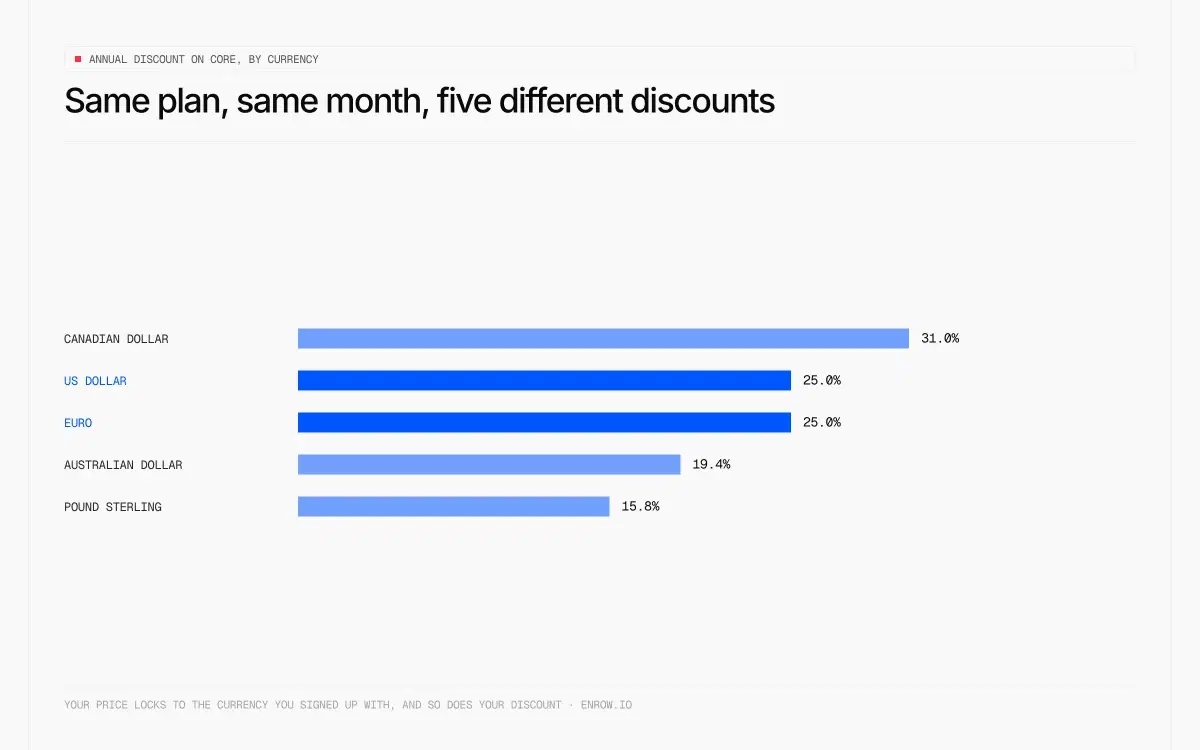
LinkedIn publishes Sales Navigator pricing in five currencies, and on the identical Core plan the annual discount runs from 15.8% in sterling to 31% in Canadian dollars. Almost nobody reproduces the grid.
| Sales Navigator Core | Monthly billing | Annual billing | Annual, per month | Annual discount vs 12 monthly payments |
|---|---|---|---|---|
| USD | $119.99/mo | $1,079.88/yr | $89.99/mo equiv. | 25% off |
| EUR | €120,99/mo | €1 088,88/yr | €90,74/mo equiv. | 25% off |
| GBP | £94.99/mo | £959.88/yr | £79.99/mo equiv. | 15.8% off |
| CAD | C$144.99/mo | C$1,199.88/yr | C$99.99/mo equiv. | 31% off |
| AUD | A$154.99/mo | A$1,499.88/yr | A$124.99/mo equiv. | 19.4% off |
All five grids read off LinkedIn's compare-plans FAQ accordions on August 28, 2026. Monthly equivalents computed from LinkedIn's own annual figures.
Same product, same month, and the discount depends on which country is billing you. A British buyer gets the worst annual deal in the table. A Canadian gets the best.
These are not conversions of a dollar price. They are separately set market prices, which is exactly why the discounts don't line up. It opens a door I'll come back to.
What you actually pay, for a real team
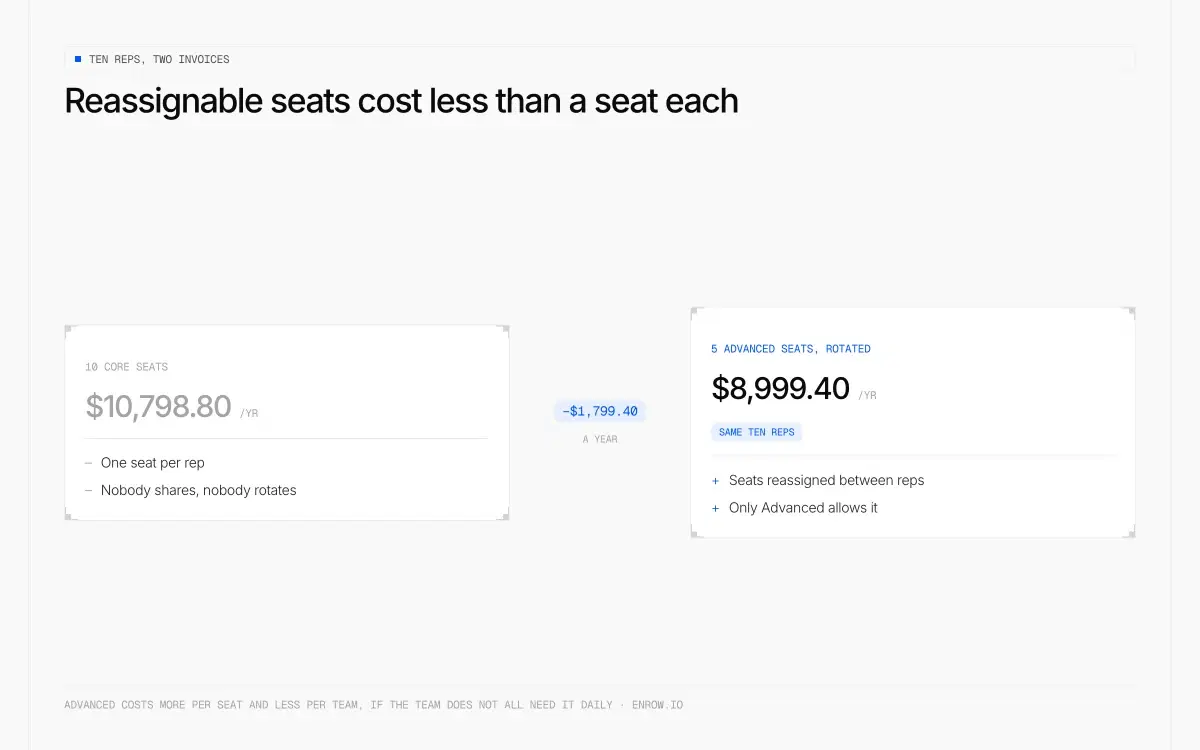
Advanced costs more per seat and less per team, if the team doesn't all need it daily.
Sticker prices are per seat, so ten reps on Advanced costs $17,998.80 a year against $10,798.80 on Core — a $7,200 gap before anyone has sent a message. Paying Core monthly instead of annually costs another $3,600 a year on the same ten seats.
| Team size | Core, monthly billing | Core, annual billing | Advanced, annual billing | Core → Advanced gap |
|---|---|---|---|---|
| 1 rep | $1,439.88/yr | $1,079.88/yr | $1,799.88/yr | +$720/yr |
| 5 reps | $7,199.40/yr | $5,399.40/yr | $8,999.40/yr | +$3,600/yr |
| 10 reps | $14,398.80/yr | $10,798.80/yr | $17,998.80/yr | +$7,200/yr |
Every cell is LinkedIn's published per-seat price multiplied out. Monthly-billing columns are annualised at 12 months so the comparison stays like-for-like.
Seven thousand dollars a year, for ten reps, to move from Core to Advanced. Hold that number while you read the next section, because I don't think most teams should spend it.
My honest read on each plan
Core: the one almost everyone should buy
Core does the job. You get the search, the filters, the lead and account lists, the saved searches, and 50 InMail credits a month.
That last number deserves attention, because it is the quiet argument against upgrading. Core, Advanced and Advanced Plus all get 50 InMail credits per month. Identical. Unused credits roll for up to three months, capped at 150, and an InMail that gets a reply within 90 days is credited back to you. Paying $720 more per seat per year does not buy you a single extra message.
Pros
- Cheapest plan in LinkedIn's entire range per InMail, at $2.40 a message on monthly billing
- 25% annual discount, the best of the two published Sales Navigator tiers
- Lead and account lists, saved searches and the full filter set
- Same 50 InMails as the two tiers above it
- Self-serve, so the currency lever is available
Cons
- No CSV account import
- Single seat, with no licence reassignment
- Search capped at 2,500 leads and 1,000 accounts
- Price has climbed steadily; it sat near $80 not long ago
Best for: anyone who prospects on LinkedIn and isn't managing a team's licences. That's most buyers.
Advanced has two good reasons, and a lot of noise
I'll defend the upgrade properly, because there are two features in Advanced that genuinely earn their place.
CSV account import. This is the real reason to upgrade and hardly anyone writes about it. Advanced, and Advanced Plus above it, lets you push a list of companies into Sales Navigator — a list you scraped, exported from your CRM, or built from a set of websites. It takes accounts only, not leads, up to 1,000 accounts a list. Short of the CRM sync reserved for Advanced Plus, it is the only bridge between your own data and LinkedIn's interface, and it runs one way: nothing comes back out as a file. If you run account-based outbound, that single feature can justify the tier by itself.
License reassignment. On team plans you can pull a license off one person and hand it to another from the admin console. Not as often as you like, though: LinkedIn caps license assignments each calendar month, sets the cap by how many licenses you hold, and resets it on the 1st.
That second one has a consequence worth doing the arithmetic on. Say you have ten reps, and they don't all need Sales Navigator in the same month. Buy five Advanced licenses and rotate them, in turns long enough to stay under that cap:
- 10 Core licenses, annual: $10,798.80
- 5 Advanced licenses, rotated across 10 people: $8,999.40
The Advanced plan comes out $1,799.40 cheaper, and you get CSV import thrown in. That is the one scenario where upgrading saves money instead of costing it, and it is the opposite of how LinkedIn sells the tier.
Now the rest of Advanced, which I have used and would not pay for.
Team reporting tells you nothing you can act on. Buyer Intent doesn't work well enough to plan around. TeamLink is dead weight in practice. The recent wave of AI features has been announced far more loudly than it has been useful. Smart Links are the only extra I'd call mildly interesting, and mildly is doing real work in that sentence.
Strip it back and you are paying $720 a seat for a CSV importer and a seat-shuffling screen.
Pros
- CSV account import, the genuine reason to upgrade
- Licence reassignment across a team, within a monthly cap that resets on the 1st
- Smart Links for tracking what you send
- Rotating fewer seats across more reps can undercut Core outright
Cons
- $720 more per seat per year for zero extra InMails
- Annual discount collapses to 6%, against 25% on Core
- Team reporting, Buyer Intent and TeamLink underdeliver
- The recent AI additions have been announced more than they've been used
Best for: teams that will genuinely use CSV import, or that can rotate a small pool of licences across a larger group.
Advanced Plus, for a specific kind of buyer
Deep CRM integration, custom onboarding, negotiated terms. If you have a CRM ops team and a procurement process, you already know whether you need this. If you're asking the price, you don't.
One thing to know before you start that conversation, and I'll explain why in a moment: buying through a sales rep locks you out of a discount route that self-serve buyers keep.
Pros
- Deep CRM integration and custom onboarding
- Negotiated terms, so there's room to move on price
Cons
- No published price anywhere
- Requires a sales conversation and, in practice, a procurement process
- Sold through a rep, which rules out the currency lever entirely
- Still 50 InMails, same as the $119.99 plan
Best for: organisations with a CRM ops function and a real procurement cycle.
How to pay a lot less
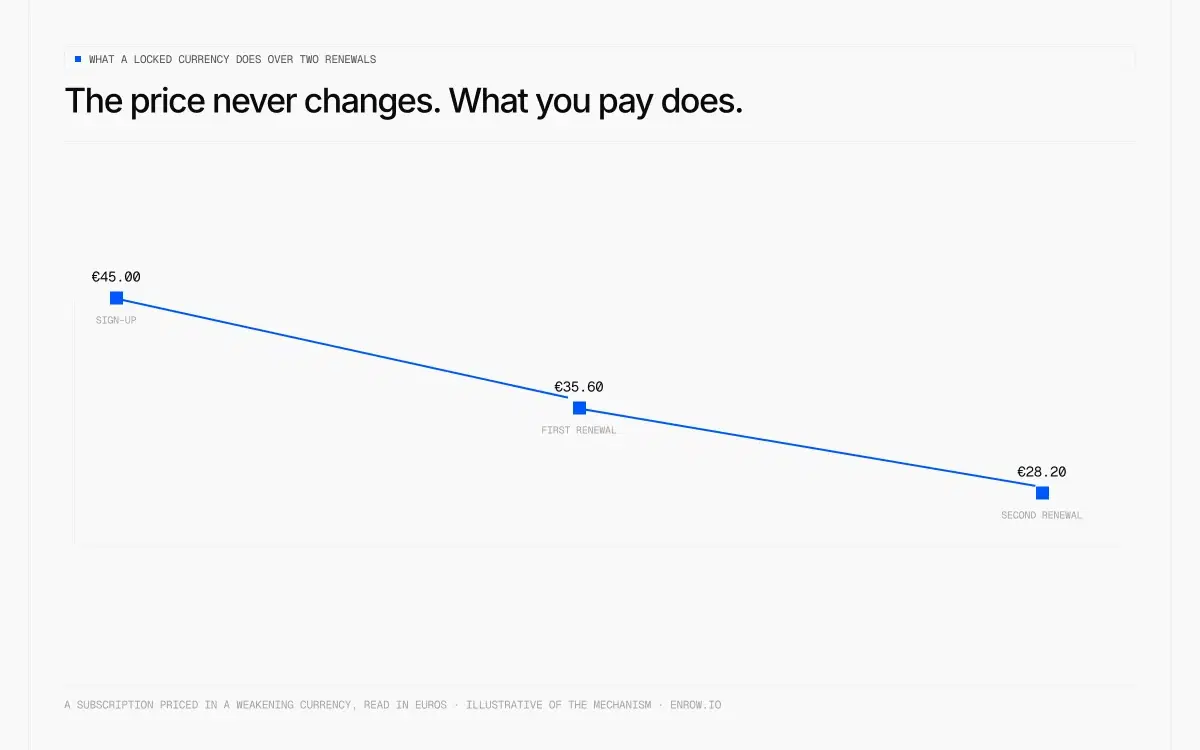
The price on the invoice never changes. What it costs you does.
Same plan, same month, five different discounts.
Search intent for this topic is overwhelmingly about paying less, and most articles answer with "take the annual plan." Here is the real list.
1. Take annual on Core, think twice on Advanced
25% versus 6%. That is the whole decision, and it is the reverse of what most buyers assume.
2. Rotate seats instead of buying them
Covered above. If your reps use Sales Navigator in stretches rather than all at once, licensing half your team on Advanced and reassigning within LinkedIn's monthly cap beats licensing everyone on Core.
3. Time your free trial around the 365-day rule
LinkedIn's trial eligibility is stricter than people realise, and it is written down: free trials go to members not currently on any paid LinkedIn subscription — Premium included — and who have not used a LinkedIn free trial in the past 365 days.
Two things follow. Holding a Premium subscription disqualifies you from a Sales Navigator trial, so cancel first if you're planning one. And eligibility recharges after a year, which is not something LinkedIn advertises. You also get an email seven days before the trial converts.
4. Buy in a currency that is falling
This is the one that saves serious money, and I have never seen it explained correctly.
LinkedIn bills self-serve subscriptions in 57 currencies. Not five. Fifty-seven, including the Argentine peso, Turkish lira, Nigerian naira, Egyptian pound, Pakistani rupee and Ukrainian hryvnia. The list is public in LinkedIn's help centre.
Once you subscribe, your price is locked in that currency. LinkedIn can and does re-price a market for new buyers. They did it in Lebanon when the local grid drifted too far from reality. Existing subscriptions carried on at the old number. So if you hold a subscription priced in a currency that keeps sliding against the euro or the dollar, your real cost falls at every renewal, without you doing anything.
A Core subscription frozen in Argentine pesos costs 37.3% less in dollars today than the same subscription did two years ago. Nobody had to do anything for that to happen.
| Currency you're billed in | Real cost after 1 year | Real cost after 2 years |
|---|---|---|
| Turkish lira (TRY) | 14.9% cheaper in USD | 28.9% cheaper in USD |
| Argentine peso (ARS) | 10.7% cheaper in USD | 37.3% cheaper in USD |
| Philippine peso (PHP) | 8.3% cheaper in USD | 9.6% cheaper in USD |
| Indian rupee (INR) | 8.1% cheaper in USD | 12% cheaper in USD |
| Indonesian rupiah (IDR) | 7.6% cheaper in USD | 12.5% cheaper in USD |
Each percentage is the fall in the dollar cost of a price frozen in that currency, measured on 2026-08-28 against 2025-08-28 and 2024-08-28. It is a currency movement, not a LinkedIn discount.
I've done this. I bought a subscription priced in Argentine pesos, at roughly €45 a month. Two renewals later I'm paying just under €30 for the same thing, and I haven't touched anything.
The mechanism, which is where every other article gets it wrong. You need two steps and they only work together:
- Change the country on your LinkedIn profile. That is what makes LinkedIn display prices in the local currency.
- Use a VPN, particularly at the moment of payment.
A VPN on its own does nothing. Changing your profile country on its own does nothing either. It's the combination.
And now the honest part, because there are four constraints and they matter.
Currency choice is a one-shot decision. LinkedIn's own help page states that to be billed in a different currency you must cancel your plan and wait until the end of your billing cycle before buying again. Pick badly and you lose a full cycle correcting it.
A weak currency is not the same as a falling one. Over the past year the Nigerian naira strengthened by 14.4% against the dollar and the Colombian peso by 27.6%. A subscription bought in either is more expensive today than when it was purchased. What you want is structural decline, not volatility.
This route is self-serve only. LinkedIn accepts just 12 currencies for contracts bought through a sales rep, and none of the fast-depreciating ones are on that list. Advanced Plus is therefore excluded by design — one more reason to stay on Core or Advanced.
And there's a real risk attached, which I'd rather state plainly than bury. LinkedIn's User Agreement requires accurate profile information, and LinkedIn explicitly reserves the right to restrict accounts whose profiles don't reflect reality. The exposure here isn't your card. It's your account, and if you sell on LinkedIn that account is worth vastly more than the subscription. Your call, made with the facts.
The last piece of advice follows from all of the above: if you get in at a good price, never cancel. The advantage compounds quietly, renewal after renewal, and it disappears the moment you resubscribe.
Two limits nobody mentions until you hit them
Search results are capped, twice. LinkedIn lets you view up to 2,500 lead results across 100 pages, or 1,000 account results across 40 pages. A search matching 50,000 people will hand you 2,500 of them. You then slice the search by seniority, geography, headcount and start again. The account cap is the tighter of the two and the one that hurts account-based programmes.
Sales Navigator has its own inbox. Messages sent from Sales Navigator live in a separate mailbox from regular LinkedIn messaging. Your prospect replies there, you spend your day in normal LinkedIn, and the reply sits unread for a week. Send from regular LinkedIn and use Sales Navigator for what it's good at.
What Sales Navigator is genuinely best at
I've spent this article picking at the pricing, so let me be fair about the product, because on one dimension it has no real competition.
The data is fresh. Not fresh in a marketing sense. Structurally fresh, because the people in it maintain their own records. Someone changes job and updates their own profile that afternoon. Every tool built on a proprietary contact database is working from a snapshot: 45 days old in the best case, six months in the ordinary one. For finding out who currently does what, nothing else comes close.
The company pages are also better than LinkedIn lets on. Recent hires, headcount shifts, movement inside a team. For account-based work that is high-grade signal, and LinkedIn barely markets it.
One more feature that gets overlooked: a paid subscription lets you browse privately while still seeing who viewed your own profile. Look without being seen, without giving up your own inbound signal.
Where it stops, and what you need next
Sales Navigator will show you exactly the right person, with a current title, at a company that just hired three people in the department you sell to.
It will not give you their email address. It will not give you their phone number. And its 2,500-result ceiling makes clear it was never built to be a database you work through in volume.
That's the gap my company fills, so read this knowing it. Enrow finds and verifies work emails and direct phone numbers in real time rather than serving them from a stored list, and you're charged only when the result comes back valid — no valid contact, no credit spent. Each address goes through 10+ verification checks, with observed bounce under 1%. Catch-all addresses get verified and delivered rather than flagged and dropped. On European direct dials we're not blocked by GDPR.
The part that matters specifically here: our Chrome extension works inside Sales Navigator. Open a profile, and it finds that person's verified work email and direct phone number without you leaving the page. No second tab, no switching between windows, no copying a name into another tool and waiting. You stay in the search you were already running.
The contact then lands in your CRM through a native connection to HubSpot, Salesforce or Pipedrive — a direct integration rather than a chain of automation tools taped together, so the record arrives properly formed in the system your team actually uses.
Whole lists are where people expect a shortcut, and Sales Navigator doesn't give one. There is no CSV or XLS export of leads or accounts on any plan; records only leave through CRM Sync on Advanced Plus, and even that leaves email and phone for the rep to type. So work the list where it lives. Open each profile from your saved search, and the extension puts the verified email and direct phone into your CRM. If you already hold a CSV, say a segment pulled from your CRM, enrich that file and pay for the rows that come back valid. There's an API for the same job, and an MCP server (github.com/EnrowAPI/enrow-mcp) if you'd rather call it from an AI assistant.
Where I'd honestly send you elsewhere: Enrow has no searchable database, and that's deliberate. Stored databases go stale, which is the whole problem we set out to avoid, so sourcing stays with LinkedIn and Sales Navigator. We don't do sequencing either, and won't. For that, look at Emelia, La Growth Machine or lemlist.
Pricing starts at $17 a month for 1,000 credits. One email is one credit, one direct phone is 40, and there's a free tier of 50 credits every month with no card.
ready to stop wasting time?
Connected in minutes.
Verified data in seconds.
FAQ
How much does Sales Navigator cost per month?
Sales Navigator Core costs $119.99 per month and Advanced costs $159.99 per month, verified against LinkedIn's compare-plans FAQ on August 28, 2026. Annual billing brings Core down to $89.99 a month equivalent ($1,079.88/yr) and Advanced to $149.99 ($1,799.88/yr). Advanced Plus carries no published price and is quoted per deal.
Can I get Sales Navigator for free?
There's a free trial, but eligibility is narrower than most people expect. You must not be on any paid LinkedIn subscription, Premium included, and you must not have used a LinkedIn free trial in the previous 365 days. That eligibility does come back after a year.
Which is better, LinkedIn Premium or Sales Navigator?
Different jobs. Premium Business at $69.99 a month is built around your own visibility and networking. Sales Navigator is a prospecting search engine with the advanced filters, lead lists and saved searches that Premium doesn't have. If you're building target lists, Premium won't do it.
Do I need both LinkedIn Premium and Sales Navigator?
No. Sales Navigator already carries the Premium features that matter for selling, so running both at $119.99/mo and $69.99/mo duplicates spend. Holding a Premium subscription also disqualifies you from a Sales Navigator free trial, because LinkedIn reserves trials for members on no paid subscription at all.
Is Sales Navigator Advanced worth the upgrade?
For most teams, no. The InMail allowance is identical across all three plans at 50 a month, and the extra reporting and intent features underdeliver. Two things justify it: CSV account import, and license reassignment across a team. If you'll use both, it pays. If not, stay on Core.
How much does Sales Navigator Advanced Plus cost?
LinkedIn publishes no price. It's quoted per deal based on team size, CRM integration and onboarding needs. Third-party sites report a floor around $1,600 per seat per year, which I could not verify against any LinkedIn source.
Why do different websites list different Sales Navigator prices?
Because most of them are quoting a price LinkedIn charged in an earlier year and never revisited the page. Of sixteen non-LinkedIn publisher domains ranking on August 28, 2026, nine published a figure LinkedIn does not charge, most often Core at $99.99/mo instead of $119.99/mo. Check the date on any article before you budget from it.
How we verified these prices
Nothing here was taken from another article, which matters on this keyword more than most, given how much of page one is out of date.
The Core and Advanced figures, the five-currency grid, the free-trial eligibility rule and the cancellation policy all come from the pricing FAQ on LinkedIn's Sales Navigator compare-plans page, read on 28 August 2026. The 2,500-lead and 1,000-account search ceilings come from LinkedIn's help centre article on search limits, which the company stamps "Last updated: 11 months ago". The 57-currency list and the 12-currency contract list are two separate LinkedIn help pages.
Annual monthly-equivalents and discount percentages are computed from LinkedIn's own numbers rather than transcribed.
For Advanced Plus, LinkedIn publishes no price at all, so the roughly $1,600 per seat figure is labelled as a third-party report and nothing more.
The claims-versus-source table was built mechanically, not by reading around. On 28 August 2026 I pulled the Google results served for linkedin sales navigator pricing, sales navigator pricing and how much does sales navigator cost, extracted every price string in the snippets — 484 of them across the wider LinkedIn pricing set — and checked each one against the compare-plans FAQ. Publication dates are the ones the articles display in their own snippets, so a missing date is recorded as missing rather than guessed. No claim was called wrong without that check, and every site quoting LinkedIn's real figures is listed alongside those that aren't.