Key takeaway Putting a LinkedIn profile into a CRM is trivial. Putting one in that a rep can email on Tuesday is the part almost nobody solves. HubSpot explains the failure in its own documentation. Email is "the primary unique identifier to avoid duplicate contacts", and without one, "each row of your import file will be imported as a new contact record". Pipedrive's matcher wants a name plus an email, a phone or a shared organisation. Hand either platform a half-empty record and you have handed it nothing to match on. So hold any LinkedIn to CRM tool to four things: it writes the complete contact card, it performs a create-or-update instead of a blind insert, the address is verified before it lands, and phone coverage includes EU direct dials. Enrow handles that step from the profile itself into HubSpot, Salesforce or Pipedrive: the full contact card, verified before it lands, written as a create-or-update — the record you already hold gets updated, and only a genuinely new person gets created. Credits move only against a valid result. It will not build your list. Sourcing stays in LinkedIn.
A rep finds the right person on LinkedIn. Right title, right company, right week. That judgement is the expensive part, and it takes about forty seconds.
Then the profile has to become a record, and the LinkedIn to CRM step gets treated as plumbing. It isn't plumbing. It's where the judgement either survives or gets thrown away, because what lands in HubSpot, Salesforce or Pipedrive is usually a fragment of a person with no route to their inbox.
Three routes are in common use. A rep retypes the fields. A connector syncs the profile automatically. Or somebody assembles a CSV and imports it. All three break, in different places, and the breakages compound — because the cleanup for one is what triggers the next.
Here's the map of all three, then the standard I'd hold any tool to before I let it write into a CRM I care about.
Route one: a rep retypes it
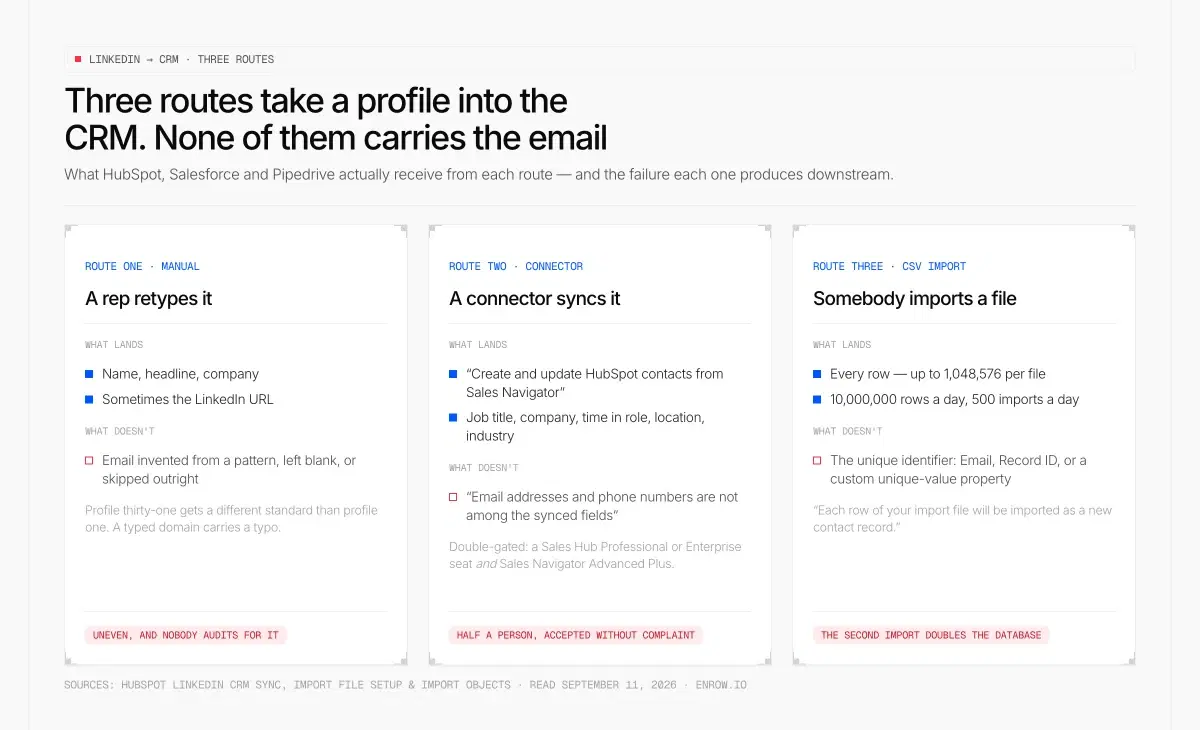
The article's spine in one frame: each route lands a different subset of the profile, and none of the three carries the email address.
It works. That's the awkward part. A human reading a profile and typing five fields into a CRM produces a record with no structural defects at all.
What it produces is an uneven one. Whatever the profile puts on screen gets transcribed: name, headline, company, sometimes the LinkedIn URL. The email is a different matter. It gets invented from a pattern, or left blank with a note to come back to it, or skipped outright because the rep is on profile thirty-one and only the first ten got the full treatment.
That fatigue curve is the real cost, and it doesn't show up in any report. Your CRM ends up holding records built to two different standards depending on what time of day they were created. Nobody audits for that.
There's a quieter one too. Typing a company domain by hand puts a typo somewhere in your database roughly as often as you'd expect from any manual transcription task, and a domain typo produces an address that is syntactically perfect and functionally dead.
Route two: the connector that writes half a person
Sync tools do the creation part properly. The record appears, the fields line up, the association to the company is correct.
What they carry across is what the profile shows. LinkedIn's own official routes make the clearest example, because they're documented in public and they're honest about their scope.
HubSpot's LinkedIn CRM Sync lists "Create and update HubSpot contacts from Sales Navigator" among its capabilities. A genuine create-and-update, from LinkedIn, into the CRM. Read the rest of the capability list — importing contacts into Sales Navigator lists, logging Sales Navigator activity, including or excluding matched records in search, revenue attribution reporting — and you'll notice that email addresses and phone numbers are not among the synced fields anywhere in the article.
It's also double-gated. HubSpot's documentation requires "an assigned Sales Hub Professional or Enterprise seat" and a "LinkedIn Sales Navigator Advanced Plus plan". The lighter Sales Navigator integration carries the same double gate and surfaces job title, company, time in current role, location, industry, shared connections and recent activity. Useful context on a record you already own. Not a way to reach anyone new.
HubSpot's own Sales Chrome extension sits in a similar position. Its supported surfaces are Gmail, Google Calendar, Salesforce with a Professional or Enterprise requirement, and "All other websites" once you toggle that on. LinkedIn is not named in the article. It creates contacts and companies, logs calls, enrolls contacts in sequences, sends email, books meetings. No email or phone discovery is documented for it.
And here's what makes the half-person record so durable: every CRM will accept it without complaint. HubSpot's contacts API states that "when creating a new contact, it's required to include at least one of the following properties: email, firstname, or lastname". Pipedrive's Persons endpoint needs name and nothing else. So the fragment goes in clean, sorts correctly, filters correctly, and looks identical to a good record in a list view.
Quotes from HubSpot's LinkedIn CRM Sync and Sales Navigator integration articles, the Sales Chrome extension article and the contacts API reference, plus Pipedrive's Persons endpoint. All read September 11, 2026.
Route three: the CSV that comes back as duplicates
The spreadsheet route feels like the grown-up option. Export LinkedIn leads to your CRM in one batch, import once, move on.
HubSpot states the rule for it in one sentence: "To update existing records and avoid duplicate records, your files must include a unique identifier property for each object." For contacts that identifier is Email or Record ID, or a custom unique-value property. For companies it's the domain name or Record ID.
Then it states the consequence just as plainly. "If you don't include the Email property or other unique identifier in your import, each row of your import file will be imported as a new contact record." The company version is identical, with the domain in place of the email.
Record ID, where you have one, "supercede[s] any other unique identifiers included in the import" — and "if a row in your file doesn't contain a value for Record ID, a new record will be created."
Nothing about the platform will stop you. On Starter and above, HubSpot accepts files up to 512MB with "up to 1,048,576 rows per file", "up to 10,000,000 rows per day", and 500 imports a day. Even the free tools allow 500,000 rows a day across 50 imports. The ceiling is not your constraint. The email column in your file is.
Which is where the LinkedIn side turns into its own problem, because that column is the one LinkedIn withholds. We took the export apart separately in how to export LinkedIn contacts — the short version is that the address is conditional on the other person's settings, and Sales Navigator has no file export at all.
So the first import is fine. The second one, next month, with the same names and the same missing column, is the one that doubles your database.
Import rules and limits from HubSpot's import file setup and import objects articles, read September 11, 2026.
Why a duplicate costs more than an empty field
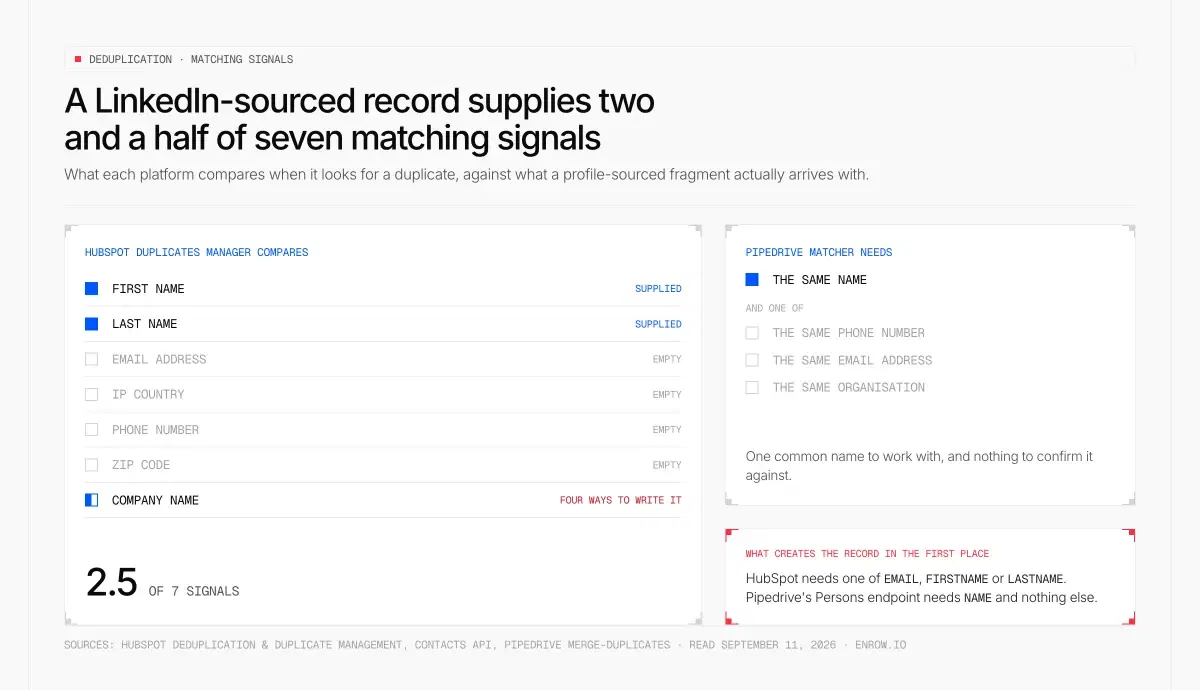
Two and a half signals out of seven. The deduplicator is looking for an email, a phone and a postcode that the profile route never delivered.
An empty email field is visible. Somebody sees the blank, somebody fills it. A duplicate is invisible by construction, and it charges you five different ways.
Start with why it happens rather than what it costs. HubSpot "automatically deduplicates contacts using email addresses" and companies using domain names. Deals, tickets, products and custom objects only dedupe manually, via Record ID. When HubSpot's duplicates manager looks for pairs it compares "First Name, Last Name, Email address, IP country, Phone number, Zip Code, and Company Name."
Count what a LinkedIn-sourced fragment actually supplies from that list. A first name, a last name, and a company name that could be written four different ways depending on who typed it. Two and a half signals out of seven.
Pipedrive's logic lands in the same place from a different direction: it looks for contacts with "the same name – like Tom Smith – and one of the following: the same phone number, the same email address, or are part of the same organization." No email, no phone, no linked organisation, and the matcher has one common name to work with.
Reporting drifts first. Two records for one person means your contact count is wrong, your conversion rate denominators are wrong, and every list built on a property filter returns a number nobody can reconcile against another number.
Activity history splits, and this one is worse than it sounds. HubSpot's merge documentation says "all timeline activities of both records included in the merge will appear on the new record". Read that backwards. Until the merge happens, they don't. One record holds the two emails you sent in March, the other holds the reply that came back in April, and the rep opening either one sees half a conversation and no reason to suspect there's another half.
Lead scoring then inherits the split. No CRM vendor documents this, so treat it as reasoning rather than a citation: a score is computed on a record, from that record's activity. Divide one person's behaviour across two records and neither may reach the threshold that would have routed them to a rep. Or the wrong one does, and the rep opens the empty twin.
There's a hard-money version too, though it only bites contacts you've set as marketing. HubSpot: "if you exceed your current contact tier by adding marketing contacts, your account will be upgraded to the next contact tier." And getting back down is not symmetrical — "HubSpot doesn't downgrade contact tiers mid-term", so "you are billed for the higher contact tier until your subscription's next renewal date, even if your marketing contact count later drops."
Cleanup is the fifth cost, and it's gated. HubSpot's duplicates manager needs a Professional or Enterprise subscription, surfaces up to 10,000 duplicate pairs as standard, 30,000 with Data Hub Professional and 100,000 with Data Hub Enterprise, and bulk management requires a Data Hub subscription. Merging is one-way, in HubSpot's own words: "It's not possible to unmerge records." And there is a ceiling on how much of it you can do at all — "You cannot merge records if they've been included in a combined total of 250+ merges."
Rejecting a suggested pair, at least, can be rolled back for 14 days. That's the only undo in the whole mechanism.
Deduplication, duplicate management and merge behaviour from HubSpot's deduplication, duplicate management and merge records articles; marketing contact billing from the billing article; Pipedrive matching from its merge-duplicates article. Read September 11, 2026.
Four things to hold a LinkedIn CRM integration to
Every tool in this category will tell you it connects LinkedIn to your CRM. They all do. The differences sit underneath the word "connects", and these four questions surface them in about a minute.
1. Complete card, or fragment
Ask which fields land, not whether it syncs. The list I want to see is name, email, phone, company and the LinkedIn URL, written in one operation.
A record missing the email is not 80% of a record. It's a record with no identity, for the reasons above — and it's the input that produces the duplicate two months later.
2. Create-or-update, or blind insert
Both major platforms ship this primitive, which means there is no technical excuse for a tool that doesn't use it.
HubSpot exposes a contacts batch upsert endpoint. Its behaviour, verbatim: "if the contacts already exist, they'll be updated and if the contacts don't exist, they'll be created." You tell it what to match on with the idProperty parameter, naming either email or a custom unique-identifier property. Batch operations cap at 100 records at a time.
Salesforce does it with a PATCH against an external ID field. The documented outcomes are clean: no match and "a new record is created according to the request body"; one match and "the record is updated according to the request body"; multiple matches and "a 300 error is reported, and the record isn't created or updated". Passing updateOnly=true suppresses creation entirely.
Several tools in this market now advertise create-or-update, and I'm not going to pretend otherwise. The follow-up question is the one that separates them: what identifier does it match on. An upsert keyed on an email you don't have is an insert wearing a better name.
3. Verified before it lands, or cleaned up afterwards
Verification after the write is data hygiene — a job you schedule, a queue you never quite finish. Verification before the write is a filter, and a record that fails it never enters the CRM at all.
The two produce very different databases after six months.
4. Phones, including EU direct dials
An address gets the record into whatever sequencer you already run. A direct dial gets you a conversation, and on a named account that's often the shorter route.
If your market includes Europe, ask specifically about EU numbers and about the legal basis for holding them. Plenty of US-built finders simply don't carry them.
Upsert behaviour from HubSpot's contacts API reference and Salesforce's REST upsert documentation, read September 11, 2026.
LinkedIn to HubSpot
HubSpot is the deepest of the three on everything except the field you need most.
Its native enrichment can improve a contact considerably. The full list of contact properties it can fill, verbatim: "City, Country, Country Code, Employment Role, Employment Seniority, Employment Sub Role, Enrichment opt-out, Enrichment opt-out timestamp, First Name, Job Title, Last Name, LinkedIn URL, State/Region, State/Region Code". Email is absent from that list. So is any personal phone — "Phone number" appears only among the company properties.
And the entry condition closes the loop: "contacts must have a business email address. Personal addresses such as Gmail or Yahoo will not be enriched." Enrichment makes a reachable record better. It cannot make an unreachable one reachable.
Two mechanics worth knowing before you plan around it. Automatic enrichment "fills properties containing blank or empty values" and "doesn't overwrite values set by a user or another system", so a wrong value already in a field stays there; manual enrichment will overwrite. Bulk enrolment from an index page runs 100 records at a time.
On cost, HubSpot prices credits at $0.010 each, $10 per 1,000-credit capacity pack, and the catalog is explicit that "unused credits do not roll over into the following month". What it does not publish anywhere I could reach is how many credits one enriched record consumes — so any per-contact figure you see quoted for HubSpot enrichment was computed by somebody who was guessing. The credit pool and what else competes for it is broken down in HubSpot data enrichment.
The write side of the same platform — properties, upserts, and what the API will cheerfully accept — is in HubSpot API and contact data.
Enrichment scope and behaviour from HubSpot's enrichment article; credit pricing from the product and services catalog. Read September 11, 2026.
LinkedIn to Salesforce
Salesforce has the strongest create-or-update story of the three, and it's the least used.
The upsert-on-external-ID pattern above is exactly what a LinkedIn-to-Salesforce write should use: key on the email, let Salesforce decide whether that's a create or an update, and take the 300 error as a signal that your org already has an ambiguity worth looking at rather than as an obstacle.
What Salesforce doesn't do is find the email in the first place. Its own Chrome extension moves records rather than sourcing contact data, and its duplicate machinery works off whatever signals the record arrived with. We covered both, plus the matching-rule ceilings, in Salesforce Chrome extension.
LinkedIn to Pipedrive
Pipedrive is the most permissive of the three about what it will store, and that's a design choice consistent with what it is — a pipeline tool that was never sold as a data tool.
name creates a Person. Everything else is optional, the address and the number included. Its duplicate matcher then wants a name plus an email, a phone or a shared organisation — precisely the set a LinkedIn sync tends not to bring.
The enrichment side, the credit expiry and the plan gates are in Pipedrive LinkedIn integration.
Who else is working on this job
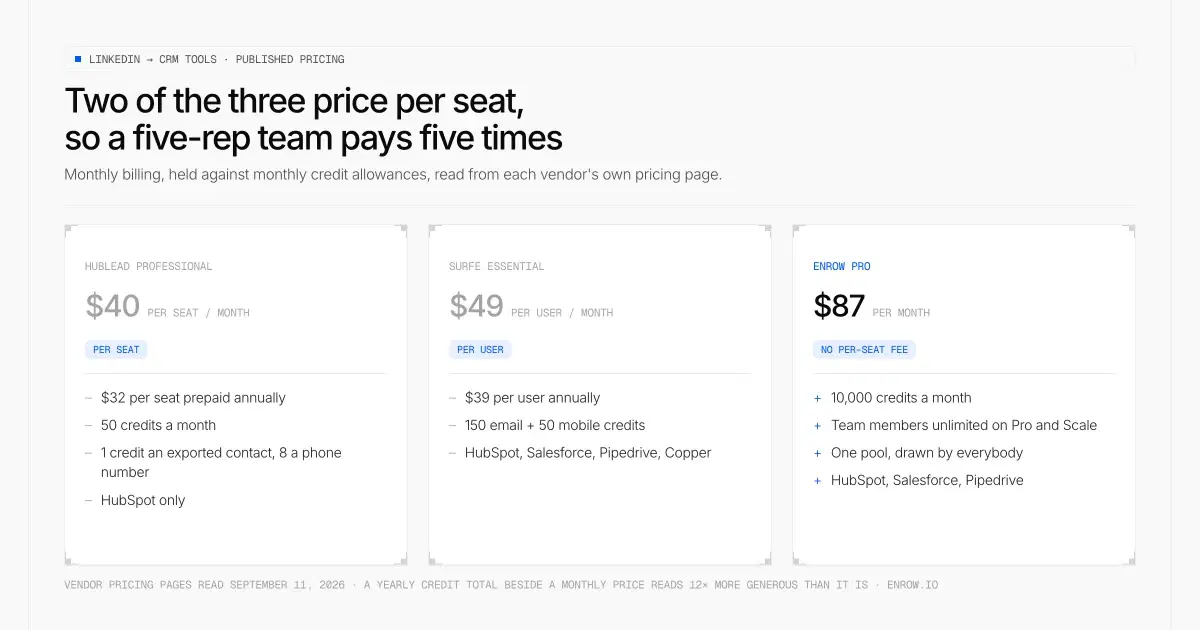
Two of the three meter by seat, so the sticker moves with headcount. Monthly prices held against monthly credit allowances, as the article insists you compare them.
Two tools compete with us directly here, and both are good at what they're built for. I'll stick to what they publish.
Hublead is HubSpot-only. Starter is free and comes with no enrichment credits. Professional runs $40 per seat per month, $32 if you prepay the year, and carries 50 credits a month. Business is $80 and $64, at 500 a month. Scale is $140 and $112, at 2,000. Its published rates put an exported contact or a HubSpot list enrichment at 1 credit, and phone number access at 8.
Surfe covers more CRMs — HubSpot, Salesforce, Pipedrive and Copper. Free gives 20 email finds and 5 mobile finds a month with a limited one-click add to CRM. Essential is $49 per user per month, $39 annually, with 150 email and 50 mobile credits. Pro is $89 and $79, with 1,000 email and 100 mobile credits, plus syncing to Salesloft, Outreach and lemlist. Enterprise is quoted.
Both price per seat. That's the structural difference to know about before you compare stickers, because a five-rep team pays five times for the same tool.
Enrow charges no per-seat fee, and team members go up to 10 on Pro and are unlimited on Scale. One pool, drawn by everybody, so the arithmetic doesn't move between one rep and nine.
One caution when you run the comparison yourself. Hold monthly against monthly and annual against annual, and hold a monthly credit allowance against a monthly credit allowance — a seat plan that prints a yearly credit total beside a monthly price reads twelve times more generous than it is.
I haven't tested either tool's write behaviour against a live CRM, so I'm not going to characterise how their sync handles duplicates. Ask them the four questions above and make them answer with the identifier they match on.
Pricing read from both vendors' own pricing pages on September 11, 2026.
What Enrow writes into the record
Enrow sits underneath the CRM rather than beside it. It has one job on this problem: take a LinkedIn or Sales Navigator profile, find that person's real contact details, verify them, and hand your CRM a finished card.
The field list is published, so I'll quote it rather than paraphrase. "Push any contact straight to HubSpot, Salesforce, or Pipedrive. Name, email, phone, company, LinkedIn URL — full record, zero manual entry." No blank email property. No note to come back to it later, which nobody ever does.
The write is a create-or-update. Already in your CRM, that record gets updated. Not in it, one gets created. What you don't get is the March version of a person sitting two rows above the August version, each holding half the history.
Verification happens in front of the push, not behind it, so nothing enters the CRM on probation. What that check consists of gets its own section further down. The lookup itself is live: two to five seconds, run at the moment you ask, against the mail server rather than against a table somebody assembled last spring.
Phones are the part this category tends to sell separately. Enrow covers EU direct dials, which US-built finders frequently don't attempt at all.
And you're billed on the outcome, never on the attempt. An empty lookup costs you nothing, and neither does an address that fails verification.
Extension quote from Enrow's Chrome extension page; native integration list from enrow.io/en/integrations. Both read September 11, 2026.
A populated field and a correct field are different things
This is the part that survives every tooling decision you make, so it's worth being precise about.
An address is a claim about one mailbox on one server, and the claim expires without telling anybody. There are three specific ways a field can be full and wrong, and none of the three looks wrong in a list view.
The pattern was right for the company and wrong for that person. Most organisations run first.last@, and then there are the two Sarah Chens, the contractor on a different domain, and the executive whose mailbox was set up in 2014 under a scheme nobody uses anymore.
The person left. The address in that field worked perfectly in February. They moved in March, the mailbox got deactivated in April, and your record still shows a fully populated email property with a green tick beside it in every dashboard you own.
The domain is catch-all. The server accepts every address you throw at it and confirms nothing, so a naive check comes back positive for an address that does not exist. We wrote up the mechanics in what is a catch-all email.
Enrow's answer to all three is the same: 10+ separate checks before an address is ever handed back. Several SMTP passes. Catch-all probes repeated from servers sitting in different regions, which is what resolving a domain that says yes to everything actually takes. A catch-all comes back here as a verdict, not as a "risky" flag you're invited to price yourself.
Measured on my own files, the match rate lands near 60% and bounce stays under 1%. Those are observations from my sends, not commitments about yours, and I'd rather put it here than let you find it in a bounce report.
Which also means two names in five return nothing at all. Those cost you nothing either, and that is the entire reason to bill on the result.
What the data layer costs
Enrow's ladder, monthly billing:
| Plan | Monthly | Credits | Spent entirely on emails | Spent entirely on phones |
|---|---|---|---|---|
| Start | $17 | 1,000 | 1,000 emails ($0.017 each) | 25 direct dials |
| Pro | $87 | 10,000 | 10,000 emails ($0.0087) | 250 direct dials |
| Scale | $397 | 50,000 | 50,000 emails ($0.0079) | 1,250 direct dials |
| Scale | $1,397 | 200,000 | 200,000 emails ($0.007) | 5,000 direct dials |
Those last two columns are the two extremes of one budget, not two allowances sitting side by side. There is a single pool. A credit buys an email; a quarter of one re-checks an address you already hold; forty of them buy a direct dial, around $0.35 on Pro. Spend on phones and you are spending your email budget. Which is the honest way to put it, and the reason nobody should blanket-enrich a whole database with numbers.
Annual billing takes 10% off Pro and Scale. Start is monthly only. Unused credits roll over on Pro and Scale.
Credits move against a valid result and nothing else — a rule that predates most of this market. Enrow was the second tool anywhere to charge for the email it found rather than the search it ran, and the rest of the category followed.
The free tier renews. 50 credits arrive every month, no card asked for, and it isn't a trial that runs out.
At volume the browser drops out of it entirely. CSV, the API, webhooks, or a flow in Make, Zapier or n8n. Claude and OpenAI sit on the native list too, reached through the official MCP server at github.com/EnrowAPI/enrow-mcp, which puts the finder and the verifier in an assistant's tool list instead of behind a wrapper you maintain. That setup is written up in AI sales agents and MCP.
The part Enrow doesn't do
List building isn't part of it. Enrow holds no searchable database and won't be adding one — a database is a photograph, and the job market keeps moving after the shutter closes. Real-time lookup is the whole design. What that design costs you is that somebody else has to produce the person, and that somebody is LinkedIn or Sales Navigator.
Nothing here sends, either. Enrow will not sequence, now or later. That craft sits with Emelia first, then La Growth Machine and lemlist; the verified card should land in whichever of them you already pay for.
Technographics are absent as well. What Enrow knows about a company is roughly what LinkedIn shows about it, and no deeper than that.
And the CRM list is genuinely three, not thirty. HubSpot, Salesforce and Pipedrive are native today. Attio, Close CRM and Microsoft Dynamics work through third-party connectors, not a native integration, and I'm not going to dress that up as anything else on a page about writing clean records.
5,000+ companies use Enrow. Narrow on purpose, and intending to stay narrow.
How I verified this
Every HubSpot claim on this page comes from a HubSpot-owned page read on September 11, 2026: the contacts API reference, the deduplication, duplicate management and merge articles, both import articles, the enrichment article, the marketing contacts billing article, the Sales Chrome extension article, the two LinkedIn integration articles, and the legal product catalog. Salesforce's upsert behaviour comes from its REST API developer documentation. Pipedrive's required fields come from its developer docs and its matching criteria from its support KB.
Where a number isn't published, this page says so instead of estimating it. That applies to HubSpot's credit cost per enriched record, to Salesforce Lead required fields, and to any statistic about how often a sync produces an unreachable record — no vendor publishes one, and I'm not inventing it.
Enrow's own figures come from enrow.io, verified September 11, 2026.
Take one profile you already decided was worth pursuing. Push it in by whatever route you use today, then open the record and look for the email. If it's blank, or it's there and you can't tell whether it works, that's the whole problem on one screen. Enrow gives you 50 credits a month, recurring, no card. Enough to run the same profile the other way and compare what lands.
ready to stop wasting time?
Connected in minutes.
Verified data in seconds.
FAQ
How do I connect LinkedIn to my CRM?
Three routes. A rep copies the fields by hand. A sync connector or Chrome extension writes the profile into the CRM automatically. Or you build a CSV and import it. Judge them on what lands in the record, not on whether the connection succeeds: is there a verified address on it, does the write match an existing record instead of inserting a new row, and are your markets covered on phones. A connector that carries across nothing LinkedIn wasn't already showing you has moved a fragment rather than a contact.
Can I integrate my CRM with LinkedIn Sales Navigator?
Yes, and it's gated on both sides. HubSpot's documentation requires an assigned Sales Hub Professional or Enterprise seat plus a LinkedIn Sales Navigator Advanced Plus plan for both the Sales Navigator integration and CRM Sync. What syncs is context and activity — job title, company, time in role, location, industry, shared connections, recent activity, plus CRM writebacks. Email addresses and phone numbers are not listed among the synced fields.
Which CRM has the best LinkedIn integration?
The integration isn't what decides it. All three major CRMs will accept a LinkedIn profile as a record, and all three will store one nobody can contact. HubSpot is the strictest about identity, since email is its primary unique identifier for deduplication. Salesforce has the cleanest create-or-update primitive through upsert on an external ID. Pipedrive is the most permissive, needing only a name. Pick on the rest of your stack, then fix the data layer separately, because that's the part that determines whether the records are worth having.
Why do I keep getting duplicate contacts in my CRM?
Because the write had no unique identifier to match on. HubSpot states it directly: without the Email property or another unique identifier, "each row of your import file will be imported as a new contact record". Its duplicate manager compares First Name, Last Name, Email address, IP country, Phone number, Zip Code and Company Name — and a LinkedIn-sourced record supplies barely any of those. Pipedrive needs a matching name plus an email, a phone or a shared organisation. Put a verified email on the record at creation and the whole class of problem disappears.
Can I export LinkedIn leads to a CRM for free?
Partly. LinkedIn's connections archive exports, though the email column only fills for people whose settings allow it, and Sales Navigator publishes no CSV or XLS export at all. Both are covered in how to export LinkedIn contacts. On the enrichment side, Enrow's free tier is 50 credits every month, recurring, with no card — enough to test the workflow end to end on a real list before paying anything.
How much does it cost to get one reachable contact into a CRM?
Enrow's half of that is published in full. A valid email costs $0.017 on Start, $0.0087 on Pro and $0.0079 on Scale; a valid direct dial, from any country, runs about $0.35 on Pro, and it draws on the same credit pool as the emails rather than a separate one. An empty lookup is not charged. The CRMs' half can't be computed honestly: HubSpot prices a credit at $0.010 but publishes no consumption rate for enriching a record, and Pipedrive publishes credit counts without a credit price.
Does a LinkedIn CRM sync bring email addresses with it?
Usually not, and the documentation is where you check. HubSpot's LinkedIn CRM Sync lists creating and updating contacts among its capabilities without naming email or phone among the fields. HubSpot's native enrichment can't fill a contact email at all — its enrichable property list stops at name, job title, seniority, location and LinkedIn URL, and it requires a business email address to run in the first place. If nothing in the chain finds and verifies an address, nothing in the chain will put one on the record.