Key takeaway LinkedIn publishes far fewer numbers than the internet thinks it does. Confirmed hard caps as of today: 30,000 first-degree connections, 3 personalized notes a month on a free account at 200 characters each, 2,500 lead results per Sales Navigator search. LinkedIn's own pages disagree on the InMail body limit (2,000 in the InMail FAQ, 1,900 in two others), so it is not in that list. The famous "100 connection requests per week" appears on no LinkedIn help page. I checked four of them this morning. The LinkedIn connection request limit exists, it is enforced, and LinkedIn deliberately refuses to quantify it. The commercial use limit on search is the same story: real, undisclosed, and it resets at midnight PST on the 1st of each calendar month. Not weekly. Not rolling. An invitation restriction typically lasts one week and LinkedIn support cannot shorten it. A Sales Navigator soft lock generally lifts on its own after 24 hours.
Search for the LinkedIn connection limit and you will get a confident number in the first line of nearly every result. One hundred invitations a week. Two hundred if your account is old or your Social Selling Index is high. Thirty a day, a thousand a month, reset on Sunday at midnight Pacific.
None of that is on LinkedIn.
I spent this morning reading every official help page that touches a cap: invitations, connections, search, messaging, InMail, profile views, account restrictions. I copied the wording, noted LinkedIn's own "last updated" stamp on each page, and wrote down what it actually says. Two of the URLs most frequently cited as sources for the LinkedIn commercial use limit and for account restrictions now return HTTP 404. Articles still linking them have not rechecked their own sources in years.
So here is the whole thing in one dated table, followed by what each cap costs you in real prospecting volume, which ones I think are genuinely a problem, and which ones are folklore.
Disclosure first. I run Enrow, which finds and verifies work emails and direct phone numbers. LinkedIn is where I source. It is not a competitor, it is the layer above mine, and there is a section near the end where I explain exactly where it stops.
Every LinkedIn limit, in one table
| Cap | Official value | Applies to | Resets / duration | Official source | Checked |
|---|---|---|---|---|---|
| 1st-degree connections | 30,000 | All accounts, free and paid | Permanent ceiling — cannot be raised | Network size limit | 2026-09-08 |
| Followers | No limit | All accounts | — | Network size limit | 2026-09-08 |
| Weekly invitations | LinkedIn publishes no number | All accounts | Restriction "typically lasts one week" | Invitation limit reached | 2026-09-08 |
| Personalized note on an invite | 3 per month, 200 characters | Basic / free | Monthly | Personalize invitations to connect | 2026-09-08 |
| Personalized note on an invite | Unlimited (invite caps still apply) | Any Premium | — | Personalize invitations to connect | 2026-09-08 |
| Commercial use limit on search | Number not disclosed | Free accounts | Midnight PST on the 1st of each calendar month | Commercial use limit | 2026-09-08 |
| Monthly people search usage | Number not disclosed; cannot be lifted on request | Free and Job Seeker | Midnight PST on the 1st | Monthly People Search Usage | 2026-09-08 |
| Search results returned | 2,500 leads / 100 pages · 1,000 accounts / 40 pages | Sales Navigator, all editions | Per search | Search results limit | 2026-09-08 |
| Saved leads | 1,000 per list · 10,000 total · 25 saved at a time | Sales Navigator | — | View and save leads | 2026-09-08 |
| Messages sent | No number published | All accounts | "a certain time period" — unspecified | Send messages on LinkedIn | 2026-09-08 |
| InMail credits | 5 / 15 / 50 / 30 per month (see plan table) | Career / Business / Sales Nav / Recruiter Lite | 1st of each month | InMail credits and renewal | 2026-09-08 |
| InMail characters | 200 subject · body 1,900 or 2,000 (LinkedIn's pages disagree) | All plans | — | InMail character limits (1,900) · InMail FAQ (2,000) | 2026-09-08 |
| InMail sends per day | 1,000 per seat · 200 in a new seat's first week | Recruiter and Recruiter Lite | Daily | InMail sending limits | 2026-09-08 |
| Profile views per day | Number not disclosed; cannot be lifted on request | All, including Sales Navigator | Daily | Data Security Limits on Profile Views | 2026-09-08 |
| Sales Navigator soft lockout | Search, InMail, invites and profile views can all be frozen | Paid Sales Navigator seats | "generally lifted automatically after a 24-hour period" | Usage, limitations, restrictions | 2026-09-08 |
Five rows in that table say some version of "not disclosed". That is not me failing to find the number. It is LinkedIn's stated position, in writing: "We are not able to display the exact number of searches or views you have left", and on the search page, "we also cannot lift the limit upon request."
One more thing worth knowing before you cite anyone on this topic. LinkedIn stamps a "last updated" date on each help article, and I read them all today. Monthly People Search Usage: four years ago. Commercial use limit: two years ago. Network size limit: two years ago. Permanent account restrictions: three years ago. The freshest cap page in the whole set is InMail credits and renewal, updated three weeks ago. Even the source of record is stale.
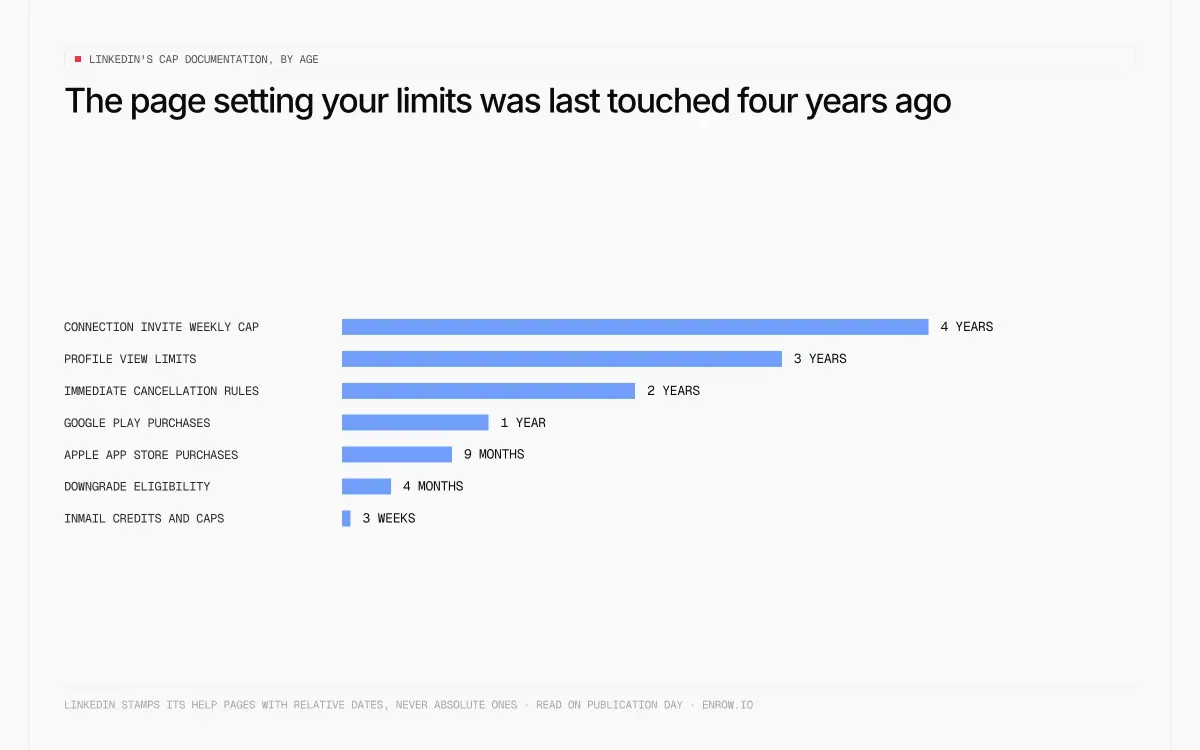
The page setting your caps was last touched four years ago.
What the caps cost you in real volume
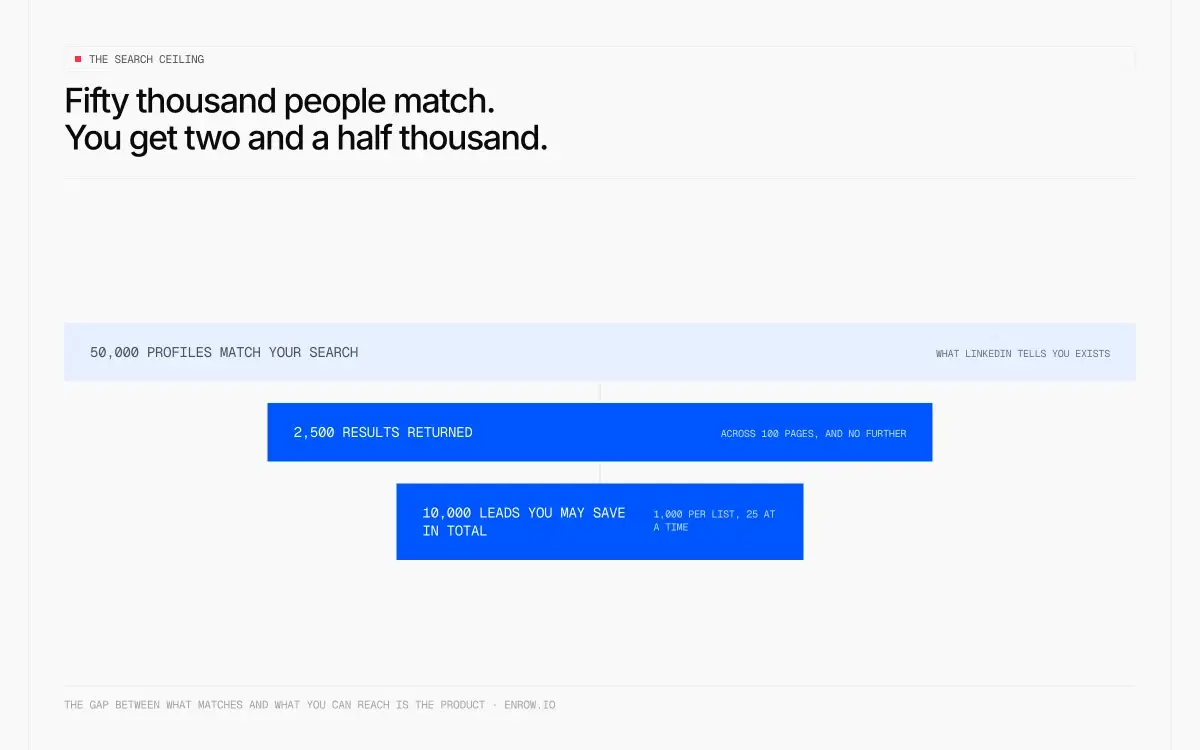
Fifty thousand people match. You get two and a half thousand.
Numbers on a help page mean nothing until you turn them into a week of work.
A free account gets three personalized invitations a month at 200 characters. Six hundred characters of context, total, for an entire month. Every other request you send goes out blank, to a stranger, and blank requests are exactly the ones that sit pending — which is one of the three things LinkedIn names as a trigger for restricting your invitations in the first place. The free tier is built to make you fail at the thing that keeps your account safe.
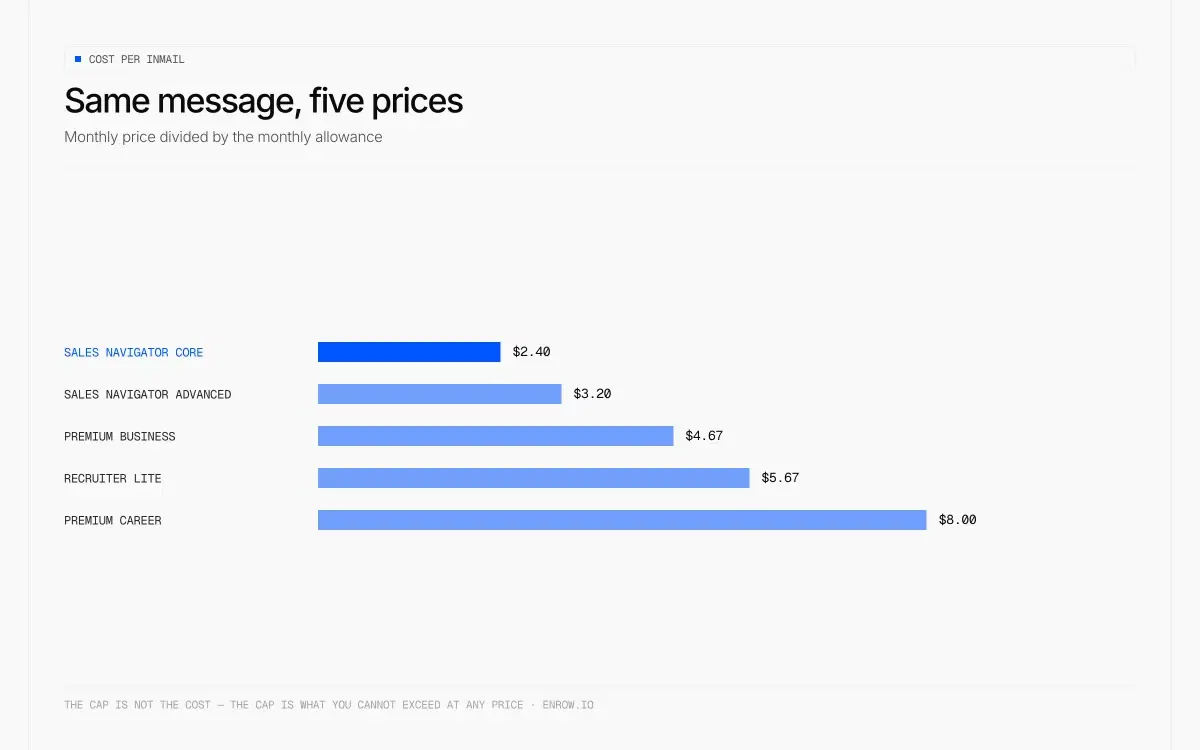
Sales Navigator Core gives you 50 InMails a month. About twelve a week. At $119.99 that is $2.40 a message. Pre-pay the year and the monthly equivalent falls to $89.99, which works out at $1.80 a message on the same allowance. Fifty is also the ceiling on Advanced and Advanced Plus, so the $40 a month upgrade buys zero additional messages. I broke that down properly on the Sales Navigator pricing page.
Recruiter Lite is the odd one. $170 a month buys 30 InMails, which is $5.67 each — fifty dollars a month more than Sales Navigator Core for twenty fewer messages. Full plan detail sits on the Recruiter pricing page.
List-building runs into two ceilings at once. A search matching 50,000 people hands back 2,500 of them, across 100 pages. You can hold 10,000 saved leads in total, 1,000 per list, and bulk save moves 25 at a time. Four hundred clicks to fill the account to capacity, assuming you never mis-click.
The LinkedIn message limit cannot be planned for at all. LinkedIn confirms it throttles messaging, then gives you the entire rule in one sentence: "we limit how many messages a member can send in a certain time period." No number, no period, no plan you can build against it.
Then there is the week you lose. A restriction stops whatever cadence you had running, withdrawing your pending invitations does not lift it, and you cannot buy your way out — LinkedIn states plainly that you cannot acquire more invitations while restricted. Support will not tell you which rule you broke either, because "LinkedIn Support cannot disclose the type or reason for the restriction."
InMail allowance and cost per message, by plan
| Plan | Credits / month | Max accumulated | Bank multiple | Price (USD, monthly) | Cost per InMail |
|---|---|---|---|---|---|
| Premium Career | 5 | 15 | 3x | $39.99 | $8.00 |
| Premium Business | 15 | 45 | 3x | $69.99 | $4.67 |
| Sales Navigator Core | 50 | 150 | 3x | $119.99 | $2.40 |
| Sales Navigator Advanced | 50 | 150 | 3x | $159.99 | $3.20 |
| Sales Navigator Advanced Plus | 50 | 150 | 3x | Quote only | not published |
| Recruiter Lite | 30 | 120 | 4x | $170 | $5.67 |
Allowances and accumulation caps come from a543695 and a101030, both read on September 8, 2026. Prices come from LinkedIn's own product and pricing pages, last read on August 28, 2026. Every price here is monthly, so the last column compares like with like. Cost per InMail is arithmetic on those two verified inputs, not a LinkedIn figure. LinkedIn Hiring Pro is left out of the table on purpose: I could confirm neither its price nor its InMail allowance on a LinkedIn page, and a guessed row is worse than no row.
Two rules govern the credits and both work against you. Unused ones carry forward but expire after 90 days. And you only get a credit back when the InMail is accepted, declined or answered within 90 days of sending — a message that simply sits there counts as neither accepted nor declined, so the credit is gone. Silence is the most expensive outcome and it is also the most common one.
Search allowance by plan
| Plan | Commercial use limit | Search result ceiling | Network reach | Price (USD, monthly) |
|---|---|---|---|---|
| Free / Basic | Applies. Number undisclosed, resets midnight PST on the 1st | Standard LinkedIn search | 3rd-degree + groups | $0 |
| Premium Career | Applies (Job Seeker plans keep the restriction) | Standard | 3rd-degree + groups | $39.99 |
| Premium Business | Lifted — "Search for people and companies with no limits" | Standard | 3rd-degree + groups | $69.99 |
| Premium DACH Essentials | Still applies — named exception on LinkedIn's own page | Standard | — | not published |
| Recruiter Lite | Lifted | 20+ filters | Up to 3rd-degree | $170 |
| Sales Navigator Core | Lifted | 2,500 leads / 1,000 accounts per search | Extended | $119.99 |
| Sales Navigator Advanced | Lifted | Same 2,500 / 1,000 ceiling | Extended | $159.99 |
Sources: a564226, a524372, a106030, and the Premium Business product page. All read September 8, 2026. Plan-by-plan pricing across the whole catalogue is on the LinkedIn pricing page, with the Premium tiers broken out separately on the Premium pricing page and the Premium Career page.
Note the trap in that table. Paying lifts the commercial use limit and then installs a different ceiling behind it. Sales Navigator will never return more than 2,500 leads from one search, however many match.
One detail that saves free accounts a surprising amount of headroom: searching a person by name in the box at the top of the page does not count toward the commercial use limit. Neither does browsing your own connections from the Connections page, or searching the Jobs page. What burns it is filtered people search, the "People Also Viewed" module, and the People tab on a company page.
My honest read on which caps matter
Same message, five prices.
I have run outbound on LinkedIn for years and I have been restricted. Here is what I think, separated from what gets repeated.
The search result ceiling is the one that actually breaks a motion. Not the invitation cap. Two thousand five hundred leads per search, ten thousand saved in total. If your addressable market is forty thousand people, Sales Navigator is not a database you can work through, it is a viewfinder you point at one slice at a time. Every serious list I have built required slicing the same search by seniority, headcount and geography until each slice came in under the ceiling. That is hours of nothing.
The invitation restriction is different, because you can trigger it without deserving it. Read the three official triggers again. Sending a lot in a short time, yes, that is on you. But "many of your invitations have been ignored, left pending, or marked as spam by the recipients" sits partly outside your control. Target an industry where half the profiles are dormant and you can send a modest, human number of invites and still get blocked, because the people you picked never log in. Nobody warns you about that.
And the undisclosed numbers are worse than the caps themselves. A cap you can plan around. A cap LinkedIn refuses to display, will not lift on request, and will not explain after the fact is a cap you can only discover by hitting it. That is the real design decision here.
Now the folklore.
The 30,000 connection limit is not your problem. Almost nobody reaches it, and if you do, followers are uncapped and Follow simply becomes the default button on your profile. Good outcome, badly presented.
The exact weekly invitation number is not worth tuning to either. People set their cadence to 99 a week to stay under a limit LinkedIn has never published. You are optimising against a rumour. Send fewer, better-targeted invitations to people who will accept, and the trigger LinkedIn actually names stops firing.
Social Selling Index buys you nothing. No LinkedIn page connects SSI to any cap. It is a score, not a currency.
And a doctrine point, because it comes up every time. I do not recommend InMail. It arrives labelled as a paid commercial message and it reads that way to the recipient. A plain connection request from a real person performs better, costs nothing, and does not evaporate after 90 days.
What actually gets an account restricted, and how the appeal runs
| Trigger | Official wording | Consequence | Route back |
|---|---|---|---|
| Too many invites, too fast | "You've sent many invitations within a short amount of time" | Invitations blocked | Wait. "LinkedIn cannot remove or shorten the wait period", typically one week |
| Invites ignored or marked spam | "Many of your invitations have been ignored, left pending, or marked as spam by the recipients" | Invitations blocked | Same. Withdrawing pending invites does not help |
| Suspected automation | "If you send an excessive number of invitations and we suspect the use of an automation tool, we may suspend or restrict your account" | Suspension or account restriction | Disable the extension; "Your account will then automatically be re-enabled at the time specified on the suspension notification" |
| Scraper or automation extension detected | "We don't allow the use of third-party software or browser extensions that scrape, modify the appearance of, or automate activity on LinkedIn's website" | "risk having their accounts restricted or shut down" | Remove the tool, then follow the notification |
| Identity or profile doesn't match reality | "If we find that your profile or parts of your profile are intentionally fraudulent or do not reflect your true identity, we may place a restriction on your account" | Account restricted | Sign in, verify identity — may require a government ID, driver's licence or passport |
| Egregious content violation | "we may permanently restrict your account after a single violation" | Permanent | Appeal after the violation. No published response time |
| Unusual activity on a paid seat | "certain features of your Sales Navigator subscription may be temporarily restricted if our system detects unusual activity" | Search, InMail, invites, profile views frozen | "generally lifted automatically after a 24-hour period" |
Three things about the appeal that nobody writes down. LinkedIn publishes no response time on any of these pages. The appeal entry point at linkedin.com/help/linkedin/ask/ts-f-appeal is not a public form, it is a sign-in gated support gateway that greets you with "Please sign in so we can provide the best support possible" — which is awkward when the reason you are there is that your access is restricted. And enforcement is not a ladder you climb one rung at a time: content-level action, then feature restrictions, then account restriction, except that certain violations skip straight to permanent.
The automation ban is the one with teeth, and it is written into the User Agreement rather than a help page. Clause 8.2.2 prohibits "software, devices, scripts, robots or any other means or processes (such as crawlers, browser plugins and add-ons or any other technology) to scrape or copy the Services." Clause 8.2.13 covers "bots or other unauthorized automated methods" for adding contacts, sending messages or driving engagement. The current agreement took effect on November 3, 2025. LinkedIn's help centre adds the part people underestimate: prohibited tools "may become non-operational without notice", so the extension you built a cadence around can die on a Tuesday and take your pipeline with it.
Staying inside the caps without losing the account
Nothing clever here, and deliberately no tool recommendations. Every workaround sold as a way to beat the invitation cap is the exact behaviour LinkedIn names as grounds for restricting your account.
Send fewer invitations to better-chosen people. Volume is one trigger; ignored and pending requests are another, so a list of active profiles in your actual market beats a bigger list every time.
Stop withdrawing pending invites in the hope it helps. LinkedIn states it does not.
If you are on a free account and burning your commercial use limit, change how you search. Name lookups in the top search box, and browsing your own connections, do not count against it. Filtered people search does.
If a restriction lands, disable any extension that automates activity before you do anything else, then wait. The clock is the clock. Support cannot shorten it and will not tell you which rule you hit.
And if you are being asked for a government ID, that is the identity branch, not the volume branch. Something on your profile does not match who LinkedIn thinks you are. Fix the profile, not the cadence.
What LinkedIn will never give you
Every limit on this page is a limit on reach. Invitations, searches, messages, InMails, profile views. All of it rationed, most of it undisclosed, and all of it resetting on a calendar LinkedIn controls.
Email is not rationed. There is no weekly invitation limit on an inbox, no commercial use limit on a domain, no credit that expires at 90 days if nobody replies.
So keep LinkedIn as the sourcing layer and move the contact itself off-platform. Sales Navigator is genuinely the best place in the world to work out who to talk to, because the people in it maintain their own records — someone changes job and updates their profile that afternoon. What it will not hand you is the verified work email or the direct dial.
That is the gap my company fills, so read this knowing it. Enrow finds and verifies emails and direct phone numbers in real time instead of serving them from a stored list, and you are charged only when the result comes back valid. Every address goes through 10+ verification checks, with observed bounce under 1% across our own sends — an average we measure, not a guarantee we sell. Catch-all addresses get verified and delivered rather than flagged risky and dropped. Match rate sits around 60%. On European direct dials we are not blocked by GDPR.
The arithmetic against a rationed InMail is not close, and it holds monthly against monthly. Sales Navigator Core is $119.99 a month for fifty InMails, so $2.40 a message. Enrow's Pro tier is $87 a month for 10,000 credits, one credit per verified email, so $0.0087 an address. Thirty-three dollars cheaper, and the ceiling is the plan you bought rather than LinkedIn's calendar. Direct phones cost 40 credits each, which is the honest number and the reason phone work needs its own budget line.
The piece that matters for this workflow is the Chrome extension. Open a Sales Navigator profile, and the full contact card — every field, verified — goes into HubSpot, Salesforce or Pipedrive in one click, without leaving the search you were already running. That write is a create-or-update, which starts to matter the moment you work at volume. The same person surfaces in two saved searches; two reps open them the same week. What lands is one record updated twice, not two records competing over the same buyer, and nobody spends a Friday merging them back together. There is an API for whole lists, and an MCP server (github.com/EnrowAPI/enrow-mcp) if you would rather call it from Claude or Cursor.
Where I will send you elsewhere, plainly. Enrow has no searchable database, on purpose: stored databases go stale, rivals refresh theirs every three to nine months, and you end up prospecting people who changed jobs in March. Real-time resolution is why the data holds up, and the cost of that choice is that sourcing stays with LinkedIn or Sales Navigator. We do not do sequencing either, and will not build it. For that, look at Emelia, La Growth Machine or lemlist.
Pricing starts at $17 a month for 1,000 credits, and the free tier is 50 credits every month, recurring, no card.
ready to stop wasting time?
Connected in minutes.
Verified data in seconds.
FAQ
What is the LinkedIn weekly invitation limit?
LinkedIn does not publish one. I checked all four help pages that discuss invitation restrictions on September 8, 2026, and none of them states a number. The restriction exists and is enforced, and LinkedIn says only that it "typically lasts one week". The "100 per week" figure repeated across the SERP has no official LinkedIn source.
Can you have more than 30,000 connections on LinkedIn?
No. LinkedIn caps first-degree connections at 30,000 for every account, free or paid. At the ceiling, Follow becomes the default button on your profile and you cannot send or accept new invitations without removing existing connections first. Followers are unlimited, so reach itself is not capped.
What is the LinkedIn commercial use limit and when does it reset?
It is a cap on how much people-searching a free account can do in a month, and LinkedIn will not tell you the number: "We are not able to display the exact number of searches or views you have left." It resets at midnight PST on the 1st of each calendar month. Filtered people search, the "People Also Viewed" module and a company page's People tab all count against it. Searching someone by name in the top search box does not.
Why is my LinkedIn account restricted, and how do I get it back?
LinkedIn documents four categories: content violations, profile violations, identity violations, and use of automated tools. For content, you sign in and follow the prompts to request a review. For identity, you sign in and verify who you are, which may mean uploading a government ID, driver's licence or passport. If the restriction came from an automation tool, LinkedIn's instruction is to disable the software first, after which the account is re-enabled at the time given on the suspension notice. No LinkedIn page publishes a response time for any appeal.
How long does a LinkedIn restriction last?
An invitation restriction typically lasts one week, and LinkedIn states it cannot remove or shorten the wait. A temporary Sales Navigator restriction is different and generally lifts automatically after 24 hours. Restrictions for serious violations can be permanent, and LinkedIn reserves the right to apply that after a single violation.
Does Sales Navigator remove the LinkedIn search limit?
It lifts the commercial use limit, then applies its own ceiling. Any Sales Navigator search returns a maximum of 2,500 lead results across 100 pages, or 1,000 account results across 40 pages, no matter how many people match. Saved leads cap at 1,000 per list and 10,000 in total. Premium Business also lifts the commercial use limit, at $69.99 a month against $119.99.
Does LinkedIn ban you for using automation tools?
It can, and the rule is in the User Agreement rather than buried in a help page. Clauses 8.2.2 and 8.2.13 prohibit scrapers, browser plugins and bots used to access the service, add contacts or send messages. LinkedIn's help centre says members using them "risk having their accounts restricted or shut down", and that the tools themselves "may become non-operational without notice".
How I verified this
Every cap here was read off a live LinkedIn page on September 8, 2026. The prices were read off LinkedIn's own product and pricing pages the day before, on August 28. Nothing was taken from another article, which matters more on this topic than most, given that the most-cited source URL for the commercial use limit has been returning a 404 for long enough that nobody rechecked.
Twenty-seven live LinkedIn pages went into it, plus two dead ones that competing articles still cite as sources: the help centre articles linked in each table, the account restriction pages, and the User Agreement effective November 3, 2025. Prices came from LinkedIn's own product pages, cross-checked against the canonical sheet behind the pricing cluster, which also covers the company page tier.
Cost-per-InMail figures are arithmetic on two verified inputs, the published allowance and the published price. They are not LinkedIn numbers. Where LinkedIn declines to publish a figure, this page says so instead of borrowing one from a competitor's blog.