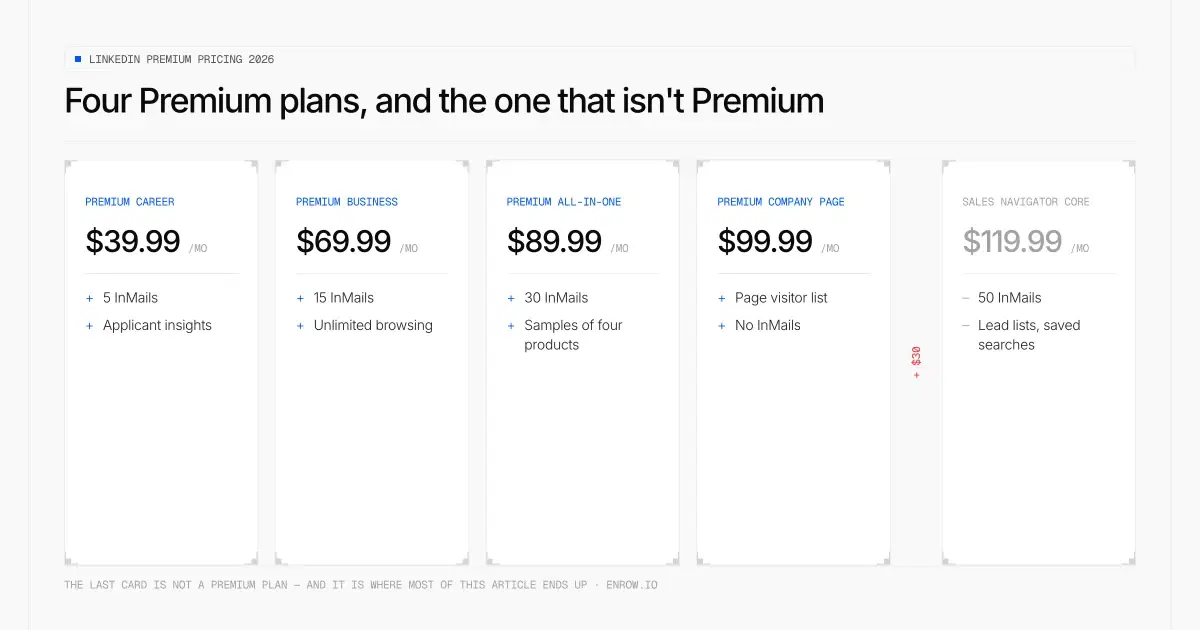
The fifth card is not a Premium plan. It is where this article ends up.
Key takeaway LinkedIn Premium is four separate products: Career at $39.99 a month, Business at $69.99, All-in-One at $89.99 and Company Page at $99.99. The annual discount swings wildly between them. Career gives you 50% off. All-in-One gives you 16.7%. Same billing page, same month. Here's the number that should decide most purchases: Premium All-in-One is $30 a month below Sales Navigator Core. If your goal is pipeline, that $30 buys you a serious search tool instead of a bundle of features from products you aren't really buying. Career and Business also have a two-licence "duo" price hidden in an accordion. The second seat runs at half price on Career and 30% off on Business. All figures read off LinkedIn's own pricing pages, verified August 28, 2026 and re-checked on the 29th. Every Premium page carries LinkedIn's own stamp: Last updated: April 20, 2026.
LinkedIn Premium is not one subscription, which is the first thing that trips people up. It's four, aimed at four different people, sharing a name and a badge.
I've bought most of them at some point. My honest position, before you read another word: apart from Sales Navigator and possibly Recruiter, LinkedIn's paid tiers are cash grabs. Not fraud, nothing dishonest. The return on the money is just poor, and it gets worse the more the bundle tries to cover.
Prices below come from LinkedIn's own pricing pages, which carry a "Last updated: April 20, 2026" stamp. Worth knowing, because a lot of what ranks for this keyword still quotes the pre-increase numbers.
Disclosure: I run Enrow, a B2B contact-data tool. It competes with none of these, and it sits downstream of Sales Navigator. There's a section near the end doing the arithmetic on where I'd actually put the budget.
Every LinkedIn Premium price
Premium runs from $39.99/mo to $99.99/mo across four plans, and the annual saving on those same four plans ranges from 16.7% to 50% — a Career subscriber gets three times the discount an All-in-One subscriber gets, on the same billing page in the same month.
| Plan | Monthly | Annual | Annual, per month | Annual saving vs 12× monthly | InMails | Verified |
|---|---|---|---|---|---|---|
| Premium Career | $39.99/mo | $239.88/yr | $19.99/mo | 50% off | 5/mo | Aug 28, 2026 |
| Premium Business | $69.99/mo | $539.88/yr | $44.99/mo | 35.7% off | 15/mo | Aug 28, 2026 |
| Premium All-in-One | $89.99/mo | $899.88/yr | $74.99/mo | 16.7% off | 30/mo | Aug 28, 2026 |
| Premium Company Page | $99.99/mo | $839.88/yr | $69.99/mo | 30% off | — | Aug 28, 2026 |
| Sales Navigator Core, for reference | $119.99/mo | $1,079.88/yr | $89.99/mo | 25% off | 50/mo | Aug 28, 2026 |
Source: premium.linkedin.com for the four Premium plans, business.linkedin.com/sell/sales-navigator/compare-plans for the reference row, both read on August 28, 2026. US list prices, VAT and GST excluded. Every Premium page above carries LinkedIn's stamp Last updated: April 20, 2026.
Two patterns are worth pulling out of that table.
The annual discount is inconsistent, by a lot. Half off on Career, a sixth off on All-in-One. If you're buying Career or Business, paying monthly is close to throwing money away. On All-in-One the case is much weaker, and you should think about whether you want to commit twelve months to it.
The InMail ladder is the real product ladder. 5, then 15, then 30, then 50. Everything else LinkedIn adds between tiers is atmosphere; the message allowance is the thing that changes what you can actually do.
The duo option
Career and Business both have a two-licence price that LinkedIn mentions once, inside a collapsed accordion. Nobody covers it. The second Career seat costs $120.00/yr against $239.88/yr for the first, exactly half, and the second Business seat costs $378.10/yr against $539.88/yr, a 30% cut.
| Plan (annual billing) | 1 licence | 2 licences | Second seat | Cost per person |
|---|---|---|---|---|
| Career | $239.88/yr | $359.88/yr | $120.00/yr — 50% off a first seat | $14.99/mo |
| Business | $539.88/yr | $917.98/yr | $378.10/yr — 30% off a first seat | $38.25/mo |
Annual billing only, US prices, verified August 28, 2026 on premium.linkedin.com.
On Career that works out at $14.99 per person per month, which is 63% below the monthly sticker. All-in-One and Company Page have no duo option.
In other currencies
These are LinkedIn's own local list prices, not conversions, so even the distance between the cheapest and the dearest Premium plan changes by market: $60.00/mo in the US, €70,01/mo in the eurozone, £49.68/mo in the UK and A$102.00/mo in Australia.
| Plan | USD | EUR | GBP | CAD | AUD |
|---|---|---|---|---|---|
| Career | $39.99/mo | €29,98/mo | £29.99/mo | C$49.99/mo | A$54.99/mo |
| Business | $69.99/mo | €52,49/mo | £49.99/mo | C$74.99/mo | A$74.99/mo |
| All-in-One | $89.99/mo | €66,99/mo | £64.00/mo | C$94.99/mo | A$94.99/mo |
| Company Page | $99.99/mo | €99,99/mo | £79.67/mo | C$139.99/mo | A$156.99/mo |
Monthly billing, taxes excluded, read from LinkedIn's localized pricing accordions on August 28, 2026.
Note the Company Page row: LinkedIn charges €99,99 against US$99.99. Nominal parity on a stronger currency, so European buyers pay materially more in real terms. The discounts move around too — Premium Business gets 40% off annually in sterling against 33.3% in Canadian dollars.
Premium Business: the most overrated subscription on the platform
This is the one people mean when they say "LinkedIn Premium", and the one I'd argue hardest against.
What you get is a better version of your own profile. A dynamic cover image with up to five images at the top. A custom call-to-action button that follows you into posts, messages and search results. Services matching, so people looking for what you do can find you. Profile optimisation tips. Business insights on company growth and hiring activity. LinkedIn Learning.
Some of that is genuinely good. The custom button is a real thing: sending profile visitors to a demo booking or your site, without them having to hunt, has obvious value if you sell. The profile presentation tools do make a page look more considered.
Two features I'd call properly useful. Unlimited search lifts the commercial use limit that free accounts hit, and if you do a lot of manual searching you stop noticing it only because it stopped hurting. And who's viewed your profile, with the ability to browse privately while still seeing your own viewers, is the feature I'd miss first.
A warning attached to the search point. Unlimited applies to human searching. The moment you automate against LinkedIn you're outside what the subscription covers and you're risking the account, which is worth vastly more than the subscription. I wouldn't do it.
The rest I'd skip. Services is dead weight. The premium profile treatment doesn't move the needle the way it did five years ago, and on a network of more than a billion members a slightly fancier page is not a differentiator.
Then the price. $69.99 a month, $839.88 across a year if you pay monthly. For that you get 15 InMails, which is $4.67 per message.
And here's the comparison that matters: Sales Navigator Core is $50 a month more and it's a different class of tool, with proper lead and account lists, saved searches, real filters, and 50 InMails instead of 15. If you're spending $70 a month on LinkedIn to generate business, spending $120 instead gets you something that measurably does it.
One genuine point in Premium's favour, and it's about price stability rather than value. Career and Business have barely moved in years. Sales Navigator has climbed steadily: it sat around $80 not long ago and it's $119.99 today. You can actually see that history in the search results for Sales Navigator pricing, where old articles still quote $79.99 and $99.99. Those aren't only errors. They're fossils of previous price points.
Pros
- Unlimited search, which lifts the free account's commercial use limit
- 365 days of profile viewers, plus private browsing that keeps your own visibility
- Custom call-to-action button across profile, posts and search results
- Solid 35.7% annual discount, and a duo price for a second seat
Cons
- 15 InMails a month works out at $4.67 a message
- Sales Navigator Core is $50 away and in a different class
- Services matching and the premium profile treatment add little today
- LinkedIn's own page contradicts itself on 365 versus 90 days of viewer data
Best for: consultants and founders who sell through their personal profile and want the presentation tools more than search power.
Premium All-in-One: a bit of everything, not enough of anything
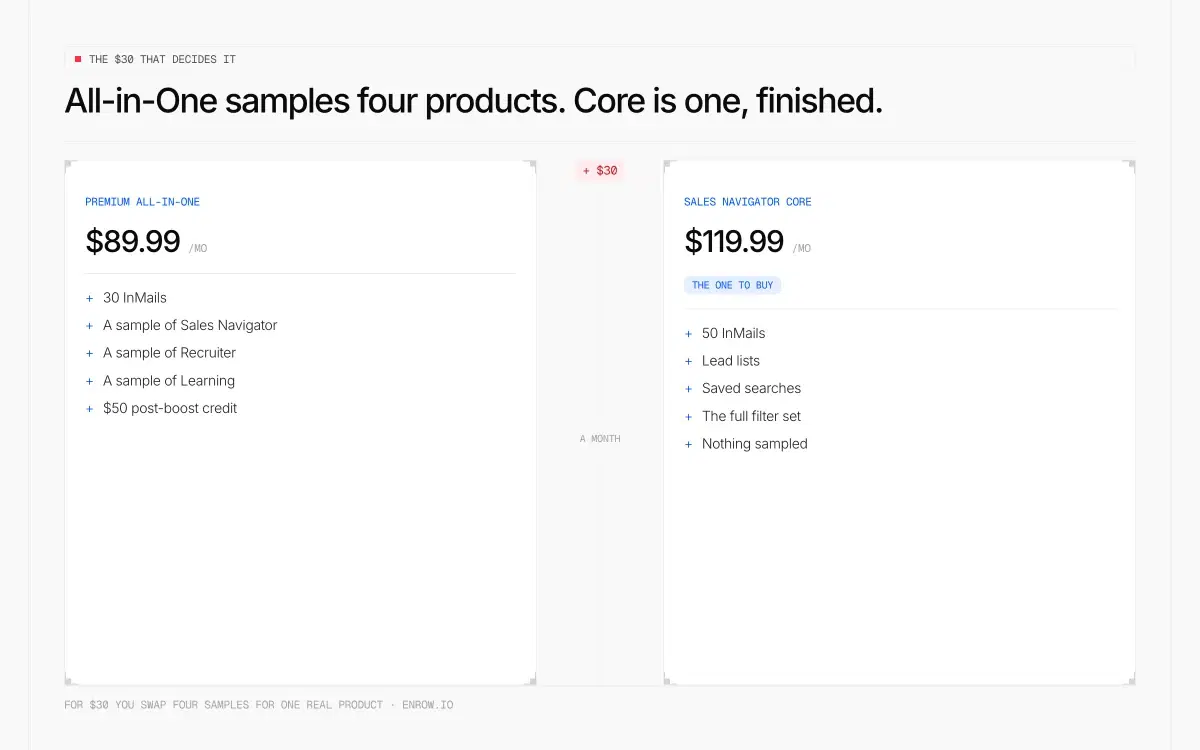
For $30 a month you swap four samples for one finished product.
This one is new, and it's LinkedIn's attempt to sell a small business the whole catalogue at once.
For $89.99 a month you get the Premium Business feature set plus 30 InMails, unlimited search with filters for job function, seniority, location, headcount and years of experience, a curated feed of posts from your top prospects, daily prospect suggestions, a centralised dashboard with AI insights, a $50 monthly credit to boost your posts as ads, and a monthly credit to promote job postings.
The $50 boost credit is the standout, and I'll give it full marks. It's real money, it recurs, and it's a low-friction way to test paid distribution on LinkedIn without opening an ads account. If you were going to spend on boosting anyway, that credit covers a meaningful chunk of the subscription.
Everything around it is thinner. This is a bundle of cheap versions of four LinkedIn products. The sales tooling isn't Sales Navigator. The hiring credit isn't Recruiter. The boost isn't LinkedIn Ads. You get a taste of each and the full capability of none, wrapped in AI features that have consistently been announced more loudly than they've been useful.
Now put it next to the alternative. All-in-One is $89.99. Sales Navigator Core is $119.99. Thirty dollars a month.
For that $30 you swap a bundle of samples for the actual tool, with 50 InMails instead of 30 and a search built for prospecting rather than browsing. If the goal is finding customers, that is not a close decision.
Where All-in-One does make sense: a small business owner who genuinely does all three jobs, who will use the boost credit every month, and who wants one line on the invoice instead of three. That person exists. They're rarer than LinkedIn's marketing implies.
Pros
- $50 monthly post-boost credit, real recurring money
- Monthly credit toward promoting job posts
- 30 InMails, double Premium Business
- One invoice instead of three
Cons
- Weakest annual discount in the Premium range at 16.7%
- Sales Navigator Core is only $30 more and vastly better at prospecting
- Each bundled capability is a reduced version of a standalone LinkedIn product
- Heavy on AI features that haven't yet justified the billing
Best for: a small business owner who personally handles sales, marketing and hiring, and will spend the boost credit every month.
Premium Career and Premium Company Page, briefly
Career, at $39.99, is aimed at job seekers and it's the plan I'd steer people away from hardest. It's covered in full in our Premium Career breakdown, including LinkedIn's own hiring statistics and why they don't say what the page implies. Short version: no extra database, no hidden jobs, and two of the AI features aren't available outside the US.
Company Page, at $99.99, is a different animal aimed at the company rather than the person, and it deserves its own piece. It's the only plan here that isn't about your personal profile.
About LinkedIn's InMail statistic
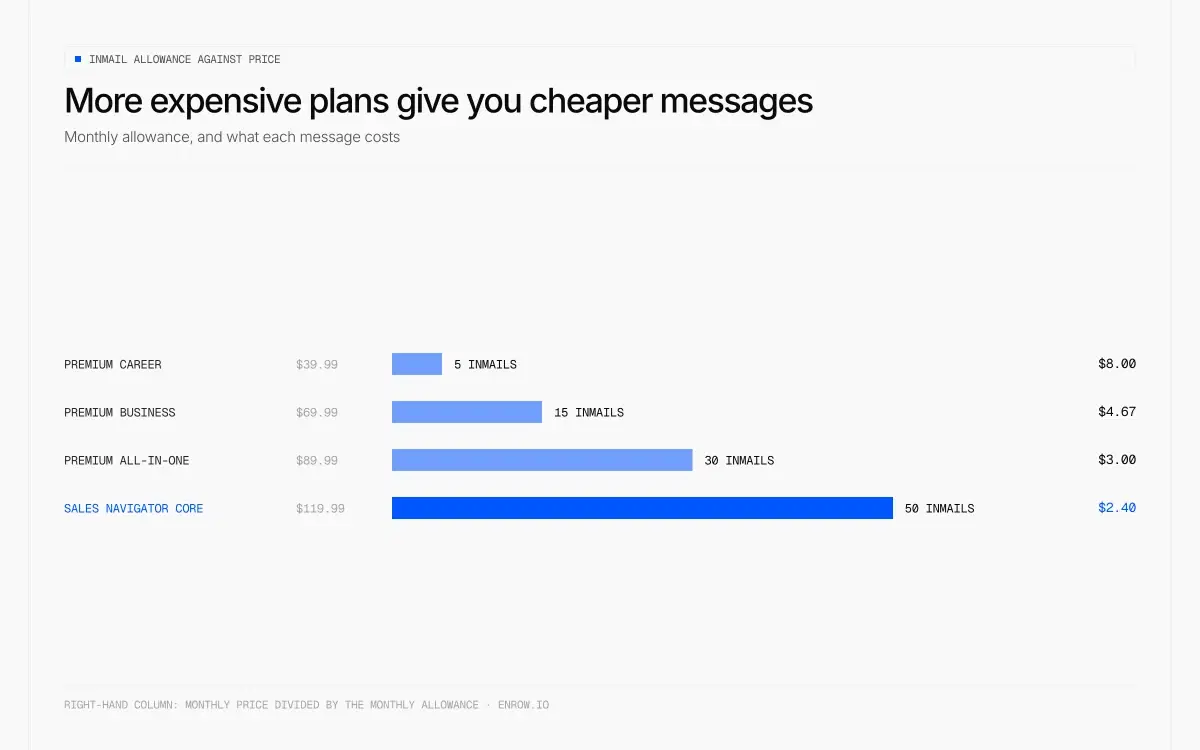
The dearer the plan, the cheaper each message.
Premium Business is sold partly on this line: "You're 4.6x more likely to hear back with LinkedIn InMail than with cold email." LinkedIn sources it to its own data, dated November 2022.
Most articles quoting this claim say 6x, sourced to July 2024. They aren't inventing it — that's what the page used to say. LinkedIn swapped both the number and the date on the same URL without flagging the change, which tells you what the figure is worth.
Take it carefully, for three reasons.
The source is LinkedIn, comparing its own product against a channel it doesn't sell. There's no third-party study behind it.
The populations aren't comparable. Someone sending 15 carefully chosen InMails a month behaves nothing like someone blasting a bought list. Compare a good InMail against a good cold email and the gap narrows sharply.
And the volume ceiling makes the multiple close to irrelevant. Fifteen messages a month is not an outbound motion. Even if every one of them performed 4.6 times better, you'd have fifteen conversations to show for $69.99.
Small thing I noticed while checking, which tells you how carefully these pages are maintained: LinkedIn's Business page says you get "up to 365 days of viewer data" in the feature list, and "visibility into who's viewed your profile over the past 90 days" in the FAQ lower down the same page.
The discount nobody prints
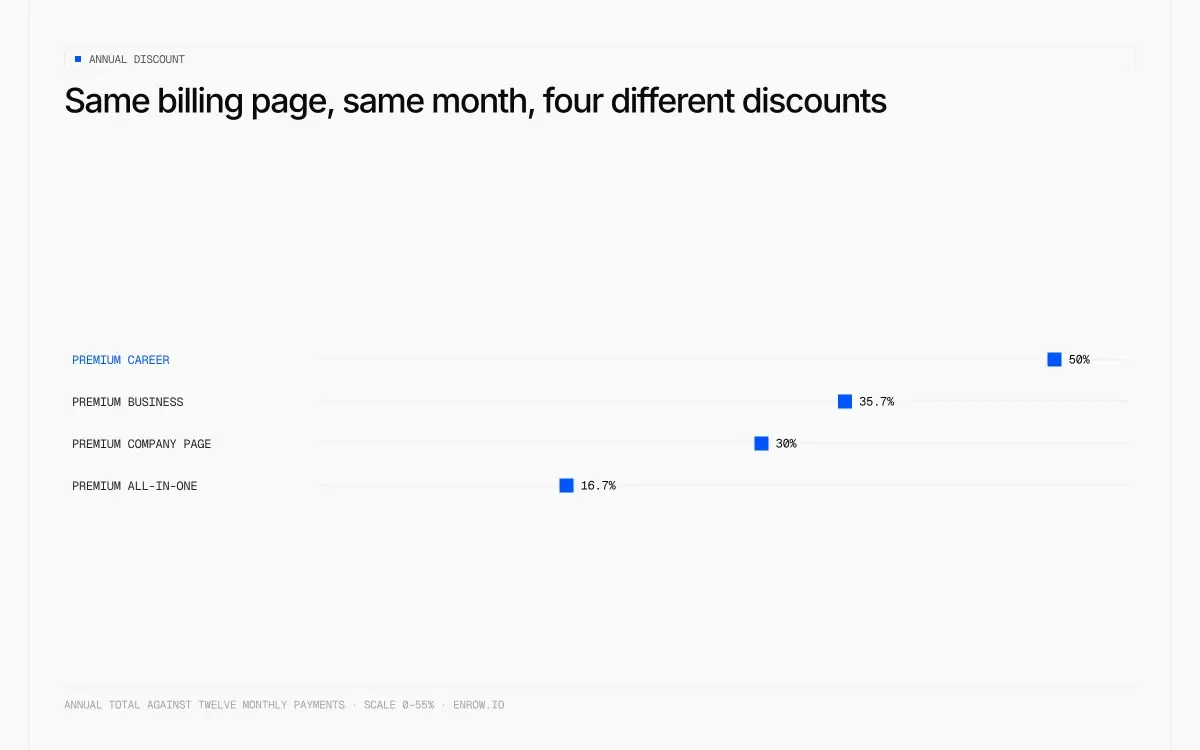
Same billing page, same month, four different discounts.
Before the plan comparison decides anything, know that the annual toggle isn't the biggest lever on your bill.
LinkedIn bills self-serve subscriptions in 57 currencies, and every Premium plan is self-serve. Your price locks to the currency you subscribed in and stays there. LinkedIn does re-price markets that drift too far from reality, but that hits new buyers, not existing subscriptions. So a plan bought in a structurally weakening currency gets quietly cheaper in real terms every year you keep it.
Measured over two years: a price frozen in Argentine pesos now costs 37.3% less in dollars, one in Turkish lira 28.9% less. Not every soft currency works — the Nigerian naira strengthened 14.4% in the past year, so a subscription bought there costs more today, not less.
Two constraints worth knowing before you try it. Changing currency later means cancelling and sitting out your billing cycle, so you choose once. And LinkedIn's User Agreement requires accurate profile information, with account restriction as the stated consequence, which on LinkedIn is a far bigger loss than any subscription. Full method and caveats in the Sales Navigator pricing article.
Where I'd actually put the money
Let me do this honestly, because it's my own product and the comparison isn't like-for-like.
An InMail is a delivered message inside LinkedIn. A verified email address is a contact detail you then have to send to yourself, with your own tool. Different things. But if the goal is reaching people who might buy from you, the cost per person reached is not close.
Premium Business gives you 15 InMails for $69.99. That's $4.67 a message.
Enrow starts at $17 a month for 1,000 credits, and one email is one credit, so that's a thousand verified addresses for seventeen dollars. Direct phone numbers cost 40 credits each, so the $87 Pro plan at 10,000 credits gives you 10,000 emails or 250 phone numbers, or any mix. You're only charged when a result comes back valid: no valid contact, no credit spent.
The data is found and verified in real time rather than pulled off a stored list, which is the whole design decision. Stored databases go stale and you end up prospecting people who changed jobs eight months ago. Each address goes through 10+ verification checks, with observed bounce under 1%, and catch-all addresses get verified and delivered instead of dropped. On European direct dials we aren't blocked by GDPR.
The bit that's directly relevant here: the Chrome extension runs inside LinkedIn and Sales Navigator. You open someone's profile and their verified email and direct phone are found on that page, without a second tab or a detour through another tool. Given Premium's whole pitch is a better experience of LinkedIn, that is what a genuinely useful in-profile feature actually looks like.
Contacts sync natively to HubSpot, Salesforce and Pipedrive — direct integrations, not automation glue. Each push is a create-or-update: a contact already on file has the new email and phone written into the record you have, and only a genuinely new name creates a new one. One buyer split across two records is how lead scoring starts lying to you. There's an API for bulk work, and an MCP server (github.com/EnrowAPI/enrow-mcp) for AI workflows.
The free tier is 50 credits every month, no card. That's 50 verified emails a month, recurring, which is enough to test the thing properly.
What I'd honestly do with $120 a month: put the whole lot into Sales Navigator Core if finding the right people is the hard part. If it isn't, LinkedIn stays free and the money goes on contact data, where $87 already buys 10,000 credits. What I wouldn't do is pay $89.99 for samples of four products.
And where Enrow doesn't help you: it has no searchable database, deliberately, so building the target list still happens in LinkedIn or Sales Navigator. It doesn't send sequences either, and won't. For that, Emelia, La Growth Machine or lemlist.
ready to stop wasting time?
Connected in minutes.
Verified data in seconds.
FAQ
How much does LinkedIn Premium cost per month?
Four plans: Premium Career at $39.99/mo, Premium Business at $69.99/mo, Premium All-in-One at $89.99/mo and Premium Company Page at $99.99/mo. Annual billing brings those to $19.99, $44.99, $74.99 and $69.99 a month respectively. All four were read off LinkedIn's own pricing pages on August 28, 2026, each stamped "Last updated: April 20, 2026".
Which LinkedIn Premium plan should I get?
If you're job hunting, probably none. If you're selling, skip Business and All-in-One and look at Sales Navigator Core at $119.99, which is only $30 above All-in-One and a considerably stronger tool. Premium Business makes sense mainly if you want the profile presentation features and the custom call-to-action button, and you value them more than search capability.
What's the difference between LinkedIn Premium Business and Sales Navigator?
Premium Business is built around your own profile: presentation, a custom button, services matching, business insights, 15 InMails a month. Sales Navigator is a prospecting engine with lead and account lists, saved searches, advanced filters and 50 InMails. Business costs $69.99, Sales Navigator Core $119.99. For generating pipeline, the extra $50 is the better spend.
Is LinkedIn Premium All-in-One worth it?
Premium All-in-One bundles cheap versions of Sales Navigator, Recruiter and LinkedIn Ads into one $89.99 subscription. The $50 monthly post-boost credit is genuinely good value if you'd boost posts anyway. The rest is a sample of each product rather than the product. Given Sales Navigator Core is only $30 more, most people selling anything should buy that instead.
Does LinkedIn Premium give unlimited searches?
Premium lifts the commercial use limit that free accounts run into, so manual searching is effectively unrestricted. That applies to human browsing. Automating searches against LinkedIn falls outside what the subscription covers and puts the account at risk.
Why do different sites show different LinkedIn Premium prices?
Because LinkedIn's Premium pages carry a "Last updated: April 20, 2026" stamp and most articles ranking for this term were written before it. The stale pair is $29.99/mo for Premium Career and $59.99/mo for Premium Business. LinkedIn's published figures, read on August 28, 2026, are $39.99/mo and $69.99/mo.
Does LinkedIn Premium give you email addresses?
No. No LinkedIn subscription, Premium or Sales Navigator, gives you someone's email address or phone number. InMail lets you message people inside LinkedIn; it doesn't hand you their contact details. Getting the address needs a separate data tool, and Premium Business gives you 15 InMails a month at $4.67 each.
How we verified these prices
All four Premium plans were read directly from their own pages on premium.linkedin.com on 28 August 2026 and re-checked on the 29th. Each carries LinkedIn's stamp "Last updated: April 20, 2026", which is worth checking yourself, because a large share of what ranks for this term still quotes the pre-increase figures.
The duo prices and the currency grids sit inside collapsed accordions on those pages. That's the main reason they go unreported.
InMail allowances came from each plan's own feature list. The Sales Navigator comparison row came from its separate pricing FAQ. Monthly-equivalents, discount percentages and cost-per-InMail are all computed from LinkedIn's raw figures.
The comparison table of what other articles claim was built from the price strings mined out of the Google results actually served for "linkedin premium cost" and "linkedin premium business cost" on 28 August 2026, stored in linkedin.com. Each row quotes the snippet as served on that date and names the article's own publication date where the snippet carries one. Nothing there is paraphrased.
LinkedIn's marketing statistics are quoted exactly as published, each with the source line and date LinkedIn attaches to it. Where those numbers are criticised, the criticism is about what the statistic can support, not about whether LinkedIn reported it accurately.