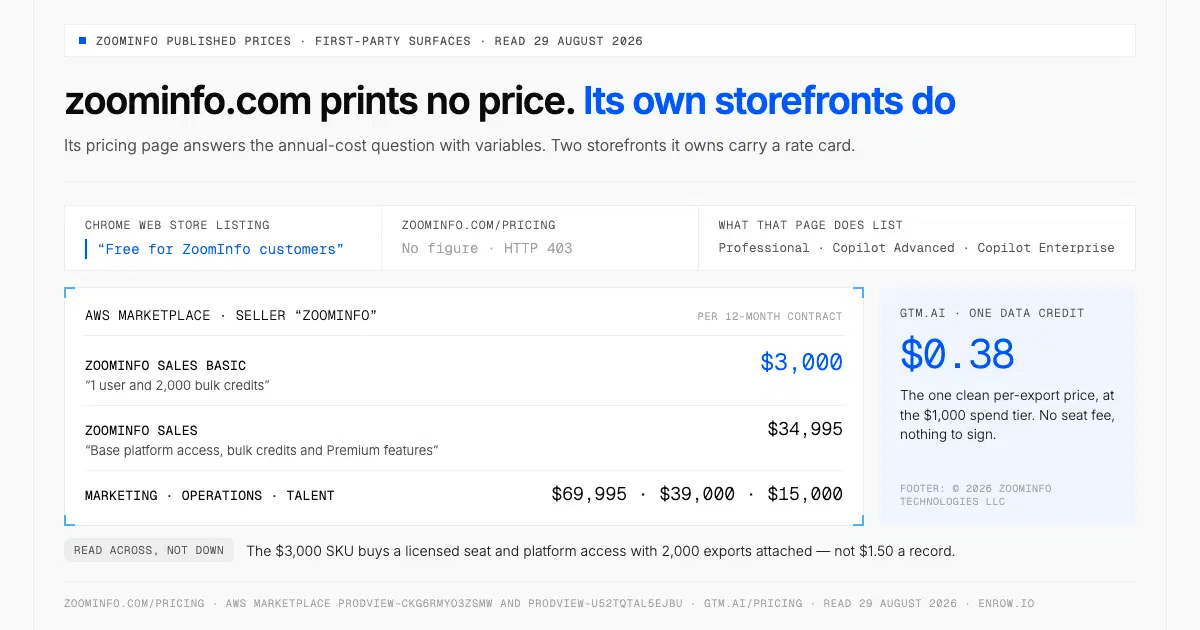
One Sales Basic seat costs $3,000 for 12 months on AWS Marketplace, a figure zoominfo.com never prints.
Key takeaway This extension finds contact data and finds it well: verified emails, direct dials and mobiles on a LinkedIn profile, off an index ZoomInfo puts at 500M+ professional profiles. I sell a competing product and will still say that plainly. The constraint isn't the software, it's the paperwork. "Free for ZoomInfo customers," says the listing, and zoominfo.com prints no price for becoming one. Its AWS Marketplace storefront does: $3,000 per 12 months for one Sales Basic seat with 2,000 bulk credits, $34,995 for ZoomInfo Sales. Annual terms, seat minimums, and ZoomInfo's own guidance is to ask whether unused credits roll over. Search costs nothing; export costs a credit, and that credit buys a stored record, not a result that lands. Enrow inverts that last part: a verified card off the profile into HubSpot, Salesforce or Pipedrive as a create-or-update, one credit when the email is valid, nothing when it isn't.
Most of what ranks for this keyword describes software replaced in the summer.
On 15 July 2026 ZoomInfo issued a release headed "The New ZoomInfo Chrome Extension: Rebuilt Natively, 2-3x Faster With Higher Match Rates". Rebuilt "natively from the ground up", pages loading "2 to 3 times faster", parsing complete enough that more people a rep views "return a verified, complete record instead of a blank." No percentage is attached to that last claim, and I'm not inventing one.
The listing has kept pace: version 12.20.1, dated 27 August 2026, from ZoomInfo Technologies Inc. 300,000 users, 3.5 out of 5 from 302 ratings. Installing costs nothing. Using it is a different question, and that one runs through the whole page.
What it puts on a profile
The listing describes a sidebar following you across "company sites, LinkedIn, your CRM, and your inbox", built on "500M+ contacts, 100M+ companies". Verified business emails, direct dials and mobiles. Intent, buying signals, an account fit score. An AI layer drafts outreach and writes pre-call briefs.
ZoomInfo University is the better source, written for people who already paid. Its course, last updated 24 November 2024, covers pinning the extension, then reaching "verified contact details and company-level data — including funding, revenue, headcount, Scoops, and tech stack — directly on LinkedIn profiles and company websites". You filter employees by Buying Group and management level, "export selected contacts to your CRM or Excel", and enrich Salesforce records in place. One line tells you more than the marketing does: its People Search module covers "understanding A/A+ rated vs. web-generated contacts", ZoomInfo's own taxonomy separating its best records from ones a crawler assembled.
On the way out the verb never changes: "Push contacts and accounts straight into the tools you run GTM on — Salesforce, HubSpot, Outreach, Salesloft, and 10+ more CRMs, sequencers, and marketing platforms." The ZoomInfo Salesforce integration and the ZoomInfo HubSpot integration are what that button feeds. What the listing never says is what happens when the person already exists in your CRM. ZoomInfo's blog tells admins to "configure CRM enrichment to update existing records rather than re-exporting contacts already in your system", so matching runs at platform level; which key it uses, the integration pages would say, and they returned 403 to nine attempts.
Chrome Web Store listing, ZoomInfo University, the ReachOut page, 29 August 2026.
The index underneath it, credited properly
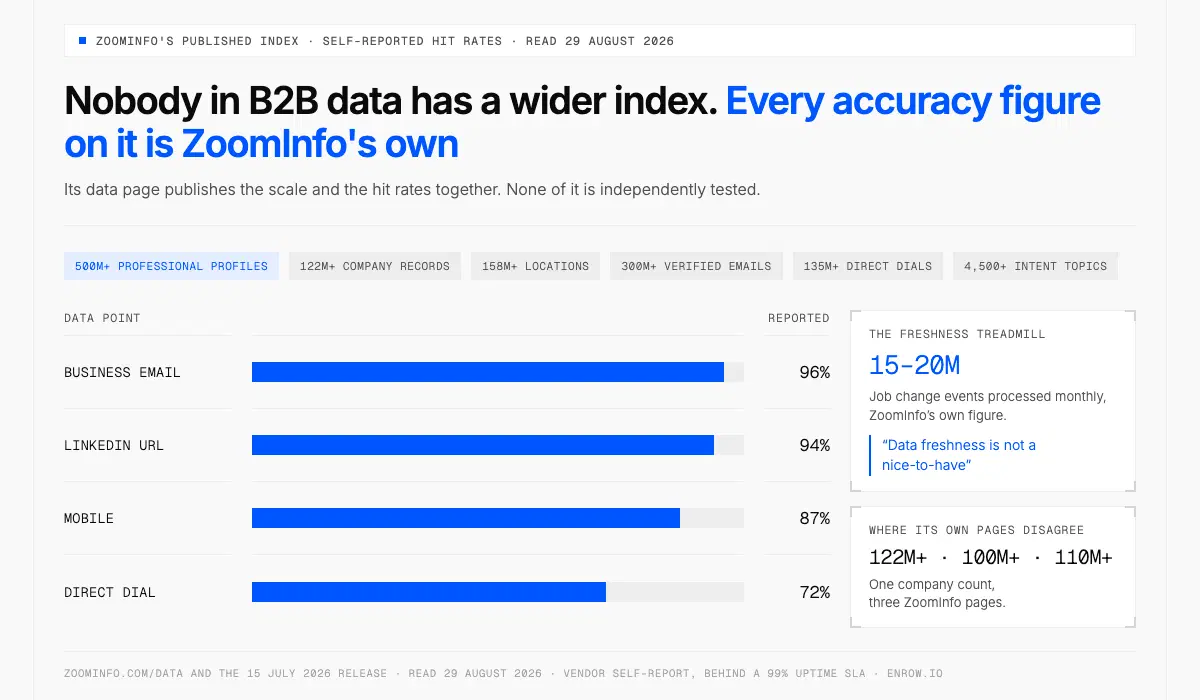
The index is the widest in B2B data, but nobody outside ZoomInfo has tested its 96% email hit rate.
Nobody in B2B data has a wider one. That is not a courtesy. It is the fact the rest of this page sits on.
Its data page publishes 500M+ professional profiles, 122M+ company records, 158M+ locations, intent across 4,500+ topics, 300M+ verified emails, 135M+ direct dials. Self-reported hit rates: 96% business email, 94% LinkedIn URL, 87% mobile, 72% direct dial, behind a 99% uptime SLA. Europe isn't an afterthought: 20.5M+ companies, 66M+ contacts, 18.5M+ mobiles. None of it independently tested, and its own pages disagree — companies read 122M+ on the data tiles, 100M+ in the July release, 110M+ on the trial page.
The number I keep going back to isn't a criticism: 15–20M job change events processed monthly, ZoomInfo publishing the size of the treadmill any stored index runs on. Its own post says "data freshness is not a nice-to-have" for accounts where the buying team turns over.
Credit on provenance too. Notice to data subjects after enrichment, opt-out through a Privacy Center inside 48–72 hours, SOC 2 Type II, ISO 27001, ISO 27701, TRUSTe, and a displayed 4.5 out of 5 from 9,384 G2 reviews. It also scopes WebSight BuyerID honestly as "US-only", with "GDPR markets are not in scope". That is visitor de-anonymisation, not the contact index, so nobody should stretch it into "ZoomInfo doesn't cover Europe".
zoominfo.com/data and the 15 July release, 29 August 2026.
Which licence switches it on
Core features aren't tier-gated. The clever filters are. ZoomInfo University: "Core Chrome Extension features — including contact and company data access, CRM export, and employee search — are included across all ZoomInfo Sales packages. Advanced Search capabilities and Buying Group filters referenced in the video may require Advanced+ or Elite+." The pricing page agrees, listing "Chrome extension and mobile app" under ZoomInfo Professional, the entry Sales tier.
Mind the naming: the pricing page sells Professional, Copilot Advanced and Copilot Enterprise, the courses say Pro+, Advanced+ and Elite+. One ladder, two vocabularies.
Search is free. The export is what costs
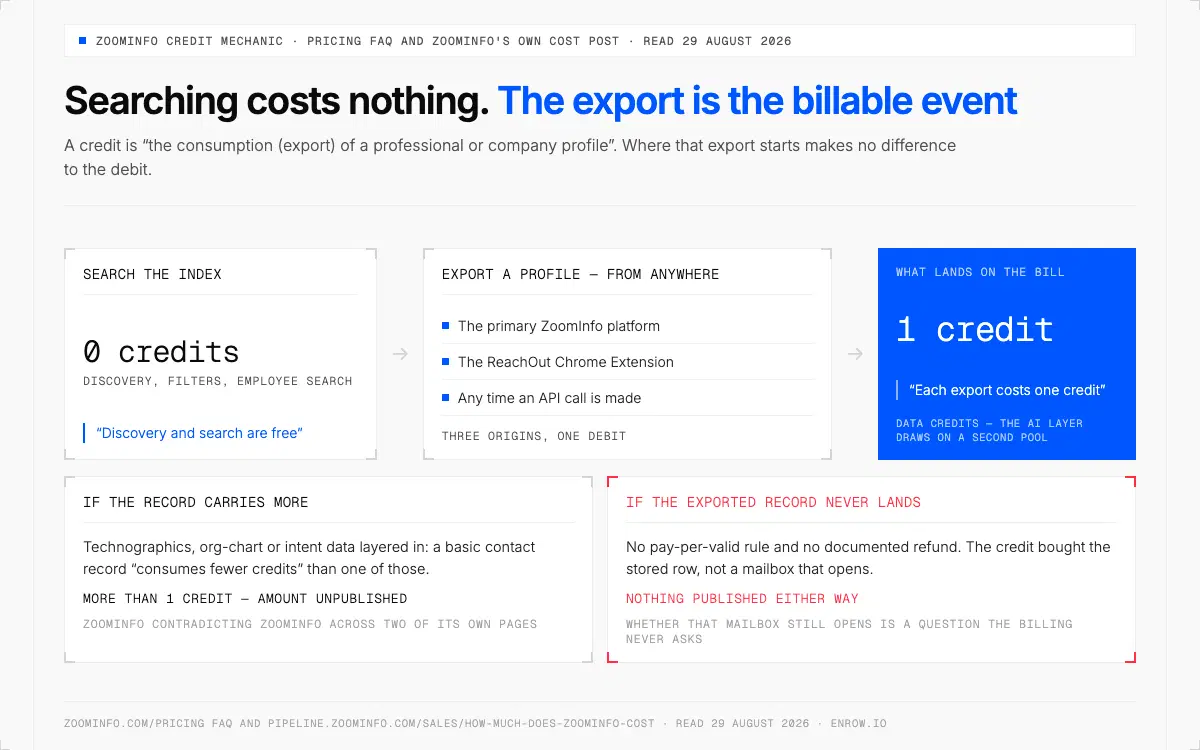
Searching is free and each export costs at least one credit, whether or not the mailbox still opens.
I had this wrong, and so does most of the internet, including a reference file in our own repo. ZoomInfo does not bill per lookup.
Its pricing FAQ says a credit represents "the consumption (export) of a professional or company profile", that the export "can originate from the primary ZoomInfo platform, the ReachOut Chrome Extension, or any time an API call is made", then: "Each export costs one credit." The blog supplies the other half in five words — "Discovery and search are free." Firm about when a charge lands, unsettled about how big it is.
| Action | What it consumes | ZoomInfo's own wording |
|---|---|---|
| Searching and browsing the index | 0 credits | "Discovery and search are free." |
| Exporting a contact or company profile | 1 data credit per record | "Each export costs one credit" |
| Exporting from the ReachOut extension | 1 data credit, named explicitly | export "can originate from… the ReachOut Chrome Extension" |
| A record with technographics, org-chart or intent data layered in | More than 1 data credit | a basic contact record "consumes fewer credits" than one carrying those fields |
| An exported record that turns out undeliverable | Nothing published either way | — |
Rows two and four are ZoomInfo contradicting ZoomInfo across two of its own pages; showing both beats quietly keeping whichever suits my argument. The last row is the one I'd argue with, and it's a mechanism, not a number, because no number exists. A credit buys the stored row. Whether that mailbox still opens is a question the billing never asks.
Pricing page FAQ and ZoomInfo's cost post, 29 August 2026.
The price isn't on zoominfo.com. It's on ZoomInfo's other storefronts
Half the internet says ZoomInfo publishes no price. Half is right, and everything here was read on 29 August 2026: zoominfo.com/pricing carries no dollar amount and answers the annual-cost question with variables rather than numbers. But ZoomInfo sells through two other surfaces it owns, and both run a rate card in plain sight — a $3,000 entry seat, a $34,995 Sales package, and a per-credit price for anyone who never wants to sign anything.
| First-party ZoomInfo surface | What's listed | Published cost |
|---|---|---|
| zoominfo.com/pricing | Professional, Copilot Advanced, Copilot Enterprise | no figure; page returns HTTP 403 to non-browser clients |
| AWS Marketplace, seller "ZoomInfo" | ZoomInfo Sales Basic — "1 user and 2,000 bulk credits" | $3,000 /12-month contract |
| AWS Marketplace, seller "ZoomInfo" | ZoomInfo Sales — "Base platform access, bulk credits and Premium features" | $34,995 /12-month contract |
| AWS Marketplace, seller "ZoomInfo" | ZoomInfo Marketing · Operations · Talent | $69,995 · $39,000 · $15,000 /12-month contract |
| gtm.ai (footer: "© 2026 ZoomInfo Technologies LLC") | one data credit, self-serve | $0.38 per data credit at the $1,000 spend tier |
Don't turn the $3,000 into $1.50 a record. That SKU buys platform access and a licensed seat with 2,000 exports attached, so dividing the whole invoice by the credit count would flatter the arithmetic and misdescribe the purchase. The one number that is a clean per-export price is gtm.ai's $0.38, on ZoomInfo's own self-serve surface, with no seat fee and no contract behind it.
The shape of the enterprise deal is published too, and that half is the more useful half. Most paid plans billed annually upfront, "monthly billing is not standard", seat minimums that scale with headcount, per-user cost varying by plan and credit volume. Then two instructions ZoomInfo hands its own prospects, an unusual thing for a vendor to write down: cap renewal increases in the contract, and "ask whether unused credits roll over to the next period or expire." Rollover is negotiated rather than published. Ours is published — credits roll over on Pro and Scale.
What still can't be computed is a cost per valid contact for ZoomInfo, because nobody measures how many exported records still land. The method for testing that yourself sits in how to choose a B2B data provider; the full ladder, module by module, in our ZoomInfo pricing breakdown.
AWS Marketplace listings prodview-ckg6rmyo3zsmw and prodview-u52tqtal5ejbu under seller "ZoomInfo", plus gtm.ai/pricing, all read 29 August 2026.
There is a free version. It has a second price tag
Most write-ups skip this one. The answer is yes.
The permanent free tier is ZoomInfo Lite — "no credit card required", "no expiration" — carrying 10 monthly credits along with search, exports, the mobile app, WebSights Lite at 10 visitor reveals a day, and the Chrome extension. A trial exists too: ZoomInfo "typically offers a 7-day free trial for new users", no card, though it warns that length and terms vary by promotion, company size and package.
Community Edition takes the allowance to 25 credits, and here the currency changes. You install Contact Contributor, which "scans your email contact lists, email headers, and signature blocks to extract only business-related fields, job title, company name, work email address, and phone number". ZoomInfo's summary is the cleanest sentence on any of its pages: "You are not paying with money; you are paying with data." CE also carries export limits and no Buyer Intent, API or GTM Workspace, and ZoomInfo names the objection itself: "some legal or compliance teams will not approve it."
A second pool sits alongside the data credits. ZoomInfo runs "two credit types (data credits and AI credits)", and on gtm.ai the AI ones are priced separately at $0.05 apiece against $0.38 for a data credit. Exporting a contact spends the data pool; asking the AI layer to research one spends the other.
So you can try ZoomInfo free. Buying the enterprise product still runs through a conversation — the AWS listings and gtm.ai are the only two places you can transact without one, and neither is the package a sales team actually gets sold.
Community Edition post and free trial page, 29 August 2026.
Where Enrow sits under all this
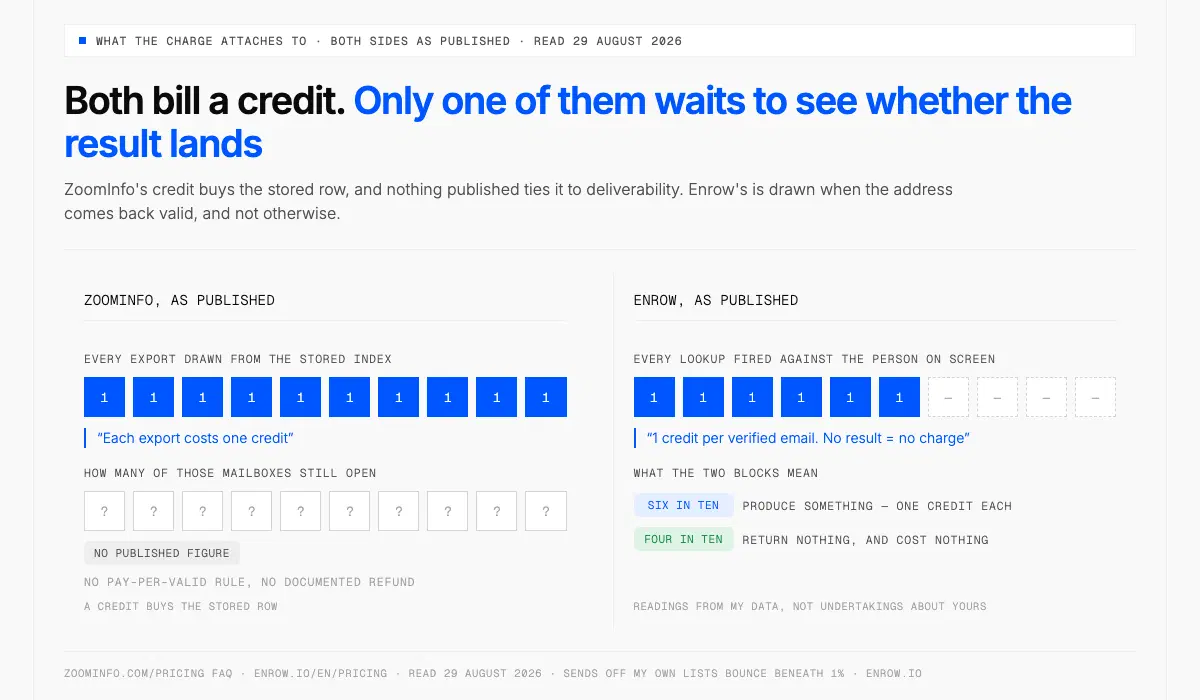
ZoomInfo bills every export; Enrow bills only valid results, so roughly four lookups in ten cost nothing.
Smaller product, deliberately, doing the last step instead of the whole motion.
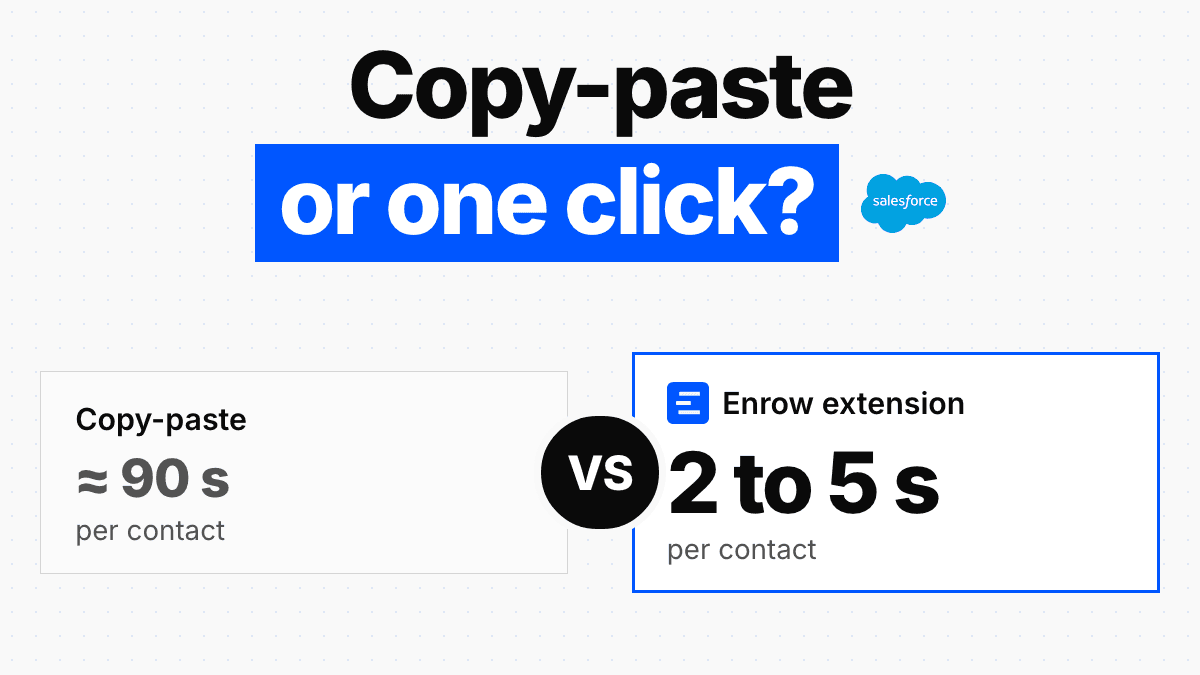
You're on the profile: "Get their email + phone in one click." Nothing gets read out of a warehouse. The lookup fires against the person on screen and comes back inside two to five seconds, and it bills only if something valid arrives. Phones are "real mobile numbers and direct lines. No switchboards, no receptionists" — a direct dial somebody answers, EU included, with the legal file to back it.
The second half is the CRM write, and it behaves as a create-or-update instead of an insert. Choose HubSpot, Salesforce or Pipedrive; if the person is already on file the blanks get filled, and if they aren't a record opens. Name, verified mailbox, direct dial, employer and LinkedIn URL travel together, in one pass, with no CSV in the middle. What that looks like against a portal's native tooling is worked through in the HubSpot Chrome extension guide; the plumbing sits in LinkedIn to CRM.
Set the two side by side and they barely overlap on what they surface. Where they diverge is what a charge attaches to.
| ZoomInfo, as published | Enrow, as published | |
|---|---|---|
| What a credit buys | A record exported from the stored index; "each export costs one credit" | One verified email (1 credit) or direct dial (40 credits), checked live |
| An address that fails verification | No pay-per-valid rule, no documented refund | Never billed. "1 credit per verified email. No result = no charge" |
| Published price | Nothing on zoominfo.com. On AWS Marketplace: $3,000 /12 months (Sales Basic, 1 user, 2,000 bulk credits) · $34,995 /12 months (ZoomInfo Sales). On gtm.ai: $0.38 per data credit | $17/mo for 1,000 credits · $87/mo for 10,000 · $397/mo for 50,000 · $1,397/mo for 200,000; annual −10% on Pro and Scale |
| Contract, seats, rollover | Annual, seat minimums, per-seat cost above the included count; "ask whether unused credits roll over… or expire" | Monthly or annual (~10% off Pro/Scale), no seat fee, published rollover on Pro and Scale |
| Free route | Lite, 10 credits/mo, or 25 with Contact Contributor scanning your mailbox | 50 credits/mo, recurring, no card, nothing installed |
Neither column is the other's like-for-like. Three thousand dollars on AWS buys a licensed seat and platform access with 2,000 exports attached; eighty-seven buys 10,000 Enrow credits and no platform whatsoever. The row worth reading across is the second one.
Where ZoomInfo splits the bill across a data pool and an AI pool, Enrow keeps one balance and nothing beside it. An email draws a single unit, a direct dial draws forty, a re-verification draws a quarter — which puts a phone number at roughly $0.35 under Pro and $0.47 on Start's 4,000-credit plan, taken out of the same allowance the emails come from rather than billed as a second line. Move to annual and about a tenth comes off Pro and Scale: the 10,000 tier settles around $78 a month, the 50,000 tier around $357. No tier charges for a seat.
Verification is where I'd plant the flag, though not on the SMTP handshake, because ZoomInfo runs one of those too. What separates the two is the ambiguous middle. Ten-plus checks run against every address, and a catch-all domain is worked until it commits one way or the other instead of being filed under "risky" and quietly dropped. Sends off my own lists bounce beneath 1%, and around 60% of the names I look up produce something — readings from my data, not undertakings about yours. Which leaves the uncomfortable half: on the other four in ten you get told there's nothing, and you get charged nothing, rather than handed an address assembled from a naming convention.
None of it requires the browser. CSV, the API, Make, Zapier, n8n, and an MCP server at github.com/EnrowAPI/enrow-mcp when the caller is an agent rather than a rep. Somewhere north of 5,000 companies use it.
The thing ZoomInfo does that we don't do at all
No searchable database. Not a roadmap item.
On most pages I write that and move on. Not here, because ZoomInfo's index isn't a feature of the product, it is the product. If the job is browsing a market, filtering companies by headcount, funding stage and installed tech, ZoomInfo does that and Enrow does nothing of the kind. Just don't buy us expecting one.
What we sell instead is a check that runs at the moment you need the answer. A stored row was true when it was written; a live lookup is true when you send. Skipping the warehouse costs us a couple of seconds per lookup and costs you the sourcing step, which you'll be doing in LinkedIn or Sales Navigator. Company data stops at roughly what a LinkedIn profile shows: no technographics, no intent topics, no org charts, no visitor de-anonymisation. And Enrow never sends anything — finding and verifying is the entire job.
Where I'd draw the line
Opening an unfamiliar account and pulling its buying group in one pass is index work, and ZoomInfo runs the best-stocked index in the market. A narrower job is a lookup: this person, a mailbox that opens, a number that rings. But a lookup shouldn't need an annual contract underneath it. And if anyone on your team is close to signing, get two things on the paper first: a cap on the renewal increase, and what happens to credits you don't spend. ZoomInfo tells you to ask for both.
ready to stop wasting time?
Connected in minutes.
Verified data in seconds.
FAQ
Is there a Chrome extension for ZoomInfo, and how do I add it?
Yes. ZoomInfo Technologies Inc. publishes one at 300,000 users and 3.5 out of 5 from 302 ratings, version 12.20.1 dated 27 August 2026. Download it from the Chrome Web Store, pin the browser extension, then sign in. The listing's own line: "Free for ZoomInfo customers."
Is the ZoomInfo Chrome extension free?
Free to install, and "free for ZoomInfo customers" per the store listing. It also runs on ZoomInfo Lite, the permanent free tier: no credit card, no expiration, 10 credits a month. Community Edition raises the allowance to 25, in exchange for letting Contact Contributor scan your own business contacts.
What ZoomInfo plan do I need for the Chrome extension?
Any Sales package. ZoomInfo University states that core extension features, "including contact and company data access, CRM export, and employee search", are "included across all ZoomInfo Sales packages", while Advanced Search and Buying Group filters "may require Advanced+ or Elite+". The pricing page lists it under ZoomInfo Professional.
Does the ZoomInfo Chrome extension find emails and phone numbers on LinkedIn?
Yes, and that's its purpose. The listing promises "verified business emails, direct dials, and mobile numbers", and ZoomInfo University documents that data appearing "directly on LinkedIn profiles and company websites", plus a People Search overlay. Sales Navigator is named on no first-party page.
When does the ZoomInfo Chrome extension spend a credit?
On export, not on search. ZoomInfo's pricing FAQ names "the ReachOut Chrome Extension" as an export origin and states that "each export costs one credit". Its blog adds that a basic contact record "consumes fewer credits" than one carrying technographic, org-chart or intent data. Nothing ties the charge to deliverability.
How much does ZoomInfo cost?
Not on its own pricing page, which prints no figure. ZoomInfo's AWS Marketplace storefront does list prices, read 29 August 2026: $3,000 per 12 months for one Sales Basic seat carrying 2,000 bulk credits, $34,995 for ZoomInfo Sales. Most paid plans are billed annually upfront, with seat minimums that scale with headcount.
Can the ZoomInfo Chrome extension push contacts into Salesforce or HubSpot?
Yes. The listing names Salesforce, HubSpot, Outreach, Salesloft "and 10+ more CRMs, sequencers, and marketing platforms" as one-click destinations. The published wording is export and push; how it behaves against your own duplicate rules is an admin-level setting ZoomInfo doesn't document.
Why is the ZoomInfo Chrome extension not working?
ZoomInfo's troubleshooting article prescribes checking for updates, removing the extension, then reinstalling from the Chrome Web Store. Rule out the thing that article can't mention: a lapsed licence or an exhausted credit allotment produces the same symptom, a sidebar that loads and returns nothing.
What is the ZoomInfo Engage extension?
The ZoomInfo Engage Chrome Extension is a second, separate listing from the same publisher, for calling and emailing contacts from ZoomInfo or Salesforce, with Salesflows campaigns and an auto-dialler. It sits at 10,000 users and 2.4 out of 5 from 19 ratings, version 1.10.12, last updated 23 July 2024, twenty-five months before the main extension's current build.
How do I get a verified email from LinkedIn into my CRM without a ZoomInfo contract?
Use an extension billed on valid results. Enrow finds and verifies the address on the profile, then writes the full card into HubSpot, Salesforce or Pipedrive as a create-or-update, completing an existing record instead of duplicating it. Nothing charged on a miss; 50 free credits monthly, no card.
What I read, and what I couldn't
Every ZoomInfo claim here comes off a ZoomInfo property read on 29 August 2026, including two most write-ups miss: the AWS Marketplace listings where ZoomInfo is the named seller, and gtm.ai, whose footer reads "© 2026 ZoomInfo Technologies LLC". Four sources resisted. Five help.zoominfo.com articles serve only a CSS-error shell, so the troubleshooting steps come from the Google snippet. The CRM integration pages returned 403 nine times, which is why nothing here claims its export deduplicates. g2.com returned 403, so that 4.5 from 9,384 is ZoomInfo's own on-site display. And zoominfo.com/pricing, zoominfo.com/faqs/pricing and university.zoominfo.com now return 403 to non-browser clients on re-read, so their quotes stand on the first read of the same day — the credit wording was corroborated separately, the licence-tier wording was not.
Get 50 free credits
No contract, no seat minimum, no call with anybody. Get 50 free credits → Every month, no card.