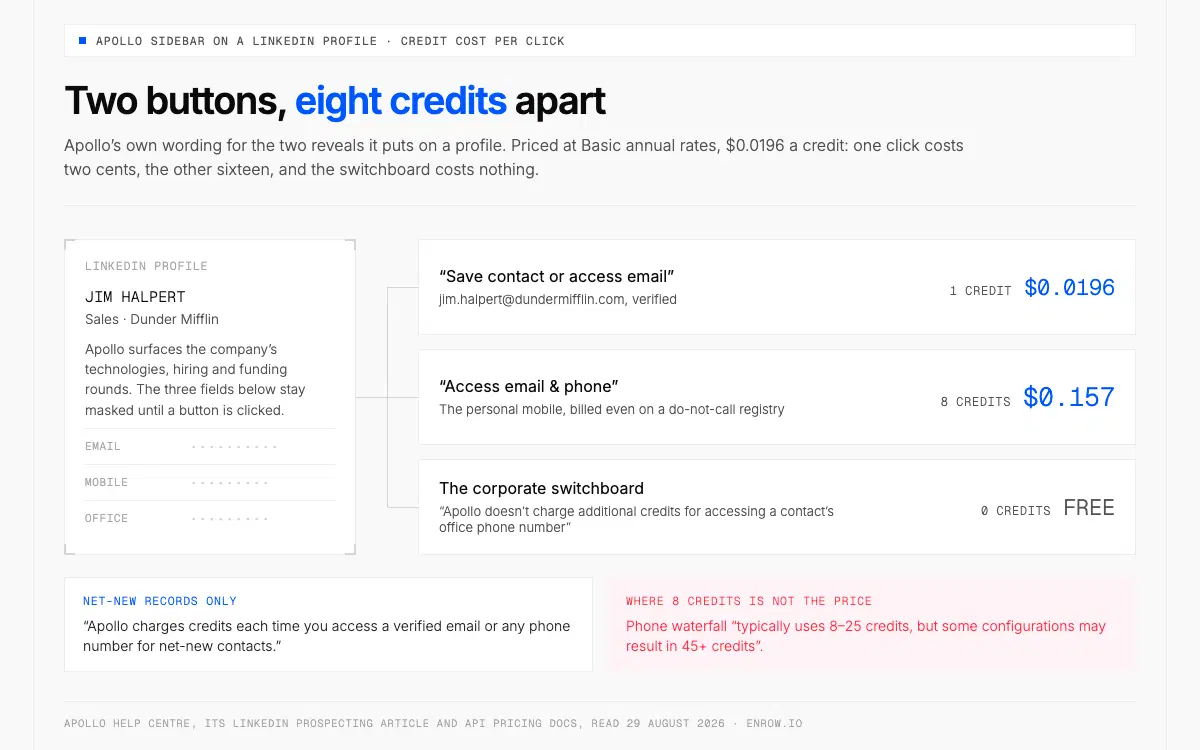
Eight credits separate the two buttons, while the switchboard number comes along for nothing.
Key takeaway Apollo's extension finds the email. Half the internet writes about this tool as though it doesn't. On a LinkedIn profile Apollo gives you two buttons, worded in its own help centre as "Save contact or access email" and "Access email & phone", and eight credits separate them. An email costs 1 credit. A personal phone costs 8. The corporate switchboard is free. Paid seats run $49, $79 and $119 per seat per month billed annually for 30,000, 48,000 and 72,000 credits per seat per year — $0.0196, $0.0198 and $0.0198 a credit. Climbing the ladder buys features, not cheaper data. The free plan is thinner than its Chrome Web Store listing suggests: 900 credits per seat per year, phone access switched off after an initial window, one seat after 100 days. Enrow replaces none of that. No database, no sequencer, no dialer. It replaces the row underneath — a live lookup instead of a stored record, GDPR-cleared EU direct dials, no seat fee, and a one-click create-or-update that lands the whole contact card in HubSpot, Salesforce or Pipedrive. On mobiles, what matters is how many numbers come back. We find a number for 92 contacts in a hundred taken off LinkedIn, measured on our own files. Fifty credits a month are free and need no card; $17 buys 25 numbers if you'd rather run the comparison than take my word for it.
Two buttons. That is what the apollo chrome extension puts on a LinkedIn profile, and the gap between them explains an Apollo invoice better than any feature list does.
Almost nobody writing about this tool prices those clicks, so that is where this page starts.
Apollo is a strong product and there's no version of this page where I pretend otherwise. Its Chrome Web Store entry, published by ZenLeads Inc., counts a million users and averages 4.7 across 2.2K ratings; version 16.5.0 shipped on 28 August 2026. The pricing page adds a G2 badge at 4.7/5 from 9,690 reviews. For $49 a seat you get a database, a sequencer, a dialer and this extension behind one login, and very few vendors bundle that much at that price.
What the sidebar actually shows
On an individual profile Apollo surfaces the company's technologies, hiring information and funding rounds. You can pull saved information on colleagues, see activity already logged against the company, edit custom fields, and place a call from the browser.
Over a Sales Navigator search the buttons go bulk: select leads at the top of the results list, request contact information for the batch, then email them or drop them into sequences. Each card carries "Request their email address" and "Request their Direct Dial".
On a saved contact, Apollo documents seven actions — add to list, add to sequence, compose email, log activity, view colleagues, push to CRM, review additional information. View colleagues bulk-acts on a whole set of suggested people, with a warning attached: "When you save a contact, you may be charged for credit."
There is no separate Apollo LinkedIn extension, incidentally. One build runs the same way on Gmail, Google Calendar, HubSpot, Salesforce, Pipedrive, Salesloft and company websites.
Sidebar behaviour from Apollo's LinkedIn prospecting article and its Use the Apollo Chrome Extension help article, August 29, 2026.
How to use Apollo on a LinkedIn profile, with the meter running
Four steps, priced at Basic annual rates of $0.0196 a credit.
- Install from the Chrome Web Store. Free to download, available on all four plans including Free.
- Open a profile and click the extension icon. Apollo's instruction is exactly that: "Go to a user profile on LinkedIn, then click the Apollo Chrome Extension to open it."
- Click Save contact or access email. One credit, $0.0196, for a verified address. The switchboard number rides along free: "Apollo doesn't charge additional credits for accessing a contact's office phone number."
- Or click Access email & phone, at 8 credits for the personal number, $0.157 on top. Apollo flags a number sitting on a do-not-call registry and bills you anyway, "regardless of whether the number is on a do not call registry".
Credits burn on net-new records only: "Apollo charges credits each time you access a verified email or any phone number for net-new contacts."
One warning belongs here rather than buried in an FAQ, because it is Apollo's own and it lands at the exact moment you click. "Apollo doesn't remove EU-based or UK-based contacts from the Apollo Chrome Extension. Apollo strongly recommends that you use caution and double-check a prospect's location on LinkedIn before saving them." Compliance judgement, profile by profile, on the rep.
Now the part comparison pages get wrong in Apollo's favour. Its API documentation prices people enrichment at "1-9 credits per person, charged only if credit-consuming data is found", so a miss on Apollo's own data isn't billed. The exception is waterfall enrichment, where the lookup goes out to third-party vendors and "some vendors consume credits per lookup even when no data is found" — phone waterfall there "typically uses 8–25 credits, but some configurations may result in 45+ credits", against a headline of 8.
Is the Apollo.io extension free?
The extension installs free from the Chrome Web Store and runs on all four Apollo plans, Free included. What Free grants as priced today is 900 credits per seat per year, released monthly, with one buying-intent topic and 2 sequences per team. Apollo's pricing page adds that "phone number access will be disabled and your team may be limited to one seat unless you upgrade", and its help centre puts a 100-day clock on that.
The Chrome Web Store listing hasn't caught up with the pricing page, and the two disagree on the numbers that matter most. The store still promises unlimited email credits, 3 buying-intent topics and 10 export credits a month. On AI writing the two agree: 5,000 words. Both were read the same day.
| Free tier claim | Chrome Web Store, updated 28 Aug 2026 | apollo.io/pricing, read 29 Aug 2026 |
|---|---|---|
| Email credits | "Unlimited email credits" | 900 credits/seat/year, granted monthly |
| Buying intent | "3 buying intent topics" | 1 intent topic |
| Sequences | "2 basic sequence automation" | 2 sequences per team (matches) |
| AI writing | "5K words in AI assisted emails" | 5,000 words/month (matches) |
| Exports | "10 export credits per month" | "may only apply to certain plans or legacy configurations" |
| Seats | not stated | 1 seat after 100 days of active use |
| Phone access | not stated | disabled after the initial access period |
Free also caps the Record Selection Limit at 25, against 1,000 on Basic and 10,000 on Organization, holds daily sends to 250, and switches waterfall enrichment off.
Free-plan wording from apollo.io/pricing and Apollo's plan management article; listing text from the Chrome Web Store. All August 29, 2026.
Where the push lands, and where the documentation goes quiet
Apollo's Push to CRM table is narrower than its list of supported platforms. HubSpot: "Click Push to HubSpot to sync the contact's information to HubSpot." Salesforce: the same sentence with the name swapped. Salesloft and Outreach are rows too, but what they take is a cadence or a sequence, which is a sending destination rather than a CRM write.
Pipedrive is a supported extension platform and has no row in that table. That doesn't stop the push. Pipedrive is one of the three CRMs Apollo's sync writes to, alongside HubSpot and Salesforce.
The help article stops at "sync the contact's information". The rest lives in Apollo's CRM integration documentation. Apollo writes the contact to its own database first. An admin then connects one CRM to the Apollo account, HubSpot, Salesforce or Pipedrive, and sets the push rules; from there Apollo creates the record or updates the one already in the CRM. What crosses over is a default field set, eight fields on HubSpot and Pipedrive, with no LinkedIn URL among them. On a portal with strict dedupe rules those settings deserve a look before the first push, and the CRM end of the problem gets its own treatment in the HubSpot Chrome extension guide.
Apollo's full CRM integrations are better documented and genuinely bi-directional. Salesforce gets contacts, leads, accounts, email activity, notes, calls, tasks, meetings and calendar events pushed to it, with opportunities pulled back. HubSpot's carries contacts, accounts, email activity, calls, tasks and notes both ways.
The bill follows headcount, not usage
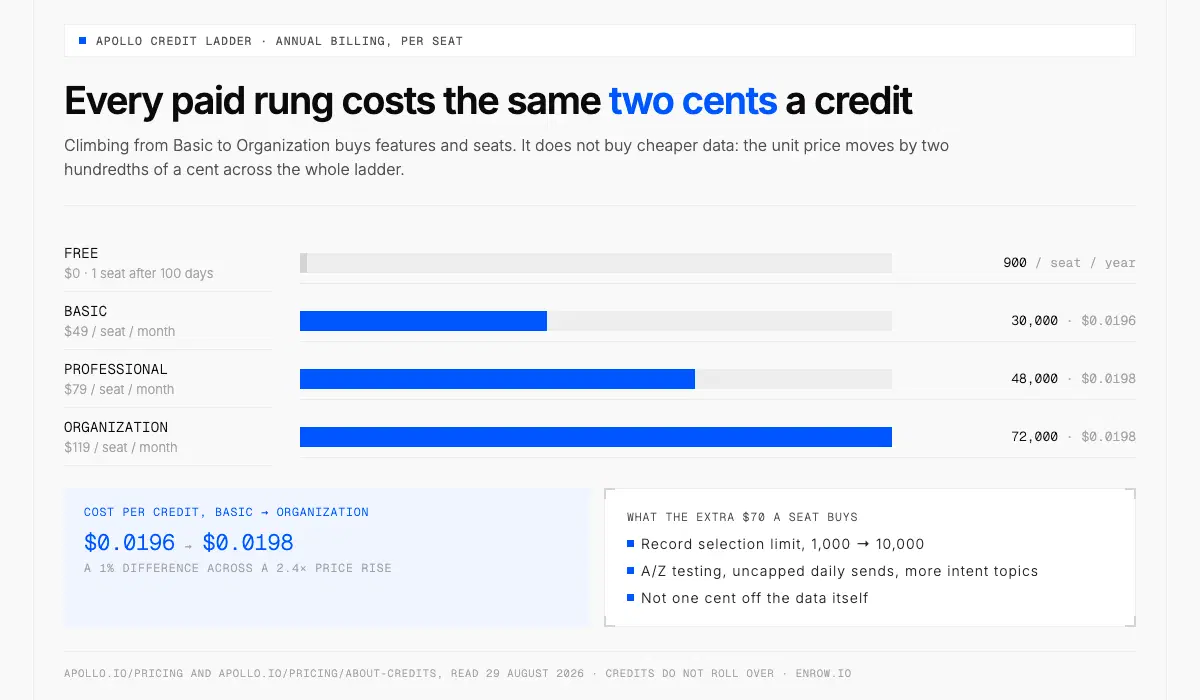
Climbing the ladder buys features, not cheaper data: a credit stays between $0.0196 and $0.0198.
Apollo prices per seat, Enrow prices per credit with no seat fee, so the honest comparison is the credit itself, annual against annual — and on that measure Apollo lands between $0.0196 and $0.0198 whichever tier you buy, Enrow between $0.0071 and $0.0078. A year on Pro comes to 120,000 credits and a year on Scale to 600,000, drawn down month by month rather than handed over in one lump at signature.
| Plan, billed annually | Price | Credits included | Cost per credit |
|---|---|---|---|
| Apollo Basic | $49/seat/mo | 30,000/seat/yr, upfront | $0.0196/credit |
| Apollo Professional | $79/seat/mo | 48,000/seat/yr, upfront | $0.0198/credit |
| Apollo Organization | $119/seat/mo, min 3 seats | 72,000/seat/yr, upfront | $0.0198/credit |
| Enrow Pro | $78/mo, whole team | 10,000/mo · 120,000/yr | $0.0078/credit |
| Enrow Scale | $357/mo, whole team | 50,000/mo · 600,000/yr | $0.0071/credit |
Apollo plan prices, the three-seat minimum on Organization and every credit grant were read from apollo.io/pricing on August 29, 2026. Enrow's annual rows are the monthly list price less the roughly 10% annual discount — $87 and $397 a month before it — so treat $78 and $357 as rounded, not as printed prices.
Apollo's per-credit price doesn't improve as you climb. Basic to Organization moves it by two ten-thousandths of a dollar. Unlimited sequences are already in Basic, so what the higher tiers add is A/Z testing, uncapped daily sends against Basic's 250, unlimited Google and Microsoft mailboxes, agentic loops, and 50 or 500 automated workflows per team where Basic gets 5.
Against Enrow Pro at $0.0078 a credit, Apollo Basic sits around 2.5×, and about 2.75× against Scale. Read that as a cost per credit, not a cost per valid contact. Apollo bills on a revealed record; Enrow bills only on a valid result. Converting Apollo's email figure into a cost per valid would need a find rate Apollo doesn't publish, and inventing one would flatter us for nothing. Where a find rate does turn up further down, we measured it ourselves and the line says so.
Mobiles need a closer read, because the two meters aren't charging for the same thing.
| What you reveal | Apollo credits | Apollo cost, Basic annual (USD) | Enrow credits | Enrow cost, Pro annual (USD) |
|---|---|---|---|---|
| Verified email | 1 credit | $0.0196 | 1 credit | $0.0078 |
| Personal mobile or direct dial | 8 credits | per number returned from the index, do-not-call listings included, never refunded | 40 credits | per valid mobile only, looked up when you ask |
| Corporate switchboard | 0 credits | free | not a product | — |
| Re-check an address you hold | 1–9 credits (enrich) | $0.0196–$0.176 | 0.25 credit | $0.002 |
| US dialer | 2 credits/minute | $0.039/min | not a product | — |
Apollo's 8 credits buy a number returned from its stored index, and Apollo publishes a quality figure to go with it: "less than 1% invalid direct phone numbers", alongside 144M direct dials and mobiles and 146M international contacts. Enrow's 40 buy a mobile looked up at the moment you ask, billed only when it comes back valid. Neither of us bills for a lookup that comes back empty, waterfall enrichment aside. Re-checking an address you already hold runs Apollo's enrichment meter at 1 to 9 credits, $0.0196 to $0.176; on our side it's a quarter of a credit, $0.002. The dialer is Apollo's alone, 2 credits a minute or $0.039. What Apollo doesn't publish anywhere on its site is a regional phone breakdown, and it states that it "doesn't refund any credits for mobile numbers". Enrow's EU direct dials are GDPR-cleared. How to spend forty credits well is in our direct dial numbers guide.
Then the unit price stops being the interesting number.
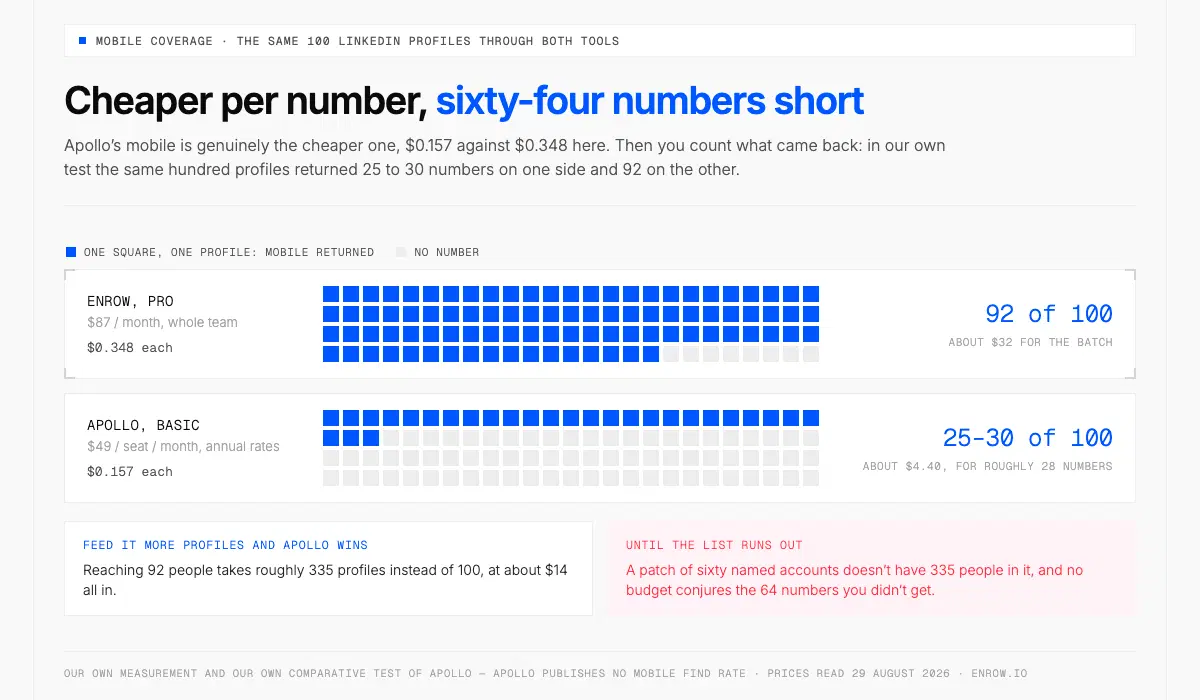
On a list of 100 LinkedIn contacts, Enrow comes back with a mobile for 92 of them. That is our own measurement, taken on our own files, and we publish it because a reader can break it in an afternoon. We ran the same kind of hundred-profile list through Apollo and got a number on 25 to 30 of them — our own comparative test, not a rate Apollo publishes anywhere, and it should never be read as one of theirs.
A price per number is one thing. More numbers is another, and the second one is what a rep dials.
| The same 100 LinkedIn profiles | Mobiles returned | What each number is billed as | Profiles left without a number | Profiles needed for 92 numbers |
|---|---|---|---|---|
| Enrow | 92 of 100, our own measurement | 40 credits per valid mobile, found live | 8 | 100 profiles |
| Apollo | 25–30 of 100, our own test of Apollo and not an Apollo figure | 8 credits per number returned, never refunded | 70 to 75 | about 335 profiles |
The 92 is Enrow's internal measurement, run with LinkedIn profiles as the input. The 25–30 is our own comparative test of Apollo, run the same way; Apollo publishes no mobile find rate anywhere, so that range is ours and never theirs.
Twenty-eight numbers or ninety-two, out of the same hundred people. Those are two different afternoons on the phone.
Reach 92 people through Apollo and you'd feed it roughly 335 profiles instead of 100. That plan holds right up to the point where you ask where the other 235 profiles come from. A patch of sixty named accounts. The attendee list from a conference in March. Lists like that don't have 335 people in them, and no budget conjures the 64 numbers you didn't get.
Feeding in more profiles is a motion for lists with no end to them: broad title-and-geo filters, a market you're happy to work at volume, nothing riding on any single row. It only works while the list is infinite, and most of the lists that matter aren't — a named-account patch or a conference export runs out long before you've fed it 335 profiles.
Keep the sums in proportion, too. Ninety-two valid mobiles is about $32 on Pro, which lists at $87 a month and works out at $0.348 a number, or $0.312 if you pay annually. On Start's 4,000-credit tier, $47 a month, a number is $0.47; on Scale, $0.32. Always forty credits, always drawn from the same single pool the emails come out of, never a separate phone allowance sitting beside it. And nothing stops a team paying both invoices.
Rollover is the quieter line on the bill. Apollo's documentation carries one sentence in three separate places: "Credits do not roll over into the following billing cycle or upon renewal." Enrow's roll over on Pro and Scale. A slow month costs you the balance on one side and costs you nothing on the other.
None of which you have to take from me. Pull a hundred profiles off LinkedIn, ones you'd actually work, and push them through both tools the same afternoon. Fifty free credits a month, no card, is enough to watch it run. Twenty-five numbers is $17. Then count what came back.
Where the data comes from, and what freshness costs
Apollo runs a stored index, and it is a big one: 240M global contacts, 30M companies, 128M business and personal emails, 5.3M new contacts a month, a network of 2 million data contributors, 65+ filters. Its store listing gives different headline numbers the same day, "210M contacts and 35M accounts", and I'll leave that discrepancy where I found it.
Apollo says the data is "refreshed in real-time with accuracy guaranteed" and updates "when we capture a data signal like a new job, email, or direct phone number". A stat block on the same page says 150M contacts refreshed monthly against 240M total. Both are Apollo's own, and they may not be counting the same thing — signal-driven updates and a monthly refresh cycle are different mechanisms. Read side by side, though, the monthly figure covers about 62.5% of the index, which is my arithmetic on Apollo's numbers rather than a claim Apollo makes.
That arithmetic reappears as a line item. Apollo sells job-change enrichment to catch rows that went stale, and its documentation is candid: "Job change enrichment requires credits, regardless of whether you update existing contact records or create new contact records."
The Apollo email finder has a real strength here and two different numbers for it. Its marketing page claims a "7-step email verification… delivering a 98% email accuracy rate"; its help centre says "a built-in email verification process with a 91% accuracy rate". Both live the same day. The catch-all handling behind them is legitimately clever, because Apollo knows "whether an email sent out any traffic in the past thanks to millions of linked mailboxes in our network" — why that matters is in what is a catch-all email. Apollo also refunds bounced-email credits, inside three boundaries it publishes itself: within 30 days, only for messages "sent within Apollo", never for mobiles.
Index size, refresh wording, accuracy claims and the contributor network from apollo.io/product/b2b-data, read August 29, 2026; the 91% figure from Apollo's email-verification help article the same day.
What Apollo does that Enrow does not
A searchable database of 240M contacts with 65+ filters. Unlimited sequences from Basic upward. A dialer at 2 credits a minute, with local presence, power and parallel dialing sold as separate per-team add-ons. Buying intent, 1 topic on Free up to 12 on Organization. Website visitor identification, 20 companies a month on Free and 100 on the paid plans, or up to 50,000 if you buy the Website Visitor add-on. Technographics on the sidebar.
Enrow has none of it and isn't building it.
The first one is the honest limitation of this product. There is no list inside Enrow. You bring the person from LinkedIn or Sales Navigator, and the lookup happens on the profile in front of you. That's precisely the job Apollo's index does well, and if your motion depends on building lists by filter, the database is a reason to pay Apollo.
Sending is somebody else's job as far as we're concerned. Enrow integrates natively with lemlist, Smartlead and Instantly; Emelia and La Growth Machine sit one API call away. Apollo's own sequencer is a real one and plenty of teams never need a second sender. Company data on our side stops at roughly LinkedIn level.
The layer underneath
Apollo sells the cheaper number, then comes back with 64 fewer of them.
Enrow doesn't hold an index at all. When you hit the button, the lookup goes out and comes back in two to five seconds, and the billing rule is the same one written on our product page: no valid result, no charge, one credit for a verified address. A direct dial costs 40 credits off that identical balance. There is no second phone allowance sitting beside the email one, which is worth saying plainly because most tools in this market do split the two.
The verification is the part I'd defend hardest. Every address clears 10+ verification checks, several of them SMTP passes fired from machines in different countries. A catch-all domain doesn't earn the "risky" label and a shrug here; it gets worked until it answers one way or the other. Bounce across my own sends comes in beneath 1%. Observed, on my own files, and I wouldn't write it into your contract.
Match rate is where I have to be less flattering. Roughly 60% on those same files, which means four people in ten come back empty. That 60% is the email number and it starts from a name and a company typed in cold; the 92% mobile figure earlier starts from a LinkedIn profile, a far richer input, which is why the two sit so far apart. Enrow returns nothing in that case, deliberately, because a pattern guess is how bounce rates get built.
The CRM step is one click. Everything on the card travels: the human, their checked mailbox, the direct dial, where they work, the profile you found them on. HubSpot, Salesforce or Pipedrive, whichever one you run. And the write is a create-or-update. A record that already exists comes back filled in. A person nobody has entered yet gets opened. Which of those two you're triggering is not something you need to go and check first. Apollo's push ends in the same create-or-update once its admin settings are in place; the difference is the path it takes, through Apollo's own database first, and a default field set that leaves the LinkedIn URL behind. The full route is mapped in LinkedIn to CRM.
Clicking one profile at a time isn't compulsory. Queue people as you browse and release the batch into the CRM, or pull it out as CSV. Skip the browser entirely with a CSV upload, the API, or Make, Zapier and n8n; Claude and OpenAI are native, through the MCP server we publish at github.com/EnrowAPI/enrow-mcp.
On price: 1,000 credits costs $17 a month on Start, 10,000 costs $87 on Pro, 50,000 costs $397 on Scale, and the monthly range tops out at 200,000 credits for $1,397. Pro and Scale take roughly 10% off if you pay for the year. Nothing is charged per seat. Six reps on Pro share one pool of 10,000. The free tier hands back 50 credits every month, recurring, no card. More than 5,000 companies use Enrow.
Running both
If Apollo is already your database and your sender, nothing here asks you to rip it out. Source and sequence there, then put a live lookup in front of the addresses that actually matter, because a stored row and a checked row are not the same object however good the index is. Still choosing, and the questions worth putting to a vendor are in how to choose a B2B data provider.
Installing the extension takes a minute. Knowing whether the click you just made cost one credit or eight is what keeps the invoice honest.
ready to stop wasting time?
Connected in minutes.
Verified data in seconds.
FAQ
What does the Apollo Chrome extension do?
Apollo's extension overlays contact data and sales actions onto LinkedIn, Gmail, Google Calendar, HubSpot, Salesforce, Pipedrive, Salesloft and company websites. On a saved contact it offers seven actions: add to list, add to sequence, compose email, log activity, view colleagues, push to CRM, and review additional information. It also reveals verified emails and phone numbers, for credits.
How many credits does the Apollo extension use per contact?
Apollo charges 1 credit for a verified email and 8 credits for a personal phone number, and nothing for a corporate switchboard. Person enrichment runs 1 to 9 credits and is charged only when credit-consuming data comes back, and the US dialer bills 2 credits per minute. At Basic annual rates an email costs $0.0196 and a mobile $0.157, billed per number returned from Apollo's index, do-not-call listings included, with no refund on mobiles. Coverage is the other half of that bill: in our own comparative testing Apollo returned a mobile on 25 to 30 profiles in a hundred, against 92 for Enrow, which takes its 40 credits only for a valid mobile. Apollo publishes no mobile find rate, so the 25 to 30 is our own observation and never a figure of theirs.
Can you use Apollo for free?
Yes. Apollo's Free plan grants 900 credits per seat per year, released monthly, with 2 sequences per team, 1 buying-intent topic, 5,000 AI writing words a month and a Record Selection Limit of 25. Phone access switches off after an initial period, and free accounts drop to one seat after 100 days of active use.
Can I use Apollo with LinkedIn?
Yes. Apollo's store listing advertises the ability to "Automate end-to-end Linkedin prospecting" and "Save in bulk contact search results into lists". An individual profile shows "Save contact or access email" and "Access email & phone" buttons; over a Sales Navigator results list you can select leads in bulk and request their contact information together.
Why did Apollo get removed from LinkedIn?
Apollo has not been removed. Its Chrome Web Store listing was updated on 28 August 2026, carries a million users at a 4.7 average from 2.2K ratings, and still advertises LinkedIn prospecting and bulk list saving. Reports of specific automation features breaking circulate on Reddit, and Apollo has published no statement confirming any of them.
Is it legal to use Apollo with LinkedIn?
Apollo puts that judgement on the user, profile by profile. Its own help centre warns: "Apollo doesn't remove EU-based or UK-based contacts from the Apollo Chrome Extension. Apollo strongly recommends that you use caution and double-check a prospect's location on LinkedIn before saving them. Make sure you stay GDPR compliant before enrolling them."
Can the Apollo extension push contacts to HubSpot or Salesforce?
Yes, and to Pipedrive as well. The extension saves the contact into Apollo first; once an admin has connected one of those CRMs to the Apollo account (one per account) and set push rules, Apollo creates or updates the record there. The default field set runs to eight fields on HubSpot and Pipedrive and leaves out the LinkedIn URL. Salesloft and Outreach also sit in the extension's Push to CRM table, but they take a cadence or a sequence rather than a CRM record.
Do Apollo credits roll over?
Apollo credits do not carry forward. Its documentation repeats one sentence in three separate places: credits do not roll over into the following billing cycle or upon renewal. Because a paid seat gets its whole 30,000, 48,000 or 72,000 upfront, the loss lands once a year rather than monthly. Add-on credits are a recurring charge, rebilled every cycle. Enrow's credits roll over on Pro and Scale.
Where these figures come from
Every Apollo number here was read from an Apollo property on August 29, 2026, then re-read the same day during an audit pass: the pricing page and its plan comparison table, the B2B data and Chrome extension product pages, the Salesforce and HubSpot integration entries, the LinkedIn prospecting article, the API pricing documentation, eight help-centre articles, and the Chrome Web Store listing. Apollo's month-to-month prices are deliberately absent, because the pricing page renders them only after an in-page click no fetch here could trigger. Annual is what I could read, so annual is what I quoted.
Fifty free credits, every month
Verify the addresses Apollo hands you, or find the ones it doesn't. Get 50 free credits → Recurring monthly, no card.