Key takeaway The HubSpot Sales Chrome extension is real, it's well built, and about a million people run it. HubSpot's own definition: a browser extension that lets you "track and log your emails sent from Gmail and use some of the HubSpot sales tools directly in your inbox and across the web." Templates, snippets, meeting links, calling, a sidebar. No HubSpot document claims it finds an email address. Its sidebar matches on the domain, and the object it offers to create is a company. Contacts get made from inside that company record, by typing the values into a form. HubSpot's native enrichment won't finish the job either. The published list of enrichable contact properties contains no Email and no personal phone, and enrichment declines any contact that doesn't already carry a business address. In HubSpot that matters more than it would elsewhere, because the email address is the key HubSpot deduplicates contacts on. No address, no key, and the same person can land twice. Enrow's extension fills that field. The address is found and verified while you're still looking at the profile, and the finished card — person, mailbox, direct dial, employer, profile URL — lands in HubSpot as a create-or-update: an existing Contact gets completed, a new one gets made. A valid email costs one credit. A lookup that comes back empty costs nothing.
A million installs. 4.4 out of 5 from 8.2K ratings. Version 3.1.1.43314, shipped on 20 August 2026, which tells you somebody is still actively working on it.
So this isn't a complaint about the hubspot chrome extension. It does exactly what its Chrome Web Store listing promises: "Email tracking, CRM for Gmail, and sales productivity tools in your inbox."
Read that tagline once more and notice where it puts you. In your inbox. Which is downstream of the thing a rep is actually stuck on at nine in the morning, namely that the person they want to write to isn't in HubSpot yet and has no address anywhere they can reach.
Below: what the extension really does, where its sidebar stops, why HubSpot's own enrichment can't rescue it, and what a duplicate Contact costs to unpick once it's in.
What the extension actually gives you
Start with HubSpot's list rather than mine. The Chrome Web Store entry splits it into free and paid, verbatim:
"FREE features of the HubSpot Sales Extension include: - Email tracking - CRM for Gmail - Email templates & snippets - Meeting scheduler - CRM sidebar across the web - Add companies and contacts to HubSpot - Calling and emailing - Breeze AI Copilot"
Paid adds "automated personal outreach", more meeting-scheduling functionality, and further engagement tooling. A free HubSpot account is required either way.
Note the sixth item on the free list. Add companies and contacts to HubSpot. The extension does create records, and anyone telling you it's read-only hasn't read the listing. Hold onto that, because how it creates them is the whole story.
Inside Gmail the toolset is documented tightly: Documents, Meetings, Payments, the Prospecting agent, Sequences, Snippets, Templates. HubSpot's opener for that article is a fair summary of the value: "Enroll a contact in a sequence, use templates, and insert meeting links without leaving Gmail."
Sequences carry the heaviest gate of the lot. HubSpot requires "a Sales Hub or Service Hub Professional or Enterprise subscription", an assigned Sales or Service seat, and a connected individual work email to enrol from Gmail. The product catalog caps it at 5,000 sequences per account, with 500 email sends per user per day on Professional and 1,000 on Enterprise. LinkedIn actions inside a sequence need a Sales Navigator subscription of your own.
One more line from the enrolment docs is worth carrying forward: a contact with no email address, or one that has previously bounced, errors out when you try to enrol it. HubSpot won't let you sequence someone you can't reach. It will happily let you store them.
Listing and feature quotes read on the Chrome Web Store, the extension definition from HubSpot's setup article, the Gmail toolset from its sales-tools article, sequence gates from the enrolment article and the product catalog. All September 14, 2026.
The sidebar matches a domain. A LinkedIn profile is a person.
Here is the sentence that decides how this workflow behaves, straight out of HubSpot's article on using the extension across the web:
"When activated, a sidebar will display in your Chrome browser on every website. The sidebar will match domain names to existing company profiles, or allow you to create new company records in HubSpot."
Domain names. Company profiles. The rest of the article keeps the same shape — "When you're viewing a lead's company website, view the company information or add a new company to your CRM without leaving the website" — and on Starter, Professional or Enterprise the Create Company form even fills itself in, because "the company information will be populated automatically" when your enrichment settings allow it.
Now trace the contact path in the same article. You reach it from inside a company record: click the Contacts tab, click Add, then "enter the contact property values in the create form." No property is pre-filled. No lookup is offered. You type it.
That asymmetry is the honest heart of it. Companies get matched and auto-populated. People get typed.
Which surface the sidebar runs on is configurable, and HubSpot lists the default exclusions: facebook.com, youtube.com, instagram.com, google.com and hubspot.com. LinkedIn is not among them, so the sidebar can render there. What it shows you on a personal profile, HubSpot doesn't document anywhere I could find, and I'm not going to invent it. What is documented is the job the sidebar was built for, and that job keys on a domain.
There's a plan gate worth knowing too, because it's the one place HubSpot spells out an edition requirement for the extension: using it against records inside Salesforce needs Professional or Enterprise. We took the Salesforce side of this workflow apart separately in the Salesforce Chrome extension guide.
Sidebar behaviour, contact creation steps, enablement settings and the Salesforce gate from HubSpot's across-the-web article, last updated July 21, 2026, read September 14, 2026.
The official HubSpot LinkedIn integration, and what it carries
People search for a hubspot linkedin integration expecting contact data to come with it. Two official routes exist and neither one is documented as carrying an address.
The lighter integration puts LinkedIn context on the record. What lands, per HubSpot: on a contact, "the contact's LinkedIn job title, company, time in their current role, location, and industry"; on a company, "the company's industry, size, and location". Useful for a rep about to make a call. Not a way to reach anyone new. If you installed the app after 7 October 2025, HubSpot also notes you have to add the integration card to your records by hand.
The deeper one is CRM Sync, and its capability list does include the words you're hoping for: "Create and update HubSpot contacts from Sales Navigator", alongside importing HubSpot records into Sales Navigator lists, automatic activity logging and revenue attribution reporting. A genuine create-and-update path, from LinkedIn, into HubSpot. Read the page for a field list and you won't find email or phone specified anywhere on it.
Both routes sit behind the same double gate: Sales Hub Professional or Enterprise with an assigned seat, and a LinkedIn Sales Navigator Advanced Plus plan. HubSpot's own catalog summary of the hubspot sales navigator integration is candid about the payload — "LinkedIn insights", InMail, "automatic activity logging, data validation, two-way data sync, and ad revenue attribution reporting." Insight, logging, sync. No discovery.
Advanced Plus is the expensive end of a ladder LinkedIn publishes no price for. The tiers it does publish are in our Sales Navigator pricing breakdown.
Quotes from HubSpot's Sales Navigator integration article, its CRM Sync article and the product catalog, read September 14, 2026.
HubSpot's own enrichment has no Email property
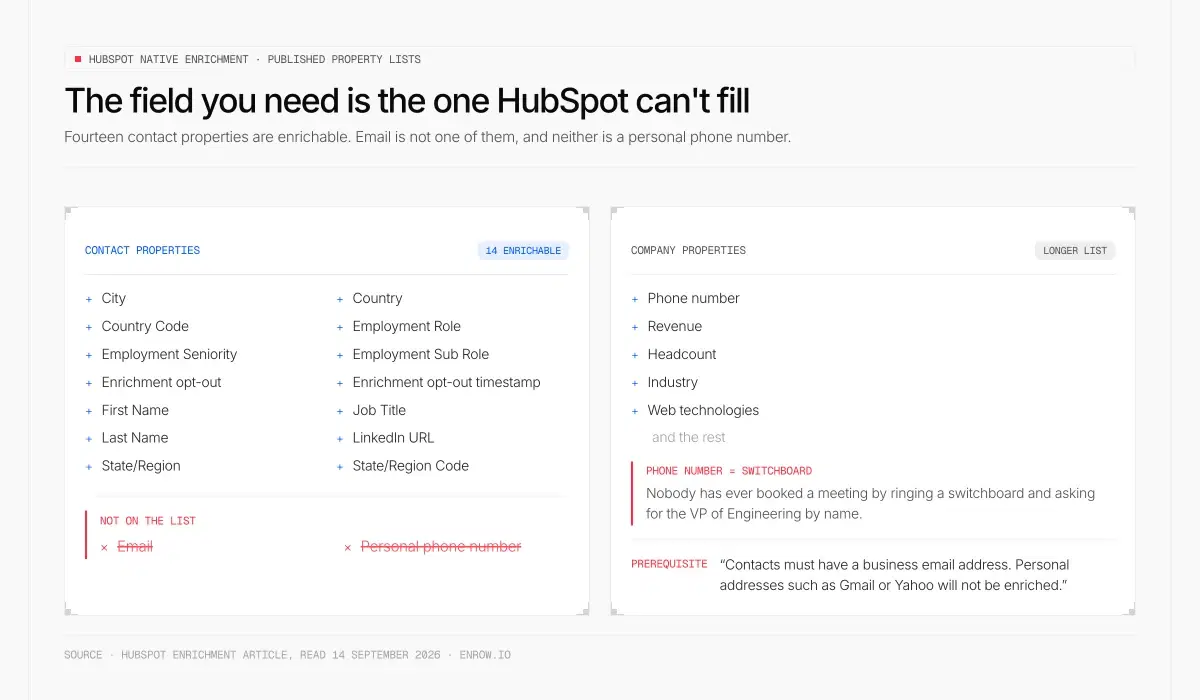
HubSpot publishes the exact list of contact properties its enrichment can fill — fourteen of them, and Email is not one
This is the fact that settles the argument, and it's published in plain sight.
HubSpot lists exactly which contact properties its native enrichment can fill: City, Country, Country Code, Employment Role, Employment Seniority, Employment Sub Role, Enrichment opt-out, Enrichment opt-out timestamp, First Name, Job Title, Last Name, LinkedIn URL, State/Region, State/Region Code.
Fourteen properties. No Email. No personal phone number.
The company list is longer and does include a Phone number, along with revenue, headcount, industry, web technologies and the rest. That number is a switchboard. Nobody has ever booked a meeting by ringing a switchboard and asking for the VP of Engineering by name.
Then HubSpot states the prerequisite, and it's the cleanest statement of the gap anyone could write: "Contacts must have a business email address. Personal addresses such as Gmail or Yahoo will not be enriched."
So enrichment improves a contact you can already email, and refuses the ones you can't. Which is a coherent product decision — it's a CRM feature, not a data source — but it means the empty Email field on a LinkedIn-sourced record is precisely the field HubSpot has no native way to fill.
Breeze's prospecting agent doesn't change that. It works on records that already exist: you "manually select contacts for enrollment" or build rulesets to enrol them automatically, at 100 credits per lead recommendation, and from Gmail "the email recipient must be an existing contact in your CRM." It recommends outreach. It doesn't go and find a person.
One number worth flagging because it doesn't exist. HubSpot's published Credits Rate Sheet has rows for AI agents, workflow actions, buyer intent and Data Studio, and enrichment has no row on it anywhere. Credits themselves are priced plainly enough at $0.010 each, $10 per pack of 1,000, with the Sales Hub row including 500 a month on Starter, 3,000 on Professional and 5,000 on Enterprise. The cost per enriched record isn't published, so any article quoting you one is guessing. What the credit pool actually buys, and how quickly the AI features drain it, is in our HubSpot data enrichment breakdown.
Property lists and the business-email prerequisite from HubSpot's enrichment article, last updated July 20, 2026; agent behaviour from the prospecting agent article; credit prices and the rate sheet from the product catalog. All read September 14, 2026.
In HubSpot, the email address is the record
Every CRM dislikes duplicates. HubSpot is unusual in how narrowly it defines identity.
Its deduplication article is a single-sentence rule: "HubSpot automatically deduplicates contacts using email addresses", and companies by domain name. Try to create a contact by hand with an address that already exists and HubSpot warns you. Import a file with a matching address and "the imported information will update the existing contact rather than create a new one." Submit a form as an existing contact and the new information gets added to the record you already have.
HubSpot also ships the operation as a first-class endpoint. POST /crm/objects/2026-03/{objectType}/batch/upsert, described as "create or update records identified by a unique property value as specified by the idProperty query param." So create-or-update isn't marketing vocabulary borrowed from somewhere. It's HubSpot's own word for the write, and the developer docs name email as one of the recognised unique identifiers for a contact. The engineering-level version of all this is in our HubSpot API and contact data guide.
Now put two documented facts next to each other and follow them out.
Fact one: the email address is HubSpot's only automatic dedupe key for contacts. Fact two: HubSpot's enrichment cannot produce an email address, and won't even run without one.
A record pushed in from a LinkedIn profile with no verified address therefore lands outside HubSpot's automatic deduplication entirely. There's nothing for the platform to match on. Push the same person again next quarter from a different list, and you get a second Contact. That's reasoning from HubSpot's published mechanics, not a HubSpot claim, and nobody publishes a number for how often it happens. The mechanism is enough on its own.
What a duplicate Contact costs to unpick
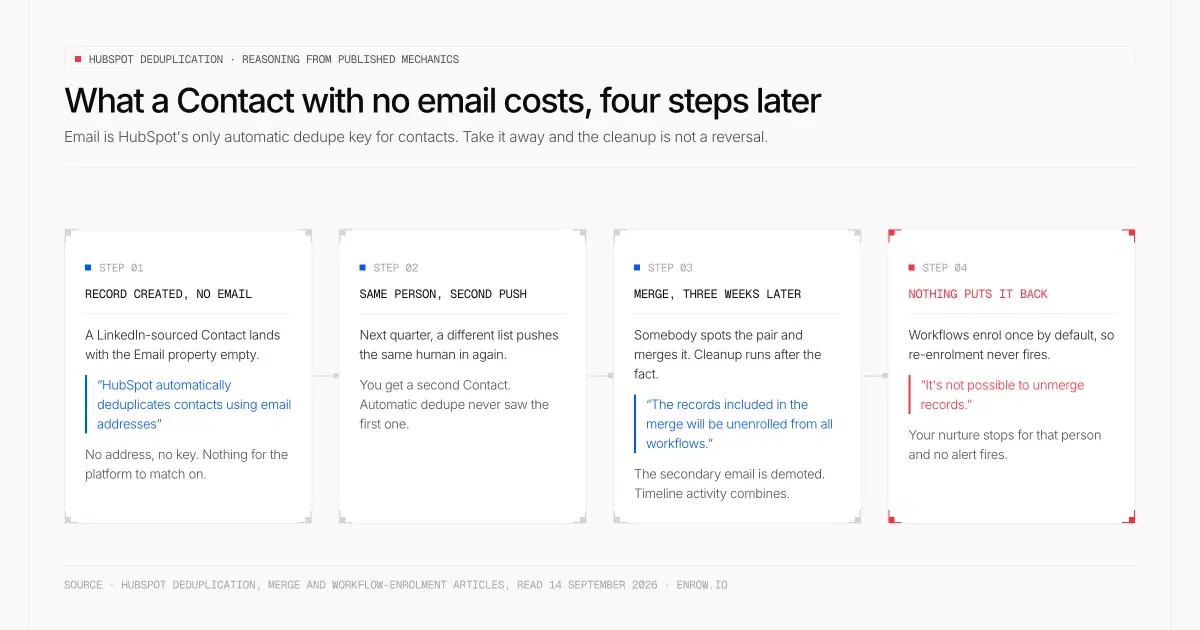
Four documented HubSpot mechanics in sequence: no email means no dedupe key, and the merge that cleans it up unenrols the survivor from every workflow
HubSpot does give you cleanup tools, and they're decent. The duplicate management tool scans daily and compares contacts on First Name, Last Name, Email address, IP country, Phone number, Zip Code and Company Name, with ceilings of 10,000 duplicate pairs on Professional and Enterprise, 30,000 on Data Hub Professional and 100,000 on Data Hub Enterprise.
Read that as what it is. Cleanup runs after the fact. Nothing there prevents the duplicate from being created.
And merging is not a free reversal. HubSpot's merge article lists what happens, and it's more than most people expect:
- The primary record's property values win; the secondary contact's email becomes a secondary email on the surviving record.
- "The secondary record is removed from all static segments", and active segment memberships may change as data shifts.
- "The records included in the merge will be unenrolled from all workflows."
- Timeline activity from both records combines onto the survivor.
- "It's not possible to unmerge records." Two records can't be merged at all once they've been through a combined total of 250 merges.
The third bullet is the expensive one, and it only bites because of a separate HubSpot default: "records are only enrolled in workflows the first time they meet the workflow enrollment triggers or are enrolled manually." Re-enrolment has to be switched on deliberately.
Follow the chain. Duplicate gets created. Somebody merges it three weeks later. The merge unenrols the survivor from every workflow it was in, and because workflows enrol once by default, nothing puts it back. Your nurture stops for that person and no alert fires. Sequences add their own edge, since a contact can only sit in one sequence at a time and has to be unenrolled before it can join another.
None of this is a bug. It's a set of sensible defaults that assume identity was established correctly at creation, and there are more of them than fit here — sync-tool match fields, marketing-contact billing, the 14-day rollback on a rejected pair. We pulled those apart in HubSpot CRM data quality. What they all have in common is that they push the problem back to the moment the record was made.
Dedupe rules from HubSpot's deduplication article, cleanup ceilings from its duplicate management article, merge behaviour from the merge article, enrolment defaults from the workflow enrolment settings article, upsert wording from the contacts batch upsert reference. All September 14, 2026.
LinkedIn to HubSpot, in one click, as a create-or-update
Two moves, and neither involves a second tab.
The first is the lookup. You're on the profile, you hit Find email, and Enrow goes and gets it live rather than reading a stored row that was last refreshed some time last spring. Our product page states the billing rule in the same breath: "If it's not valid, you don't see it — and you're not charged. 1 credit per verified email." Direct dials draw on the same balance at 40 credits, on the same "no result = no charge" rule. European mobiles are covered inside GDPR.
The second is the write. One click sends the finished card into the portal — the person, the verified mailbox, the direct dial, the employer, the profile URL — with nothing retyped. And the write is a create-or-update. Already a Contact, and the record gets completed. Not a Contact yet, and one gets made. Nobody has to go and search the portal first to work out which of the two applies.
That distinction is why the HubSpot machinery above matters. A record arriving with a verified address arrives with the key HubSpot dedupes on, already populated, before anything downstream depends on it.
It doesn't have to be one profile at a time either. Queue people up while you work through a Sales Navigator search, then release the whole queue into the portal, or take it out as CSV instead. The extension remembers what it has already found, so looking the same person up twice never spends a second credit.
Two things I won't dress up, because they aren't published. Which property the push keys on inside your portal isn't something we document, and neither is its behaviour against a contact whose address exists as a secondary email after an old merge. If you're wiring this into a portal with strict property rules, ask us first. It's a real question with a portal-specific answer.
Underneath all of that sits the verification, and it is the part I'd actually defend. 10+ checks per address. Several are SMTP passes made from servers sitting in different regions, and a catch-all domain gets tested repeatedly until the answer is an answer rather than a shrug. Plenty of tools stop at the shrug, hand you "risky", and leave the judgement call to a rep who has no way to make it. Bounce across my own sends comes in under 1% — an average I measure on my files, not a promise about yours.
The number that cuts the other way is discovery, which lands near 60% on my own files. A meaningful share of the people I look up have no address worth returning, and Enrow returns nothing rather than a pattern guess. Those lookups are free, which doesn't make them less irritating.
Not every team wants a browser in the loop. Upload a CSV, call the API, or let Make, Zapier or n8n move the rows for you. Claude and OpenAI are native integrations, and the official MCP server at github.com/EnrowAPI/enrow-mcp puts the finder and the verifier in reach of any MCP-compatible assistant.
Hublead and Surfe, factually
If you've shortlisted anything for LinkedIn to HubSpot, these two are on it. Both are good at what they were built for, and neither deserves a hatchet from me.
Hublead sits at 4.9 from 155 ratings and around 6,000 users, and describes itself as "the best Chrome extension to connect your CRM and LinkedIn in 1-click." The HubSpot visibility it puts on a LinkedIn profile is genuinely handy, and its free Starter tier gives you that with no user limit. It also checks before it writes — its own FAQ says it searches your HubSpot for an existing contact across a mix of first name, last name, job title, company name, website, email and phone. Anyone telling you Hublead dumps duplicate rows is wrong.
Where it differs from us is the layer underneath. Hublead's own FAQ describes what the base Add to CRM click carries: "First name, Last name, LinkedIn URL, Job title, Website URL, City, Country/Region & Language." Contact data is a separate, credited step — "using one credit with the 'Enrich' button fetches an external email for your HubSpot contact beyond LinkedIn" — and the enrichment itself runs, in Hublead's words, "through a waterfall across several providers, or plug in your own." Its plan table names them: Hunter, Apollo, RocketReach, with Kaspr and Lusha connectable. Hublead routes that lookup well. What lands in your portal, though, is whatever the provider at the end of the waterfall returned, and the depth of the verification behind it belongs to that provider rather than to Hublead.
Surfe is the bigger of the two at roughly 40,000 users and 4.5 from 57 ratings, and its sidebar is the one most people picture when they imagine this workflow. It covers HubSpot, Salesforce, Pipedrive, Copper and Google Sheets, it's ISO27001 certified, and its listing says it "auto-maps fields and keeps everything clean and organized so you avoid CRM duplicates." Its enrichment "checks 15+ data sources in real-time" — a waterfall again, bought rather than built.
So the split isn't sync quality. Both sync well. The split is that they buy the contact layer from other people and meter it out per seat, and that layer is the whole of what we build.
What a month actually costs
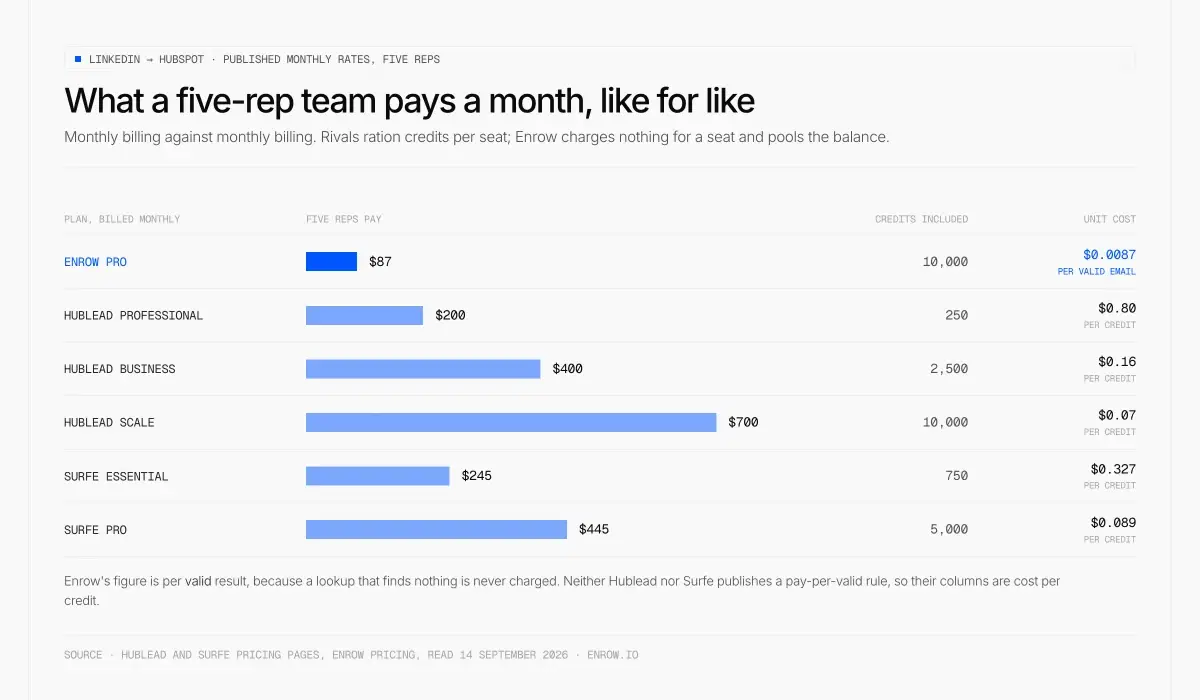
Five reps, one month, published rates: Enrow bills per valid result from one shared pool, the rivals meter credits per seat
Like for like, monthly against monthly, at published rates for a five-rep team:
| Plan (billed monthly) | Five reps pay | Credits included | Cost per credit |
|---|---|---|---|
| Enrow Pro | $87 — one shared pool, no seat fee | 10,000 | $0.0087 per valid email |
| Hublead Professional | $40/seat → $200 | 50/seat → 250 | $0.80 |
| Hublead Business | $80/seat → $400 | 500/seat → 2,500 | $0.16 |
| Hublead Scale | $140/seat → $700 | 2,000/seat → 10,000 | $0.07 |
| Surfe Essential | $49/seat → $245 | 150 email/seat → 750 | $0.327 |
| Surfe Pro | $89/seat → $445 | 1,000 email/seat → 5,000 | $0.089 |
One clarification I'd want if I were reading this. Enrow's figure is per valid result, because a lookup that finds nothing is never charged. Neither Hublead nor Surfe publishes a pay-per-valid rule, so their columns are cost per credit. Converting those into a cost per valid contact would need a find rate neither of them publishes, and a made-up one would only flatter us.
The seat structure is the other half of it. Both rivals ration credits per user, so the rep who burns through theirs on Tuesday sits idle while a colleague's allowance expires unused. Enrow charges nothing for a seat. Put the whole team on Pro (up to 10 members) or Scale (no limit) and they all draw down the same balance.
Enrow's ladder, for completeness: Start is $17 a month for 1,000 credits, Pro $87 for 10,000, Scale $397 for 50,000, running up to 200,000 at $1,397. Annual takes about 10% off Pro and Scale. One email is one credit, a direct dial is 40 — roughly $0.35 a number on Pro — and re-checking an address you already hold costs a quarter of a credit. Unspent credits carry into the next month on Pro and Scale. HubSpot's don't: its catalog is blunt about it — "unused credits do not roll over into the following month." The free plan puts 50 credits back in the account at the start of every month and never asks for a card.
Free tiers, since people compare them: Hublead's Starter is free forever with no user limit and puts HubSpot context on the profile rather than supplying contact data. Surfe's free plan gives 5 mobile and 20 email searches a month. Ours is the 50 recurring credits above, spendable on whatever you like.
Hublead and Surfe prices read on their own pricing pages, September 14, 2026. The HubSpot credit rule quoted above is from the product and services catalog, same date.
No database. That's the trade.
Enrow will not build your list, and we're not planning to fix that.
A bought list is a snapshot, and the refresh cycles behind those snapshots run three to nine months. Mail it late enough and part of it describes jobs people have already left. Doing the lookup at the moment you need the address is harder to explain on a landing page and holds up far better when you press send. What it costs you is the sourcing: the names have to arrive from somewhere, which means LinkedIn, Sales Navigator, filters and saved searches, whatever your team already runs. We come after that step, not instead of it.
We don't sequence either, and won't. lemlist, Smartlead and Instantly are native integrations; Emelia and La Growth Machine connect through the API. Any of them will send better than a data company bolting a sender onto the side of its product.
No technographics. Company data is roughly what LinkedIn shows, and that's the ceiling.
More than 5,000 companies use Enrow, almost all of them running it underneath a CRM they already own.
Putting it together
Keep the HubSpot Sales extension. Email tracking and one-click meeting links are worth the install on their own, and the sidebar earns its place the moment you're on a company website working out whether that account already exists.
Add the lookup where HubSpot's docs stop, which is at the person. And check one thing before you let any extension write into your portal: does the address it puts in the Email property clear a send, or is it a pattern somebody's tool inferred from a domain.
A Contact with no email isn't a half-finished record in HubSpot. It's a record the platform can't recognise the next time it meets the same human.
ready to stop wasting time?
Connected in minutes.
Verified data in seconds.
FAQ
Does HubSpot have a Chrome extension?
Yes. It's called HubSpot Sales, published by HubSpot, Inc. The Chrome Web Store put it above a million users and rated it 4.4 from 8.2K reviews when we read the listing on September 14, 2026. HubSpot describes it as a way to "track and log your emails sent from Gmail and use some of the HubSpot sales tools directly in your inbox and across the web." A free HubSpot account is required to use it.
Does the HubSpot Chrome extension find email addresses?
No HubSpot document says it does. The Chrome Web Store listing covers email tracking, CRM for Gmail, templates and snippets, a meeting scheduler, the sidebar, calling and adding companies and contacts. Contact discovery appears nowhere. HubSpot's native enrichment confirms the boundary from the other side: its published list of enrichable contact properties includes First Name, Job Title, LinkedIn URL and location fields, and contains no Email and no personal phone number.
What does the HubSpot Sales Chrome extension actually do?
Inside Gmail it handles Documents, Meetings, Payments, the Prospecting agent, Sequences, Snippets and Templates, so a rep can enrol a contact, drop in a template and insert a booking link without leaving the inbox. Across the rest of the web it shows a sidebar that "will match domain names to existing company profiles, or allow you to create new company records in HubSpot." Sequences need Sales Hub Professional or Enterprise plus an assigned seat. Using the extension against Salesforce records needs Professional or Enterprise too.
Can HubSpot integrate with LinkedIn?
Two official routes exist. The Sales Navigator integration puts LinkedIn context on the record — job title, company, time in role, location and industry for a contact. CRM Sync goes further, listing "Create and update HubSpot contacts from Sales Navigator" alongside activity logging and revenue attribution. Both require Sales Hub Professional or Enterprise with an assigned seat and a LinkedIn Sales Navigator Advanced Plus plan. Neither article specifies an email or phone field.
How do I connect LinkedIn Sales Navigator to HubSpot?
Through HubSpot's Sales Navigator integration, then optionally CRM Sync on top of it, and both sit behind the same double gate: a Sales Hub Professional or Enterprise seat on the HubSpot side and Advanced Plus on the LinkedIn side. If you installed the Sales Navigator app after 7 October 2025, HubSpot notes you have to add the integration card to your records manually. What arrives is insight and activity, so plan the contact-data layer separately.
How do I add a LinkedIn contact to HubSpot?
Natively, you'd open a company record in the extension sidebar, click the Contacts tab, click Add, and type the property values into the create form. Nothing is pre-filled and no lookup runs. The faster path is an extension that does the lookup first. Enrow finds the address on the profile, verifies it, and writes the completed card into HubSpot in a single click as a create-or-update, so a person who already exists is updated instead of duplicated.
Will pushing LinkedIn contacts into HubSpot create duplicates?
It depends entirely on whether a verified email comes with the record. HubSpot "automatically deduplicates contacts using email addresses", and that's its only automatic key for contacts. Push someone in without one and there's nothing for HubSpot to match on, so the same person can land twice. Merging afterwards is not a clean fix: the merge unenrols both records from all workflows, workflows only enrol once by default, and HubSpot states that "it's not possible to unmerge records."
Is there a free way to get LinkedIn contacts into HubSpot?
Partly. Hublead's Starter plan is free forever with no user limit, but it shows you HubSpot context rather than supplying contact data. Surfe's free plan allows 5 mobile and 20 email searches a month. Enrow's free plan is 50 credits, reset monthly with no card, spendable on emails, phones or verifications, and nothing is deducted for a lookup that finds nothing.
Does Enrow handle the sending once the contact is in HubSpot?
No, and it never will. HubSpot's own Sequences handle that inside the CRM, on Professional or Enterprise with an assigned seat, capped at 500 or 1,000 email sends per user per day. Outside HubSpot, lemlist, Smartlead and Instantly are native Enrow integrations, with Emelia and La Growth Machine reachable through the API. Enrow finds and verifies the data. Somebody else sends it.
Where these facts come from
Every HubSpot claim above was read from a HubSpot-owned page on September 14, 2026: the Chrome Web Store listing for HubSpot Sales, the three knowledge-base articles on setting up the extension, using it across the web and using its sales tools, the enrichment article on the /records/ path, the deduplication, duplicate management and merge articles, the workflow enrolment settings article, the sequence enrolment article, the prospecting agent article, both LinkedIn integration articles, the legal product and services catalog, and the developer references for the CRM object model and the contacts batch upsert endpoint.
Hublead and Surfe figures come from their own pricing pages and Chrome Web Store listings, same date. Enrow's own figures come off our pricing, integrations and Chrome extension pages and were checked before this went out. Where the text gives a match rate near 60% or a bounce under 1%, those are measurements from my files and are labelled as measurements. Anything I couldn't confirm on a first-party page is listed in the footnote rather than smoothed over — including the one figure a lot of articles get wrong, which is HubSpot's credit cost per enriched record. It isn't published.
Get 50 free credits
Stop creating HubSpot Contacts the platform can't recognise next quarter. Get 50 free credits → Reset every month, no card.