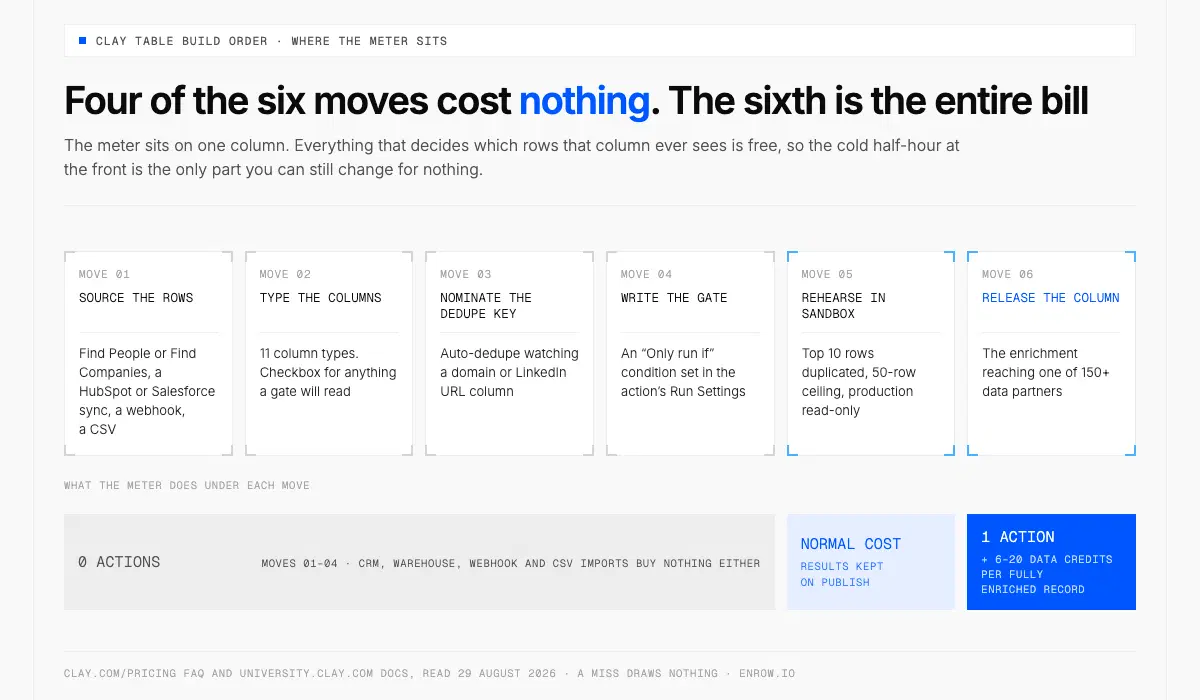
The four free moves decide which rows the paid column ever sees, so finish them first.
Key takeaway Disambiguation first: this is Clay the go-to-market platform, not the stuff that goes in a kiln. A Clay table behaves like a spreadsheet right up to the moment a column reaches out to one of 150+ data partners and writes the answer back into the cell. That column is the only part with a price on it. Clay publishes the list of what draws no Action: sourcing lists of accounts or contacts, CRM imports, data warehouse imports, webhook imports, manual data entry, Clay formulas and filters, creating audiences (Clay's note: "only the export counts"), Send Table Data, and Lookup Single Row in Other Table. So you finish the table cold. Source picked, columns typed, dedupe key nominated, gate written, ten rows rehearsed in sandbox. Only then does the enrichment run, at 1 Action and 6–20 Data Credits per fully enriched record, against rows you meant to ask about.
Search "how to use clay" and Google returns air-dry clay, kilns and polymer — the entire first page, this morning. The other Clay is a go-to-market platform at clay.com, and its unit of work is the table.
Two meters run underneath every table. Clay's pricing FAQ defines the first one: "Actions measure the orchestration you do on Clay — enriching data, running a table, calling an AI model, sending data to a third-party system, or exporting data out of Clay." The docs put the rate plainly: "Each record enriched or exported counts as 1 Action—regardless of data source or provider." The second meter buys the data itself: "Data Credits are used when you purchase data from Clay's marketplace — finding emails, phone numbers, company data across our 150+ data partners." A fully enriched record typically runs 6–20 Data Credits. Entry rates start at $0.05 per Data Credit and under $0.01 per Action, and both fall as volume climbs.
None of this needs a paid plan to learn on. The free tier carries 100 Data Credits and 500 Actions a month against a ceiling of 200 rows per table, with "unlimited seats and tables", multi-provider waterfalls, Claygent, your own API keys and Clay's sequencer for email. Above it, the same FAQ names Launch "starting at $185/mo" and Growth "starting at $495/mo" on monthly billing, with a 14-day trial on either. Every rung of both dials is printed in our Clay pricing breakdown.
What is a Clay table?
A Clay table is a grid where one row holds one company or one person, and each column either stores a plain field or calls an outside provider to fill itself in. Rows arrive from a source. Columns decide what happens to them. Finished records leave for a CRM, a sequencer or a warehouse.
One line on the pricing page settles the question everyone asks first: "If an enrichment returns no result, you're not charged Data Credits or Actions." A miss draws nothing. Which puts the whole game upstream. The sharper the list arriving in the table, the bigger the share of any run that comes back as a contact somebody can actually work.
How to use Clay: the two frameworks Clay teaches in one lesson
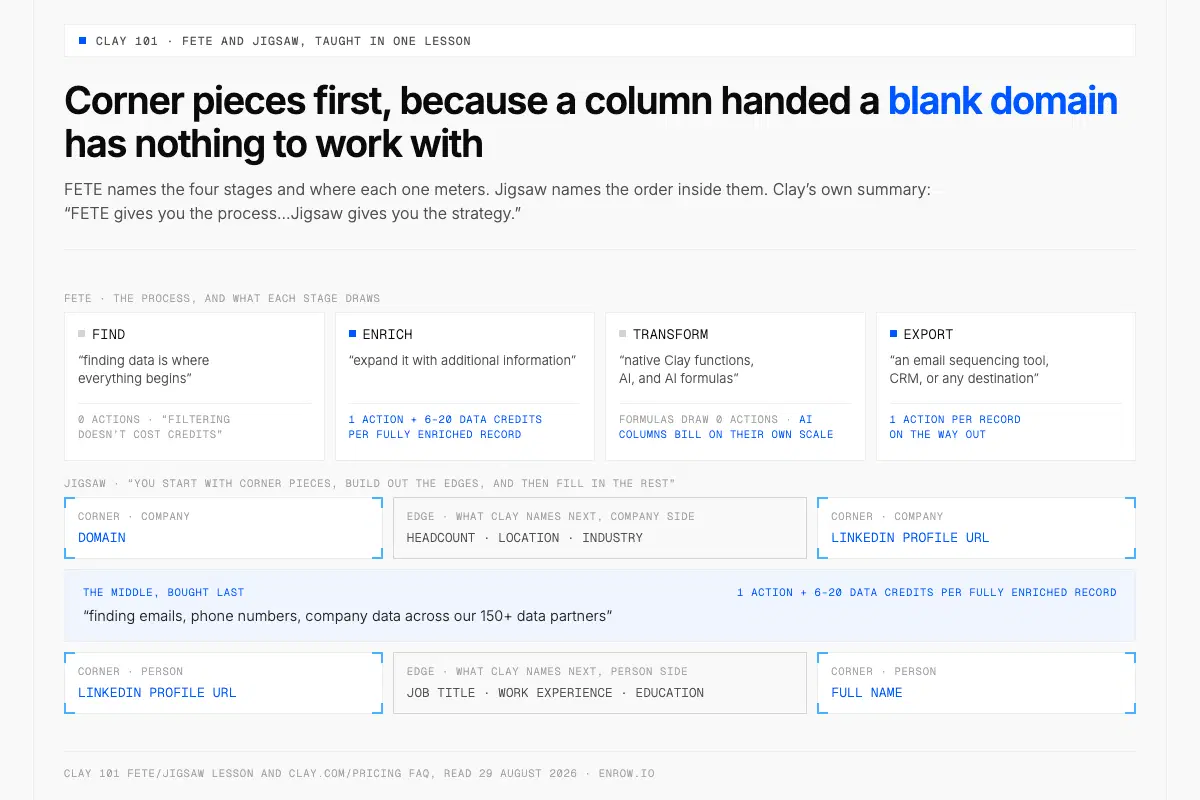
Identifiers go in before anything specialised, since marketplace providers match on them and a blank domain matches nothing.
Clay 101 opens with FETE, four stages naming the whole arc. Find, where "finding data is where everything begins". Enrich, to "expand it with additional information". Transform, with "native Clay functions, AI, and AI formulas". Export, to "an email sequencing tool, CRM, or any destination".
The same lesson then hands you Jigsaw, which is about order rather than stages. "Think about working with data in Clay like assembling a puzzle. You start with corner pieces, build out the edges, and then fill in the rest." Corner pieces are the identifiers: a domain and a LinkedIn profile URL on a company, a LinkedIn profile URL and a full name on a person. Edges are what Clay names next — headcount, location and industry on the company side; job title, work experience and education on the person side. Everything specialised from the marketplace fills the middle. Clay's summary: "FETE gives you the process...Jigsaw gives you the strategy."
Order matters more than it looks. Fill the corner identifiers before you buy anything specialised, because marketplace providers match on those identifiers and a column handed a blank domain has nothing to work with.
The build order, and where the meter actually sits
Four of the six moves below cost nothing at all. The fifth is paid once and kept. The sixth is the entire bill.
| # | Move | What it is in Clay | What the meter does |
|---|---|---|---|
| 1 | Source the rows | Find People or Find Companies, a HubSpot or Salesforce sync, a webhook, a CSV | 0 Actions; a CRM, warehouse, webhook or CSV import buys nothing from the marketplace either |
| 2 | Type the columns | 11 column types, Checkbox for anything a gate will read | 0 Actions |
| 3 | Nominate the dedupe key | Auto-dedupe watching a domain or LinkedIn URL column | 0 Actions |
| 4 | Write the gate | An "Only run if" condition set in the action's Run Settings | 0 Actions |
| 5 | Rehearse in sandbox | Top 10 rows duplicated, 50-row ceiling | Normal cost, results kept on publish |
| 6 | Release the column | The enrichment reaching one of 150+ data partners | 1 Action per record + 6–20 Data Credits per fully enriched record |
Choose the source once, because editing it later fixes nothing
Four families feed a table: list builders such as Find Companies and Find People, CRM systems like HubSpot and Salesforce, webhooks, and CSV files. Pick before you build a single column, for one blunt documented reason. "Editing the source of a Clay table after it's been run won't retroactively update the results, because Clay doesn't reprocess previously generated data automatically." Clay names two remedies — "either delete and re-run the step or duplicate the table with the updated source" — and both mean running the enrichment a second time once the first one has fired.
CSV import carries the dropdown that decides whether money moves the moment rows land. "Save and run rows in this CSV" runs every enrichment on that table immediately. "Save and don't run" brings them in cold. Take the second while you are still building.
Clay Search spans "900M people, 70M companies, and 300M jobs" and "is available across all Clay plans". On cost, quote the doc rather than rounding to "sourcing is free": "filtering doesn't cost credits, and the core data points that come back with your results are included."
Type the columns, then nominate the dedupe key
Clay ships 11 column types: Text, URL, Checkbox, Select, Multi-select, Number, Date, Currency, Assigned To, Email, and Image from URL. Leaving everything as Text costs you two steps later, because Checkbox is the type Clay calls "ideal for conditional runs" — a true/false field a paid column reads before deciding whether to fire.
Auto-dedupe "continuously monitors a specified column to detect and resolve duplicate values, keeping either the oldest or newest row and deleting the duplicates", with "blank cells and cells with more than 200 characters" excluded. Point it at a company domain or a LinkedIn URL. Never a free-text name, where "Acme Inc." and "Acme, Inc" enrich as two rows and bill as two records.
Clay does not document whether dedupe resolves before or after an enrichment fires on a freshly inserted row, so treat dedupe-first as a habit of yours, not a claim about Clay's internals. Then kill the auto-run while you work: column-level settings only function when the table-level toggle is live, and "if table-run is OFF: No columns will run automatically, regardless of column settings."
Write the condition before the column is allowed to fire
Conditional runs "allow you to execute specific actions or enrichments in a workflow only if certain conditions are met, helping you add programmable logic to your workflows". You set them in the Run Settings of the action itself, and if you would rather not write the expression yourself there is a Use AI button that drafts it from a description. Clay publishes four examples, and in each one a billable step decides on its own not to fire.
| Where the gate sits | Clay's condition | What never runs |
|---|---|---|
| Before a CRM upload | {{email}} is not empty | A contact record created with no contact in it |
| Before a sequencer hand-off | {{lead_score}} > 80 AND {{industry}} == "SaaS" | 1 Action per row exporting leads nobody works |
| Writing into another table | {{region}} == "North America" | The manual split you would do later |
| Round-robin assignment | {{assigned_rep}} == "Kareem" | The same row landing in two reps' queues |
Clay's own credit-conservation checklist
Clay's credit-conservation doc carries six headings, with filtered views described inside the conditional-runs section, and every one of the seven is a decision you take before a single row runs.
| Technique | What it changes |
|---|---|
| Pause enrichments for new entries: turn auto-update off while building | Nothing fires while the columns are still moving |
| Use your own API keys (OpenAI, Anthropic, Apollo, an email provider) | Data Credits stop covering that provider's calls |
| Qualify leads before enriching | Rows that fail the test never reach a paid column |
| Test on roughly 10 rows before releasing a column | A misconfigured column costs 10 records, not 4,000 |
| Conditional runs | The "Only run if" gate above |
| Filtered views, which "only enriches the rows you're viewing" | A view becomes the boundary of a run |
| Look up existing data with a Lookup column | Data already in a Clay table or your CRM gets read again at 0 Actions |
That last row earns its place. Lookup Single Row in Other Table matches on a value two tables share, with a strict Equals or a looser Contains operator, and sits on the no-Action list. Enrich 4,000 accounts one quarter, and next quarter's people table reads all of it for nothing.
Sandbox mode is a rehearsal you get to keep
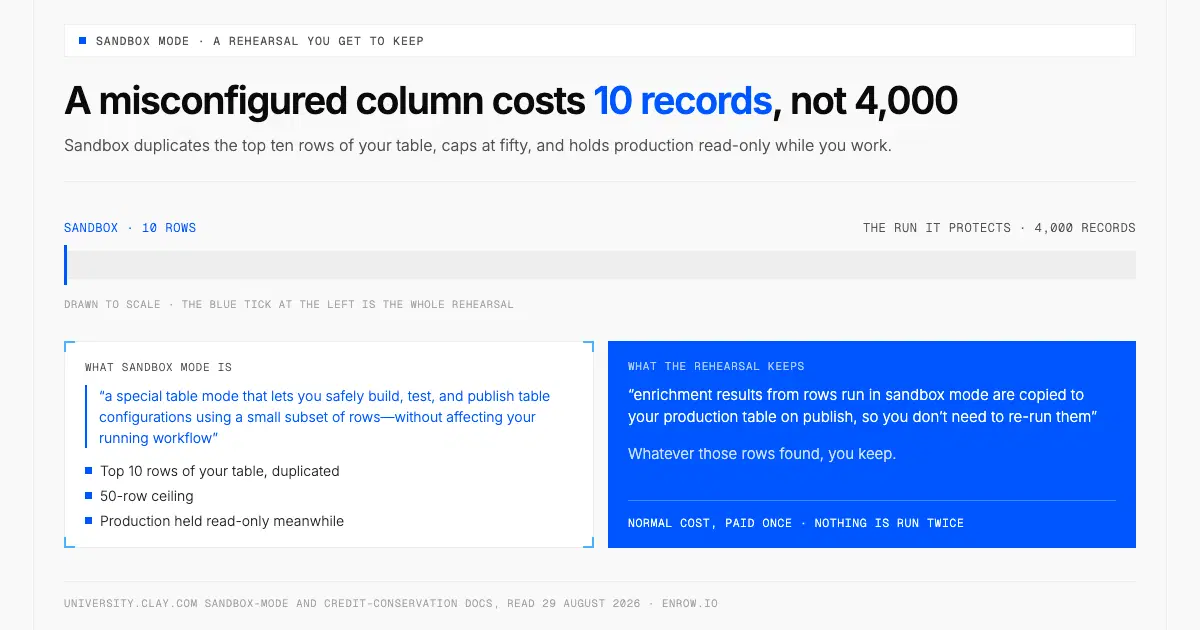
Whatever the rehearsal finds is copied to production on publish, so no row is paid for twice.
Sandbox mode is "a special table mode that lets you safely build, test, and publish table configurations using a small subset of rows—without affecting your running workflow". Starting it duplicates "the top 10 rows from your existing table", caps at 50 rows, and holds production read-only meanwhile.
Here is the part that beats a manual ten-row test: "enrichment results from rows run in sandbox mode are copied to your production table on publish, so you don't need to re-run them." Whatever those rows found, you keep.
Clay formulas, functions, and AI columns
Clay formulas and filters sit on the no-Action list, and a formula buys nothing from the marketplace, so no Data Credits move either. A table carries a dozen for nothing. That makes the formula column the right home for scoring and normalising, and the right place to compute the boolean a paid column later reads in its "Only run if" box. Free column decides. Billable column obeys.
Functions take it further. They "let you convert any enrichment sequence into a reusable workflow", and underneath, "Clay spins up a background mini-table, runs every enrichment step, and returns the outputs to your table as a single column". Clay's own line for what that saves: "what used to be 20–50 enrichment columns becomes a single Run Function column." Functions are "available on all paid plans at no additional cost, including paid legacy plans" and "do not add their own credit or action cost", so fix the logic once and every table calling it inherits the fix.
AI columns bill on their own scale. Fixed AI pricing "charges a flat number of data credits per task" and "applies to 80% of models in Clay", running from 0.2 credits at the cheap end of Clay's table to 7.5 at the top. Reasoning models sit on variable pricing instead, where Clay "charges 0% markup" and you "pay exactly what Clay pays the AI provider". The full ladder is in the pricing breakdown.
Clay templates and Claybooks are two different things
Templates are "ready-to-use starting points that help you implement common workflows in Clay", the sort you "copy a template, input your data, and run the table instantly". Claybooks are the other thing people mean by the word: they "showcase what's possible with Clay through interactive, step-by-step guides", each one highlighting a specific use case rather than handing over a running table. Templates sit at clay.com/templates; Claybooks have their own shelf at university.clay.com/claybooks, where clay.com/claybooks lands after a 301.
The library carries 11 category tags today: AI copywriting, AI personalization, Account research, Enrichment, Qualification & classification, List building, Automated outbound, Claygent, Scoring & signals, AI research, and Automated inbound. Clay publishes no running total, so treat any count you read elsewhere as somebody's guess.
And one habit before running a borrowed table: it arrives carrying its author's assumptions about volume, so open the run settings and check whether auto-update is on and whether the "Only run if" field is empty. A table built for a 200-row demo behaves differently against 12,000 imported rows.
Clay workflows are not Clay tables
Clay's own distinction is the cleanest sentence in its docs. A workflow "is a graph of connected nodes that a trigger starts. It runs once per record or event — where a table enriches a list row by row, a workflow moves a single record along a path, with branching, conditions, and logic on the way."
Six triggers start one: a manual run, a new member in a segment, a segment on a schedule, a plain schedule, a webhook call where Clay "generates a URL, and each POST to it becomes a run", and a CSV upload, which produces "a run for each row of a file you upload". Six node types work inside: run enrichment, run function, run Claygent, update audience members, conditional, and run code.
Three shapes hold logic in Clay. Reaching for the wrong one is how a table ends up 50 columns wide.
| Shape | What it processes | Reach for it when |
|---|---|---|
| Table | A list, row by row | 4,000 accounts sit still and need enriching |
| Workflow | One record or event, along a branching path | Something arrives: a form fill, a webhook POST, a new segment member |
| Function | A saved enrichment sequence, callable anywhere | You are rebuilding the same six columns a third time |
Two subjects this page leaves alone. Waterfalls, which chain providers behind one column and stop at the first valid result, are in how a Clay waterfall runs; export surfaces and ceilings are in Clay's API and integrations. Budget 1 Action per record on the way out.
Which source fills the corner piece
Identifiers are where Clay's ecosystem and a direct data source divide the work. Clay Search names the person. A verified provider turns that name into a work email or a mobile number. Picking who sits in that slot deserves more thought than the column's rate usually gets: how the provider bills, who ran the coverage test behind whatever number you were quoted, how it behaves on a domain that accepts every address, whether its European mobile coverage has documentation underneath it. Those criteria are laid out in how to choose a B2B data provider.
Enrow is one of those providers, and a native Clay integration with its own page in Clay's docs. Clay describes it there as "an email finding and validation tool that also provides mobile phone number lookup", and exposes three table actions: find work email, validate work email, find mobile phone number. You can point them at "your own Enrow API key or the Clay-managed account", so a plan you already pay for drops straight into a Clay column. Behind each answer sit 10+ verification checks, and a domain that accepts everything comes back resolved and delivered instead of stamped risky and dropped.
The honest limit decides where that column can sit. There is no searchable database behind Enrow. Type a filter into it — every VP of Engineering in Berlin at Series B companies — and the result set is empty, since nothing is stored for a filter to run over. The choice was deliberate. A stored index ages between refreshes, and an aged index was the one product we refused to put a price on, so the answer gets resolved at the moment you ask, inside 2 to 5 seconds. Sourcing therefore has to happen before the column runs, and inside a Clay table it already has: Find People or a CRM sync filled those rows before any enrichment woke up. Billing runs off a single pool with no separate phone allowance beside it — 1 credit for an email, 40 for a direct dial, 0.25 for a verification — and nothing leaves that pool unless the result comes back valid. Endpoint detail sits in the email finder API guide.
A table nobody deduped will cheerfully return 4,000 answers. Several hundred of them describe accounts already sitting in your CRM under a slightly different spelling, and they arrive looking exactly like the ones you wanted. Nothing malfunctioned. The list was wrong before Clay ever touched it, and the cold half-hour at the front is the only place that was fixable. Spend it, and the same run hands back more contacts a rep can actually call.
If one of those columns needs a verified source, Enrow's free tier is 50 credits every month, recurring, no card, to test it at enrow.io. Bringing your own key into Clay goes through the API, which opens with any purchase: a plan from $17/month or a one-time credit pack.
ready to stop wasting time?
Connected in minutes.
Verified data in seconds.
FAQ
What is a Clay table?
A Clay table is a spreadsheet-style grid where every row holds one person or one company. Rows arrive from a source: a list builder, a CRM connection, a webhook or a CSV file. Columns either store a plain field or call an external provider that fills the cell in.
What is a Clay workflow?
A Clay workflow is a graph of connected nodes started by a trigger, running once per record or event. Where a table enriches a list row by row, a workflow moves one record along a path with branching, conditions and logic. Six triggers exist, webhook calls and CSV uploads among them.
Is Clay a CRM system?
No. Clay is an orchestration and enrichment layer that writes into a CRM rather than replacing one. HubSpot and Salesforce work in both directions: documented sources that feed rows into a Clay table, and destinations that finished records export to at 1 Action per record.
Is Clay free to use?
Yes, there is a real free plan: 500 Actions and 100 Data Credits a month, unlimited seats and tables, up to 200 rows per table, multi-provider waterfalls, Claygent enrichment and Clay Sequencer for email. Paid plans come with a 14-day trial, Launch starting at $185/mo on a monthly basis.
Do Clay formulas cost credits?
No. Clay lists formulas and filters among the features consuming no Action, and a formula buys nothing from the data marketplace, so no Data Credits move either. Filtering, scoring and normalising are free, which is why qualifying logic belongs in a formula column rather than a paid enrichment.
What is the difference between a Clay template and a Claybook?
Templates are ready-to-use starting points for common workflows: copy one, input your data, run the table. Claybooks are interactive step-by-step guides showing what Clay can do rather than handing over a working table. Templates sit at clay.com/templates under 11 category tags.
How do I stop a Clay table from enriching rows I don't want?
Four documented controls, used together. Import a CSV with "Save and don't run". Switch table-level auto-run off while building, which disables every column setting beneath it. Set auto-dedupe on a domain or LinkedIn URL column. Then gate the paid column with an "Only run if" condition.