Key takeaway Clay ships a public API:https://api.clay.com/public/v0, aclay-api-keyheader, 13 documented operations, and a 67,151-byte OpenAPI 3.1.0 spec live atdevelopers.clay.com/openapi.jsonon 29 August 2026. Five other things get called "the Clay API" and are not — the HTTP column, an inbound webhook source, an outbound signed webhook, a native provider action, the MCP server. Different plans, different ceilings. Where Clay documents a behaviour but publishes no number, this page says so.
A RevOps lead forwarded me a blog post last month as proof that Clay had no API. Plenty of write-ups still say that. They describe a product that has moved: the base URL is public, and the spec downloads clean. I pulled it on 29 August — 67,151 bytes, OpenAPI 3.1.0, 13 operations.
The developer platform never got its own changelog entry, which is part of why the stale answer keeps ranking. Below is the wiring: what creates rows, what fills cells, what your code reaches, and every published ceiling.
Does Clay have an API?
Yes. Clay's public API sits at https://api.clay.com/public/v0, authenticates on a clay-api-key header issued under Settings → Account → API keys — still marked beta — and exposes 13 operations spanning an identity check, routine runs, batch runs, Searches and table queries. A rejected key answers {"message": "Authentication failed"}; keys stay server-side.
The spec is machine-readable, so your client can generate itself: openapi.json declares info.title "Clay Public API", info.version "0" and a single ClayApiKey scheme. There is no openapi.yaml.
Clay integrations: ten surfaces, and telling which one you need
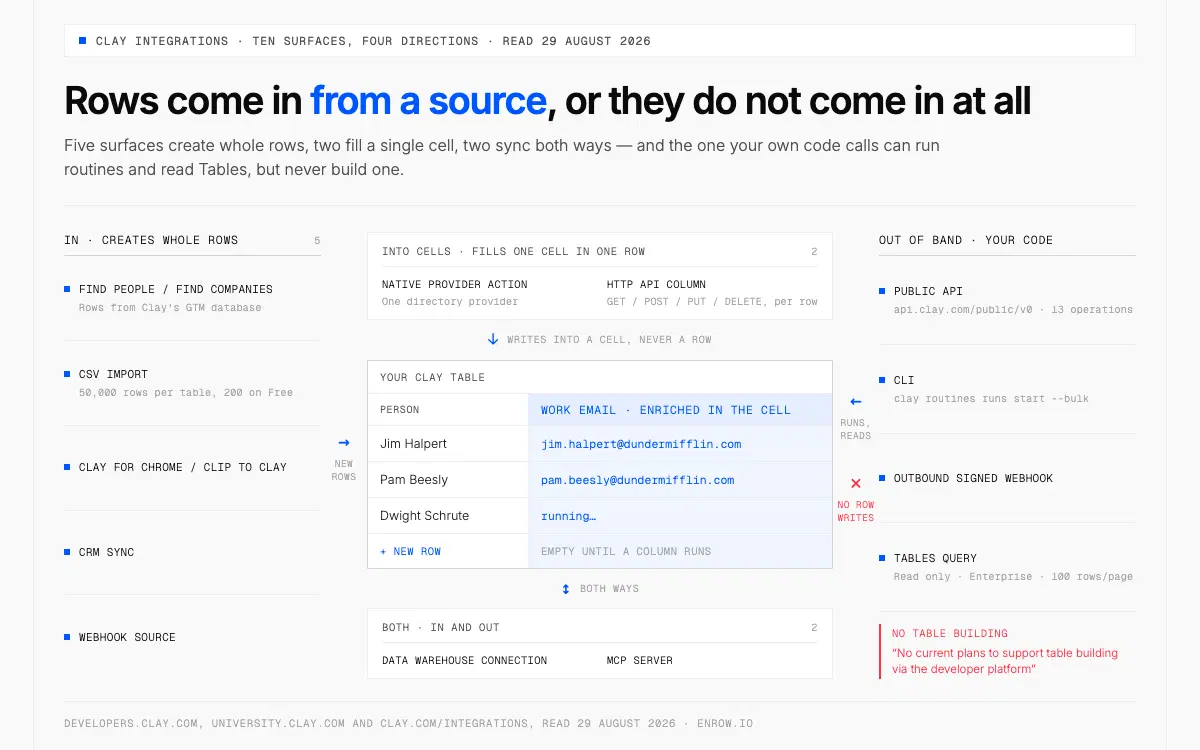
Rows get in through a source or not at all: the public API reads tables but never builds one.
Most tickets worded "we need the Clay API" are really a source or a column, which is the difference between a sprint and a plan upgrade.
| Surface | Direction | What it moves | Lowest plan listed |
|---|---|---|---|
| Find People / Find Companies | in | Rows from Clay's GTM database | None published; Free lists unlimited search |
| CSV import | in | Up to 50,000 rows per table, 200 on Free | None |
| Clay for Chrome / Clip to Clay | in | Data scraped off a webpage | None |
| CRM sync (HubSpot, Salesforce) | in | Objects, list views, reports | Growth |
| Webhook source | in | JSON posted to a Clay URL | Growth |
| Native provider action | into cells | One directory provider, as a column | None; phones from Launch |
| HTTP API column | into cells | GET/POST/PUT/DELETE, per row | Growth |
| Data warehouse connection | both | Snowflake, Fivetran, Postgres, Databricks, BigQuery | Growth |
| Public API, CLI, outbound webhook | out of band | Routine runs, batch jobs, Searches, table reads | All, per Clay's docs |
| MCP server | both | Workspace exposed to Claude, ChatGPT, Copilot, Glean | Controls from Launch |
One disagreement to carry before you plan around that last block. university.clay.com/docs/clay-api-cli says the developer platform is "available across all Clay plans, including free and trial plans", with API and CLI calls consuming "the same credits and actions as the equivalent work done in-product". The pricing FAQ lists "Clay API access" as an Enterprise bullet, and the compare table carries no API row. Check your own workspace first. Two related notes from the same doc: the CLI and API are supported on Mac and Linux in open beta, not Windows, and the Agent Plugin beta runs on modern plans plus legacy plans through the end of 2026.
Launch is $185/mo, $167 billed annually; Growth is $495, or $446; the ladders sit in Clay pricing. Clay counts that provider directory three ways: "200+ providers" in its navigation, "150+ data partners" in the pricing FAQ, and 157 unique /integrations/data-provider/ URLs when I counted clay.com/integrations on 29 August, across 24 categories.
Routines: the unit of work your code can call
A routine is Clay logic with an address: build a custom function in the UI, enable its API integration, take the t_... id and prefix it function:.
Small jobs run inline. POST /routines/{routine_id}/run takes an items array of minimum 1 and maximum 100 — Clay titles that reference page "Execute a routine against 1-100 items", so the cap is in the heading. It replies 202 with a routine_run_id, and accepts an optional webhook_id.
Bigger jobs are four calls: request a presigned URL from run-batch/upload-url, PUT the JSONL as application/x-ndjson with lines shaped {"id": "row-1", "inputs": {"domain": "clay.com"}}, POST to run-batch/start, then GET /routines/run-batch/{id}/results. The CLI folds all four into clay routines runs start function:t_abc123 --bulk rows.jsonl, and clay login --device authenticates on a headless box.
Searches query Clay's proprietary GTM database, in advanced search (beta, nested boolean) or structured filters, under the caps in the limits table below. Exceed one and Clay returns HTTP 402 naming it. Caveat: university.clay.com/docs/clay-api-cli prints 10,000 results per request on paid self-serve where developers.clay.com/searches prints 500. I quote the developer docs.
And the boundary nobody on page one states. Clay says there are "no current plans to support table building via the developer platform". Tables reads only, Enterprise only, at POST /public/v0/tables/query, no list-tables endpoint. Rows get in through a source or not at all — build order for that side is in how to use Clay.
What Clay tells you when a call fails
Clay documents its failure behaviour thoroughly and publishes no number for where the throttle sits. Settle that before sizing a job.
You get HTTP 429 against a per-workspace request rate limit, Retry-After in seconds, and X-RateLimit-Limit, X-RateLimit-Remaining, X-RateLimit-Reset "when available". The CLI raises exit code 4. Clay's advice is to treat 429 as retryable and "prefer batch and async endpoints over tight polling loops".
Non-2xx bodies are JSON with a human-readable message. Clay states that "error response bodies do not currently include stable error codes", so your switch runs on the status — 401 and 403 auth, 404 missing, 409 and 422 validation, 429 rate, 5xx transient. And a 202 on an async endpoint is not success. It means still running.
The HTTP API column: wiring a source Clay has never heard of
This column aims Clay at something outside its directory: it "lets you send or retrieve data from any tool or database using an API endpoint, even when Clay doesn't offer a native integration", across GET, POST, PUT and DELETE. Every status code Clay documents for it describes the endpoint you called rather than Clay, which is where to look when a column turns red.
| Code | Clay's stated cause |
|---|---|
| 200 OK | Everything worked correctly |
| 400 Bad request | Check JSON body formatting, syntax |
| 401 Unauthorized | Verify API key or authentication token |
| 402 Request failed | Review API documentation requirements |
| 403 Forbidden | Check API key permissions and scopes |
| 404 Not found | Verify endpoint URL is correct |
| 409 Conflict | Check for duplicate or conflicting data |
| 429 Too many requests | Configure rate limits in your enrichment |
That last row inverts the usual arrangement: the throttle is yours to set, not Clay's to impose. Two fields do it, Request limit and Duration (ms), and Clay's own example of 10 over 1,000 ms is ten requests a second.
Two credential warnings, both Clay's. A key typed into the Headers field is "visible in plain text to anyone with access to the table column", so use a saved account. But editing one "will affect every HTTP API enrichment column across your workspace that uses it".
Clay webhooks point two ways and share nothing but the word
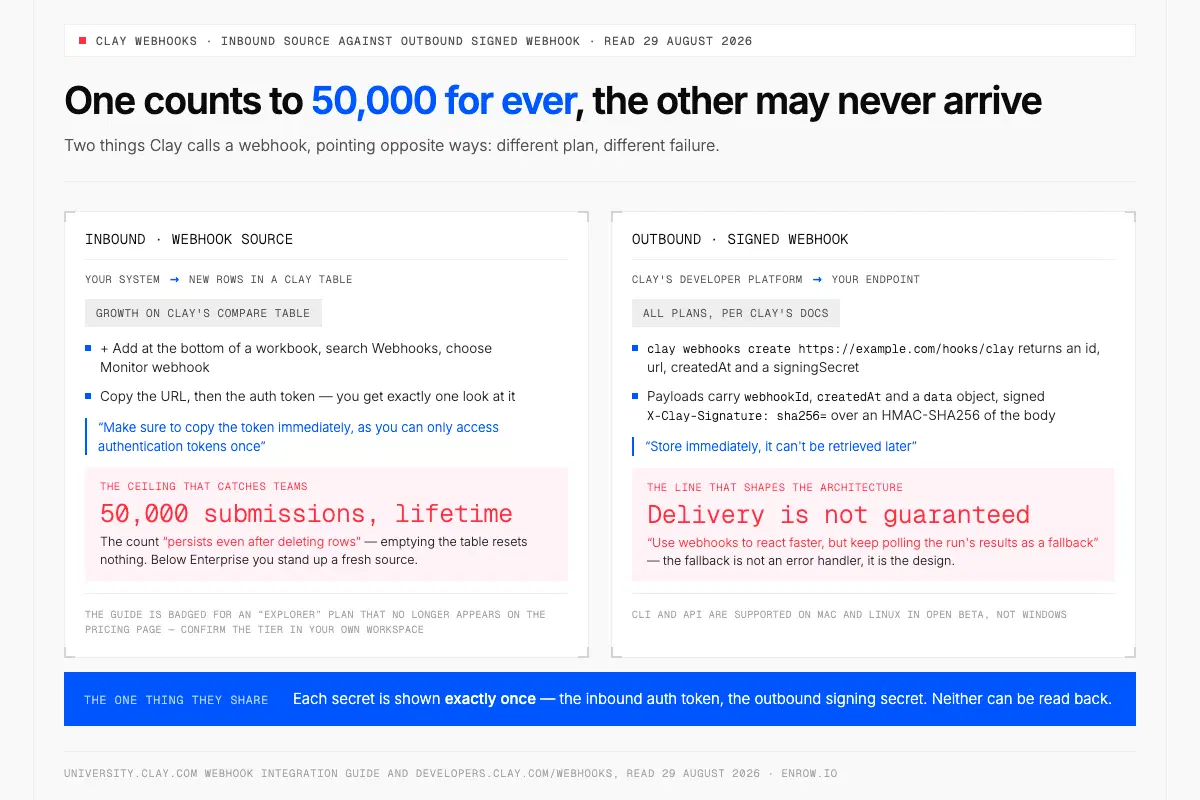
Emptying the table gives back none of the 50,000 submissions, and an outbound webhook may never arrive.
Inbound is a source: + Add at the bottom of a workbook, search Webhooks, choose Monitor webhook, copy the URL. The auth token gets exactly one look — "make sure to copy the token immediately, as you can only access authentication tokens once." Then the ceiling that catches teams: a webhook source accepts 50,000 submissions, and that count "persists even after deleting rows". Emptying the table does nothing; below Enterprise you stand up a fresh one. The guide is badged for an "Explorer" plan that no longer appears on the pricing page, so confirm the tier in your own workspace.
Outbound belongs to the developer platform. clay webhooks create https://example.com/hooks/clay returns an id, url, createdAt and a signingSecret you should "store immediately, it can't be retrieved later". Payloads carry webhookId, createdAt and a data object, signed as X-Clay-Signature: sha256= plus an HMAC-SHA256 over the body. Then the line that should shape your architecture, not your error handler: "Webhook delivery is not guaranteed. Use webhooks to react faster, but keep polling the run's results as a fallback."
Clay and LinkedIn: Find People limits, and what the Chrome extension really does
Find People is where LinkedIn-shaped lists usually start, under the ceilings in the table below, plus exclusions of 300,000 people and 100,000 per source across three sets, matched on LinkedIn URLs. Clay's documentation never names the underlying data source, so neither will I.
The Chrome extension is where searchers guess wrong, so here it is flat: Clay's documentation describes both of its extensions as extraction tools, not contact-reveal tools. Clay for Chrome pulls structured data off a page, mapping fields such as name, website, LinkedIn or Crunchbase into a table. Clip to Clay saves whole pages. Its listing reads 4.4 out of 5 from 9 ratings, 10,000 users, version 1.0.0, updated 10 April 2025.
Clay MCP: your workspace inside an assistant
Clay's MCP server connects a workspace to Claude, ChatGPT, Microsoft Copilot and Glean, administered at Settings → MCP users. Credit controls arrive on Launch, Growth and Enterprise; audience controls are Enterprise-only. Billing matches the product exactly: "If a Function that finds someone's email and phone number costs 12 credits in a Clay table, it costs 12 credits when a rep triggers it from Claude or ChatGPT." The agent plugin is a separate thing again: Clay's developer docs describe it as shipping Clay's skills plus the clay CLI to coding agents such as Claude Code, Codex and Cursor, so it lives in a terminal rather than a chat client.
Every ceiling Clay puts in writing
Almost every limit in Clay is 50,000, and the webhook source is the one to design around, because its counter survives deletion.
| Limit | Published value | Source |
|---|---|---|
| Rows per table | 50,000 rows | "across all pricing plans" |
| Rows per table, Free | 200 rows | Free plan card |
| Webhook source submissions | 50,000, lifetime | Persists after deletion |
| Inline routine run | 1–100 items | POST /routines/{id}/run |
| Tables query page size | 100 rows | Enterprise only |
| Searches (API), results per request | 500 paid · 50 Free | developers.clay.com |
| Searches (API), volume | 1,000,000/yr paid · 10,000,000/yr Enterprise · 100/mo Free | Annual resets 1 Jan UTC |
| Find People | 500 per cell · 50,000 per search | 100 per company |
| Salesforce Reports import | 2,000 records | Salesforce API restriction |
| Public API rate limit | Behaviour published, no figure | 429 plus Retry-After |
Bulk enrichment over 50,000 records is Enterprise-only. And one line from Clay's sources doc is worth reading before a big import: at the row limit, "Clay imports records up to the limit and stops automatically. No error message is displayed." Clay's own remedies are to split the file by filter or date range, or to move to auto-delete tables and bulk enrichment on Enterprise.
Giving Enrow a column in your table
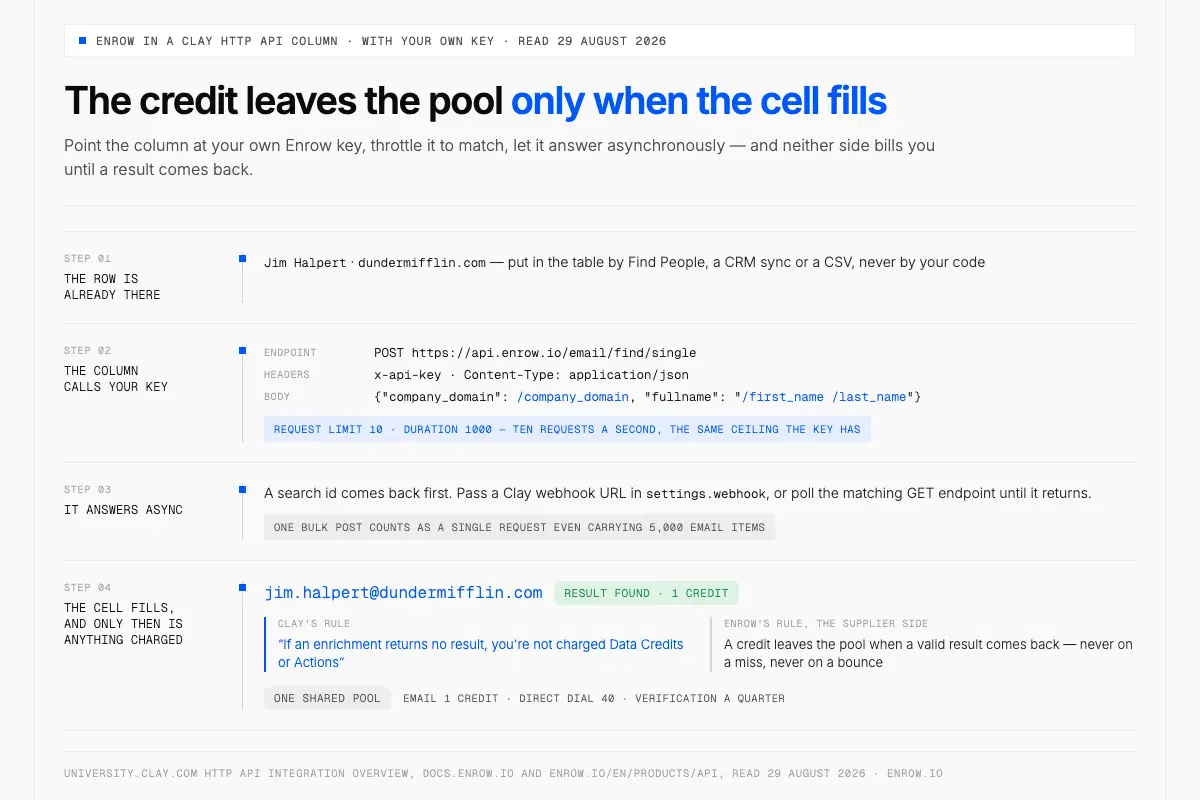
Neither Clay nor Enrow bills an empty lookup, so a chain that retries only pays when something comes back.
Enrow has sat in Clay's directory since 1 September 2024, under Contact Data and Contact Data Verification, a Clay-built integration labelled "Included in All Plans". Three actions run as columns, each returning a qualification status beside the result.
| Clay action | What it needs | Billing label on Clay's listing |
|---|---|---|
| Find Work Email with Enrow | Full name, plus company domain or name | Clay Credits or Bring Your Own Account |
| Find mobile phone number with Enrow | A profile URL, or name plus company info | Clay Credits or Bring Your Own Account |
| Validate Work Email with Enrow | The work email | Free Action |
Enrow's own doc records a Clay-credit cost on that verification where Clay's listing calls it free, so confirm it in-app. With your own key, point an HTTP API column at https://api.enrow.io/email/find/single, headers x-api-key and Content-Type: application/json, body {"company_domain": /company_domain, "fullname": "/first_name /last_name"}. It answers async, so pass a Clay webhook URL in settings.webhook, or poll the search id on the matching GET endpoint until it returns. Set Request limit 10 and Duration 1000 to match: every Enrow POST endpoint allows ten requests a second per key, and one bulk POST counts as a single request even carrying 5,000 email items.
Here is the part that matters in a chain that retries. Clay's rule: "if an enrichment returns no result, you're not charged Data Credits or Actions." Enrow's matches from the supplier side — a credit leaves the pool when a valid result comes back, never on a miss. When something lands, an email costs 1 Enrow credit, a direct dial 40, a verification a quarter, out of one shared pool. Ordering is covered in Clay enrichment waterfalls.
Behind each address sit more than ten verification passes, catch-all domains resolved and delivered rather than stamped risky. Match rate runs near 60% and bounce under 1% on our own files — measurements we take, never numbers we promise.
The list Enrow will not build for you
Enrow resolves people you have already identified. An email needs a full name and a domain; a mobile needs a profile URL, or a name with company context. Nothing sits behind it to browse, so "every VP of Engineering in Amsterdam at Series B companies" comes back empty. That is deliberate. Stored rows decay quietly and real-time resolution does not, and I would rather lose the search feature than ship a stale one. Inside Clay it costs you nothing, because Find People, a CRM sync or a CSV already does that job upstream — how to choose a B2B data provider sets out the criteria.
If your pipeline is code rather than a workbook, the same lookups answer directly. Enrow's API issues a key without a sales call, with official SDKs now in seven languages — JS/TypeScript, Python, PHP, Go, Java, Swift, Rust — all early access, from GitHub source. The MCP server EnrowAPI/enrow-mcp puts the same three lookups behind an assistant, so Claude or Cursor can resolve a contact without a table in between. Endpoint detail lives in email finder API.
ready to stop wasting time?
Connected in minutes.
Verified data in seconds.
FAQ
Is Clay's API free?
The developer platform carries no surcharge. Clay's docs state it is available across all plans including free and trial, and that API and CLI calls consume the same credits and actions as in-product work. Free's 500 actions and 100 data credits a month are the constraint.
What is the difference between Clay's HTTP API and Clay's public API?
Clay's HTTP API and Clay's public API face away from each other. The HTTP API is a column inside a Clay table that calls a third-party endpoint and writes the response into a row, gated at Growth on Clay's compare table. The public API at https://api.clay.com/public/v0 is the surface your own code calls from outside Clay, to run routines, start batch jobs and query Searches.
What plan do I need for Clay's HTTP API and webhooks?
Growth. Clay's compare table marks "HTTP API integrations" and "Automate any signal via webhooks" as not included on Free or Launch, with CRM and warehouse connections on the same tier. The public API, CLI and MCP server run on every plan per Clay's developer docs.
What are Clay's API rate limits?
Clay publishes the behaviour and not the number. The public API enforces a per-workspace request rate limit, returns HTTP 429, sends Retry-After in seconds and adds X-RateLimit-Limit, X-RateLimit-Remaining and X-RateLimit-Reset when available. No requests-per-second figure appears in the docs.
Can I write data into a Clay table with the API?
No. Clay states there are no current plans to support table building through the developer platform. Tables is read-only and Enterprise-only, queried at POST /public/v0/tables/query with a page size capped at 100 rows. Rows enter through a source.
Is there a webhook limit in Clay?
Yes, and it is permanent. A Clay webhook source accepts 50,000 submissions, and Clay documents that the limit "persists even after deleting rows", so emptying the table resets nothing. Below Enterprise the fix is a new source; Enterprise lifts the cap with auto-delete tables.
What does the Clay Chrome extension do?
The Clay Chrome extension scrapes pages rather than revealing contacts. Clay for Chrome extracts structured data from a webpage, an autodetected list or an individual profile, into a Clay table, mapping fields like name, website, LinkedIn, Twitter or Crunchbase. Clip to Clay, the second extension, saves entire webpages to a table.
Does Clay have an MCP server?
Yes, connecting a workspace to Claude, ChatGPT, Microsoft Copilot and Glean, managed at Settings → MCP users, with credit controls from Launch upward and spend resetting on the 1st of each month, midnight UTC. Clay charges no MCP premium: 12 credits in a table is 12 credits from an assistant.
So open your workspace, list what you actually run, and put each one in a row of the first table. The answer to "can we automate this" is usually already in the account, one tier up or one column across.
If what you are short of is a verified email or an EU direct dial, Enrow sits in the directory as a column you can switch on today. The free tier hands you 50 credits at the start of every month, indefinitely, and asks for no card to do it, for the app, the Chrome extension and AI assistants. Plugging your own Enrow key into the column goes through the API, which opens with any purchase: a plan from $17/month or a one-time credit pack.