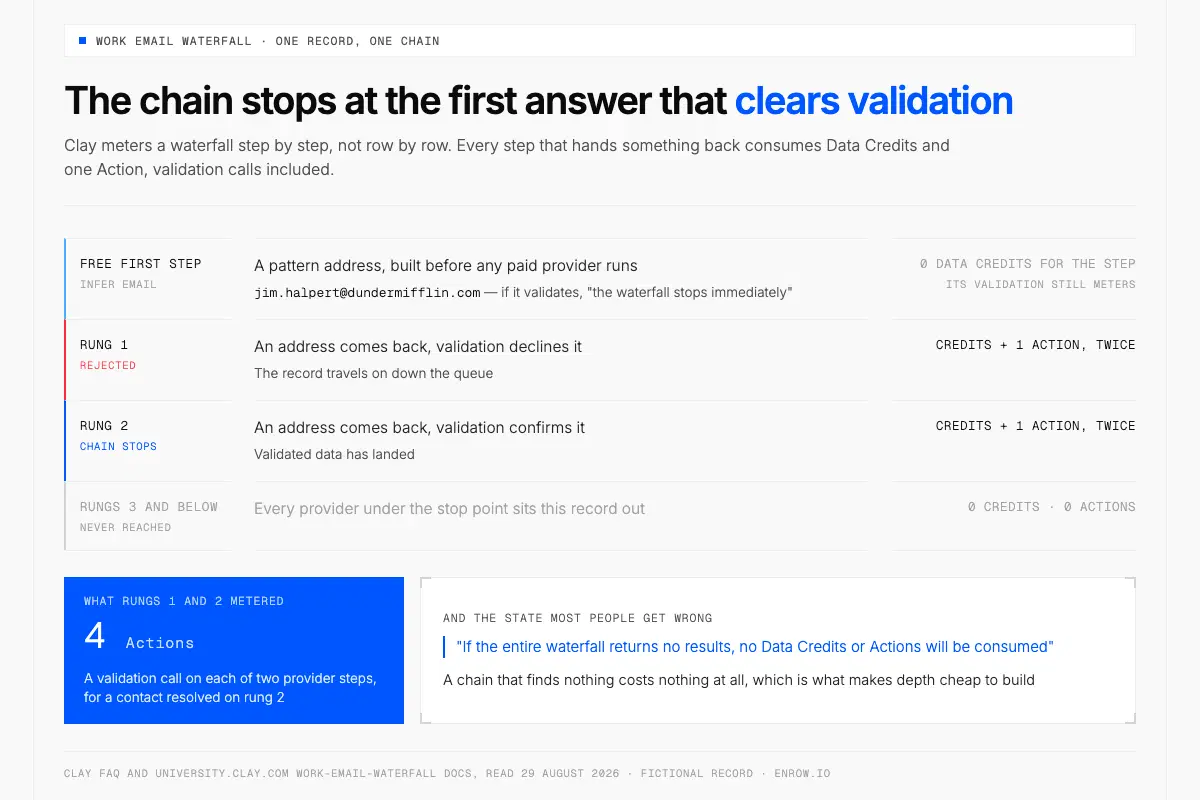
Clay meters per step, not per row, so a record pays for every step that hands something back.
Key takeaway A Clay waterfall queues suppliers behind one enrichment column and stops at the first answer clearing validation. The meter runs per step, not per row: "Each step of the waterfall that returns data will consume Data Credits (unless using API keys) and an Action", validation steps included, and "If the entire waterfall returns no results, no Data Credits or Actions will be consumed." Priced at Clay's entry rate, Clay's own 100-contact illustration comes to 95 Data Credits, $4.75. Full configuration holds the dials that decide how far a chain runs: a free Infer Email step valid roughly 31% of the time on Clay's software-industry test, four validation strategies, and a duplicate threshold shipping at 0.
Enrichment in Clay happens one column at a time. Add the column, aim it at the marketplace the pricing page puts at "150+ providers", feed it a company domain, and the cell fills with a work email, a mobile number or a headcount figure. Data Credits buy the data. Actions buy the orchestration around it, flatly: "Each record enriched or exported counts as 1 Action—regardless of data source or provider."
Waterfall enrichment swaps the single supplier for a queue, which every page on this query already draws. What moves your results is the metering at each rung, a settings screen most people never open, and three columns Clay ships hidden. Disclosure: I run a data company listed in that marketplace, so weigh the section near the bottom accordingly.
What is waterfall enrichment?
Waterfall enrichment sends one record through several data providers in a fixed order and stops at the first result that clears validation. Clay's guide calls it "a fallback chain, not a single lookup." A provider coming back empty passes the record down. Clay's blog calls the same object a data waterfall: "a sequential enrichment method where you query multiple data providers one after another." Coverage is why it exists: no vendor covers a whole list.
Any field several vendors sell can carry a chain — work emails, mobile numbers, professional profile URLs, revenue, headcount. Mobile is the hard case, where Clay reports coverage "rarely clears 90 percent on any one source." Waterfalls run on every plan, Free included, at 100 Data Credits, 500 Actions/mo and 200 rows per table. Launch opens at $185/mo monthly with 2,500 credits and 15,000 Actions, Growth at $495/mo with 6,000 and 40,000. Both ladders in full: Clay pricing.
The rule that meters every step
A Clay waterfall bills per step that hands something back, not once per row, and not at all on an empty chain. Four states, all four documented on Clay's FAQ.
| What happens at a step | Data Credits | Actions |
|---|---|---|
| A provider step returns data | consumed, "unless using API keys" | 1 Action |
| A validation step returns a result | consumed, "unless using API keys" | 1 Action |
| Validated data has landed | 0 for every step below it | 0 |
| The chain returns nothing at all | "no Data Credits or Actions will be consumed" | 0 |
Read the fourth row first. It is the one most people get wrong about waterfalls: a chain that finds nothing costs nothing at all, which is what makes depth cheap to build. Then the first two rows, where the assumption that a row equals one Action falls apart. A record answered on the first rung meters once. A record that walks three rungs meters three times, and a step returning an address your validation bar then declines leaves that record travelling on down the queue. How far it travels is a setting. All of them sit behind Full configuration.
Putting real numbers on a chain
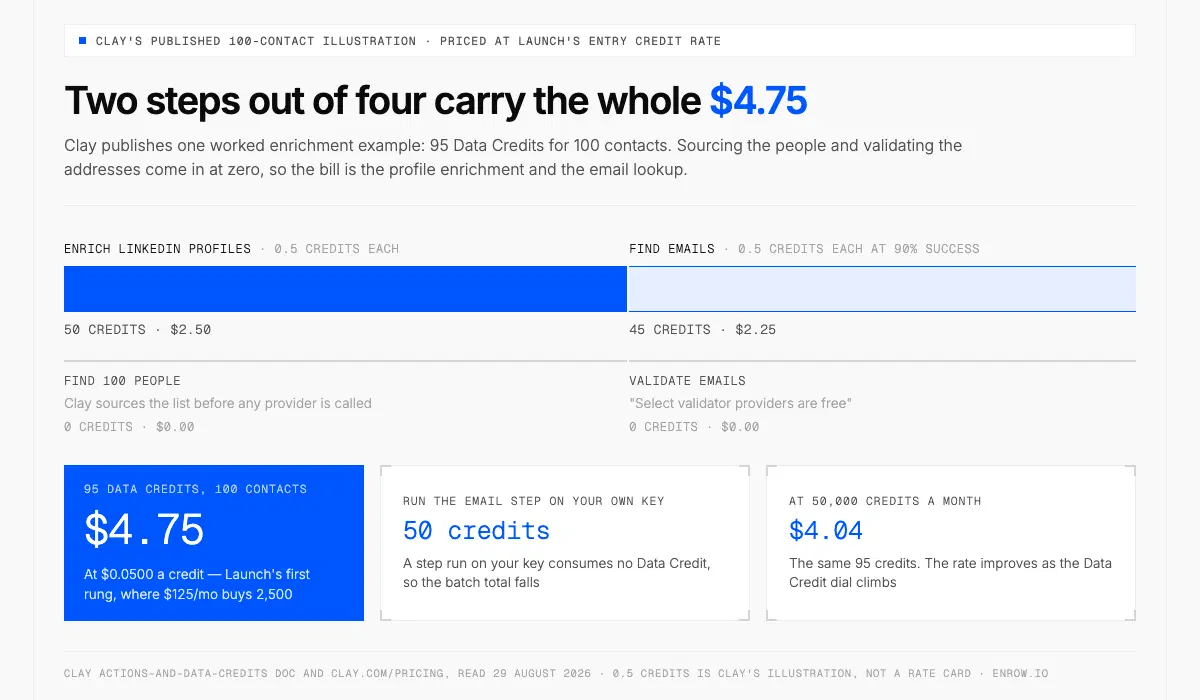
Only two of the four steps cost anything, and together they come to $4.75.
Clay publishes one worked enrichment example, and priced at Clay's own entry credit rate it comes to $4.75 for 100 contacts.
| Step in Clay's 100-contact illustration | Data Credits | At $0.0500/credit |
|---|---|---|
| Find 100 people | 0 credits | $0.00 |
| Enrich LinkedIn profiles, 0.5 credits each | 50 credits | $2.50 |
| Find emails, 0.5 credits each at 90% success | 45 credits | $2.25 |
| Validate emails, "select validator providers are free" | 0 credits | $0.00 |
| Total | 95 credits | $4.75 |
Run the email step on your own key and Clay's total for the batch falls to 50 Data Credits. Two cautions on the arithmetic. The 0.5-credit rate is an illustration, not a price list — the doc's actual statement is "Varies (0.5–10+ credits based on data type)", a fully enriched record "typically" 6 to 20 credits. And $0.0500 is the first rung of Launch's Data Credit dial, where $125/mo buys 2,500 credits; the rate improves as the dial climbs, so at 50,000 credits a month the same 95 credits cost $4.04.
Actions are the half you model yourself, since Clay publishes no worked waterfall showing the Action total for a record that passed three providers. The rule hands you the arithmetic: count the steps that returned something, validation steps included. A contact resolved by the second provider, after the first returned an address validation rejected, with a validation call on each, reads as 4 Actions — $0.016 at $0.0040 on Launch's 15,000/mo rung. Actions are the cheap meter: "Each action costs a few tenths of a penny." Confirm the count on ten rows; the product prints the exact cost beside each option before it runs.
Ordering the queue, and what you feed it
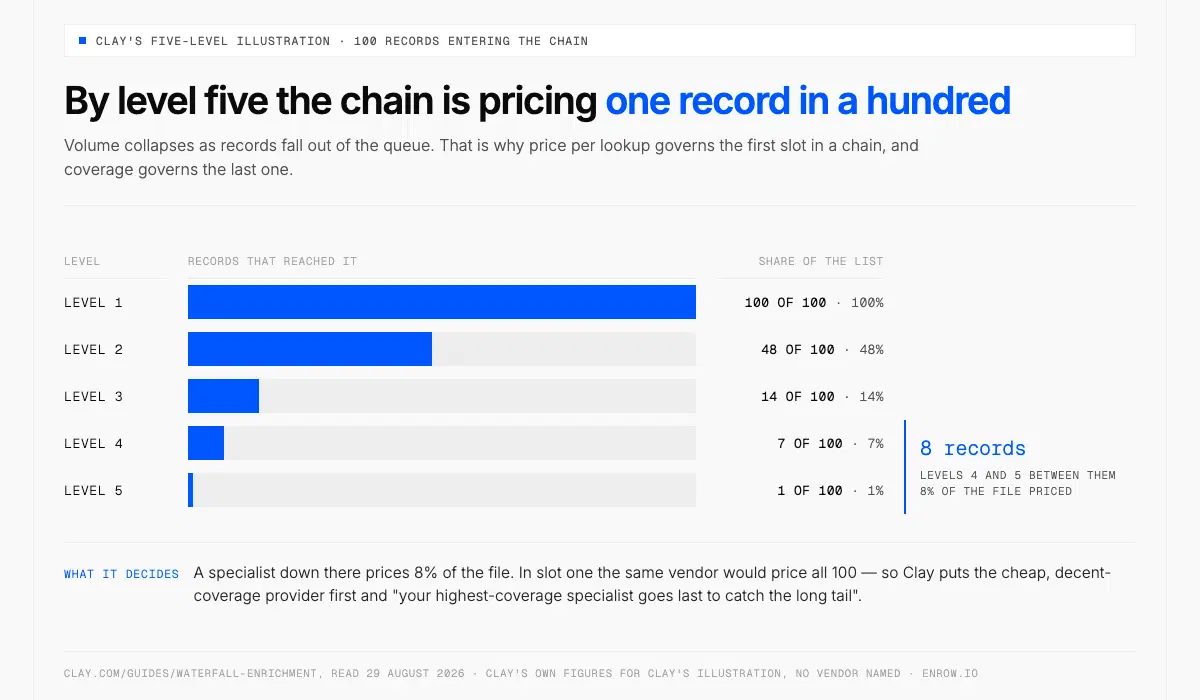
One record in a hundred reaches level five, so price decides the first slot and coverage the last.
Fix the input before you touch provider order, because it costs nothing and it is the bigger lever. Clay 101: "The primary input required is the Company Domain. Ideally, also include Personal Linkedin URLs. If unavailable, use fallback combinations like Full Name + Company Name or Full Name + Personal Email." Hand a chain a company name where a domain belongs and every level resolves the company before it looks for the person. Results sag from the top down, and provider order takes blame it never earned. Infer Email will not run without a domain either.
Then order. Volume collapses fast as records fall, which is why price per lookup governs the first slot and coverage the last. Clay's five-level illustration over 100 records shows the collapse.
| Level in the chain | Records that reached it | Share of the list |
|---|---|---|
| Level 1 | 100 of 100 records | 100% |
| Level 2 | 48 of 100 records | 48% |
| Level 3 | 14 of 100 records | 14% |
| Level 4 | 7 of 100 records | 7% |
| Level 5 | 1 of 100 records | 1% |
Levels four and five saw 8 records between them, so a specialist down there prices 8% of the file. In slot one the same vendor would price all 100.
Clay's own doctrine follows that curve. Price decides slot one — "Put a cheap, decent-coverage provider first and it clears the bulk of the list at the lowest price per record", so that "your most expensive provider runs on the fewest records." Quality at your confidence bar decides the middle, since a loose source stopping the chain early costs you a bounce three weeks later rather than a line on an invoice. Coverage decides the end, where "your highest-coverage specialist goes last to catch the long tail."
Rearranging is free. Clay's docs let you "reorder, add. or delete your waterfall data providers", and a toggle beside each one skips it without deleting it. Saved templates "cannot be edited, only created and deleted."
The three dials in Full configuration
Adding a Work Email waterfall offers Quick setup or Full configuration, and every control that changes what a chain spends sits on the second path. Given the per-step rule, all three are spend controls rather than hygiene toggles.
| Dial | Ships as | What it changes |
|---|---|---|
| Infer email | a toggle, "Include infer-email enrichment as first step?" | a free pattern-built address ahead of every paid provider; if it validates, "the waterfall stops immediately" |
| Validation | four strategies plus a "Require validation success?" switch | what counts as good enough for the chain to stop on |
| Threshold for duplicate results | 0, which disables it | "Set to 2 or higher to stop the waterfall after the same invalid email appears that many times" |
Clay is unambiguous on the first: "Infer Email is completely free. The validation step does cost Clay credits, but it is cheaper than running the waterfall without it." Default pattern first.last@domain.com, and on Clay's internal software-industry test it "returned a valid email roughly 31% of the time." Close to a third of that file resolving before a paid provider is touched. Your own rate tracks how patterned your segment's domains are.
Validation strategy is the real stop control, and Clay states the trade in one sentence: "too strict and you'll over-spend chasing elusive emails; too loose and you'll accept results that bounce." Of the four settings, Conservative is the one Clay aims at cold outreach; the other three buy reach by lowering the bar.
| Strategy | Clay's description | Reach for it when |
|---|---|---|
| Conservative | "The safest approach, including all verified email types" | cold outreach, "where bounce rates affect sender reputation" |
| Balanced | "Moderate risk level, including catch-alls" | accept-all domains are a large slice of the file |
| Aggressive | "Higher risk level, good for casting a wide net" | "volume and coverage take priority over precision" |
| Advanced | "Manual configuration for fine-grained control" | you already know which email types you accept |
Beside them sits "Require validation success?", accepting an address only where the validator "explicitly confirms it as valid." Catch-alls ride the same switch. Clay counts them valid by default and, per Clay 101, "defaults to ZeroBounce" for the check, with an "Only mark 'Safe to Send' emails as valid" toggle that drops them again. Whether accept-all domains belong on a send list is a separate call.
The duplicate threshold pairs directly with the billing rule. Clay on the default: "Left at 0, the waterfall will continue through every provider, spending credits on a result it's already decided to reject." Set it to 2 and the queue halts the second time the same rejected address surfaces — "especially useful when paired with the Conservative strategy", which is exactly where a strict bar sends the most records downstream.
Keeping rows out that were never worth enriching
Nothing is charged on a total miss, so money never leaks there. It leaks on rows returning good answers nobody was going to use: the duplicate account, the personal address, the contact who left in March.
Clay's credit-conservation guide holds the mechanics. Gate the column with an "Only run if" condition under Run Settings, where a Use AI button takes the rule in plain language. Keep auto-update off while you build, since a column re-runs "whenever its input values change". Filtered views enrich only the rows you are looking at, and a Lookup column reads what another table or your CRM already holds before you buy it twice. Connect your own provider keys and the pricing page is explicit about what changes: "Each run will count as one Action, but no Data Credit will be used." Clay's own docs size that at a 50–80% saving on Data Credits. Check the feature against your plan before you build a table around it — the pricing page and the credit-conservation guide describe its availability differently, and the product is the tiebreak. That plumbing is the email finder API job.
Reading what the chain actually did
The three columns that make a waterfall auditable all arrive switched off. "Output name of successful provider?" adds a column naming the provider that landed each result. "Hide provider columns?" is on by default. And per Clay 101, "Validation columns are hidden by default. Open the Columns Panel and unhide these columns to inspect detailed validation steps." Turn the first on before your next run at volume, or slot order stays a decision you re-guess every quarter with nothing underneath it.
Spend has its own instrumentation and the useful view is not the headline one. Settings → Usage covers the workspace, filterable by date, owner and integration, exportable as CSV. The table-level dashboard, reached from the Credits popover or the Table History button, holds Column view: "your spend broken down by each column in your table, helping you identify which enrichments are using the most credits." Time view and Run view sit alongside. One limit before you go looking — "Historical data for the table credit dashboard begins on November 5th, 2025."
How deep is deep enough
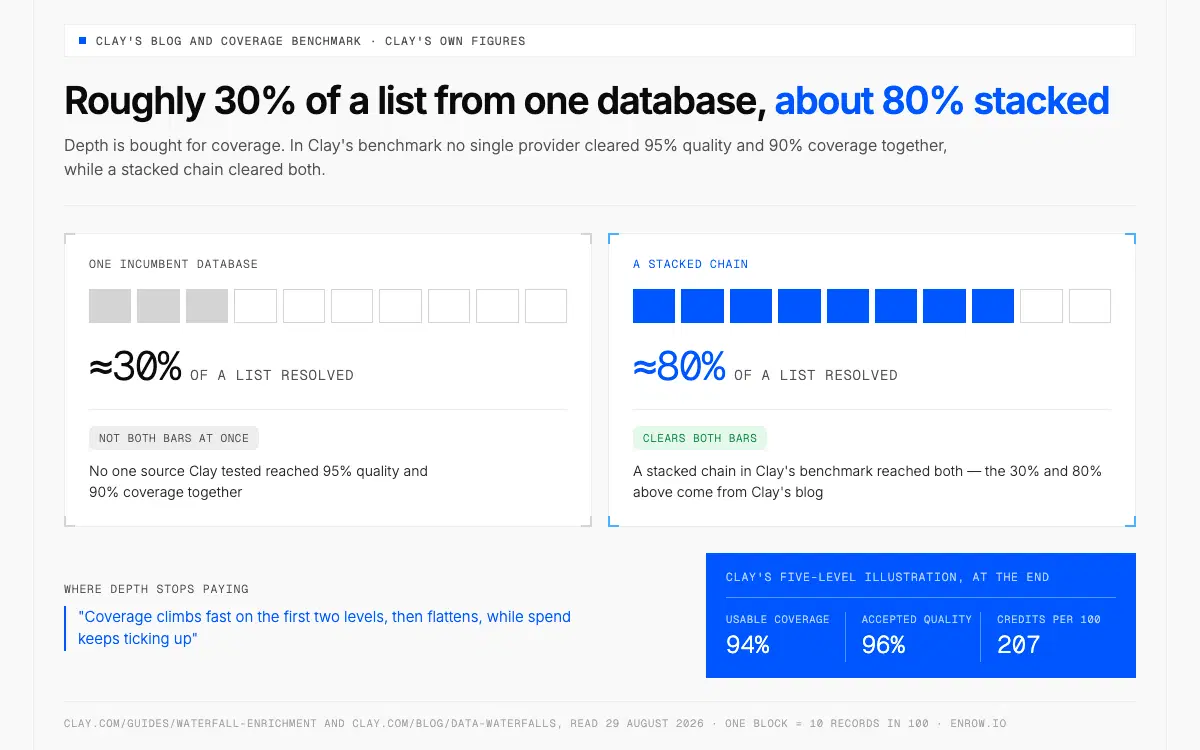
No single provider in Clay's benchmark cleared 95% quality and 90% coverage together; a stacked chain did.
Depth buys coverage on the first two levels and then flattens, and Clay draws that curve itself: "Coverage climbs fast on the first two levels, then flattens, while spend keeps ticking up." Your confidence bar bends the same line — "A stricter cutoff rejects borderline matches, so quality climbs while coverage dips and cost rises." For cold outreach Clay says set it strict, because a wrong email is worse than a missing one. I would not argue.
The case for stacking is Clay's own, measured by Clay on Clay's files, and it is strong. Its benchmark reports no single provider clearing 95% quality and 90% coverage together, while a stacked chain clears both. The five-level illustration finishes at 94% usable coverage, a balanced threshold accepting 96% quality for 207 Data Credits per 100 records: $10.35 at the entry rate, $8.80 at the 50,000/mo rung. Clay's blog draws the shape from the other end, one incumbent database resolving roughly 30% of a list against about 80% stacked.
Clay sizes plans in records per month rather than credits — the honest unit once a record's credit cost moves with whatever chain sits behind it — and puts Launch at roughly a thousand records a month, Growth from one to ten thousand.
| Plan | Data Credits per month | Clay's own guideline |
|---|---|---|
| Launch | 2,500–10,000 credits/mo | "~1,000 records/month" |
| Growth | 6,000–100,000 credits/mo | "1,000–10,000 records/month" |
| Enterprise | 100,000+ credits/mo | "10,000+ records/month" |
Clay attaches a caveat: "The more API keys you connect, the fewer Data Credits you'll need." Two numbers belong to the same decision. Unused Data Credits roll over up to 2× the monthly allowance on Launch and Growth, so a quiet month funds a heavy one, and a single bulk run above 50,000 records is an Enterprise feature.
Where a verified source sits in the queue
A chain judges a provider on narrower ground than a buyer does — how fast the call returns, and what the answer looks like when there is nothing to give back.
Enrow has sat in Clay's marketplace since 1 September 2024, a Clay-built integration filed under Contact Data and Contact Data Verification. Three actions: find work email, find mobile phone number, and validate work email, which the listing marks a Free Action. The two finders run either on Clay credits or on an Enrow account you connect yourself. Answers land in two to five seconds, so the column does not hold a table run open, and a credit leaves our pool only when the result comes back valid. An accept-all domain gets probed until the mailbox commits one way or the other, so it lands in the cell usable rather than flagged and discarded — one outcome of the 10+ verification checks sitting behind every address.
Three limits decide which slot the column belongs in. The first bites specifically here. Clay's waterfall is built around a tunable bar, and an Enrow column hands that bar a verdict instead of a number: the Qualification field says valid or not valid, with no confidence band beneath it to cut against. We hold that threshold on our side deliberately, because a score is a judgement we would be handing you to defend to whoever owns your sender reputation. On a platform built for tuning, that is a real trade.
Second, no index sits behind it. Enrow resolves a person you have already named, so the sourcing slot is not ours — Clay's free Find People step, a CRM sync or a CSV supplies the name and domain first. A warehoused index starts rotting the day it is built, and I would rather not sell you last quarter's rows.
Third, one shared pool covers everything: an email draws 1 credit, a mobile 40, a verification a quarter of one. Point an email column and a phone column at the same 5,000 rows and they spend against each other.
Which sources earn a slot at all — how they bill, who ran the match-rate test, what happens on an accept-all domain, whether EU coverage has documentation under it — is the job of how to choose a B2B data provider. Everything upstream of the enrichment column sits in how to use Clay.
Open Full configuration on your work email column. Infer Email on, duplicate threshold at 2, winning-provider output on, then run ten rows and read what came back. At month end, open Column view and check whether your bottom two providers caught anything. Usually one did not, and moving it takes five seconds once you can see it.
Fifty Enrow credits land in the account on the first of every month. Free, and nobody asks for a card: enrow.io. Running the step on your own key goes through the API, which opens with any purchase: a plan from $17/month or a one-time credit pack.
ready to stop wasting time?
Connected in minutes.
Verified data in seconds.
FAQ
What is Clay data enrichment?
Clay data enrichment is a column that calls an outside provider and writes the answer into the row. Hand it a company domain and it returns a work email, a mobile number or a company field, drawn from the 150+ providers Clay's pricing page advertises. Each enriched record costs one Action plus the provider's Data Credits.
How do Clay waterfall credits work?
Clay meters a waterfall step by step. Every step that returns data consumes Data Credits and one Action, unless that step runs on your own API key, and each validation step returning a result does the same. Once validated data lands, the providers below it consume nothing further.
Does Clay charge when a waterfall provider finds nothing?
No. Clay's FAQ states that if the entire waterfall returns no results, no Data Credits or Actions are consumed, and the pricing page repeats the rule for enrichments generally. Charges attach only to steps that hand something back, which is why the validation settings repay the ten minutes they take.
Is waterfall enrichment worth it?
Coverage is the return on waterfall data enrichment, and Clay's own benchmark is the clearest evidence: no single provider cleared 95% quality and 90% coverage together, while a stacked chain reached both. Clay's published illustration lands at 94% usable coverage. Depth pays hardest on the first two levels, then flattens.
What is Infer Email in Clay, and does it cost credits?
Infer Email inserts a free first step that builds an address from a person's name and company domain, defaulting to the first.last@domain.com pattern. If it passes validation the waterfall stops before any paid provider runs. Clay's internal test on a software-industry dataset returned a valid email roughly 31% of the time.
Which validation strategy should I use in a Clay waterfall?
Clay offers four. Conservative covers all verified email types and suits cold outreach, where bounces hit sender reputation. Balanced admits catch-alls. Aggressive casts a wide net when coverage beats precision. Advanced is manual configuration. Clay's own advice for cold email is to set the cutoff strict.
In what order should I put providers in a Clay waterfall?
Clay's doctrine has three parts. Price per lookup decides slot one, since a cheap provider with decent coverage clears the bulk of the list at the lowest cost per record. Quality at your confidence bar decides the middle. The highest-coverage specialist goes last, catching the long tail.
What inputs does a Clay email waterfall need?
Company domain is the primary input, per Clay 101, with a personal LinkedIn URL as the ideal second. Where those are missing, Clay names fallbacks: full name plus company name, or full name plus personal email. Infer Email needs a domain outright, so name-only lists skip it.
How many providers should a Clay waterfall have?
Enough to cover the tail, and Clay's five-level illustration shows that is fewer than people assume. Level one saw all 100 records, level two 48, level three 14, level four 7, level five just 1. Coverage climbs fast on the first two levels, then flattens while spend keeps rising.