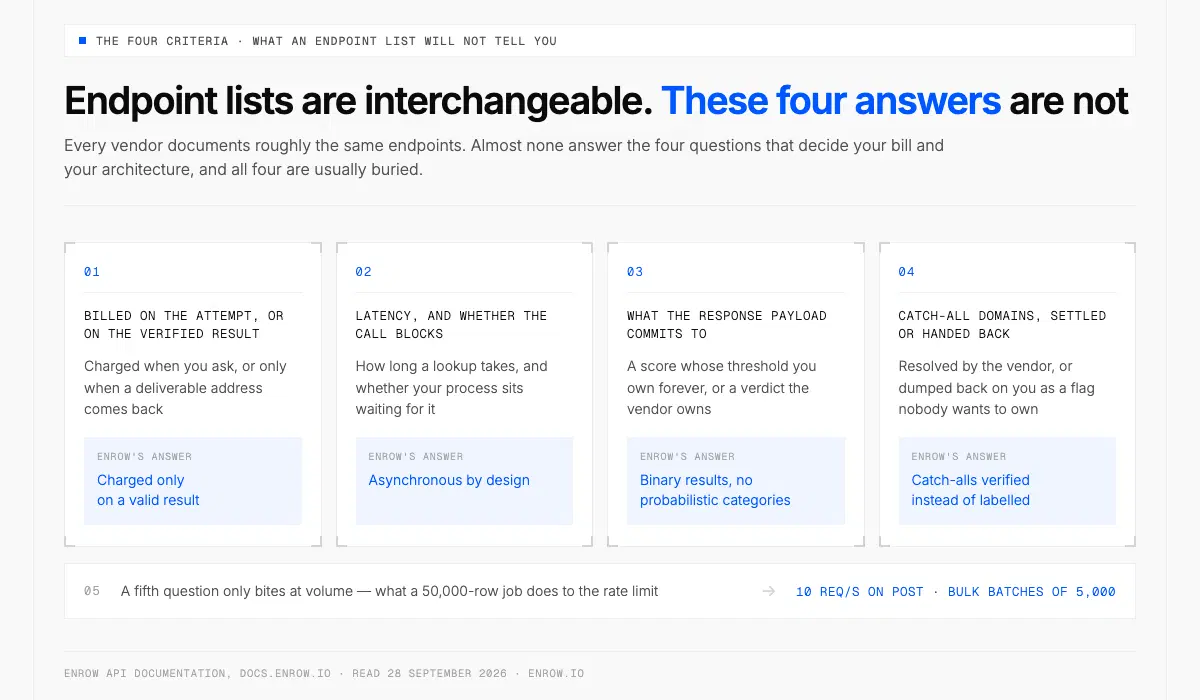
Every vendor ships the same endpoints; the four answers that decide your bill are the ones most docs leave out.
Key takeaway An email finder API takes a person you already identified, usually a name plus a company, and returns a verified work address. Every vendor documents roughly the same endpoints. Almost none answer the four questions that decide your bill and your architecture: charged on the attempt or on the verified result, how long a lookup takes and whether it blocks, what the response payload actually commits to, and whether a catch-all domain comes back settled or dumped back on you. A fifth question only bites at volume — what a 50,000-row job does to the rate limit. Enrow's answers, for reference: charged only on a valid result, asynchronous by design, catch-alls verified instead of labelled, 10 requests per second on POST, bulk batches of 5,000. Read the billing line before the feature list. It moves real cost more than the sticker does.
An email finder API is an HTTP endpoint that resolves a person to their work email address. You send a name and a company. You get back an address, plus some statement about whether it's real.
First, a disambiguation, because the search term "email API" mostly returns something else. Sending providers and transactional relays. Those push mail out. A finder API resolves identity to address before any mail exists.
The four criteria below came out of building one and reading a dozen competitors' docs while doing it. Endpoint lists are interchangeable. Billing model, latency contract, response shape and catch-all handling are not, and all four are usually buried. The bulk ceiling matters too, but only once your volume is real, so it gets its own section after them.
1. Billed on the attempt, or on the verified result
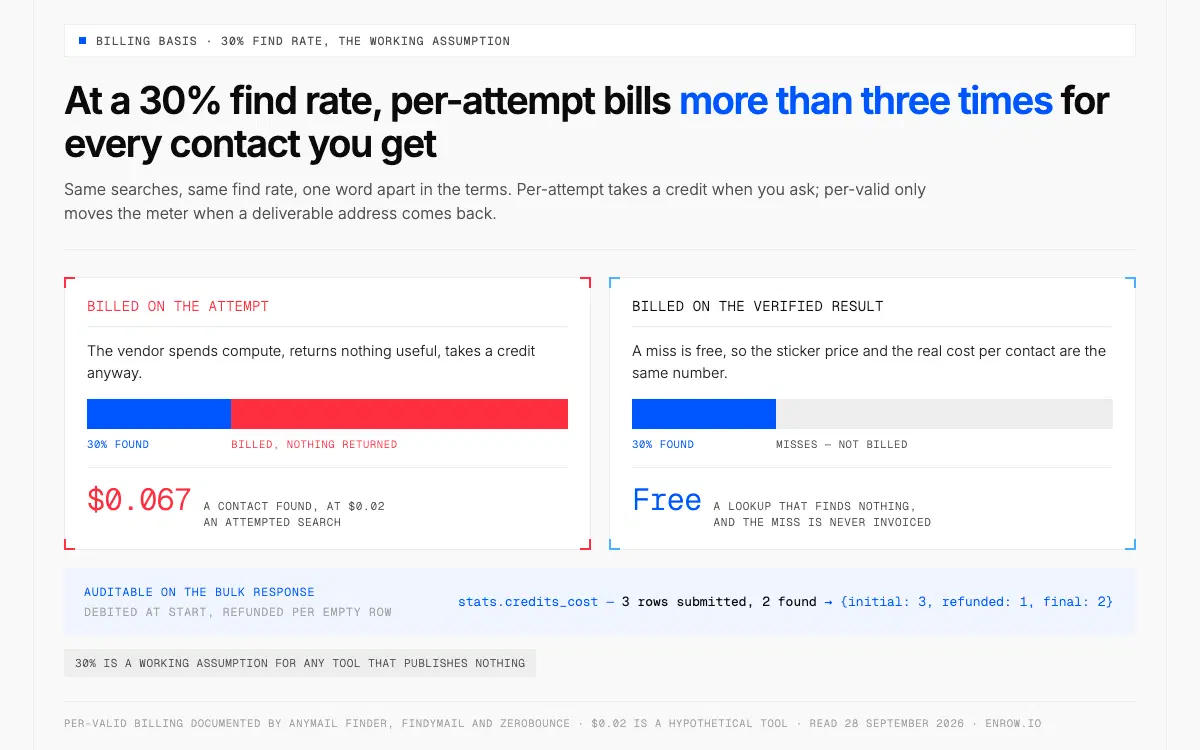
Pay for the misses and each contact found costs more than three times the search price.
The whole ballgame, and the one line most pricing pages skip.
Two models exist. Under per-attempt billing you are charged when you ask: the vendor spends compute, returns nothing useful, takes a credit anyway. Under per-valid billing a miss is free, and the meter only moves when a deliverable address comes back.
The gap is not a rounding error. Find rates on cold B2B lists run well under half, and 30% is the fair working assumption for any tool that publishes nothing. At 30%, a per-attempt vendor bills you more than three times for every contact you actually get. Then a share of what it did find bounces, and you paid for that too.
A few vendors put the per-valid line in writing, which is worth something. Anymail Finder takes a credit only once an address is verified. Findymail the same, one credit on a found address. ZeroBounce bills a successful search and charges nothing for an unknown one.
Enrow's finder endpoints work the same way, and the bulk response makes the accounting auditable. A bulk GET returns stats.credits_cost as three numbers: initial, refunded, final. Credits are debited when the batch starts, then given back for every empty row. The documented example submits 3 rows, finds 2, settles at {initial: 3, refunded: 1, final: 2}. Reconcile a month of spend against rows found, no support ticket.
One caveat, because it cuts the other way. Enrow's Email Verifier is charged per check, 0.25 credit, not per valid. Feed it dead addresses and you still pay 0.25 a row. Finding is pay-per-valid; verifying is pay-per-check. Know that before routing a hygiene job through the wrong endpoint.
2. Latency, and whether the call blocks
Two design philosophies, and neither is wrong.
Some APIs answer synchronously. Anymail Finder says most single lookups return in around three seconds. Hunter exposes the trade-off as a parameter: max_duration, between 3 and 20 seconds, default 10, with the docs stating that a longer duration lets them refine results and return more accurate data. An unusually honest knob. Accuracy costs milliseconds and they let you spend them.
Enrow went the other way. Every endpoint is asynchronous. A POST to /email/find/single returns a search ID immediately, and the result arrives by webhook or by polling the matching GET. The docs are explicit that this is deliberate, so large volumes never block the caller. While a search runs, the GET returns {"qualification": "ongoing"}.
The verification itself resolves in seconds. But your process does not sit waiting for it, and code that expects the address in the POST response will not find it there.
Which you want depends on where the lookup sits. Inside a form a human is watching, a three-second synchronous call is fine. Inside a nightly job over 40,000 rows, a blocking call is a liability. RFC 9110 §15.3.3 covers the second case: 202 Accepted means accepted for processing that hasn't completed.
What nobody publishes is a p95. Not Enrow, not the vendors above. Marketing says "in seconds" and no one commits to a percentile. Measure it against your own volume before designing around a landing-page number.
3. What the response payload actually tells you
Here the market splits into two schools, and picking the wrong one costs you engineering weeks.
School one hands you the uncertainty. Hunter's Email Finder returns a score from 0 to 100, an accept_all boolean, a verification object with a status of valid, accept_all or unknown, and up to twenty sources entries carrying the page a mention came from with extracted_on and last_seen_on dates. Their docs are candid about the score on an accept-all domain: it estimates the probability the address is valid. ZeroBounce does the same on a coarser scale, returning email_confidence as HIGH, MEDIUM or LOW plus one of nine failure_reason values.
Useful if you are building your own scoring layer. The sources array is a real forensic tool.
School two settles the question and hands you a verdict. Enrow's finder returns qualification as valid or invalid, with ongoing while the search runs. The docs say it outright: binary results, no probabilistic categories. Alongside it, email, an info block carrying company domain, company name, first and last name, and the custom object you sent in.
The question to ask is not which payload is richer. It's who owns the threshold. If the API returns 0-100 and accept_all: true, you own it forever, and every rep complaining about a bounce is complaining about a number you picked. If it returns valid or invalid, the vendor owns it and you hold them to it.
The custom object removes a class of glue code. Whatever you put in it, per request and per row in bulk, comes back untouched in the GET response and the webhook. Internal contact ID, campaign tag, CRM record ID, whatever your pipeline keys on. No reconciliation table.
4. Catch-all domains: settled, or handed back to you
An accept-all domain answers yes to every address you probe. Real mailbox, typo, total nonsense, all accepted. Not a vendor failing, it's in the protocol. RFC 5321 §3.5.3 anticipates it: there are circumstances where an address appears valid but cannot reasonably be verified in real time, and the server should then return a 252. And §3.3 notes some servers don't check the recipient until the message body arrives, so an accepted address can still bounce later.
One SMTP probe cannot resolve this. That's a protocol fact, not a tooling gap.
So most APIs pass the ambiguity to you. Hunter's verifier returns accept_all, and its own docs warn that when the SMTP server accepts everything you can get false positives on SMTP checks. Honest, and it leaves you a pile of rows nobody wants to own.
Don't discard that pile. B2B lists skew toward the companies most likely to run accept-all, so deleting on the flag throws away live decision-makers with the dead rows.
Enrow resolves catch-alls deterministically instead of flagging them: repeated SMTP passes from servers in different regions, checked against deliberately fake control addresses on the same domain, as part of the 10+ verification checks behind every result. Resolved catch-alls come back valid and bill as found. Unresolvable ones come back invalid and cost nothing. Catch-all verification is in the credit price, not an add-on. Observed bounce sits under 1%, an average from live sends and not a guarantee. Mechanics in what is a catch-all email, downstream damage in email bounce rate.
Bulk email finder endpoints and rate limits
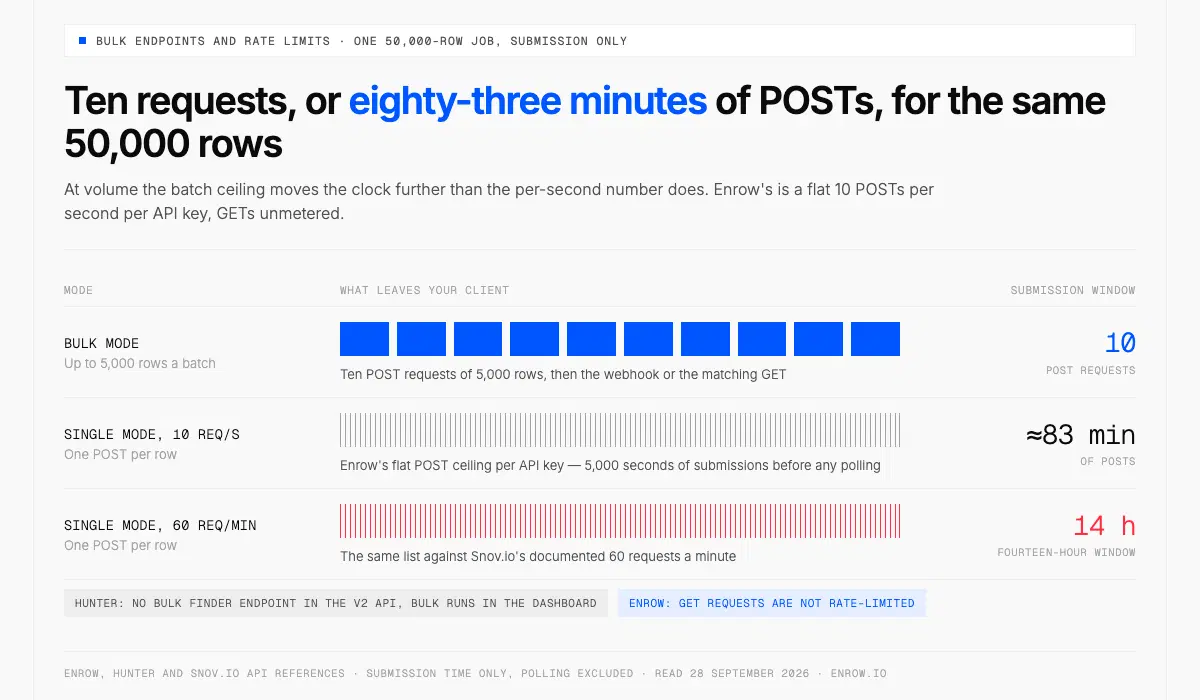
At volume, batch size matters more than the per-second ceiling: ten requests against roughly 83 minutes of POSTs.
A bulk email finder is an endpoint that accepts a whole list of contacts in one request and returns verified addresses as a batch job, instead of one HTTP call per person. It's the difference between a pipeline that finishes overnight and one that doesn't.
Batch ceilings and rate limits vary a lot, and they interact.
| Vendor | Bulk finder | Published rate limit |
|---|---|---|
| Enrow | Up to 5,000 rows per batch (3,000 for phone) | 10 req/s on all POST endpoints; GET not limited |
| Hunter | No bulk finder endpoint in the v2 API; bulk runs in the dashboard | Email Finder 15 req/s and 500 req/min; verifier 10 req/s and 300 req/min |
| Anymail Finder | Up to 100,000 rows per job, results by webhook (vendor claim) | No daily or hourly limits (vendor claim, no SLA published) |
| Snov.io | Bulk finder is a product feature; no batch endpoint described in the API reference | 60 requests per minute |
Run the arithmetic on a 50,000-row job. Single-lookup mode against a 10 req/s ceiling is 5,000 seconds of submissions, roughly 83 minutes of POSTs before polling. The same job in bulk mode is ten requests. Against Snov's documented 60 per minute, single mode is a fourteen-hour window.
So batch size matters more than the per-second number at volume. Enrow's ceiling is a flat 10 POSTs per second per API key, GETs unmetered, with an increase available on request through api@enrow.io. No published number above that, so don't design around one.
Retries, idempotency, and why the billing model changes your strategy
POST is not idempotent. RFC 9110 §9.2.2 says a client may repeat a request when no response arrives, but that the request ought to be considered idempotent for retry purposes, which a lookup POST is not. A timeout you retry is a second billable event unless the vendor deduplicates it.
The header everyone reaches for, Idempotency-Key, is not a standard. It's an IETF draft, draft-ietf-httpapi-idempotency-key-header, expired at revision 07. Support is per-vendor and patchy. Hunter implements it properly, 24-hour TTL, request-body fingerprinting, four distinct error codes, but only on its sequences and messages endpoints. Not on the Email Finder.
Under per-attempt billing that's a real problem. Retry logic becomes a spending decision, and an aggressive backoff on a flaky network quietly doubles a month's bill.
Under per-valid billing it mostly evaporates. A retried lookup that finds nothing costs nothing, so you can be aggressive about timeouts without watching the meter. Mostly, not entirely: a retry that finds the same address is still a found result, and Enrow publishes no deduplication guarantee. Keep your own log of in-flight search IDs. Pay-per-valid makes retries cheap, not free.
Two more things Enrow does not give you, stated plainly because you'll find out at 2am otherwise. There are no X-RateLimit-* headers, and a 429 comes back as a bare {"message": "Too Many Requests"}. RFC 6585 §4 makes Retry-After optional and Enrow omits it, so the docs tell you to build exponential backoff against the flat ceiling yourself. And 404 is not in the documented status codes at all — the list runs 400, 401, 402, 429, 500 — so a handler keyed on a clean 404 for an unknown or expired search ID will never fire.
Wiring it up
Auth is an API key in an x-api-key header. No OAuth flow, no bearer tokens, and the docs say so in as many words. Base URL is https://api.enrow.io.
Every POST has a matching GET: /email/find/single, /email/find/bulk, /email/verify/single, /email/verify/bulk, /phone/single, /phone/bulk, plus GET /account/info which returns your remaining credit balance as one number and any configured webhook URLs.
Six webhook events cover the endpoints. Single-search events carry the full result, so a well-built single-lookup integration never polls. Bulk events only tell you the batch has finished; the rows and the credit accounting come from the matching GET. Webhook URL is set globally on the integrations page or per request in settings.webhook, HTTPS only, and it has to answer 200.
Errors worth handling: 401 for a bad key, 402 for insufficient credits, 429 for the rate limit. Watch the 402 — it answers {reason, success} on single endpoints and the plain {message} shape on bulk, which will break a shared error parser. Official SDKs exist now, in seven languages — JS/TypeScript, Python, PHP, Go, Java, Swift and Rust, per docs.enrow.io/sdks/overview on 2026-08-29. All seven are early access and install from GitHub source rather than a package registry, so you pin a commit yourself and the curl and JavaScript examples in the docs remain the fallback. Full spec on the Enrow API page; a key takes about thirty seconds, no sales call.
If your caller is an AI agent rather than a service, there's an official MCP server, repo EnrowAPI/enrow-mcp on GitHub, MIT licensed, installed over npm or run through npx. It exposes the finder, the verifier and the phone lookup as tools — find_email, find_emails_bulk, verify_email, find_phone and their result-fetching counterparts — with Claude Desktop, Cursor and Windsurf documented as clients. An assistant resolves a contact mid-conversation, no integration code.
The email finder Chrome extension: the no-code path
Plenty of the people who need this data will never open a terminal. For them an email finder Chrome extension is the right surface, not an API.
Enrow's extension works from a LinkedIn or Sales Navigator profile. One click writes the full record into HubSpot, Salesforce or Pipedrive: name, verified email, direct phone, company, LinkedIn URL. Not a copied address pasted into a field, the whole contact card. Billing matches the API: one credit per verified email, 40 per verified phone, nothing without a result.
RevOps builds the pipeline; reps work profiles. Same credit pool, same verification, two surfaces. More in the LinkedIn email finder guide and on HubSpot enrichment.
What this API will not do for you
No searchable database. Ask Enrow for "all CTOs in Berlin at companies over 200 people" and nothing comes back, because there is no list to query. The finder needs a full name plus a company domain or name. The phone finder needs a LinkedIn URL.
Deliberate trade, and here's the reason. Database vendors refresh on cycles measured in months, so a meaningful share of what they sell describes people who already changed jobs. Enrow resolves at request time, which is why the accuracy holds. The cost is that sourcing becomes your problem. Build the list on LinkedIn or Sales Navigator, then hand it to the API. Sequencing goes to Emelia, La Growth Machine or lemlist.
What it costs per valid contact
Because billing is per found result, sticker and real cost are the same number. Start is $17/mo for 1,000 credits, $0.017 a valid email. Pro, $87/mo for 10,000, $0.0087. Scale, $397/mo for 50,000, and the monthly ladder runs to 200,000 credits at $1,397/mo. Switch that top tier to annual and it lands near $0.006 an email, the cheapest rate on the sheet. A direct phone is 40 credits, about $0.35 on Pro. Verification, 0.25 a check, live or dead.
Compare that against a per-attempt vendor at the same monthly volume and the same billing basis, not sticker against sticker. A tool at $0.02 an attempted search with a 30% find rate is costing you $0.067 a contact found, before you account for the ones that bounce. That is the only number worth putting in a spreadsheet.
No per-seat fee, up to 10 team members on Pro and unlimited on Scale, credits rolling over up to 3× your plan on Pro and 6× on Scale. The free tier is 50 credits every month, recurring, no card.
ready to stop wasting time?
Connected in minutes.
Verified data in seconds.
FAQ
Does a failed lookup cost a credit?
Depends on the vendor, and it's the first thing to check. Enrow, Anymail Finder and Findymail all state that finder endpoints bill only on a found result; ZeroBounce charges nothing for an unknown one. Per-attempt tools charge for the ask. Assume a 30% find rate on a cold B2B list and that more than triples real cost per contact, which dwarfs any headline price gap.
Is there a free email finder API?
Free tiers exist; permanently free APIs at volume generally don't, because every lookup costs the provider real SMTP work. Enrow gives 50 credits every month, recurring, no card: 50 verified emails or 200 verification checks, indefinitely, in the app, the Chrome extension and AI assistants. The API itself opens with any purchase: a plan from $17/month or a one-time credit pack.
How fast should an email finder API respond?
A synchronous lookup slower than about five seconds causes problems in anything user-facing. Hunter lets you tune this with a max_duration parameter between 3 and 20 seconds and states that longer means more accurate. For batch work, throughput matters and per-row latency doesn't. Nobody publishes a p95, so benchmark it yourself.
Can I use an email finder API in bulk?
Yes, and you should above a few hundred rows. Enrow accepts up to 5,000 contacts per bulk email finder batch and 3,000 per phone batch, returning results by webhook or GET. Hunter's v2 API has no bulk finder endpoint, so bulk runs there are a dashboard feature. Confirm the endpoint exists before architecting around it.
Is it safe to retry a lookup that timed out?
Safe technically, but price it first. POST is not idempotent under RFC 9110, and Idempotency-Key is an expired IETF draft with patchy vendor support, so a retry is normally a second billable event. Under pay-per-valid, a retry that finds nothing is free, making aggressive timeouts affordable. Track in-flight search IDs anyway.
Can I legally enrich contacts I didn't collect myself?
In the EU this runs on GDPR Art. 6(1)(f), legitimate interests, with the Art. 14 duty to inform the person you hold their data and the Art. 14(5)(b) exemption where notification takes disproportionate effort. B2B prospecting commonly fits, but the assessment is yours to document, with a lawyer rather than a blog post.
Check all four criteria against your own list. Enrow's API opens with any purchase (a plan from $17/month or a one-time credit pack) and hands you a key in about thirty seconds. The free tier's 50 credits a month, no card, work in the app, the Chrome extension and AI assistants.