Key takeaway Five of the nine routes below are free, and not one of them hands you a verified address. Three cost between $0.0070 and $0.017 per valid result, depending on how big a plan you buy. The ninth is an InMail at $2.40 to $9.00 a message, and it never returns an address at all. The connections archive is the route most articles get wrong. LinkedIn files Connections under "Available within 48 hours", not ten minutes, and the download link dies after 72. The email column only fills for people who authorised it in their privacy settings. Bounce is where the free routes send the bill. A guessed address that nothing checked goes out, hard-bounces, and counts against the account that sent it. Amazon's own sending rules open a review at 5% and can pause an account at 10%. Every figure below was checked on September 9, 2026 against LinkedIn's help centre, the User Agreement in force since November 3, 2025, and each vendor's own live pricing page.
Search this topic and you get thirty listicles of Chrome extensions, each one confident, none of them quoting LinkedIn. The top organic result for "linkedin email finder" today is a vendor landing page. So is the second. So is the third, which is a Chrome Web Store listing.
What none of them publish is the arithmetic: what each route actually returns, what it costs per address that survives a send, and the exact sentence on LinkedIn's help centre that governs it. That is what this page is.
Disclosure before the table, not after it. Enrow is mine — a real-time email and phone resolver — and it occupies one row of nine. I priced it in the same column as everything else, at the same volume, on monthly billing, so you can check the arithmetic against me. The other eight routes need nothing from my company.
Every route from a LinkedIn profile to an email address
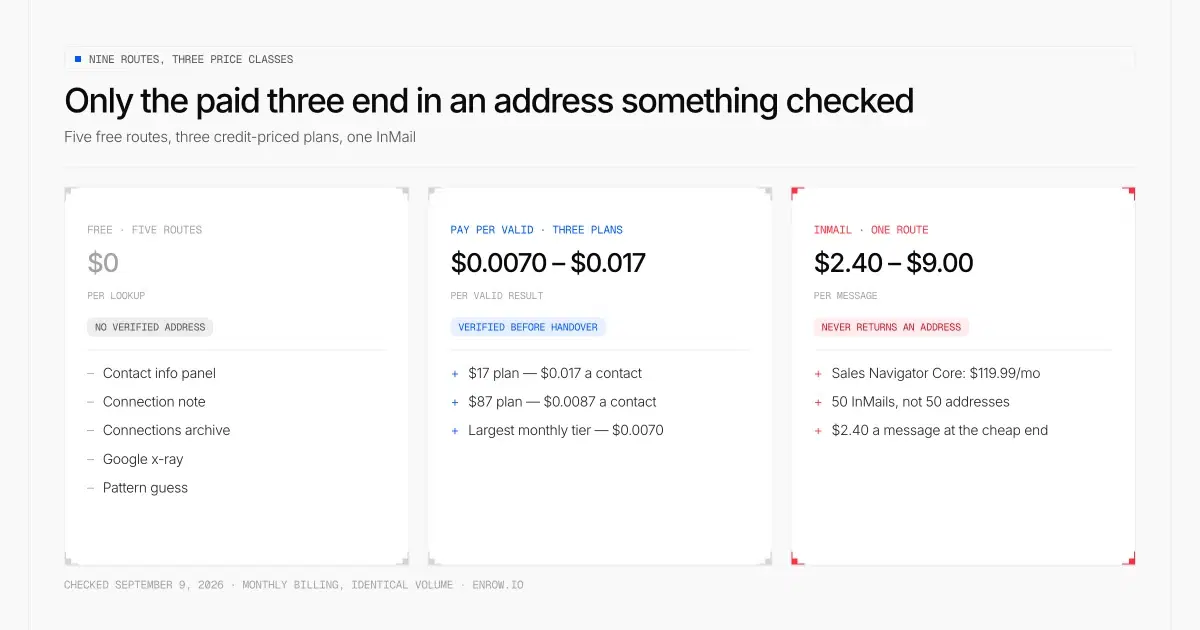
Five of the nine routes are free and none of them hands you a verified address; only the three credit-priced plans end in an address something checked, and the InMail buys a message rather than a mailbox.
Five free routes, three paid ones and an InMail. Only the paid three end in an address that something checked before handing it to you: $0.017 per valid result on the $17 entry plan, $0.0087 on the $87 plan, and $0.0070 at the largest monthly tier.
Two things fall out of that table that the SERP does not tell you. The free routes are free because they are conditional on somebody else's privacy setting, and a route that depends on a stranger's toggle is not a pipeline. And the cheapest paid route costs less per address than the character allowance of a free connection note is worth.
Does LinkedIn show email addresses on a profile?
Only when the member chose to publish one, and by default they have not. LinkedIn's own wording: "the primary email address you've registered with LinkedIn is only visible to your direct connections on LinkedIn." A second-degree prospect opening that profile sees whatever survived the member's visibility setting, which on most accounts is an empty panel.
The field itself is populated automatically. LinkedIn's own wording: "By default, your email address is pre-filled, based on what you entered as your primary email address during sign up." So the address exists on nearly every account. The visibility control decides who reads it. LinkedIn offers four settings: only visible to me, first-degree connections, first and second-degree, and anyone on LinkedIn.
Then there is the part nobody quotes. On who sees what, LinkedIn says: "The contact and personal information of your connections and contacts is only visible in the introduction section on their profile if they opt to share those details."
Worth knowing before you cite any of it. The two help pages that define the Contact info section, a565128 and a543988, both carry a "Last updated: 5 years ago" stamp. The email-visibility page, a523134, was updated three weeks ago. All three read on September 9, 2026.
An address you do find here still deserves a check. People publish a work address, change employer, and leave the stale one sitting on the profile for years. Re-checking one costs 0.25 credit, which is $0.0043 on a $17 plan.
Can you get email addresses from a LinkedIn connections export?
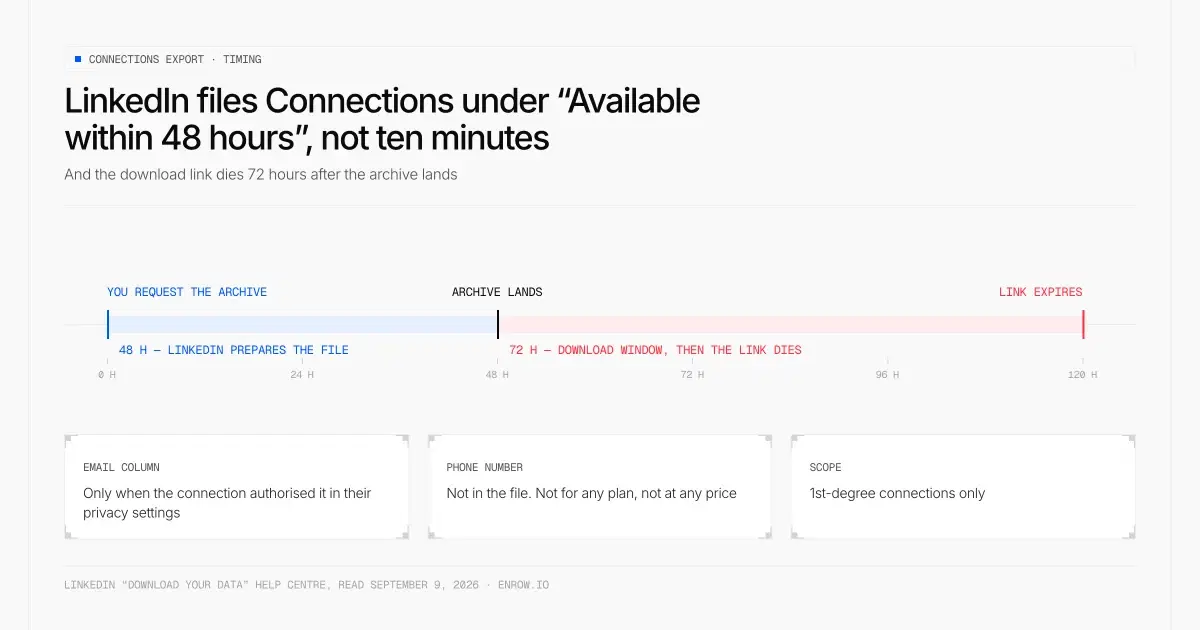
LinkedIn files Connections under “Available within 48 hours”, and once the archive lands the download link survives 72 hours — plan two days, not ten minutes.
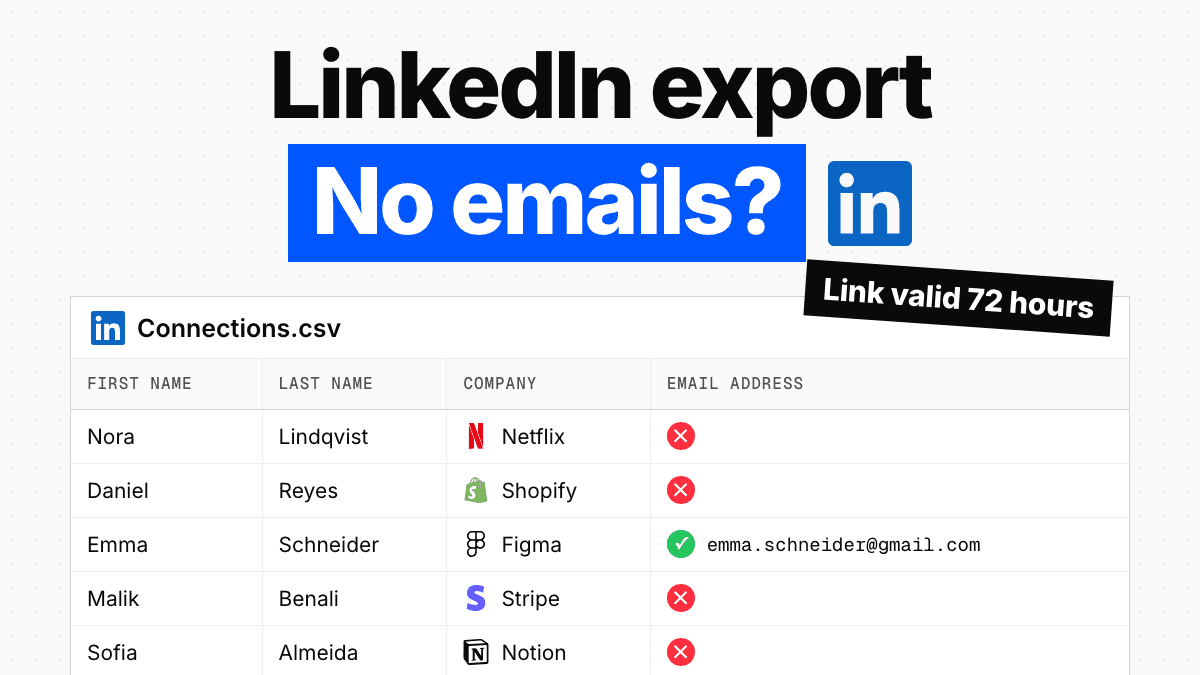
For some of your first-degree connections, yes. LinkedIn's "Download your data" page lists the export fields as "the first and last name, public profile URL, email address, company, position, and connection date for all 1st degree connections" — and then attaches the condition that decides everything: "An email address for the connection will be included only when authorized by the connection in their privacy settings."
The timing is the detail this page used to get wrong, so here it is corrected. Connections and Contacts are not in the fast bucket. LinkedIn files them under the "Available within 48 hours" heading, and once the archive lands, "the data will be available for download for 72 hours." Plan two days, not ten minutes.
What share of rows come back with an address in them, I am not going to tell you, because LinkedIn does not publish a default for the download toggle and no credible figure exists. The full click path, the field list, the toggle walkthrough and LinkedIn's own contradiction about 24 versus 48 hours are documented in how to export LinkedIn contacts.
And there is no phone number in that file. Not for any plan, not at any price.
What a guessed pattern actually costs
A pattern guess is arithmetic performed on a domain name, and arithmetic cannot tell you whether a mailbox was ever created. The category skips this section because the cost only shows up later, in the bounce log, on the send after the one that failed.
Companies do settle on one format and hold it, so finding one real address at a company usually gives you the shape of the rest. In rough order of how often I see them in the wild — an ordering from observation, and I have no sourced distribution to put behind it, so treat it as observation only:
first.last@ · first@ · flast@ · f.last@ · last.first@
Apply the shape to your prospect's name and you have a candidate. Send to that candidate and you find out what it costs.
Nobody publishes how often a guess lands on a real mailbox, and I am not going to invent a rate for it. The price of a miss is another matter: whoever carries your mail sets it, and Amazon SES sets it in writing.
So the honest version of "guess the pattern" is: guess it if you like, then pay $0.0043 to find out whether the mailbox is real, then send. On catch-all domains even that check is only worth something if the tool resolves catch-alls instead of stamping them "risky" and walking away.
What each route costs per valid address
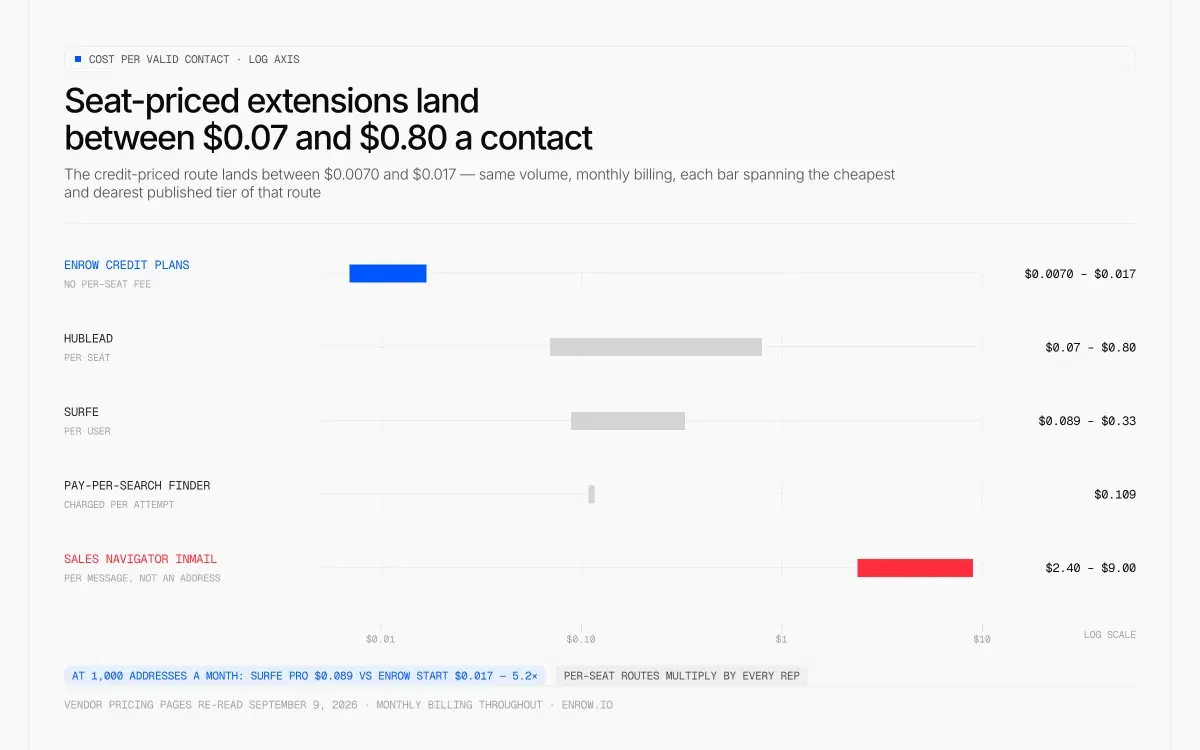
Held at the same volume and on monthly billing, the seat-priced extensions sit one to two decades above the credit-priced route — and the InMail is not even buying an address.
Held at the same volume and on monthly billing, the seat-priced LinkedIn extensions land between $0.07 and $0.80 a contact, and the credit-priced route lands between $0.0070 and $0.017. At an identical 1,000 addresses a month, Surfe Pro is $0.089 against Enrow Start's $0.017 — 5.2 times, for one seat.
| Route | Price (USD, monthly) | Included per month | Cost per valid contact | Seat model |
|---|---|---|---|---|
| Enrow Start | $17/mo | 1,000 credits (1 credit = 1 valid email) | $0.017/contact | No per-seat fee |
| Enrow Start 4k | $47/mo | 4,000 credits | $0.0118/contact | No per-seat fee |
| Enrow Pro | $87/mo | 10,000 credits | $0.0087/contact | Up to 10 team members |
| Enrow Scale | $397/mo | 50,000 credits | $0.0079/contact | Unlimited team members |
| Enrow Scale 200k | $1,397/mo | 200,000 credits | $0.0070/contact (about $0.006 on annual) | Unlimited team members |
| Hublead Professional | $40/seat/mo ($32/seat/mo annual) | 50 credits/seat | $0.80/contact | Per seat |
| Hublead Business | $80/seat/mo ($64/seat/mo annual) | 500 credits/seat | $0.16/contact | Per seat |
| Hublead Scale | $140/seat/mo ($112/seat/mo annual) | 2,000 credits/seat | $0.07/contact | Per seat |
| Surfe Essential | $49/user/mo ($39/user/mo annual) | 150 email + 50 mobile credits | $0.33/contact | Per user |
| Surfe Pro | $89/user/mo ($79/user/mo annual) | 1,000 email + 100 mobile credits | $0.089/contact | Per user |
| Sales Navigator Core InMail | $119.99/mo | 50 InMails — messages, not addresses | $2.40/message | Per seat |
| Hunter Starter, billed per search | $49/mo | 2,000 searches, charged whether an address comes back or not | about $0.082/email found, at a 30% find rate (my assumption) | No per-seat fee |
Every Enrow row divides the monthly price by the monthly credits, and 1 credit = 1 valid email. Hublead and Surfe were re-read on their own pricing pages on September 9, 2026: Hublead publishes 1 credit per exported contact and 8 per phone reveal, Surfe splits email and mobile credits, and both annual figures are monthly-equivalents so every column above compares monthly against monthly. Sales Navigator's price comes from LinkedIn's compare-plans page, read August 28, 2026. The bottom row is Hunter's entry tier, read on its pricing page on September 30, 2026. It charges every search, found or not, and publishes no find rate, so the 30% is my own working assumption: $0.0245 a search ÷ 0.30 ≈ $0.082 per email found.
Three notes on reading that table honestly. Hublead's cheapest tier gives 50 credits, so its $0.80 is entry-tier arithmetic and not a fair fight against a 1,000-credit plan — the comparable rows are Hublead Scale at $0.07 and Surfe Pro at $0.089. Both of those are per seat, which is the structural difference: five reps pay five times, whereas Enrow's Pro and Scale plans carry no per-seat fee. And the bottom row is why sticker prices on this SERP mislead so consistently. Hunter's $0.0245 a search looks close to my $0.017. Per email it actually finds, you pay about $0.082, 4.8 times Enrow Start. A tool billing per attempt charges you for every search that finds nothing, then charges you again, in reputation, for whatever share of its finds bounces.
Sales Navigator sits on top of any of these as a sourcing cost, broken down plan by plan on the Sales Navigator pricing page.
Is it legal to get someone's email address from LinkedIn?
Processing a work contact for B2B outreach is lawful in the EU under legitimate interest, provided the person can object easily and the contact is professional rather than personal. LinkedIn's User Agreement is a separate contract, and clause 8.2.2 prohibits browser plugins used to scrape or copy the service. Law and platform terms are two different exposures, and only one of them ends with your account.
Draw the line at automation, not at looking. Reading a profile you opened, exporting your own data archive, or resolving one address at a time is ordinary commercial practice. Running thousands of profiles through a headless browser is the behaviour clause 8.2.13 names, and LinkedIn's help centre adds that prohibited tools "may become non-operational without notice", which means the vendor you standardised on can go dark with no warning and no migration path. What LinkedIn enforces, how it enforces it, and which caps are folklore are all in LinkedIn limits.
Personal addresses are a different territory again. Gmail and Hotmail accounts belong to the person, not the role. B2B data tools deal in work addresses, and mine is no exception.
Why most LinkedIn email extensions disappoint
Three failure modes.
The first is a returned string that nobody checked. The accuracy claims on this SERP, 97% on one page and 90%+ on another, arrive with no bounce measurement beside them. Accuracy is what gets advertised. The bounce is what you learn about afterwards, from your own sending account.
The second is the catch-all shrug, and the rank-1 free tool on this SERP admits it in its own FAQ. A Risky result means "the company uses a catch-all mail server (it accepts every address, so we can't verify the specific mailbox) or the person's pattern couldn't be determined with confidence." Read that twice. Two entirely different outcomes — a server that will not answer, and a guess the tool has no confidence in — get the same label. You paid nothing and learned nothing, which is a fair trade, but at $0.089 a credit it stops being one.
The third is what lands in your hand. An address in a popup is a string. Somebody still has to open the CRM, find or create the record, and type the fields in. Multiply that by every prospect of every rep and you have the real cost of the category, and it does not appear on anybody's pricing page.
Where Enrow fits, and where it does not
My part of the table is the extension row and the two rows under it. On an open LinkedIn or Sales Navigator profile, one click returns the verified address in roughly two to five seconds, after 10+ verification checks — several SMTP passes and catch-all probes across servers in different regions, catch-alls resolved and delivered rather than labelled and dropped.
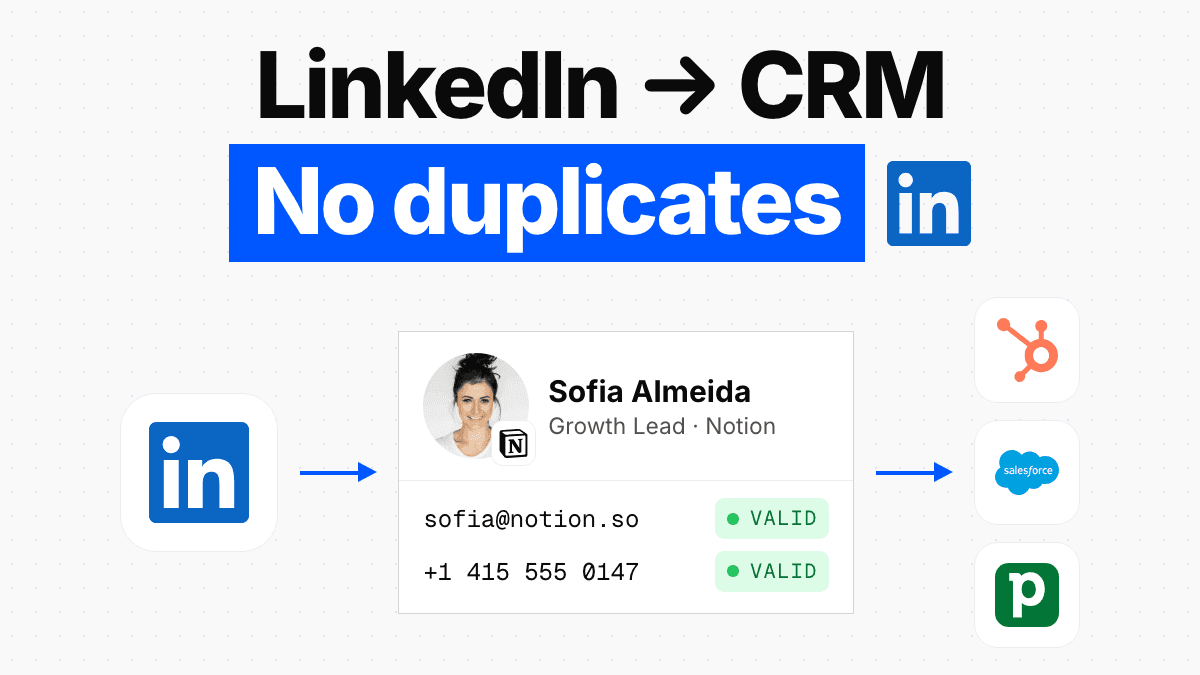
The part I actually built the thing for is what happens next. That same click writes the whole contact card — name, title, company, verified email, direct dial where we have one — into HubSpot, Salesforce or Pipedrive. It is a create-or-update on all three: the record exists and gets its blank fields filled, or it does not exist and gets created. No second copy of the same buyer, no Friday spent merging. That behaviour is the direct answer to the per-seat extensions in the cost table, and the wider CRM mechanics are in LinkedIn to CRM.
For whole lists the route is the file, not the extension: build the search in Sales Navigator, get the list out, run the CSV through the finder, pay for the rows that come back valid. A thousand valid addresses at $0.017 apiece comes to $17. Upload 1,000 rows and, at the roughly 60% match we see on our own files, the invoice covers around 600 of them — the misses are not on it. An API covers recurring volume, and the official MCP server at github.com/EnrowAPI/enrow-mcp exposes the same finder to Claude, Cursor or Windsurf. Pay-per-valid holds in all three places. Nothing found, nothing charged.
Now the limits, because a page like this is worth nothing if it only lists strengths.
There is no searchable database to browse, deliberately. A stored database is re-cut somewhere between every three and every nine months, which is how you end up writing to a person who left in March. We resolve at query time instead — which is exactly why the results hold up, and also why sourcing stays your job on LinkedIn or Sales Navigator. The native CRM list is three, not thirty; anything else goes through the API, Make, Zapier or n8n. Start carries neither annual billing nor rollover: whatever you leave unspent on that tier is gone on the first of the month. And the extension works profile by profile — a Sales Navigator list of 2,500 leads belongs in the CSV route, not in a browser tab.
Fifty credits land in the account each month without a card, and they land again the month after. Spend them as 50 found addresses or as 200 verifications at a quarter-credit each — enough to test a guessed pattern against a real list before you trust it.
ready to stop wasting time?
Connected in minutes.
Verified data in seconds.
FAQ
How do I find someone's email from LinkedIn?
Four routes work without a tool: check the Contact info section, ask in a connection note, export your own connections archive, or run a Google x-ray on the person's name plus the company domain. None returns a verified address. The paid route is a finder that resolves and verifies the address, at $0.017 per valid result on Enrow's entry plan.
Can someone get my email address from LinkedIn?
Only if your settings allow it. LinkedIn keeps your primary email visible to first-degree connections by default, and you can narrow that to nobody or widen it to anyone on LinkedIn. A separate toggle controls whether connections can download it in their data export: "Change the toggle to Yes to allow your connections to download your primary email address." LinkedIn publishes no default value for that second switch.
Is there a free LinkedIn email finder?
Several free tools exist and the top-ranking one advertises unlimited manual lookups with no sign-up. What it returns is a Valid or Risky label, where Risky covers both catch-all servers and patterns it could not determine confidently. For a result something actually checked, the Enrow free tier renews at 50 credits on the first of each month with no card on file — 50 addresses found, or 200 candidates verified at a quarter-credit apiece.
How do I get emails from a Sales Navigator list in bulk?
Build the list with Sales Navigator's filters, then get it out to a file. LinkedIn's own help centre rules out a CSV or XLS lead export in writing, so a third-party tool has to carry that step. Run the resulting file through a bulk finder. On Enrow only the rows that come back valid are billed: 1,000 valid addresses cost $17 on the entry plan. One search also caps at 2,500 lead results.
Will a LinkedIn email finder get my account banned?
The risk lives in automation volume, not in lookups. LinkedIn's User Agreement, effective November 3, 2025, prohibits browser plugins used to scrape the service and bots used to add or download contacts, and LinkedIn's help centre warns that such tools "may become non-operational without notice". Enriching profiles one at a time and downloading your own data archive are ordinary usage.
What does an unverified email address actually cost?
It costs deliverability on every future send, and the failed message is the cheapest part of the bill. Amazon SES states that a bounce rate of 5% or greater puts an account under review and 10% or greater can pause sending, counting only hard bounces to unverified domains. One dead address per twenty sends already reaches the first of those lines. Verification runs 0.25 credit, or $0.0043 on Enrow Start.
How I verified this
Every LinkedIn statement on this page came off a live help article or the User Agreement itself on September 9, 2026, quoted rather than paraphrased, with LinkedIn's own "last updated" stamp recorded next to it. Two of the pages defining the Contact info section are stamped five years old, which is worth knowing before anyone cites them as current product behaviour.
Hublead's and Surfe's numbers were pulled fresh from each vendor's published pricing on September 9, 2026, and only their published price, seat model and credit rates appear here — I have not tested how either writes to a CRM and the page says nothing about it. Sales Navigator and InMail prices come from LinkedIn's product pages, read August 28, 2026. Enrow's figures come from enrow.io, verified September 9, 2026.
The bounce thresholds come from Amazon SES documentation, confirmed live on September 9, 2026. Enrow's under-1% bounce is our own observed average across our sends, printed as that and nothing more.
Where no figure exists, this page says so and stops. That applies to how much of a connections export comes back filled, to the default state of LinkedIn's email-download toggle, and to any single number for how often a guessed pattern is correct. Nobody publishes those, so nobody should print them.