Key takeaway The LinkedIn Salesforce integration is real, documented, and narrower than the marketing implies. LinkedIn publishes the field map itself: First Name, Last Name, Company, Title and Mailing Country all say "Populated by: LinkedIn". Email and Phone say "Populated by: User". Its help centre explains why — "LinkedIn only releases information that members consent to distributing." CRM Sync pulls Salesforce data into Sales Navigator and writes selected activity back. Once a day. Lead and contact creation stop at 1,000 records per user per month, and the documentation gates all of it behind Advanced Plus — which carries no published price, while LinkedIn's own comparison table ticks CRM integration on Advanced. So you get a record you can look at and nobody can contact. Enrow writes the missing part from the same profile, verified before it lands, as a create-or-update so you don't hold two of the same person. It won't build your list — sourcing stays with LinkedIn.
A rep saves a lead in Sales Navigator, clicks Add to CRM, and a Salesforce Contact appears a second later. Name, title, account, country. Everything looks right. Then somebody opens the record to send something, and the Email field is blank.
Not a bug, and not your admin's fault. It's documented behaviour, published by LinkedIn, in a table almost nobody reads before signing.
One fork first: if you came for LinkedIn Ads — Business Manager, Lead Gen Forms — that's a marketing-side integration with its own documentation. Everything below is the sales side.
Four things wear this name
Vendors and consultancies use these interchangeably. They aren't interchangeable.
The Native Integration
Turned on inside Salesforce: Setup, search LinkedIn Sales Navigator, flip the Sales Navigator Integration toggle. That adds InMail and connection-request actions to your default page layouts, and the same flow offers an optional CRM Sync step.
Then you place components — Member Profile (Native) on lead, contact, opportunity and person-account pages, Company Profile (Native) on opportunities and business accounts. Salesforce lists the feature in Enterprise, Professional and Unlimited Editions, needing "a Sales Navigator Team or Enterprise license from LinkedIn." Hold that licence line.
LinkedIn adds a restriction Salesforce's page omits: "Salesforce Native Integration is available only to Salesforce Lightning users."
The AppExchange package
LinkedIn's own third-party package, installed from AppExchange. It carries what the native path lacks: "Native Integration doesn't support Data Validation and Salesforce Classic." Person accounts run the other way — "Person accounts are only supported with Native Integration." Both can live in one org, in LinkedIn's words: "You can install and enable both the Native Integration and the AppExchange Package in the same environment." Given the Data Validation gap, LinkedIn steers Salesforce customers to the package.
CRM Sync
Usually what someone means by "the Sales Navigator Salesforce integration", and the piece carrying the plan gate. A data pipe, whose direction matters more than anything else about it.
The ads connection
Business Manager and Lead Gen Forms. Different documentation, different buyer.
Sources: Salesforce Help's integration and components articles; LinkedIn Help a484790. Read September 12, 2026.
Which way the data flows
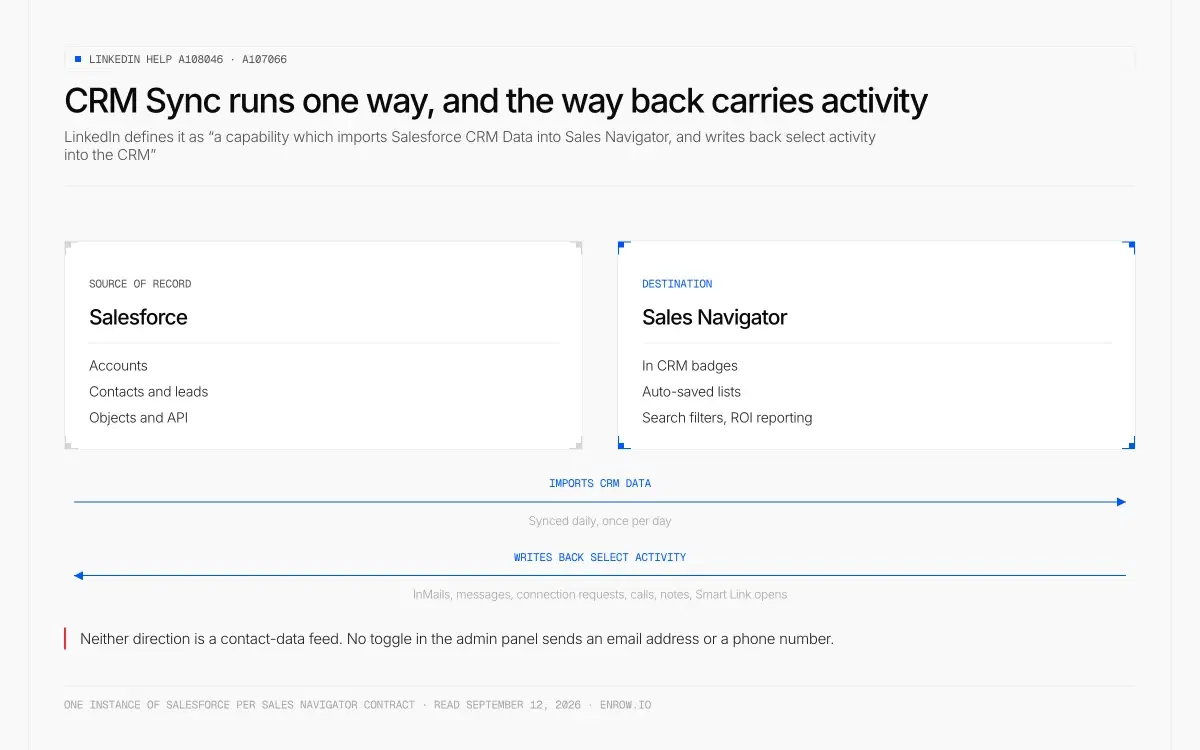
CRM Sync imports Salesforce records into Sales Navigator and writes activity back once a day. No toggle in the admin panel is a contact-data feed.
LinkedIn's technical document settles it in one sentence. CRM Sync is "a capability which imports Salesforce CRM Data into Sales Navigator, and writes back select activity into the CRM."
Salesforce feeds LinkedIn. LinkedIn returns activity.
That's the design, not a flaw in it. Your accounts and contacts populate Sales Navigator so it knows who you already own, which powers the In CRM badges, auto-saved lists, search filters and ROI reporting. Coming back: InMails, messages, connection requests, calls, notes, Smart Link opens. Run down the whole admin panel and every toggle either pulls records in or logs an action back. None is a contact-data feed.
Data Validation comes closest to enrichment, and raises exactly one flag: "When LinkedIn determines that a CRM contact is no longer with their CRM account, it will return a Not At Company value." Refreshed every 24 hours. Knowing a contact left is real signal, but it tells you a record died and hands you no replacement.
One more line from the sync documentation, easy to miss and expensive late: "You can only sync one instance of Salesforce per Sales Navigator contract."
Sources: LinkedIn Help a108046, a107066, a120992. Read September 12, 2026.
The field table, which almost nobody quotes
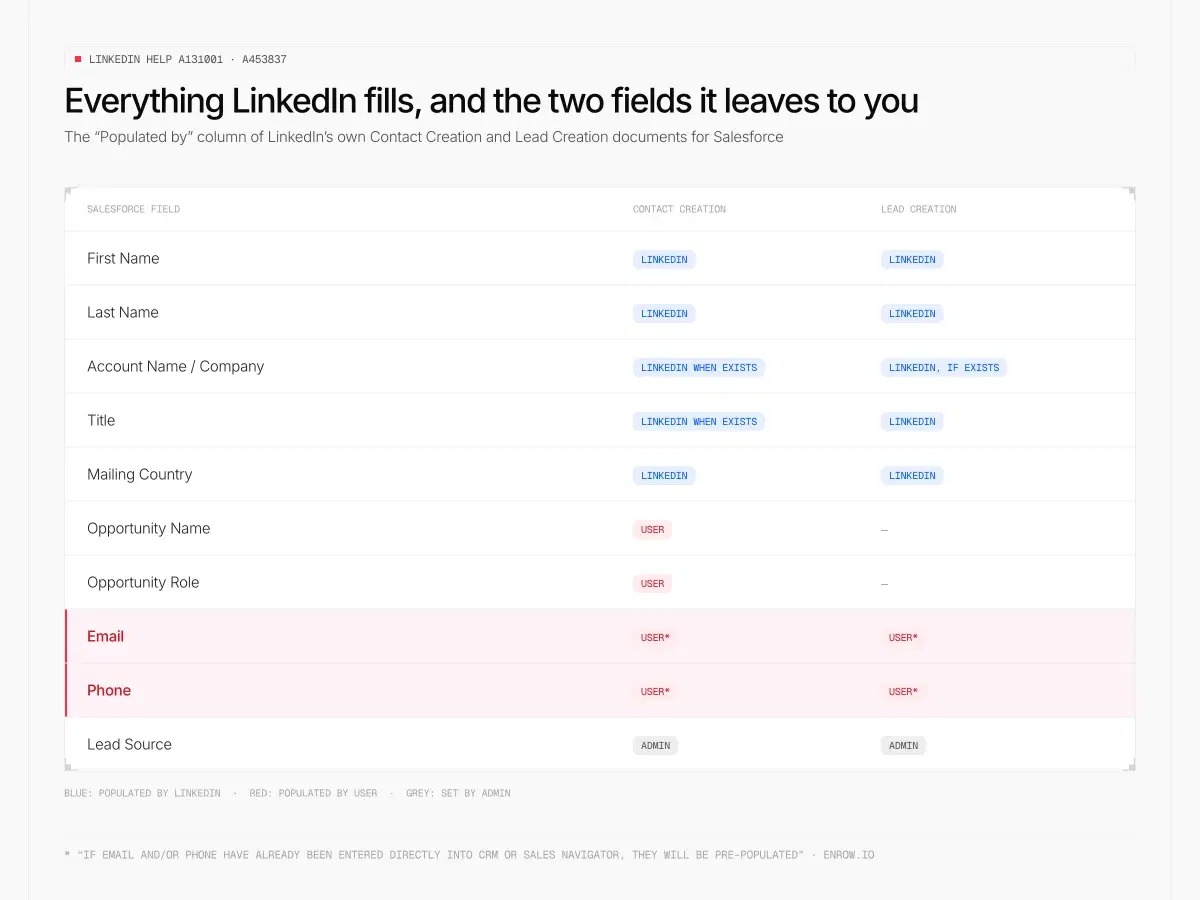
LinkedIn publishes the field map itself. Everything blue arrives from LinkedIn; the two red rows are the ones a rep needs on Tuesday.
LinkedIn publishes technical documents for Contact Creation and Lead Creation into Salesforce, and both carry a column headed "Populated by". Side by side, as LinkedIn writes them:
| Salesforce field | Contact Creation | Lead Creation |
|---|---|---|
| First Name | ||
| Last Name | ||
| Account Name / Company | LinkedIn when exists | LinkedIn, if exists |
| Title | LinkedIn when exists | |
| Mailing Country | ||
| Opportunity Name | User | — |
| Opportunity Role | User | — |
| User* | User* | |
| Phone | User* | User* |
| Lead Source | Admin | Admin |
The asterisk is LinkedIn's: "If Email and/or Phone have already been entered directly into CRM or Sales Navigator, they will be pre-populated."
A closed loop. The integration shows you an email you already had. It doesn't go and find one you didn't.
LinkedIn answers it outright, under the heading "Why is the email field not populating into the lead/contact creation form?" Verbatim: "LinkedIn only releases information that members consent to distributing. If the email is publicly available on the LinkedIn profile to any user, the field will be auto populated on the creation form. Most contact information is made available once you connect with the LinkedIn member."
Read that last sentence slowly. Details surface after you connect. So the integration supplies what you could already reach, and nothing for the list you haven't. LinkedIn's suggested workaround, same page, is InMail.
Sources: LinkedIn Help a131001, a453837, a170004. Read September 12, 2026.
The ceilings on record creation
Four constraints sit in the same documents, and none has come up in a sales conversation I've had about this product.
Volume is capped. "The Lead and Contact Creation features are limited to 1,000 contacts per user per month", says the lead-creation document, and the contact-creation one puts the same ceiling a second way: "Each individual user is limited to creating 1,000 contacts per month from Sales Navigator." Sitting under that, in LinkedIn's own words about the Salesforce side, "For the standard license, there is a daily limit of 1,000 API calls per person."
The field set is frozen: "The Lead Creation functionality supports a predetermined set of standard fields which cannot be customized." A validation rule written against an unsupported field breaks the write.
Object coverage is thin. "Creation of Account records and Opportunity records from Sales Navigator is not supported." A contact must attach to an account that already exists, so if the company isn't in Salesforce you create it by hand first. "Lead creation is not supported on the Sales Navigator mobile app" either, and each user needs API access enabled at the org level plus read and write on the standard contact fields and the contact record.
And on duplicates, in a LinkedIn to Salesforce write, LinkedIn describes a check at creation time where "the workflow will prompt you that this lead/contact may already exist in CRM and provide you the opportunity to match the record instead of creating a new record." A prompt is not a rule. The decision lands on whichever rep is clicking, mid-list, at speed.
Sources: LinkedIn Help a131001 (contact creation) and a453837 (lead creation). Read September 12, 2026.
The plan gate, and why two LinkedIn pages disagree
Settle this one before a purchase order moves.
LinkedIn's help centre is unambiguous, article after article. "Integration between Sales Navigator and your CRM is only available for Sales Navigator Advanced Plus users." Contact creation needs admins "on an Advanced Plus contract with CRM Sync enabled". Lead creation, same. Data Validation lists "A Sales Navigator Advanced Plus edition subscription" first.
Salesforce's AppExchange listing agrees, in capitals: "Our application does NOT support SALES NAVIGATOR CORE OR ADV EDITIONS." It adds that the app is free and that functionality requires an Advanced Plus subscription.
Now open LinkedIn's marketing comparison page, stamped "Updated: Aug 1, 2026". Advanced CRM Integrations sits there — "Keep your CRM current with real-time updates and sync across Salesforce, HubSpot, and more" — marked on the Advanced column, not Advanced Plus alone. Lead/Contact Creation the same: "Add leads and accounts to your CRM directly from Sales Navigator, no manual entry required." Only CRM Embedded Experiences and Profiles is held back for Advanced Plus.
Same company, two answers. I won't tell you which is right; I can't know from outside, and a wrong guess costs a five-figure contract. Email your LinkedIn rep, name the features you need, get the plan named back in writing. Ask a second thing while you're there: Salesforce's help pages call for "a Sales Navigator Team or Enterprise license from LinkedIn", retired tier names with no published mapping to Core, Advanced and Advanced Plus.
The documentation is old generally, and LinkedIn stamps every article with its age. Read on September 12, 2026, the native-versus-package page says three years, Data Validation five, the CRM Sync security document six. The three-year-old page still calls Salesforce's cadence engine High Velocity Sales, which Salesforce's own developer docs say "has changed to Sales Engagement" — we took that product apart in Salesforce Sales Engagement. A document that hasn't caught a rename in three years is not the document to bet a contract on.
What the stack costs
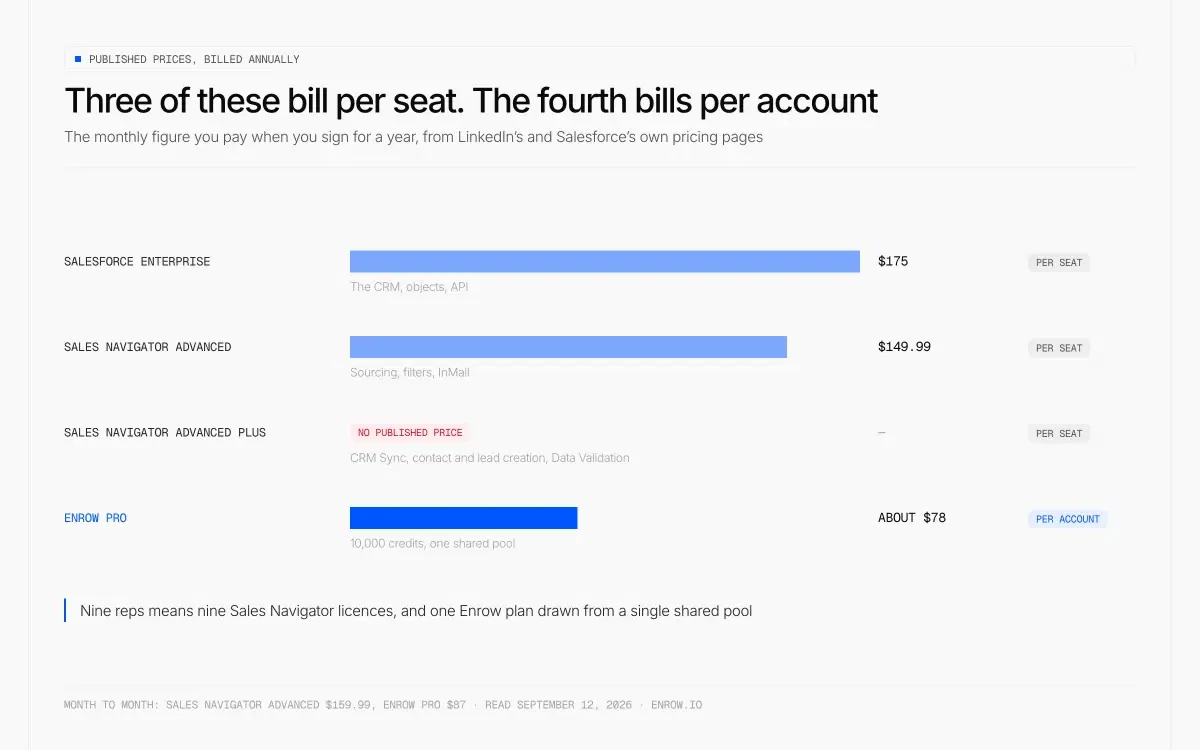
Three of the four layers bill per seat and compound with headcount. Advanced Plus, the one that unlocks CRM Sync, publishes no price at all.
Sales Navigator Core runs $119.99 a month, $1,079.88 a year. Advanced is $159.99 monthly, $1,799.88 annually. Advanced Plus publishes no price at all — it's "customized based on your sales team's size, CRM integration, and onboarding/training needs". Full ladder in our Sales Navigator pricing breakdown.
A naming snag sits underneath: the requirement docs name Professional Edition, while Salesforce's pricing page sells Starter Suite, Pro Suite, Enterprise, Unlimited and Agentforce 1 Sales. Whether Pro Suite satisfies "Professional" is documented nowhere.
Stacked up, what it takes to move one LinkedIn profile into a Salesforce record somebody can send to. Salesforce publishes Enterprise on an annual-billing basis only, so every row below is stated the same way — the monthly figure you pay when you sign for a year:
| Layer | Published price, billed annually | Billed how | What it buys |
|---|---|---|---|
| Salesforce Enterprise | $175 per user per month | Per seat | The CRM, objects, API |
| Sales Navigator Advanced | $149.99 per month per licence ($1,799.88 a year) | Per seat | Sourcing, filters, InMail |
| Sales Navigator Advanced Plus | No published price | Per seat | CRM Sync, contact and lead creation, Data Validation |
| Enrow Pro | About $78 a month for the whole team | Per account | 10,000 credits — 10,000 verified emails at $0.0078, or 250 direct dials, or any split of the two |
Month to month rather than annual, Sales Navigator Advanced is $159.99 and Enrow Pro is $87, or $0.0087 an email; both columns move together, so the shape holds either way.
Three of those rows bill per seat. The fourth doesn't, and it compounds: nine reps means nine Sales Navigator licences and one Enrow plan drawn from a single shared pool. Credits are one pool, not two allowances — a phone costs 40 of them, so every direct dial you pull is 40 emails you didn't.
Prices from LinkedIn's comparison page and salesforce.com/sales/pricing, both read September 12, 2026.
An empty Email field weakens the sync too
You can see the person inside Salesforce and still have no way to reach them. Embedded profile on the record, activity logging, badges correct, and the two fields a rep needs on Tuesday marked "Populated by: User".
There's a second cost to that blank, and it's an inference rather than something LinkedIn spells out. Its CRM Match Data Report names the contact and lead fields it works from: "First name, Last name, Title, Company, Country, Phone number, Email." Email and phone are two of those seven. LinkedIn publishes no weighting, so nobody outside can say how much either one carries — but a database where both sit empty is asking the matcher to work off five. The missing address isn't only a sending problem.
Source: LinkedIn Help a105070, "CRM Match Data Report". Read September 12, 2026.
Filling the two fields without splitting the record
This is Enrow's job, and a deliberately small one.
Open the profile in LinkedIn or Sales Navigator, hit the extension, and the finished card lands in Salesforce: name, email, phone, company, LinkedIn URL. The write is a create-or-update. If that person is already in the org, the existing record gets the new values; if they aren't, one gets made. No second copy, and no March version of a contact sitting above the August one.
Verification happens before the write, never after. Ten or more checks per address, repeated SMTP passes, catch-all probes fired from servers in more than one region — that last part is what it takes to get a straight answer out of a domain that accepts everything you throw at it. And the lookup is live, two to five seconds against the mail server, rather than a row pulled from a table somebody compiled in the spring.
Two numbers, both observed on my own files and neither one a promise about yours: the match rate sits close to 60%, the bounce rate under 1%. So four names in ten come back empty. Those cost nothing — a miss isn't billed. A direct dial costs 40 credits: about $0.35 on Pro billed monthly, $0.31 on the annual plan. EU numbers are covered.
The browser workflow is in Salesforce Chrome extension, the create-or-update mechanics across all three native CRMs in LinkedIn to CRM. At volume, skip the browser: API, webhooks, Make, Zapier, n8n, plus an MCP server at github.com/EnrowAPI/enrow-mcp.
Sources: enrow.io/en/integrations and the Chrome extension page, read September 12, 2026. Salesforce is one of three native Enrow CRM connectors, alongside HubSpot and Pipedrive.
The two tools people compare this against
Hublead comes up constantly on this job, and on a Salesforce page it rules itself out: "We only integrate with HubSpot for now." That's their line, not a knock — it's a good tool aimed at one CRM.
Surfe does cover Salesforce, and it's a fair comparison. Per user per month: Free at $0 with 20 email and 5 mobile searches, Essential $49 with 150 email and 50 mobile credits, Pro $89 with 1,000 email and 100 mobile. Annual billing drops Essential to $39 and Pro to $79, and switches the allowance display to a yearly total — 1,800 email and 600 mobile on Essential, 12,000 and 1,200 on Pro. Same monthly rate underneath; read the unit before you compare it to anything. The structural difference is the seat: Surfe's credits and price both attach to a user, Enrow's attach to the account.
The sourcing layer stays LinkedIn's
One thing Enrow won't do, and on a LinkedIn page it's the relevant one. It will not build your list.
There is no searchable database inside Enrow. That's a decision we made and intend to keep, not a line item waiting on a roadmap. Bought databases get rebuilt on a cycle measured in quarters, and between two rebuilds the people in them keep changing employer, title and mailbox without telling anyone. Looking the address up at the moment you ask is the alternative, and what you pay for it is a sourcing step we don't cover.
On this page that somebody is Sales Navigator, and nothing above argues you should cancel it. Keep paying for the sourcing. Just don't buy it expecting contact data, because LinkedIn has put in writing that it won't supply any.
How I checked this
Every LinkedIn claim above comes from a LinkedIn-owned page read on September 12, 2026 — help articles a105070, a106005, a107066, a108046, a120992, a125962, a131001, a170004, a453837, a484790, plus the compare-plans page for prices and tick placement. Salesforce claims come from Salesforce Help, the AppExchange listing and the Sales Cloud pricing page, same date. Quotation marks on this page mean the words are LinkedIn's or Salesforce's, copied from those pages; anything I'm inferring is written as an inference. Where the two companies contradict each other, both sides are printed and neither is adjudicated.
ready to stop wasting time?
Connected in minutes.
Verified data in seconds.
FAQ
Does the LinkedIn Salesforce integration give you email addresses and phone numbers?
No. LinkedIn's technical documents for Contact Creation and Lead Creation into Salesforce publish a "Populated by" column. First Name, Last Name, Company, Title and Mailing Country come from LinkedIn. Email and Phone are populated by the user, and pre-fill only "if Email and/or Phone have already been entered directly into CRM or Sales Navigator." LinkedIn explains that it "only releases information that members consent to distributing".
Which Sales Navigator plan do I need for the Salesforce integration?
LinkedIn's own properties disagree. Its help centre states that "Integration between Sales Navigator and your CRM is only available for Sales Navigator Advanced Plus users", and the AppExchange listing says the Salesforce app does not support Core or Advanced editions. LinkedIn's comparison page, updated August 1, 2026, marks Advanced CRM Integrations and Lead/Contact Creation on Advanced. Get the plan named in writing before purchase.
How do I sync LinkedIn Sales Navigator with Salesforce?
Two sides. In Salesforce: Setup, search LinkedIn Sales Navigator, turn on the Sales Navigator Integration toggle, then add the Member Profile and Company Profile components to your Lightning pages. In Sales Navigator: an admin opens Admin Settings, selects CRM, logs into Salesforce and enables the sync options. LinkedIn's documentation puts LinkedIn Sales Navigator CRM sync on Advanced Plus, and one Salesforce instance connects per contract.
Does Sales Navigator CRM Sync update Salesforce in real time?
LinkedIn's marketing page describes Advanced CRM Integrations as keeping "your CRM current with real-time updates". Its help documentation states that "Data is synced daily, once per day", and its Data Validation article says records "are updated and validated every 24 hours". Both quotes were read the same day.
Is there a limit on how many contacts I can push from Sales Navigator into Salesforce?
Yes. LinkedIn's lead-creation document states that "The Lead and Contact Creation features are limited to 1,000 contacts per user per month", and its contact-creation document adds that "For the standard license, there is a daily limit of 1,000 API calls per person" on the Salesforce side. Account and opportunity records can't be created from Sales Navigator, and "Lead creation is not supported on the Sales Navigator mobile app."
Which CRM has the best integration with LinkedIn?
LinkedIn's help centre (article a106005) puts four CRMs in the top group, each receiving CRM Sync, Embedded Profiles and Embedded Experiences: HubSpot, Microsoft Dynamics, Oracle Sales and Salesforce. Pega, SAP and SugarCRM are listed for Embedded Profiles only, Freshworks for Embedded Experiences only. LinkedIn publishes no ranking among the four, and none of them receives email addresses or phone numbers through the integration — that limit is the same everywhere.
Open a Salesforce contact your team created from LinkedIn last month and look at the Email field. That's the whole argument, on one screen, in your own org. Enrow hands you 50 credits a month on a recurring free tier with no card attached — fill that field first, then decide.