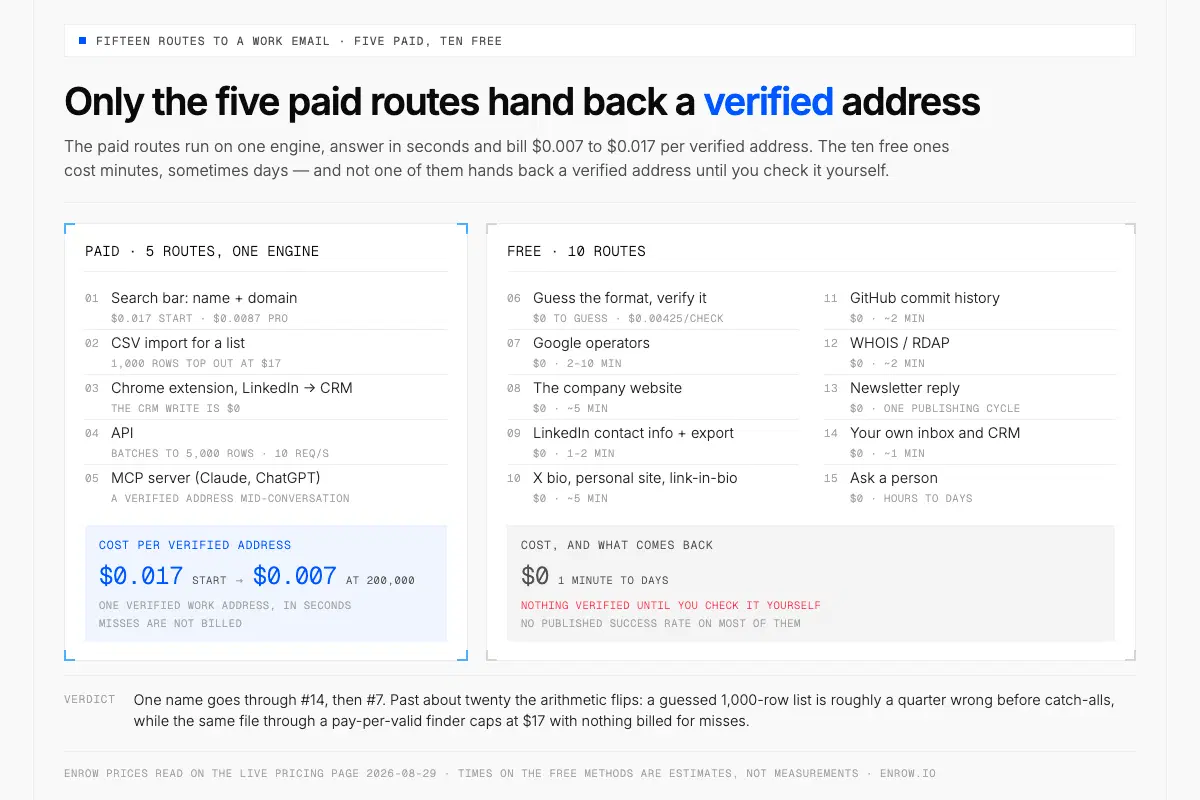
Paid routes hand back a verified address for $0.017 or less; free ones cost time and verify nothing.
Key takeaway A finder takes a name plus a company domain and verifies it in real time. That runs $0.017 per valid email at Enrow's entry tier ($17/mo per 1,000 credits) and $0.0087 on Pro ($87/10,000). A miss is never billed. Pay nothing and 50 credits still land every month, recurring, no card. Ten free routes follow. Not one of them hands back a verified address, and two get described wrongly almost everywhere: WHOIS was sunset for generic domains on 28 January 2025 and now returns a redacted record, while LinkedIn's email default has long been 1st-degree connections only, not "often public". Guessing is better arithmetic than it looks.first.last@andflast@cover 74.5% of B2B addresses in a 336,782-profile vendor study. But the split tracks headcount hard: 38.0%first.last@at 1–10 employees, 74.2% above 10,000. And the billing model decides the bill, not the sticker. Real $/valid = sticker ÷ find-rate ÷ (1 − bounce rate). Snov's $39 per 1,000 searches works out at $0.039 an attempt; assume a 30% find rate and each address you keep costs roughly $0.13, about 7.6× Enrow's entry rate.
Most business email addresses are not hidden. They sit in predictable patterns on company domains, in commit logs, in newsletter headers, in a CRM record a colleague filled in last spring. Findable, mostly, by anyone willing to spend either money or an afternoon.
Which route, and at what price, is the part nobody publishes. I read the live results for this topic on August 29, 2026. Across three query variants the ranking pages recycle the same tool names and the same operator strings, and not one of them sets a price or a measured success rate beside a single method. So every method below carries a cost, an output, a failure mode and a source I checked today.
Disclosure. I founded Enrow, an email finder, and the first five methods run through it. The other ten need no product of mine. I use several of them myself, on the lookups that come back empty — which happens about four times in ten.
The 15 methods, costed
Paid routes cost $0.007 to $0.017 per verified address on monthly billing, and they answer in seconds. The ten free ones cost minutes, sometimes days, and hand back nothing verified until you check it yourself.
| # | Method | What it costs | What it returns | How often it works | Failure mode |
|---|---|---|---|---|---|
| 1 | Search bar: name + domain | $0.017/valid (Start, $17/mo per 1,000 credits) · $0.0087 (Pro) | One verified work address, in seconds | About 6 in 10 found on our own files, an observed average, not a guarantee | Tiny or brand-new domains return nothing. Misses are not billed |
| 2 | CSV import for a list | Same per-valid rate; 1,000 rows tops out at $17 on Start | The file back, verified address per row | Same as #1 | Coverage sags on sub-10-employee companies |
| 3 | Chrome extension, LinkedIn → CRM | Same per-valid rate; the CRM write is $0 | Full contact card created or updated in HubSpot, Salesforce or Pipedrive | Same as #1 | Needs a profile open |
| 4 | API | Same rate; batches to 5,000 rows (3,000 phones), 10 req/s POST | Verified addresses inside your own system | Same as #1 | Async: poll a GET or take a webhook |
| 5 | MCP server (Claude, ChatGPT) | Same per-valid rate | A verified address mid-conversation | Same as #1 | The assistant can pass the wrong domain |
| 6 | Guess the format, verify it | $0 to guess · $0.00425/check on Start (0.25 credit) | A candidate, then a verdict | first.last@ 47.71%, flast@ 26.81% (vendor study, 336,782 profiles, Jul 2026) | Catch-alls say yes to anything |
| 7 | Google operators | $0 · 2–10 min (my estimate) | A published address, or nothing | No published rate. Google documents six refinements; + was removed | Non-publishers leave no string |
| 8 | The company website | $0 · ~5 min | Team, press or imprint address, plus the format | No published rate. German sites owe one under § 5 (1) Nr. 2 DDG (in force 14 May 2024) | A generic inbox, not a person |
| 9 | LinkedIn contact info + export | $0 · 1–2 min | A 1st-degree connection's primary address | No published rate. LinkedIn publishes no split across its four settings | Default is 1st-degree; a second toggle governs the export |
| 10 | X bio, personal site, link-in-bio | $0 · ~5 min | A self-published address | No published rate | Only reaches people who want reaching |
| 11 | GitHub commit history | $0 · ~2 min | The author address on a public commit | No published rate. GitHub publishes no share carrying a real address | Privacy on → noreply, unchangeable |
| 12 | WHOIS / RDAP | $0 · ~2 min | Almost always a redacted record | Largely obsolete: sunset 28 Jan 2025 for gTLDs; the official disclosure route approves 26% | Prospecting is not an eligible reason |
| 13 | Newsletter reply | $0 · one cycle (weekly or monthly for most B2B senders) | A monitored inbox, or the domain format | No published rate | no-reply@ senders |
| 14 | Your own inbox and CRM | $0 · ~1 min | An address that already got a reply | No published rate. Median US tenure 3.9 yrs (Jan 2024, BLS), so rows decay | A stale row looks fresh |
| 15 | Ask a person | $0 · hours to days | The address, plus a warm intro | No published rate | Stops at about five a day |
Times on the free methods are my estimates rather than measurements, and deliberately not converted into dollars. Enrow's prices came off the live pricing page on 2026-08-29. The one find rate in the table, on row 1, is ours: an average observed on our own files, to be weighed as a vendor's number. Format shares are Sendburg's, on Sendburg's own database. The rest is sourced inside the method it belongs to.
Verdict: one name goes through #14, then #7. Past about twenty the arithmetic flips. Guess a 1,000-row list at the two dominant formats and roughly a quarter of it is wrong before catch-alls enter the picture, every wrong row a hard bounce against a 2% working ceiling. Put the same file through a pay-per-valid finder and it caps at $17, with nothing billed for misses.
What an address costs, and what a sticker hides
On monthly billing a verified email runs from $0.017 at 1,000 credits down to $0.007 at 200,000. One credit buys four verifications, so checking 1,000 addresses on the entry plan costs $4.25, against the $17 it costs to find them in the first place.
| Tier | $/mo | Credits/mo | $/valid email | Phones included | Verifications those credits buy |
|---|---|---|---|---|---|
| Free | $0 | 50/mo, recurring, no card | — | — | 200/mo |
| Start | $17/mo | 1,000 | $0.017 | 25 | 4,000 ($0.00425 each) |
| Start 4k | $47/mo | 4,000 | $0.0118 | 100 | 16,000 (~$0.0029) |
| Pro | $87/mo | 10,000 | $0.0087 | 250 | 40,000 (~$0.0022) |
| Scale | $397/mo | 50,000 | $0.0079 | 1,250 | 200,000 (~$0.0020) |
| Scale 200k | $1,397/mo | 200,000 | ~$0.007 | 5,000 | 800,000 |
Monthly against monthly. Annual on Pro and Scale is that monthly price × 0.90 shown as a monthly equivalent: $78/mo at 10,000 credits, $357/mo at 50,000 — which drags the top tier down to about $0.006 an email. Credits roll over on both. One email costs one credit and one verification a quarter of one. A direct phone costs 40 ($0.47 on the 4,000-credit Start, $0.35 on Pro), broken down in direct dial numbers. All of it read off the live pricing page on August 29, 2026.
Two billing models exist. The sticker only tells the truth under one.
real $/valid = sticker ÷ find-rate ÷ (1 − bounce rate)
Pay per valid and the find-rate term equals 1, so it drops out — an empty search is never charged. Pay per search and it stays. Snov charges $39 for 1,000 searches, $0.039 an attempt. Assume a 30% find rate, my working assumption for any tool that publishes none and stated here so you can argue with it, and every address kept cost $0.039 ÷ 0.30 ≈ $0.13. That is about 7.6× Enrow's $0.017 at the same volume, before a single bounce comes off the top.
Read down the last column and the shape holds. Every pay-per-valid rival lands between 1.3× and 3.2× Enrow's entry rate per valid, measured at each vendor's own entry tier. Then the gap jumps. Tools billing per search or per database reveal sit between 7.6× and about 40× once you count the misses you paid for.
| Tool | Entry tier | Billing basis | Sticker per email | Real per valid | × Enrow Start |
|---|---|---|---|---|---|
| Enrow | 1,000 = $17/mo | Per verified valid | $0.017 | $0.017; miss free | 1.0× |
| Emelia | 1,000 = €19 ($22.80/mo) | Per valid found | $0.0228 | $0.0228 | 1.3× (a sequencer, not a data rival) |
| LeadMagic | 2,000 = $49/mo | Per verified valid | $0.0245 | $0.0245 | 1.4× |
| Findymail | 1,000 = $49/mo | Per valid found | $0.049 | $0.049 | 2.9× |
| Anymail Finder | 1,000 = $49/mo | Per valid found | $0.049 | $0.049 | 2.9× |
| FullEnrich | 1,000 = $55/mo | Per valid, 100+ vendor waterfall | $0.055 | $0.055 | 3.2× |
| Dropcontact | 500 = €19/mo (no rollover) | Per valid found | €0.038 | €0.038 | 2.5× Enrow's €0.015 |
| Snov | 1,000 = $39/mo | Per search | $0.039 | ≈$0.13 at an assumed 30% find rate | 7.6× real |
| UpLead | 170 credits = $99/mo | Per reveal | $0.582 | higher after bounces | ~34× |
| RocketReach | 100 lookups = $69/mo | Per search | $0.69 | higher after misses | ~40× |
Emelia's euros are converted at ×1.20. Dropcontact stays in euros and is set against Enrow's euro rate, €0.015 on Start, month against month. Every ladder there dates from July 6, 2026 and was not re-fetched today — read the competitor figures as of that date, not this page's. Twenty-six named tools bill per attempt, among them RocketReach, Seamless.ai, Snov.io, UpLead, GetProspect, Skrapp and Voila Norbert. ZoomInfo isn't one of them: search is free there, and a credit is spent only when you export. Apollo, Kaspr, Cognism and ContactOut price per seat instead, so no honest per-email figure exists for any of them. Lusha bills per account rather than per seat, and it charges the reveal.
One multiplier never appears on a pricing page at all. Credits that expire monthly mean you do not spend what you bought: model 15% unused a month plus one dead month a year and utilisation lands near 77.9%, another ÷0.78 on the real rate. Derivation in how to choose a B2B data provider.
What finders actually find
I would put a budget on one find rate only: the one measured on your own file. Two numbers decide whether a finder earns its fee. One is what it hands back. The other is what survives the send, after the hard bounces and the addresses sitting on the wrong company's domain come off. A tool that guesses freely can look generous on the first and give a good share of it back on the second, and a marketing page tends to print only the first.
Cost per address you keep is the figure that settles a purchase. Under pay-per-valid billing it is simply the sticker, $0.017 on Start, because a miss costs nothing and an address that fails verification is never billed. Under per-search billing it is the sticker divided by everything that went wrong, which is the formula two sections up.
So here are our own numbers, with the caveat they deserve. On the files that come through Enrow, about six addresses in ten come back found, with bounce under 1%. Those are averages observed across real sends, never anything refundable, and they are a vendor's figures about its own tool. The files behind them mostly arrive with a company domain or a LinkedIn URL attached, which is what Enrow resolves against. Take that context away and any finder, ours included, has less to work with. Tiny and brand-new domains are where we come back empty most often.
One of our limits is deliberate. Enrow has no searchable database to browse and won't build one. A stored index gets rebuilt on a three-to-nine-month cycle, so by the time you query it a slice of the rows describes jobs people already left. Resolving each address at the moment you ask is exactly why the results hold up. What that costs you is sourcing, which still has to start on LinkedIn or Sales Navigator.
1. The in-app search bar
Name in, domain in, verified address out. Seconds. It costs $0.017 on Start or $0.0087 on Pro, and nothing at all when the lookup finds nobody — the shortest path on this page, and the one most of the other methods eventually feed.
Verified is the load-bearing word there. Plenty of finders hand back a pattern guess wearing a confidence score and call it a result. 10+ verification checks stand between the lookup and your screen. SMTP passes run more than once, and the catch-all probes go out of geographically separate servers.
The free tier is 50 credits a month, no card, and it recurs: 50 found addresses, or 200 verifications, or any mix of the two.
Observed on our lists: about 6 in 10 addresses found, bounce under 1% — observed, never a guarantee.
2. A CSV import for whole lists
Same engine, list-shaped. Upload a spreadsheet of names and companies and it comes back with a verified address per row, the misses flagged, still at $0.017 per valid on Start. So 1,000 rows top out at $17, and a file that is only partly covered comes in under that.
And here is the budget line nobody plans for: catch-all domains. About 30% of B2B domains accept mail for any address you throw at them — a vendor figure, from Findymail's own site, and European lists run higher. Most tools handle those rows by stamping them risky and handing the problem back. Enrow settles them with repeated probes and returns them valid. Mechanism in what is a catch-all email.
The file comes back with a verified address per row. Misses aren't billed.
3. The Chrome extension, from LinkedIn to your CRM
Open a LinkedIn or Sales Navigator profile. The extension reads that profile, verifies the address at the same per-valid rate, then files the complete contact card (name, title, company, email, the rest of the fields) into HubSpot, Salesforce or Pipedrive on a single click. The CRM write adds nothing to the bill.
It checks before it writes. Create-or-update on all three native CRMs, never insert-and-hope: a person already on file has their record completed, a new one gets created. Which is why two reps opening the same saved search in the same week don't leave you holding that buyer twice. Walkthrough in LinkedIn to CRM.
I built this one because I was losing afternoons to moving fields between two browser tabs by hand. No other finder delivers the complete card into a CRM this way; the extension page shows the flow.
One click on a LinkedIn profile files the complete verified contact into your CRM.
4. The API
One POST, a name and a company, one verified address back, billed per valid. Bulk batches take up to 5,000 rows for emails and 3,000 for phones, with every POST endpoint capped at 10 requests per second per key. GET isn't capped.
But the endpoints are asynchronous by design, so you poll a GET or register a webhook instead of blocking on a response — an architectural constraint worth knowing before you build against it, and one that catches out anybody who assumed a finder API would behave like an ordinary REST lookup. Batch sizes, error shapes and how rival APIs compare sit in email finder API. The reference itself is on the API page.
5. The MCP server, from Claude or ChatGPT
There is an official Enrow MCP server (github.com/EnrowAPI/enrow-mcp). Point an MCP-compatible assistant at it and the finder and verifier run mid-conversation, same per-valid rate, same engine as the search bar. Claude and OpenAI are native.
Which matters more for agents than for people. An agent will happily burn a thousand lookups nobody asked for, and pay-per-valid is the billing model under which that mistake stays cheap. Economics of it in AI sales agents and MCP.
Ask your AI assistant; the MCP server runs the lookup in real time.
6. Guess the format, then verify it
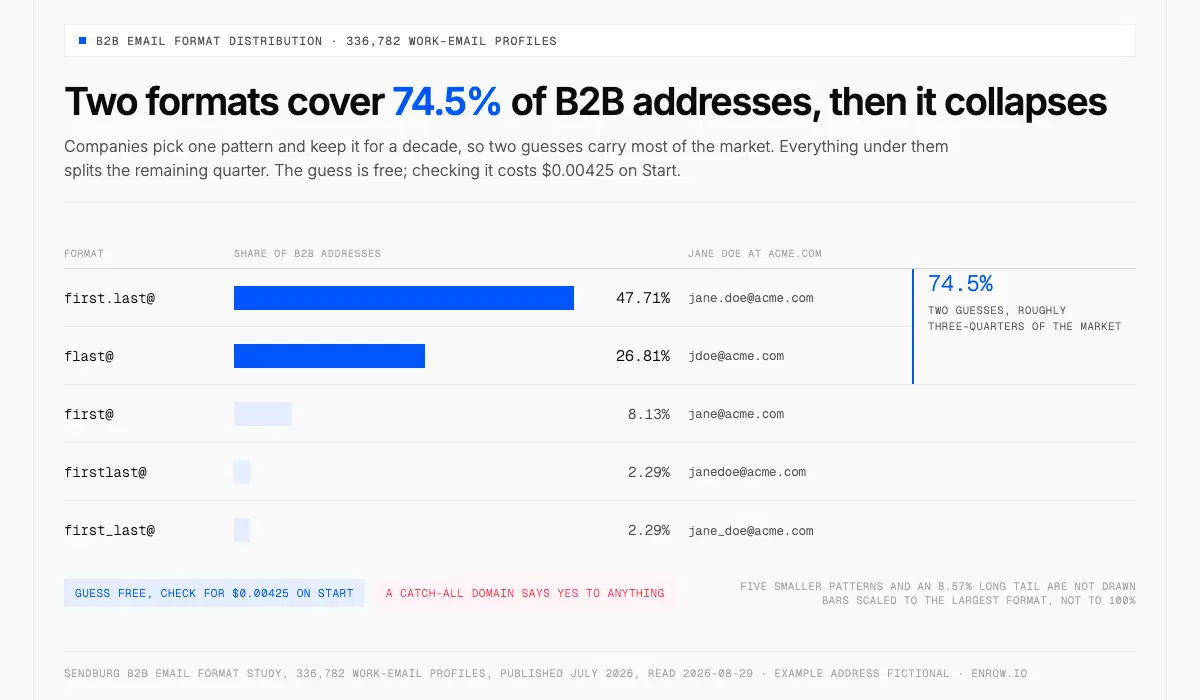
Two guesses, first.last@ and flast@, already cover 74.5% of B2B addresses.
Guessing works more often than it deserves to, because companies pick one format and then keep it for a decade. first.last@ accounts for 47.71% of B2B addresses, flast@ for another 26.81% — two guesses, roughly three-quarters of the market. The guess itself is free. Checking it costs $0.00425 on Start.
| Format | Share of B2B addresses | Jane Doe at acme.com |
|---|---|---|
| first.last@ | 47.71% | jane.doe@acme.com |
| flast@ | 26.81% | jdoe@acme.com |
| (everything else) | 8.57% | — |
| first@ | 8.13% | jane@acme.com |
| firstlast@ | 2.29% | janedoe@acme.com |
| first_last@ | 2.29% | jane_doe@acme.com |
| f.last@ | 2.14% | j.doe@acme.com |
| last@ | 1.2% | doe@acme.com |
| last.first@ | 0.65% | doe.jane@acme.com |
| first.l@ | 0.13% | jane.d@acme.com |
| first-last@ | 0.1% | jane-doe@acme.com |
Headcount decides whether that guess is a decision or a coin flip. first.last@ covers 38.0% of addresses at companies under ten people and 74.2% above ten thousand — close to double.
| Company size | Share using first.last@ |
|---|---|
| 1–10 employees | 38.0% |
| 11–50 | 36.3% |
| 51–200 | 45.2% |
| 201–500 | 47.3% |
| 501–1,000 | 52.8% |
| 1,001–5,000 | 63.2% |
| 5,001–10,000 | 68.2% |
| 10,001+ | 74.2% |
Both tables come from the Sendburg B2B email format study of 336,782 work-email profiles, published July 2026, accessed August 29, 2026. A vendor study on that vendor's own database, so it describes their data before it describes the market. Directional, not census.
Lead with first.last@ at an enterprise and you're right about three times in four. At an eight-person startup you are under a coin flip, which is roughly where first@ earns its 8.13% and where a lot of confident-looking outreach quietly dies in a mailbox that never existed. Better move: find one address you already know at that company, and the pattern for everyone else falls out of it.
Then stop. Do not send to a guess. I learned that expensively, years before Enrow existed, with a file of raw pattern guesses whose bounce wave dragged a domain's reputation down for weeks.
7. Google search operators
No published success rate exists for any of this. Not one operator, not one string, and anybody printing a percentage here invented it. What is checkable is the operator set. Most articles on this topic get it wrong, recommending operators Google stopped documenting years ago while saying nothing about the ones it kept. Two minutes to try. Nothing to spend.
"jane doe" "@company.com"site:company.com "jane doe""jane doe" contact filetype:pdf
Google's search refinements page documents exactly six things: exact-phrase quotes, site:, the minus sign, before:, after: and filetype:. It also warns against putting a space between an operator and its term. The + operator was removed. And inurl:, intitle: and AROUND(n) — recommended constantly in email-hunting listicles, including by people who have plainly not opened Google's own documentation since the last time they rewrote the article — appear nowhere on it. They may still work. Google does not document them, so nobody can promise they will keep working.
filetype:pdf is the string that pays, because conference decks and event programmes leak addresses at a rate the rest of the web never matches. And it returns nothing at all for an operations manager who has never sat on a panel.
8. The company website, past the contact page
Everyone checks /contact, finds a form, and gives up. Five minutes spent past that page is the cheapest research on this list, and even a failed search hands you the domain's format for method 6. Addresses sit in team pages, in author boxes under blog posts, in press rooms where PR contacts are published on purpose, and on the legal or imprint page.
That last one is worth targeting on German-market sites, though not for the reason most guides give. GDPR requires nobody to publish a contact address. German statute does: § 5 (1) Nr. 2 DDG, in force since 14 May 2024 and the replacement for the TMG, obliges every commercial digital service to keep permanently available "Angaben, die eine schnelle elektronische Kontaktaufnahme und eine unmittelbare Kommunikation mit ihnen ermöglichen, einschließlich der Adresse für die elektronische Post": details enabling fast electronic contact, including the address for electronic mail. Read on gesetze-im-internet.de, 2026-08-29.
An Impressum is a legal obligation, which means somebody maintains it. Often the freshest address on the whole site.
9. LinkedIn contact info and the connections export
Narrower than their reputation, both of them. A minute or two each, nothing to pay, and the default is 1st-degree connections only — in LinkedIn's words, "By default, the primary email address you've registered with LinkedIn is only visible to your direct connections on LinkedIn."
Four settings exist: only me, 1st-degree, 1st and 2nd-degree, anyone on LinkedIn. A separate toggle governs whether a connection can download your address in their data export, which is why a connections CSV sometimes hands back blank email columns for people you are definitely connected to. Both live on LinkedIn's email visibility page, stamped updated three weeks ago, accessed August 29, 2026.
LinkedIn publishes no figure for how many members sit at each setting. So anyone claiming the share is shrinking is guessing, and the previous version of this page was among the guessers, which is why that claim is gone rather than hedged.
Export steps: export LinkedIn contacts. For a whole Sales Navigator list, the nine LinkedIn-specific routes sit in the LinkedIn email finder guide.
10. X bios, personal sites and the link-in-bio trail
This one only ever reaches people who want reaching. No published rate, five minutes, no money. Bios carry an address outright, or a line saying the DMs are open. The link under the bio leads to a personal domain, and a personal domain often carries the contact page the corporate site never had.
Substack about pages. Linktree footers. The route works on anyone who publishes for a living — journalists nearly always, founders and creators often enough to be worth the click. For a salaried VP of Operations who last posted in 2021, there is no trail at all.
11. GitHub commit history
Every git commit records an author email. Two minutes in a public repo (the commit's patch view, or git log on a clone) and you either have it or you don't. GitHub publishes no figure for the share of public commits carrying a real address, so treat the hit rate as unknown rather than high.
What GitHub does document is the default. With email privacy on, the commit address "cannot be changed and will be a no-reply by default", formatted ID+USERNAME@users.noreply.github.com for accounts created after 18 July 2017 and USERNAME@users.noreply.github.com before. GitHub's current docs, accessed August 29, 2026.
So a numeric prefix means a post-2017 account with privacy switched on, and that address goes nowhere at all. Switched off is different. You often get the real work address, and for an engineering audience that beats most of this list.
12. WHOIS records, and why they mostly stopped working
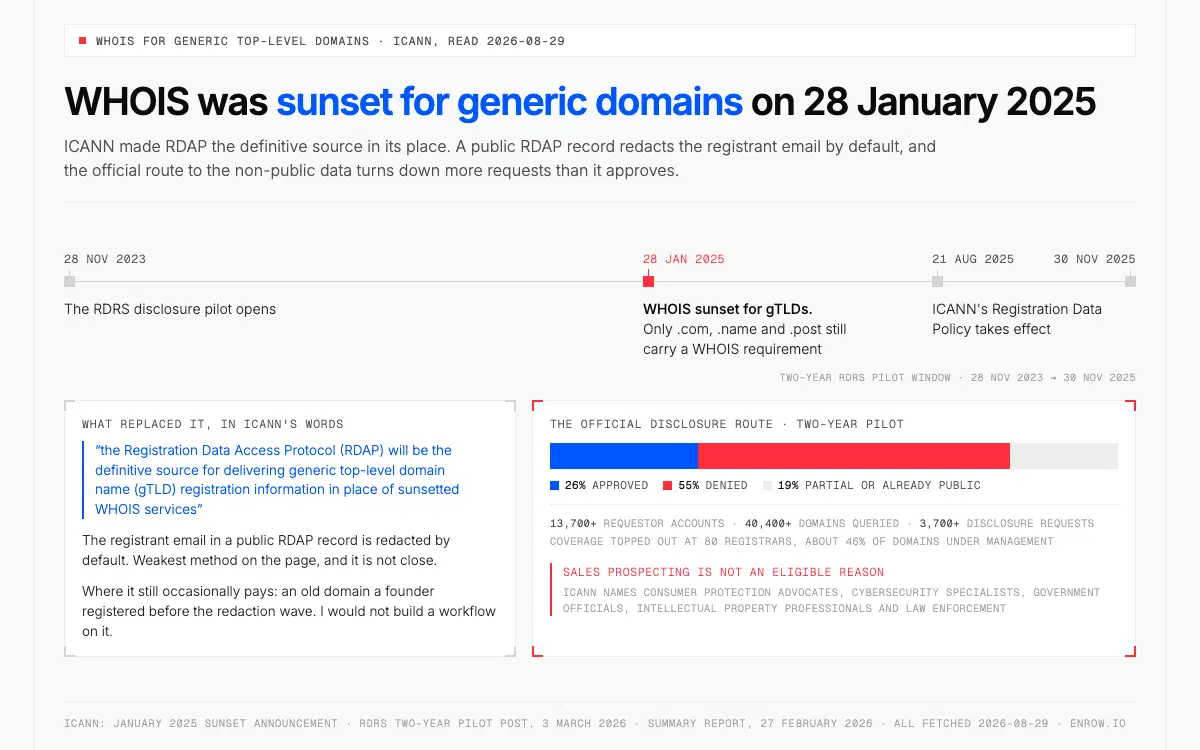
The official route to the redacted data denied 55% of requests, and sales prospecting does not qualify.
Weakest method on the page, and it is not close. ICANN sunset WHOIS for generic top-level domains on 28 January 2025: "the Registration Data Access Protocol (RDAP) will be the definitive source for delivering generic top-level domain name (gTLD) registration information in place of sunsetted WHOIS services." Only .com, .name and .post still carry a WHOIS requirement, and ICANN's Registration Data Policy took effect on 21 August 2025. The registrant email in a public RDAP record is redacted by default.
There is an official route to the non-public data, and its numbers deserve to travel with any recommendation of it. Across the two-year RDRS pilot, 28 November 2023 to 30 November 2025, ICANN logged 13,700+ requestor accounts, 40,400+ domains queried and 3,700+ disclosure requests. 26% approved. 55% denied. The other 19% were partial or already public. Registrar coverage topped out at 80 registrars, about 46% of domains under management.
And ICANN's eligibility wording names consumer protection advocates, cybersecurity specialists, government officials, intellectual property professionals and law enforcement. Sales prospecting is not on that list. Figures from ICANN's RDRS two-year pilot post of 3 March 2026, its summary report of 27 February 2026, and the January 2025 sunset announcement, all fetched 2026-08-29.
Where it still occasionally pays: an old domain a founder registered before the redaction wave. I would not build a workflow on it.
13. Subscribe to the newsletter, then reply
The price is one publishing cycle. Weekly or monthly for most B2B senders — not the "one day" this page used to claim, which was wrong in a way that matters, because the method only works if you have a week to spare. The sending address is frequently a monitored inbox. A reply reaches a human. And even a no-reply@ sender hands you the domain's format, which is the input method 6 needs.
Founders and solo operators answer these. A marketing team's automation platform does not.
14. Search your own inbox and CRM first
The best address on this page comes from here. It is the one that already received a reply — verified by a human being, at no cost, in about a minute. Search the name across your mail, your calendar invites, shared inboxes and the CRM before you touch anything else, because somebody at your company has very probably had this conversation already.
The catch is decay, and it has a number. US median employee tenure was 3.9 years in January 2024, down from 4.1 in January 2022 and the lowest since January 2002: 3.5 years in the private sector against 6.2 in the public, and 2.7 for 25-to-34-year-olds. Bureau of Labor Statistics, Employee Tenure release, reference period January 2024, published 26 September 2024.
Divide 1 by 3.9 and about a quarter of a contact list changes employer every year. That division is mine, not the BLS's, and it assumes a flat hazard rate that real careers plainly do not have — people leave in clusters, after acquisitions and reorganisations and bad Januaries, not on a smooth annual drip. Right order of magnitude, though. Which makes a CRM row from 2023 a coin flip.
15. Ask a person
It stops working past roughly five contacts a day. That is the honest failure mode, not a charming quirk, and hours-to-days is the other half of a price you pay for the highest-quality introduction available to anybody. Ask a mutual connection. Failing that, message the person directly, or call the switchboard and ask which address to use — receptionists hand that out far more often than pride expects.
For the one contact who genuinely matters, the direct ask beats every clever trick above. It also starts things somewhere warmer than a cold send.
Four questions with short answers
How do I find someone's email address from a phone number?
You can't, with a B2B tool. No business contact-data product, Enrow included, accepts a phone number as input and hands back an email address. Enrow takes a full name plus a company domain, and nothing else. The services advertising phone-to-email are consumer people-search sites running on different data under different legal bases, and what they return is not deliverable B2B contact data.
How do I find all the email addresses associated with someone?
No B2B finder does that. It would need a searchable database indexed by person, and Enrow deliberately has none. What a finder does is resolve one identity (this name, at this company domain) and hand back the current work address for it. Assembling every address a human has ever used belongs to people-search, a different industry under different rules.
Can I find an email with just a name?
Not reliably. A name with no company attached gives a finder nothing to resolve against, and a common-name search returns the wrong person with total confidence. Add the company or the domain and the same lookup comes back verified in seconds, at $0.017 or less. With only a name, your actual job is finding the employer first.
What is the best way to find email addresses?
For a single contact, search your own inbox and CRM, then run an exact-phrase Google query. Past twenty the arithmetic wins: a pay-per-valid finder costs $0.017 per verified address at Enrow's entry tier and charges nothing for a miss, against a guessed list where roughly a quarter of the rows are wrong before catch-alls are even counted.
Verify before you send
Where your bounce rate sits decides whether you send, clean, or stop.
Whatever produced the address, the last step never changes. And the thresholds here are published numbers rather than folklore: Amazon SES drops an account into review once hard bounces hit 5%, and can stop the sending outright at 10%, while Google publishes no bounce threshold at all, only a 0.3% spam-complaint ceiling that gets quoted as one.
| Number | What it is | Who sets it | Source |
|---|---|---|---|
| Under 1% | Where cold outreach should sit; what a verified list produces | Practice; observed on our own sends, not a guarantee | Enrow, observed average |
| 2% | The working ceiling across senders | Industry practice | Email bounce rate |
| 5% | Account automatically placed under review | Amazon SES, hard bounces only | SES reputation docs, verified 2026-08-29 |
| 10% | Sending may be paused entirely | Amazon SES, hard bounces only | SES reputation docs, verified 2026-08-29 |
| 0.3% | A spam-complaint rate for senders of 5,000+/day to Gmail. Not a bounce rate. Above 0.1% already costs placement | Google sender guidelines | Google, verified 2026-08-29 |
| — | Google publishes no public bounce threshold | — | — |
That 0.3% is the most misquoted figure in the category, cited as a bounce ceiling article after article while measuring something else.
A bounce costs more than one lost reply. Providers score senders, dead addresses drag that score down, and the next campaign routes toward spam — including the messages you spent an hour researching. Verification runs the same 10+ checks as the finder at 0.25 credit an address, so cleaning 1,000 of them costs 250 credits, about $4.25 on Start. Status-by-status mechanics in bulk email verification.
An address you didn't verify is a guess wearing a suit.
Which route to take
Volume decides, and so does where your day already happens. One contact: your own inbox, then a Google query. A list of any size goes through a CSV import at $0.017 a valid row, recurring volume belongs on the API, and anything starting from a LinkedIn profile belongs in the Chrome extension. No budget at all still leaves the free methods, plus 50 monthly credits to verify with.
Match your situation to the method. Most readers need only one of the fifteen.
| Situation | Method | Cost | Why |
|---|---|---|---|
| One contact, right now | #14 then #1 | $0, then $0.017 | Your own records are verified by a reply; the search bar closes the gap in seconds |
| One contact, no tools today | #7 then #6 | $0 · 2–10 min | Exact-phrase search plus the two dominant formats covers ~74.5% of B2B patterns |
| A list of 1,000 | #2 | $17 max on Start | Only valid rows bill, so partial coverage costs less than the ceiling |
| Recurring volume | #4 | $0.0087/valid on Pro | 5,000-row batches at 10 req/s, no Monday spreadsheet ritual |
| You live in Sales Navigator | #3 | $0.017/valid, CRM write free | Full contact card, create-or-update, one click |
| Building an agent | #5 | $0.0087/valid on Pro | Pay-per-valid means an agent's wasted calls cost nothing |
| A developer | #11 | $0 · ~2 min | Commit history beats every finder on this audience when privacy is off |
| A German-market company | #8 | $0 · ~5 min | § 5 (1) Nr. 2 DDG requires a working email address on the Impressum |
| Zero budget, whole list | #6 + #7 + #14 | $0, then $0.00425/check | Guess, then verify on the 50 free monthly credits, 200 checks |
| You also need to send it | Not this category | — | Enrow finds and verifies; sending is a sequencer's job: Emelia, La Growth Machine or lemlist |
ready to stop wasting time?
Connected in minutes.
Verified data in seconds.
FAQ
How can I find someone's email address by their name?
A name on its own isn't enough. You need the name plus a company or a domain, and with both a finder returns a verified address in seconds at $0.017 or less. The free routes get there by hand: an exact-phrase Google query, the company's imprint page, or a guess at first.last@, which covers 47.71% of B2B addresses. Search a name alone and you mostly surface the wrong person.
Is there a free way to find an email address?
Several, and not one of them verified. Google operators, the company website, a LinkedIn connections export, your own inbox, a newsletter reply. All free, all costing time instead. For something free that has actually been checked, Enrow's tier renews at 50 credits every month with no card, which buys 50 found addresses or 200 verifications and behaves exactly like a paid balance.
Is it legal to find someone's business email?
In B2B, generally yes. GDPR permits processing business contact data under legitimate interest, and CAN-SPAM in the US regulates how you email rather than whether you may find an address. Provenance and conduct are what matter: relevant, professional, easy to opt out of. Enrow operates compliantly.
How accurate are email finders?
It depends on the input as much as on the tool. Two figures matter: what a finder hands back, and what still arrives once hard bounces and wrong-domain matches come off. On our own files, where each name comes with a company domain or a LinkedIn URL, Enrow finds about six addresses in ten with bounce under 1%. Observed averages, never promises. A bare name gives any finder far less to resolve.
Which is cheaper, per-search or pay-per-valid billing?
Pay-per-valid, and the gap widens with every miss. The formula: real cost per valid = sticker ÷ find-rate ÷ (1 − bounce rate). Snov's $39 per 1,000 searches is $0.039 an attempt, so at an assumed 30% find rate each address kept costs about $0.13. Enrow charges $0.017 at the same volume. A miss costs nothing.
Can I find someone's personal Gmail address?
Not with a B2B finder. Enrow resolves work addresses on company domains, so a gmail.com target returns nothing — and costs nothing, since misses aren't billed. Personal addresses sit outside legitimate interest for cold outreach anyway. The defensible routes are the ones where the person published the address, or gave it to you directly.
How I verified this
Every external figure here came off a primary source I read on August 29, 2026: ICANN's WHOIS sunset announcement and RDRS pilot post, Google's search-refinements help page, LinkedIn's email visibility article, GitHub's commit email documentation, § 5 (1) Nr. 2 DDG, and the BLS Employee Tenure release for January 2024. Where a source publishes no number (which covers most of the free methods) the tables say "no published rate" instead of borrowing an estimate from another blog.
Enrow prices came off the live pricing page the same day. Competitor ladders date from July 6, 2026 and were not re-fetched, which the page states beside the table instead of implying a fresher date. Two figures are arithmetic, not measurement, and both are labelled where they appear: the annual-turnover estimate from median tenure, and the per-verification unit costs from the credit ladder.
Stop sending to guesses. Put your next lookup through Enrow. The free tier renews at 50 credits each month and asks for no card. A search that finds nobody is never charged.