Key takeaway
A bulk email verifier runs every row through a stack of checks — formatting, mail records, a live SMTP conversation, role and disposable lookups — then hands back one status word. That word hides something much messier.
A single SMTP pass is a sample, not a verdict. Greylisting answers "come back later" by design (RFC 6647), Gmail answers 421 4.7.28 on unusual volume, accept-all servers say yes to everything. Enrow runs 10+ verification checks per email, with multiple SMTP passes and multiple catch-all checks across servers in different regions.
The rows most tools quietly bin are the catch-alls. Marked "risky", dropped, gone. Enrow verifies them and delivers them as valid.
Amazon SES puts an account under review at a 5% bounce rate and may pause sending at 10%. A verified list sits nowhere near either. Verification costs 0.25 credit on Enrow, so the free 50 credits a month cover 200 checks.Bulk email verification means running a whole file through an email checker before any campaign touches it. Upload a CSV, get it back with a status on every row, delete the bad ones. Most buyers stop reading there, which is where the money leaks.
That status word is doing enormous work. Behind "valid" sits a conversation with a mail server that may or may not have told the truth. Behind "risky" sits a domain that answers yes to everything, which is not the same as a bad address. And behind "unknown" sits, very often, a server that refused to talk to the machine asking.
What a bulk email verifier actually checks
Email validation runs in six layers. The first two are cheap and fast; the rest is where verifiers differ.
1. Syntax
Is the string a legal address. RFC 5321 §4.5.3.1 sets the boundaries: 64 octets for the local part, 255 for the domain, 256 for the whole path. It also catches the boring killers: a trailing space, .con instead of .com.
Delivery, it says nothing about. postmaster@ on any domain passes every regex ever written, and RFC 5321 requires every SMTP implementation to accept that mailbox. Perfectly valid, perfectly useless for outreach.
2. Domain and MX records
The verifier looks up the domain's mail exchanger records. No records, no mail — except the standard is subtler, and a decent verifier follows it. RFC 5321 §5.1: "If an empty list of MXs is returned, the address is treated as if it was associated with an implicit MX RR, with a preference of 0, pointing to that host." A domain with no MX but a working A record isn't automatically dead. Modern senders bounce those domains anyway, which makes them a caution flag rather than an invalid verdict.
3. The SMTP handshake
The real check. The verifier opens a connection to the receiving server and walks through the start of a delivery: identify itself, declare a sender, name the recipient with RCPT TO. Then it reads the reply and stops. Nothing is delivered.
SMTP has a command built for exactly this, VRFY, and it isn't usable in practice. RFC 5321 §3.5.2 lets a server answer 252 (cannot verify, but will accept and attempt delivery) instead of confirming anything, and §7.3 lets installations disable the command outright. Most public servers took that option years ago, so verifiers probe with RCPT TO and read reply codes.
Two code families matter (RFC 5321 §4.2.1). A 5yz reply is permanent: don't retry. A 4yz is transient: retry later. Gmail's 550 5.1.1 is the honest dead-mailbox answer, "The email account that you tried to reach does not exist." Its 452 4.2.2 means a full mailbox — a live human with a messy inbox, not an invalid address.
A verifier reading a 4yz as invalid is wrong. Reading it as valid is also wrong. Handling that ambiguity is most of the craft.
4. Role addresses
sales@, support@, info@, abuse@, webmaster@. Real, deliverable, and standardised since 1997 by RFC 2142, Mailbox Names for Common Services, Roles and Functions. They route to a shared box read by several people, or nobody.
Verifiers flag them separately because deliverability and usefulness are different questions. A role address is genuinely valid, and also the fastest route to a spam complaint on a sequence written for one named human.
5. Disposable domains
Temporary-mailbox services, the ones people use to grab a free trial. Detection here is a blocklist, not a protocol, and the de facto public reference is the disposable-email-domains repo. Its maintainers are blunt about the limits: they "cannot guarantee all of these can still be considered disposable." Matters enormously for signup forms, much less for B2B outbound.
6. Catch-all detection
The verifier offers the server an address that cannot possibly exist. If that gets accepted too, the domain accepts everything and its answer about your real address was worthless. This layer decides how much of your list survives.
Why two verifiers disagree about the same address
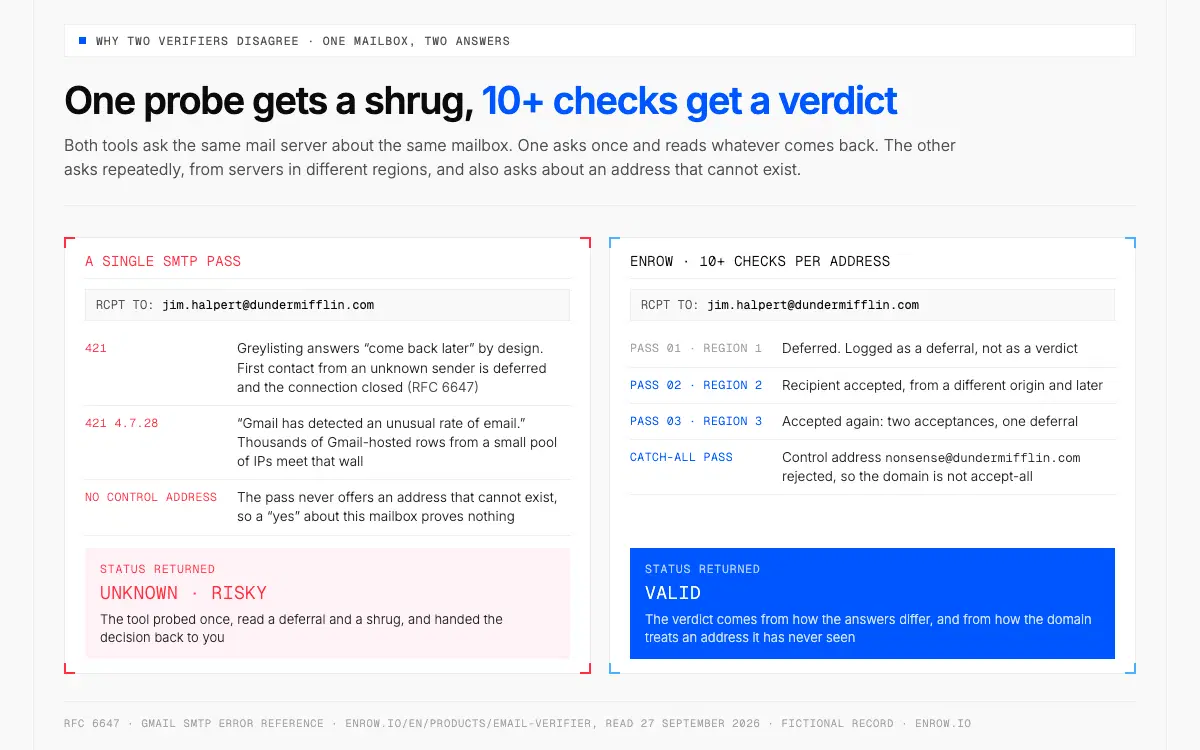
The same mailbox comes back unknown after one probe and valid after 10+ checks.
Run one address through two tools and you'll sometimes get two answers. Neither vendor is lying. A single SMTP pass is a measurement through a noisy channel, and the noise has names.
Greylisting is the loudest of them, and RFC 6647 describes it plainly. On first contact from an unknown sender the server returns a 421, closes the connection, records the tuple of IP address, sender and first recipient, then accepts on a later retry. The RFC names the cost outright — "the most obvious detriment to implementing greylisting is the imposition of delay on legitimate mail." A verifier that probes once sees the deferral and guesses.
Volume trips a different wire. Google publishes the reply itself: 421 4.7.28, "Gmail has detected an unusual rate of email. To protect our users from spam, email has been temporarily rate limited." A tool checking thousands of Gmail-hosted addresses from a small pool of IPs meets that wall, and everything behind it comes back unresolved. Whose IP is asking counts as well. Google's sender guidelines want a valid reverse DNS record on the sending IP with a forward lookup that matches, and a probe from an IP without one gets pushed back long before the mailbox question is reached.
Accept-everything tenants are the third source of noise. Microsoft 365 rejects unknown recipients at RCPT TO with 550 5.4.1 when Directory-Based Edge Blocking is enabled. Where that feature isn't in play, the tenant's answer carries far less information and the verifier is reasoning from a shrug. That mechanism is the practical root of the catch-all problem on European B2B domains.
Which is why Enrow doesn't run one pass. Each address goes through 10+ checks, with multiple SMTP passes and multiple catch-all checks from servers in different regions, and the verdict comes from how those answers differ — including how the domain treats a control address it has never seen.
One probe gets a deferral and a shrug. Several, from different regions, against a control address, get a verdict.
The catch-all problem, and why it costs you real pipeline
An accept-all domain takes delivery of mail addressed to anything. jane.doe@, jne.doe@, nonsense@. All accepted, then binned internally or bounced hours later, after the connection closed.
Most verifiers hit that and stop. They stamp the row "catch-all" or "risky" and hand the decision back to you. ZeroBounce steers unresolved catch-alls toward a separate scoring product, conceding on its own page that "you can't confirm whether the address belongs to a real person" (source).
Then the list owner does one of two damaging things. Deletes the segment, throwing away live decision-makers by the hundred. Or sends to it raw and eats the bounces. On my own files the risky pile is regularly the second-largest segment after clean valids, and on some lists it reached a third of rows. Too many to delete on a hunch.
Catch-alls can be settled from outside, just not with one probe. Repeated SMTP conversations from different origins, at different times, measured against deliberately fake control addresses, produce signal a single check cannot. Enrow resolves them that way and returns them as valid rather than as warnings. Some domains never give in, and the honest move is to leave those rows out. Far fewer unresolved than a single-pass tool produces. Not zero. Full mechanics in what is a catch-all email.
How to check if an email is valid: verifying one address
To verify an email address on its own, paste it into a tool that does live SMTP work rather than pattern matching. What you want is a tool that separates "the server said no" from "the server wouldn't say." One returning valid or invalid with no third category and no catch-all handling is usually a syntax-and-MX check wearing a costume. Doing it by hand is worse: telnetting to port 25 from an office IP gets you greylisted or blocked within a few dozen attempts, and the GitHub scripts automating that handshake inherit every problem above.
Bulk email verification, step by step
For email list cleaning at scale, order matters more than tooling.
- Normalise and dedupe first. Trim whitespace, lowercase domains, kill duplicates and the same person under two aliases. You pay per address checked, so this step is free money.
- Pull role addresses into their own tab before you upload. RFC 2142 gives you the pattern list. They verify as valid and ruin a personalised sequence.
- Upload the CSV. Enrow's Email Verifier takes a file of thousands and hands back a status on every row; the same engine answers one address at a time through the API, or from the official MCP server (
github.com/EnrowAPI/enrow-mcp) when the workflow lives inside an AI assistant. - Split the file by status rather than filtering it. Deleted rows can't be revisited.
- Send to the clean segment, then watch bounces per receiving domain rather than per campaign. Five bounces across a send is noise; five on one company domain means that company's rows are bad.
- Re-verify before the next send. Not the same file three months later.
For European lists, the processing generally runs on GDPR Article 6(1)(f), legitimate interests, with Recital 47 treating direct marketing as one. Recitals are interpretive, not binding.
What each status means, and what to do with the row
| Status | What the verifier actually observed | What to do |
|---|---|---|
| Valid | The server accepted the recipient in a live SMTP exchange, on a domain that is not accept-all | Send. |
| Invalid | A permanent 5yz rejection, typically Gmail's 550 5.1.1 | Delete, never retry. The row that damages sender reputation. |
| Catch-all / accept-all | The domain accepted a control address that cannot exist, so its answer about yours means nothing | Never delete. Route to a verifier that resolves catch-alls. |
| Unknown | No clean answer: a 4yz deferral, a greylist, a timeout, a throttle | Re-check from a different route. Treat a persistent unknown as a no. |
| Role | Local part matches a shared-function mailbox (RFC 2142) | Deliverable, wrong target for 1:1 outreach. Segment it. |
| Disposable | Domain appears on a throwaway-mailbox blocklist | Drop from outbound entirely. |
What bounce rate is safe before you hit send
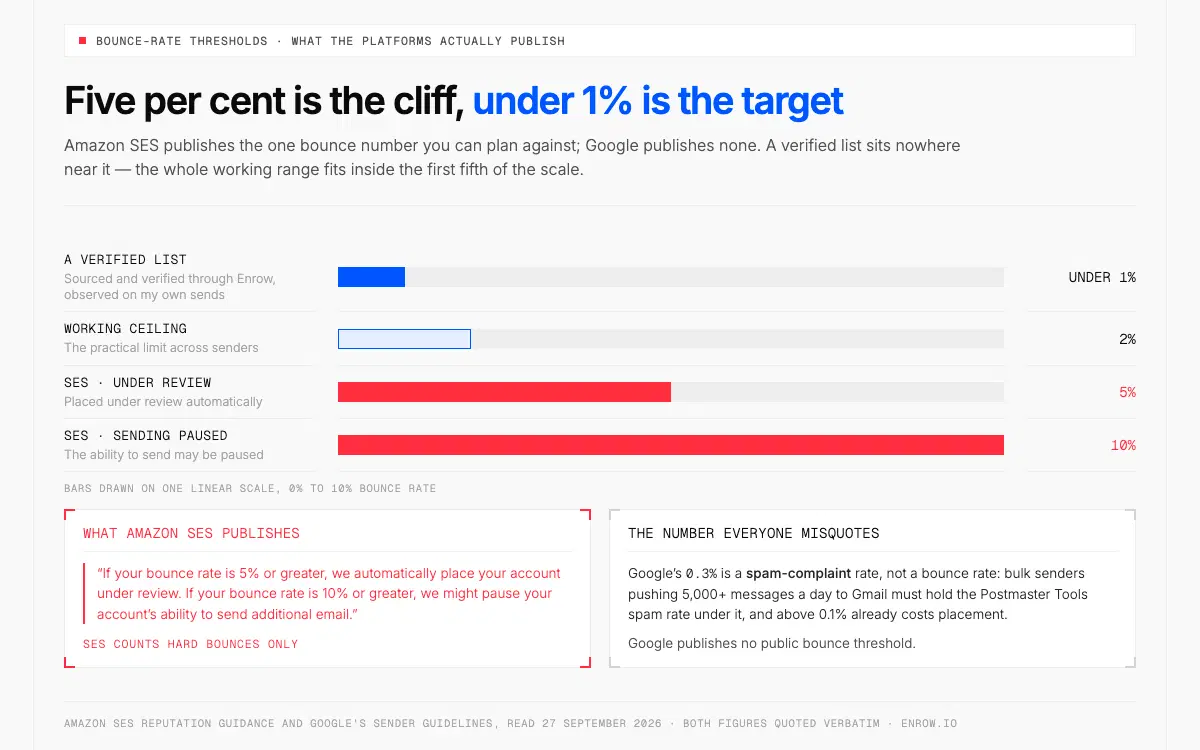
The SES review threshold is the cliff, not the target: a verified list sits under 1%.
One primary-sourced number is worth memorising. Amazon SES: "If your bounce rate is 5% or greater, we automatically place your account under review. If your bounce rate is 10% or greater, we might pause your account's ability to send additional email." SES counts hard bounces only.
Treat 5% as the cliff, not the target. The working ceiling across senders is 2%, and cold outreach should sit under 1%, which is what a verified list produces. Addresses sourced and verified through Enrow bounce under 1% on my lists — an observed average across real sends, not a guarantee and not something anyone can refund you.
One number gets misquoted constantly. Google's 0.3% is a spam-complaint rate, not a bounce rate: bulk senders pushing 5,000+ messages a day to Gmail must hold the Postmaster Tools spam rate under 0.3%, and above 0.1% already costs placement. Google publishes no public bounce threshold. More in email bounce rate.
What bulk email verification costs
Verification on Enrow costs 0.25 credit per address, drawn from the same credits you spend on finding:
| Plan | Price/mo | Credits | Cost per verification | Verifications included |
|---|---|---|---|---|
| Start | $17 | 1,000 | $0.00425 | 4,000 |
| Start 4k | $47 | 4,000 | ~$0.0029 | 16,000 |
| Pro | $87 | 10,000 | ~$0.0022 | 40,000 |
| Scale | $397 | 50,000 | ~$0.0020 | 200,000 |
The free tier is 50 credits every month, recurring, no card — 200 verifications a month, permanently.
Compare like for like. Hunter bills 0.5 credit per verified email against Enrow's 0.25. At the 10,000-credit monthly tier that's $149 for 20,000 verifications, $0.00745 each, against Enrow's $87 for 40,000 at $0.0022 — roughly 3.4× per address checked. Annual, same volume: $0.0052 against $0.00195, about 2.7×.
ZeroBounce refills 100 free credits a month and spends one credit per validation, so its ONE subscription at $99/month buys 10,000 checks, $0.0099 each. Ten thousand checks on Enrow is 2,500 credits — inside the $47 Start 4k tier, which actually carries 16,000. Monthly against monthly, same basis. That ZeroBounce plan does bundle inbox-placement and blacklist tooling Enrow doesn't sell, so it isn't purely a verification bill.
The honest caveat on Enrow's side: credits are shared. A 40,000-address verification run on Pro is the whole month's budget, and none of it goes to finding new contacts. Plan the split before you upload, or cleaning eats sourcing.
What verification cannot do
It cannot make a dead mailbox alive.
The limit nobody selling verification states plainly. On a list built a year or two ago, a verifier's job is to tell you how much of it is gone, and on an old file a large share will be. People change employers, domains fold into an acquirer's, aliases get retired. No vendor recovers those rows, and a tool returning a suspiciously high valid rate on an old list is describing its own leniency, not your data.
Verification proves only that a mailbox accepts mail today. Not that a human reads it, not that the person still holds the title in your CRM. That's a sourcing job: how to find someone's email address.
Two Enrow boundaries, both deliberate. No searchable database to browse — it works in real time, which is why the data isn't stale, and sourcing belongs to LinkedIn or Sales Navigator. And it sends nothing; sequencing goes to Emelia, La Growth Machine or lemlist. What it does that no rival matches: from a LinkedIn profile, the Chrome extension pushes the full verified contact into HubSpot, Salesforce or Pipedrive in one click.
ready to stop wasting time?
Connected in minutes.
Verified data in seconds.
FAQ
How can I check if an email address is valid?
Use a verifier that runs a live SMTP check rather than pattern matching: syntax, MX records, an RCPT TO probe, plus role and disposable lookups. A permanent 5yz rejection means the mailbox is dead. A transient 4yz means the server deferred you and the check needs repeating from another route. If the domain is accept-all, no single probe can answer, and you need a tool that resolves catch-alls.
How can I check bulk emails?
Normalise and dedupe the file, move role addresses like sales@ into their own segment, then upload the CSV and split the results by status instead of filtering rows away. Send to the clean valids, keep catch-alls for a tool that resolves them, delete hard invalids permanently, re-verify before the next campaign.
Why do two verifiers give different answers for the same address?
Because one SMTP pass is a sample. Greylisting (RFC 6647) answers 421 on first contact from an unknown sender, Gmail throttles high-volume probing with 421 4.7.28, the probing IP's reputation changes the reply, and accept-all servers say yes regardless. Vendors also draw the valid/risky line in different places. The fix is repetition: Enrow uses 10+ checks per address, with multiple SMTP passes and multiple catch-all checks from servers in different regions.
What does "catch-all" mean in my results, and should I delete those rows?
The domain accepts mail for every address offered to it, including one the verifier invented, so its answer about yours carries no information. Deleting the segment is the expensive mistake — on my lists it's regularly the second-largest pile and has reached a third of rows. Verify it with repeated multi-region checks; the resolvable ones rejoin the list, the rest stay out.
What bounce rate is safe before I hit send?
Amazon SES places an account under review at 5% and may pause sending at 10%, counting hard bounces only. Work to a 2% ceiling and aim under 1% for cold outreach, which is what a verified list produces. Don't confuse it with Google's 0.3%, a spam-complaint rate and a different metric entirely.
What's the best free email verifier?
Look for a free tier that recurs rather than a one-time sample, and that runs real SMTP checks rather than syntax validation. Enrow gives 50 credits every month, no card — 200 checks a month at 0.25 credit each, on the engine paying customers use, catch-alls included.
The status word is not the answer. The method behind it is. Clean your next list with Enrow — 10+ checks per address, catch-alls resolved instead of shrugged at, 50 free credits every month.