Key takeaway Cancel at least one day before your next scheduled billing date. That is LinkedIn's own wording, and it does not convert cleanly into "24 hours", so give yourself margin. Cancelling a paid plan does not switch Premium off. You keep it until the current cycle ends — on an annual subscription, that means the end of the paid year. A free trial behaves the other way round. Confirm, and access stops right then. If you bought Premium inside the App Store, LinkedIn cannot cancel it and cannot refund it. You cancel in Apple's Settings instead. That one fact is why so many people who believe they cancelled are still being billed. Every step below was read off LinkedIn's, Apple's and Google's own help pages on September 6, 2026.
Steps first, explanation after. How you cancel LinkedIn Premium depends on where the subscription was bought, not on the device in your hand. Find your block below.
Cancel LinkedIn Premium on desktop (billed by LinkedIn)
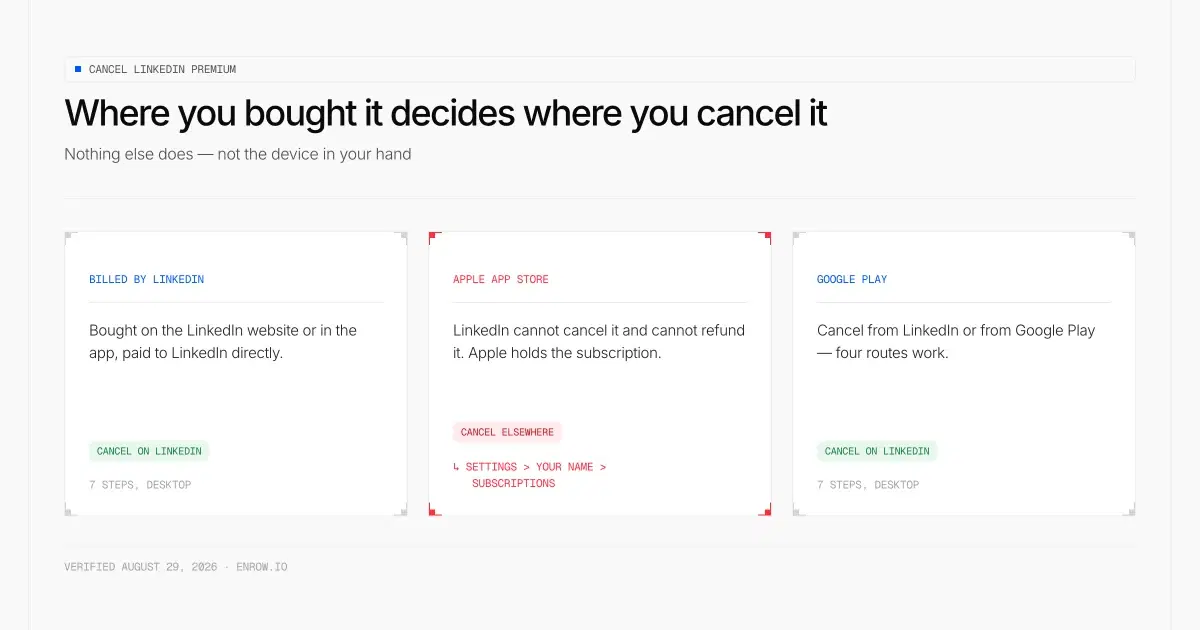
Where you bought it decides where you cancel it. Nothing else does.
Seven steps, exactly as LinkedIn documents them on its cancellation help page:
- Click the Me icon at the top of your LinkedIn homepage.
- Select Premium features from the dropdown.
- Click Manage subscription under Plan Details on the left. Some accounts show this as Subscription details. Either way it opens the LinkedIn Admin Center.
- Click Purchases on the left pane.
- Select your Active subscription.
- Under Actions, click Cancel subscription.
- Click Confirm cancel.
Step 3 is where people give up. The button hands you off to a separate Admin Center interface that looks nothing like LinkedIn, and it is easy to assume you clicked the wrong thing. You didn't. Keep going to Purchases.
Cancel in the LinkedIn mobile app
- Tap your profile photo.
- Tap Premium features.
- Tap Manage your subscription.
- Tap Cancel subscription, then follow the prompts.
This route works when LinkedIn bills you directly, and it works for Android purchases made through Google Play. It does not work for anything bought in the App Store.
Cancel LinkedIn Premium bought through Apple (iPhone, iPad, Mac)
LinkedIn is blunt about this one: "You can't cancel a LinkedIn Premium subscription purchased via Apple App Store directly on LinkedIn." Start the flow on LinkedIn and you are redirected to Apple's subscription management settings to finish it. LinkedIn also states it "can't provide any billing support for Apple App Store purchases", so payment questions and refund requests go to Apple.
There is a second trap on iPhone. Subscribe through iOS mobile web rather than the app, and LinkedIn sends you to the desktop site, because "cancellation isn't available in the iOS app". People bounce between the app and Settings for twenty minutes hunting a button that was never built.
Apple's own path, from Apple Support:
iPhone or iPad
- Open the Settings app and tap your name.
- Tap Subscriptions.
- Tap the LinkedIn subscription.
- Tap Cancel Subscription.
Mac
- Open the App Store app and click your name.
- Click Account Settings.
- Click Subscriptions.
- Click the LinkedIn subscription, then Cancel Subscription.
On a trial bought through Apple, Apple's own instruction is to cancel at least 24 hours before it ends — worth respecting, even though LinkedIn words its deadline differently.
Immediate cancellation on an Apple purchase is not LinkedIn's decision. Its help page says you can contact Apple Support for one, but that "any request for immediate cancellations are at the discretion of Apple support." Handle that page carefully — it carries a "Last updated: 2 years ago" stamp and still references a June 2020 cut-off, making it the stalest article in this set.
Cancel LinkedIn Premium bought through Google Play (Android)
Android gives you more exits than iOS does. LinkedIn says a Google Play subscription can be cancelled from the LinkedIn desktop site, the LinkedIn mobile app, Google Play on desktop, or the Google Play mobile app. The LinkedIn paths are the same seven and four steps above.
Through Google directly:
- On your Android device, open subscriptions in Google Play (or go to play.google.com/store/account/subscriptions).
- Select the LinkedIn subscription.
- Tap Cancel subscription.
- Follow the instructions.
Google's policy matches LinkedIn's on access: "When you cancel a subscription you'll still be able to use your subscription for the time you've already paid", and you won't be charged again. On money already taken, Google is less generous — "Your past subscriptions can't be refunded, with some exceptions."
Cancel without signing in (United States and Germany only)
Almost nobody publishes this one. Buried in the same LinkedIn help page: "If you're in Germany or the United States, some subscriptions can be canceled without signing in." The form sits at linkedin.com/help/linkedin/ask/PREMIUM-CANCEL, and it was returning a live page when I checked it on September 6, 2026.
Read the hedge. LinkedIn says some subscriptions, and it never says which. If you are locked out of the account, it is the route to try; if you can sign in, the desktop path is documented and this one isn't.
What happens after you confirm
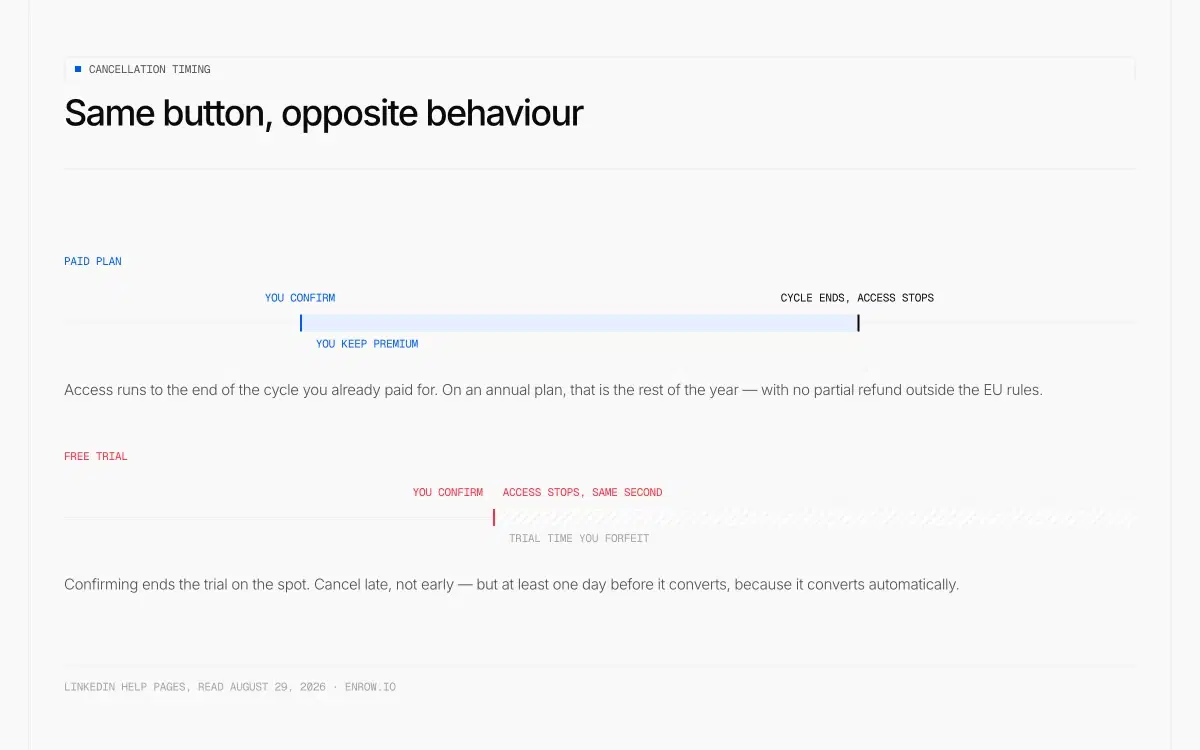
The same button ends a paid plan later and a trial instantly.
Access does not stop. LinkedIn: "Your plan will remain active until the end of your current billing cycle. You'll continue to have access to Premium features until the plan expires." On monthly billing that is a few days or weeks. On annual billing it is the rest of the paid year, and there is no partial refund attached to it outside the jurisdictions below.
Your card stays on file until then. LinkedIn only lets you delete the payment method once the billing cycle has ended: "You won't be able to delete it if you have an active paid subscription." So the sequence is cancel first, remove the card afterwards. Not the other way round.
One consequence that catches long-time subscribers. If you are paying a promotional or legacy rate, cancelling destroys it permanently — "Any active promotions applied to your current purchase will be void and can't be restored." Resubscribing later means paying today's price.
LinkedIn confirms that monthly, quarterly and annual cycles all exist, and that you can either schedule the cancellation for the next billing date or ask support for an immediate one. Whether an immediate cancellation refunds the unused period is stated nowhere I could find. Don't assume it does.
The free trial rule runs backwards
Everything above applies to paid plans. Trials invert it: "If you cancel a Premium free trial, the trial will end immediately, and Premium access will stop right away."
So don't cancel a trial on day two out of tidiness. You are throwing away the rest of it for nothing. Cancel late, at least a day before it converts — because it does convert, automatically, unless you act.
Then the rule that should decide whether you cancel a trial at all, and LinkedIn writes it more than one way. One help article treats the lockout as temporary: you "won't be eligible to sign up for another free trial for at least 12 months." A second one takes the deadline away — a member who has already used a trial "may not be eligible for any further free Premium subscriptions, even if it has been more than 12 months since your previous free trial." Both articles carry the same six-month freshness stamp, so neither is the obviously outdated one.
A third wording sits on LinkedIn's own commercial Premium page and resolves nothing. I put all three next to each other in the free trial guide. For the decision in front of you, take the harsh reading: assume the trial you are ending is the only one this profile gets.
One precise number does exist, and it belongs to Sales Navigator rather than Premium. That trial is reserved for members who are not on any paid LinkedIn subscription and have not used a LinkedIn free trial in the past 365 days. LinkedIn never applies that wording to Premium, so don't borrow it across.
Length is unpublished too. It "may vary based on region or promotional terms", which means no article can honestly tell you how many days you have. A reminder email does go out before a trial ends on desktop purchases, though LinkedIn never says how far ahead.
LinkedIn Premium refund policy: mind the two hedges
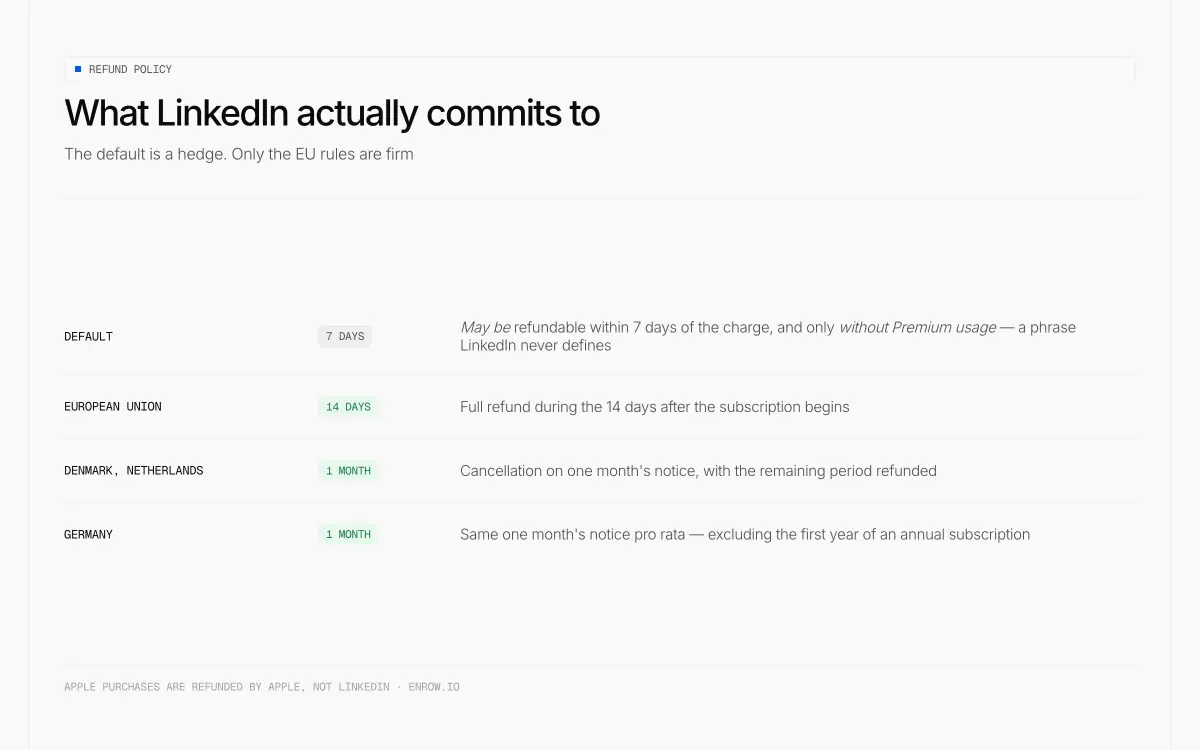
Seven days that LinkedIn only ‘may’ honour, against fourteen it must.
Here is the sentence everyone quotes: Premium subscriptions "may be refundable within seven days from the date the subscription is charged without Premium usage."
Two loaded phrases in there. May be, not will be. And without Premium usage, which LinkedIn never defines. A single InMail, or simply logging in and reading a profile — nobody outside LinkedIn knows which of those voids the claim. Treating the seven days as a right is how people end up angry.
Some jurisdictions override that default, and those rules are firmer:
| Where you are | What LinkedIn commits to |
|---|---|
| Default | May be refundable within 7 days of the charge, without Premium usage |
| European Union | Full refund during the 14 days after the subscription begins |
| Denmark, Netherlands | Cancellation on one month's notice, with the remaining period refunded |
| Germany | Same one-month-notice pro rata, excluding the first year of an annual subscription |
Refund requests go through the help centre's refund request form. On an Apple purchase, Apple holds the money and LinkedIn has said plainly that it cannot help. On Google Play, past subscription periods generally are not refunded.
Outside Denmark, the Netherlands and Germany, do not expect a pro-rata refund on an annual plan. I could not confirm one on LinkedIn's own refund page.
Downgrade LinkedIn Premium instead of cancelling
LinkedIn offers this as its own alternative: "You can downgrade your Premium subscription from your existing plan and choose a plan that better suits your needs." Desktop only.
It applies to Premium Business, Sales Navigator Core and Sales Navigator Advanced with a single active seat. Not Premium Career — LinkedIn states you cannot downgrade from it at all.
And a downgrade is not the soft landing a cancellation is. "Your billing cycle resets immediately when you switch plans", and "Downgrading removes access to features included in your current plan." You lose the higher tier the moment you apply, and you start a fresh cycle at the new price rather than coasting to the end of the one you paid for.
The path: Me > Premium features > Subscription details > Admin Center > Purchases > your active subscription > Switch plans > Explore other plans > pick the lower tier > Apply > Downgrade plan.
What you lose when the plan expires
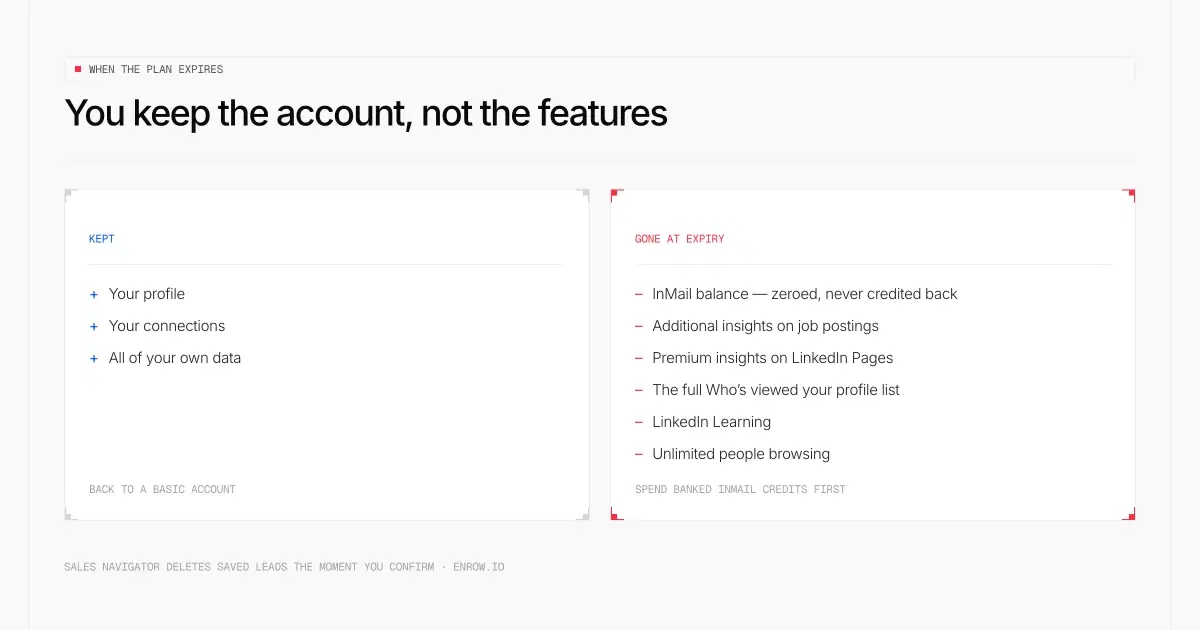
Your InMail balance is zeroed. Spend it before you confirm.
You return to a Basic (free) account and keep your profile, your connections and your data. What goes, in LinkedIn's own list: accumulated InMail message credits, which "can't be credited back"; additional insights on job postings; Premium insights on LinkedIn Pages; the full list under Who's viewed your profile; LinkedIn Learning; and unlimited people browsing.
On InMail specifically, since it is the most-asked question here: the balance is zeroed at cancellation. No grace period, and nothing transfers to another subscription. Whatever you have banked, spend it before the plan expires.
Two plan-specific extras. On Premium All-in-One, unused job and ads credits expire with the subscription — and note that LinkedIn describes All-in-One as still in testing and possibly unavailable in your location. On a Premium Company Page, only the admin who bought the subscription can cancel it, and the Page loses its premium features unless another admin subscribes.
Cancel Sales Navigator: export your saved leads first
Read this twice if you are on Sales Navigator. The rules are harsher than Premium's and hardly anyone writes them down.
Cancelling Sales Navigator deletes your messages, saved leads and saved accounts — and LinkedIn says "This data is removed as soon as you cancel". Not at the end of the cycle. As soon as you confirm. InMail credits are not transferred to your personal account, and if you subscribe again later you "start over with a new account" with none of the previous data.
Billing still runs to the end of the paid period. Access to your book of leads does not. Export first, cancel second.
The path: sign in, click the icon top-right and choose Settings & Privacy > Account Preferences > Subscriptions & payments > Manage Premium account > Manage Subscription > Purchases > your subscription > under Actions, Cancel subscription (or Cancel free trial). Employer-bought seats go through your admin, not you. And closing your LinkedIn account entirely requires the Sales Navigator subscription to be cancelled first. Prices for what you are leaving sit in the Sales Navigator pricing breakdown.
The job you were paying Premium for
Most people don't buy Premium for the badge. They buy it to reach someone who isn't a connection, which in practice means InMail.
So here is what that money bought, plan by plan — the sticker, the monthly allowance, the ceiling the balance stops climbing at, and what one message therefore costs:
| Plan | Monthly price | InMails a month | Balance caps at | Cost per InMail |
|---|---|---|---|---|
| Premium Career | $39.99 | 5 | 15 | $8.00 |
| Premium Business | $69.99 | 15 | 45 | $4.67 |
| Premium All-in-One | $89.99 | 30 | not published | $3.00 |
| Sales Navigator Core | $119.99 | 50 | 150 | $2.40 |
Monthly-billed prices throughout, divided by the monthly allowance. Annual billing changes both sides of that division, so the two are never mixed here.
Unused credits accumulate to that cap and then stop. You get one back only if the recipient accepts, declines or replies within 90 days of the send. Full arithmetic, including annual billing, sits in the InMail cost breakdown; the tier-by-tier prices are in the Premium pricing guide.
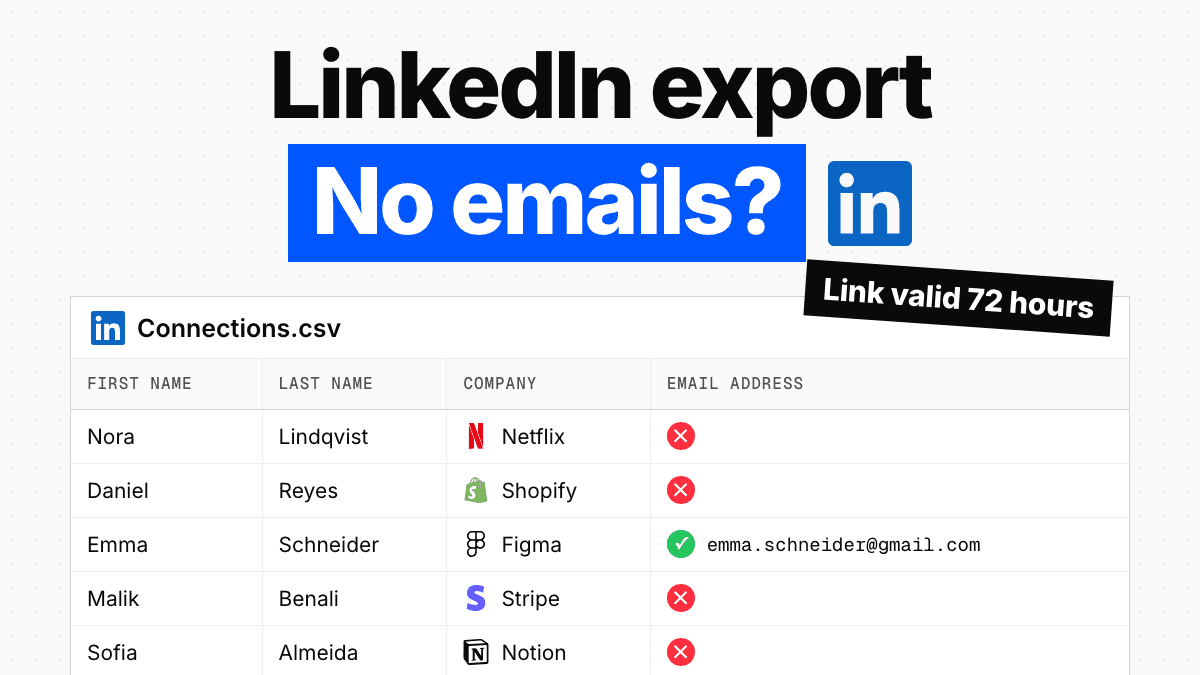
Now the part nobody says out loud at checkout. No LinkedIn plan, at any price, gives you someone's email address or phone number. Contact info on a profile is visible to 1st-degree connections by default, and the member decides who else sees it. The setting goes as tight as "only visible to me" and as wide as "anyone on LinkedIn". Phone discoverability sits behind the same control. None of those settings looks at what the viewer pays. Premium buys messages inside LinkedIn's walls and wider search reach, and that is the whole trade. The other ceilings are catalogued in the LinkedIn limits guide.
If you're cancelling because it never got you in front of anyone
Weigh what follows accordingly: I run a company that sells B2B contact data.
Five messages a month was never the real ceiling, and neither was fifteen. The ceiling is that LinkedIn shows you a person and keeps the means of reaching them off-platform to itself. That is the gap Enrow fills. Hand it a name and a company, or the profile sitting open on your second monitor, and a work email or a direct dial comes back in a couple of seconds. Before anything reaches you it has been through 10+ verification checks. Billing follows the outcome, not the attempt — nothing found, nothing charged, and an address that fails verification costs nothing either. Pro works out at $0.0087 for a valid email. Catch-all domains, which most tools hand back marked risky and unusable, are resolved and delivered here. Bounce across our own traffic is measured under 1%, and measured is all I'll claim for it.
Then the half that doesn't flatter me. Ending a Premium subscription and starting an Enrow one are not the same transaction. Enrow holds no browsable list of people, deliberately. A warehoused list is quietly wrong six months after somebody built it, and it never flags which rows went bad. Choosing who deserves a message stays LinkedIn's job, because the people in it keep their own entries current. Enrow picks up once you already have the name. Sending is out of scope as well — Emelia handles sequencing properly, La Growth Machine too, lemlist if you want the heavier product.
The two meet inside a Chrome extension that sits on the LinkedIn or Sales Navigator profile you already have open. One click writes the whole verified contact card into HubSpot, Salesforce or Pipedrive. It looks for the person first, so an existing record is updated in place rather than shadowed by a second copy of the same human.
And if you are cancelling only because this quarter has no use for Premium, go ahead and cancel. The plan will still be on sale next year. The rate you had won't be.
ready to stop wasting time?
Connected in minutes.
Verified data in seconds.
FAQ
Why won't LinkedIn let me cancel my subscription?
Almost always because you bought it in the Apple App Store. LinkedIn states plainly that such a subscription can't be cancelled on LinkedIn, and redirects you to Apple's subscription settings. If you subscribed through iOS mobile web instead, cancellation isn't available in the iOS app at all and you need the LinkedIn desktop site.
How do I cancel LinkedIn Premium on an iPhone?
Open Settings, tap your name, tap Subscriptions, tap the LinkedIn subscription, then Cancel Subscription. If LinkedIn isn't listed there, it was billed by LinkedIn rather than Apple, and you cancel on the LinkedIn desktop site or in the app under Premium features.
Can I cancel LinkedIn Premium immediately?
A paid plan, no. It runs to the end of the current billing cycle and you keep Premium features until then, though LinkedIn says you can contact support to request an immediate cancellation. A free trial, yes — and unavoidably, because ending a trial cuts access off on the spot.
Do I get a refund if I cancel LinkedIn Premium?
Only sometimes. LinkedIn says subscriptions may be refundable within seven days of the charge and without Premium usage, and defines neither phrase. EU citizens get a full refund within 14 days of the subscription starting. Denmark and the Netherlands get one month's notice with the remaining period refunded, as does Germany, excluding the first year of an annual plan. Apple purchases are refunded by Apple.
How do I stop LinkedIn from charging my card?
Cancel at least one day before your next scheduled billing date. You cannot pull the card first — LinkedIn only lets you delete a payment method once the billing cycle has ended, and blocks it entirely while a paid subscription is active.
Do my InMail credits carry over after I cancel LinkedIn Premium?
No. The balance drops to zero when the subscription is cancelled, accumulated credits cannot be credited back, and they don't transfer to another LinkedIn subscription. Use them before the plan expires.
Can I cancel LinkedIn Premium without logging in?
In Germany and the United States, some subscriptions can be cancelled without signing in, through LinkedIn's form at linkedin.com/help/linkedin/ask/PREMIUM-CANCEL. Which ones qualify is undocumented, so treat it as a fallback for a locked-out account rather than the main route.
How do I cancel Sales Navigator?
Settings & Privacy > Account Preferences > Subscriptions & payments > Manage Premium account > Manage Subscription > Purchases > your subscription > Cancel subscription. Export your saved leads first: LinkedIn deletes messages, saved leads and saved accounts as soon as you cancel, not at the end of the billing cycle, and resubscribing later starts a blank account.
Can I downgrade LinkedIn Premium instead of cancelling?
On Premium Business, Sales Navigator Core and single-seat Sales Navigator Advanced, yes, and only on the desktop site. Premium Career cannot be downgraded at all. Note that the billing cycle resets the moment you switch and the higher tier's features go straight away.
Will I lose my discounted price if I cancel LinkedIn Premium?
Yes, permanently. LinkedIn states that cancelling a promotion or a plan that is no longer offered voids the discounted price and that it can't be restored. If you resubscribe, you pay the current rate.
Can I get a LinkedIn Premium free trial again after cancelling?
Plan on no. One LinkedIn help article says cancelling a free Premium trial leaves you ineligible for another for at least 12 months. A second says a member who has used a trial may not be eligible for any further free Premium subscriptions even after more than 12 months. LinkedIn has never reconciled the two, and both pages are equally fresh. The 365-day version people quote, along with the "no paid subscription running" condition attached to it, is Sales Navigator's rule and LinkedIn does not state it for Premium.
How I verified this
Every step and every quote here was read off a live help page on September 6, 2026, never lifted from somebody else's article. What went in: LinkedIn's cancellation article and its separate cancellation FAQ, the Premium subscription FAQ, the App Store and Google Play articles, the refund policy, the downgrade article, the InMail credits page, two Sales Navigator cancellation pages, two trial eligibility articles, the Company Page and All-in-One articles, and Apple's and Google's own documentation. Every URL is listed in this page's editorial footnote.
LinkedIn stamps its help pages with relative dates rather than real ones. The freshest here reads "1 week ago". The oldest, on immediate Apple cancellations, reads "2 years ago". Where LinkedIn's wording is ambiguous, this page reproduces the ambiguity rather than resolving it on LinkedIn's behalf. Cost-per-InMail figures are arithmetic on two published inputs, the monthly price and the monthly allowance. They are not LinkedIn numbers.