Key takeaway
Pipedrive's API needs exactly one field to create a Person: name. Emails and phones are optional. So your CRM will happily store a contact nobody can reach, and in the pipeline view it looks identical to a good one.
The marketplace lists over 500 integrations. Pipedrive's own enrichment leans firmographic, is triggered by hand, caps bulk runs at 100 records, and puts its person-level fields on the top plans.
Nothing in Pipedrive's documentation says a returned address is deliverable. That's the gap.
Enrow closes it from the LinkedIn side: the Chrome extension pushes the full verified contact card into Pipedrive in one click, and a credit is spent only when a valid result comes back.Pipedrive is a pipeline tool, and a good one. It was never a data tool and has never pretended otherwise. You can read that straight out of the API: the Persons endpoint needs name to create a record. That is the entire mandatory list. emails and phones sit in the optional block underneath.
Fine for a CRM. Expensive for you. A Person with a name and a job title reads like progress, so a deal gets created against it, the stage moves, and three weeks later a rep finds there was never an address on the record. Nothing bounced, because nothing was ever sent.
Below: what Pipedrive integrations give you on contact data, and the shortest honest path from a LinkedIn profile to a record you can act on.
What Pipedrive integrations actually cover
Pipedrive's own wording is "over 500 out-of-the-box CRM integrations". The integrations page sorts them by what happens to a deal: attract leads, qualify them, nurture them, communicate, manage contracts, take payments, run projects, automate the pipeline, manage accounts, support customers.
Notice what isn't a headline category. Contact data enrichment appears nowhere in that list.
That's a map, not an accusation. The marketplace is organized around deal motion and it's deep there. Search its LinkedIn corner and you'll find connectors — LinkMatch, LeadCRM, Surfe, Breakcold and more — most built to solve the sync problem: getting a profile into the CRM as a record. Making the address on that record survive a send is the harder problem, and the marketplace doesn't sort by it.
What Pipedrive's own enrichment returns
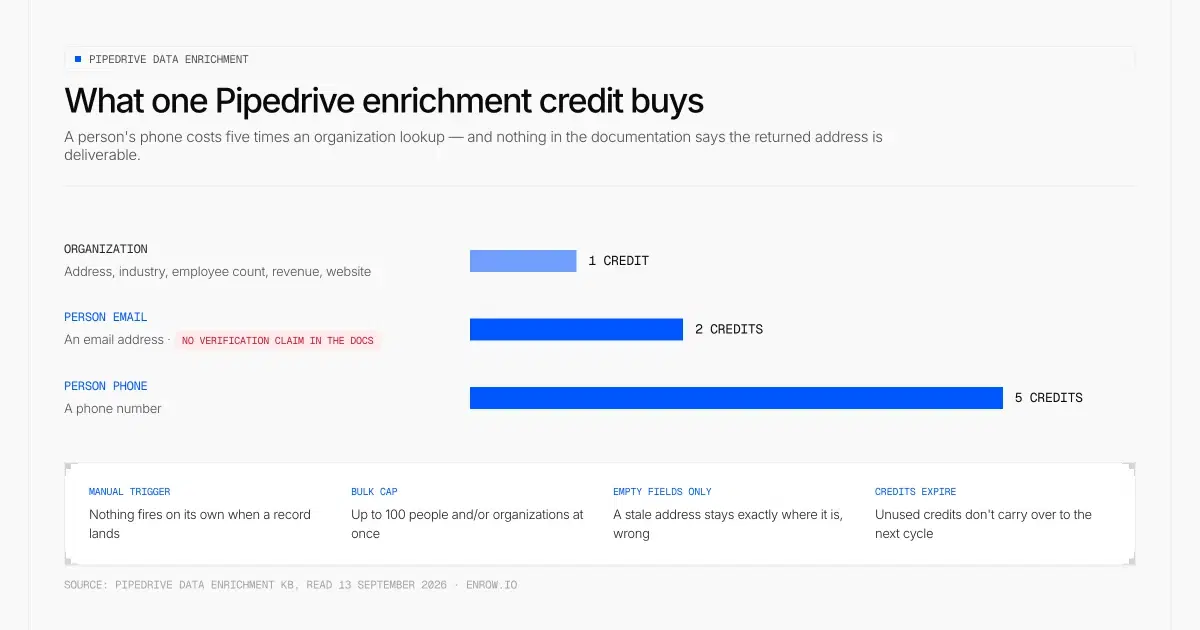
Pipedrive prices a person's phone at five credits and an email at two, and never says that email is deliverable.
Pipedrive does ship enrichment. It's worth reading the KB article closely, because the shape of it matters more than the existence of it.
| What you enrich | What comes back | Credits |
|---|---|---|
| Organization | Address, industry, employee count, annual revenue, LinkedIn profile, website | 1 |
| Person email | An email address. No verification or deliverability claim anywhere in the docs | 2 |
| Person phone | A phone number | 5 |
Four mechanics shape how that plays out in practice.
It's manual. You click "enrich data" in the detail or list view; nothing fires on its own when a record lands. Bulk runs are capped, in Pipedrive's words, at "up to 100 people and/or organizations at once".
It only fills blanks. Pipedrive's blog is explicit that "only empty fields will be enriched". So a stale address sitting in the email field stays exactly where it is, wrong.
It needs an input you may not have. Organization enrichment wants a website, a work email from a linked person, or a LinkedIn URL. Person email wants a name plus an org link or a LinkedIn profile. It improves records you hold, and sources none.
And the credits expire. Pipedrive's own line: "Unused monthly and top-up credits expire at the end of each billing cycle and don't carry over to the following month." Top-ups come in blocks between 100 and 1,000 credits, in increments of 100, with no per-credit price published on the page.
Then the plan gate, where Pipedrive's own sources contradict each other three ways. The KB says Premium, Ultimate and Enterprise, with a paid add-on required on Premium. The plan table shows contact data enrichment on Ultimate alone among the new plans, and on Power and Enterprise among the legacy ones. The resources page says Premium and Ultimate. Safe reading: it isn't on the entry plans, and on Premium it costs extra.
A company field is not a send-ready address
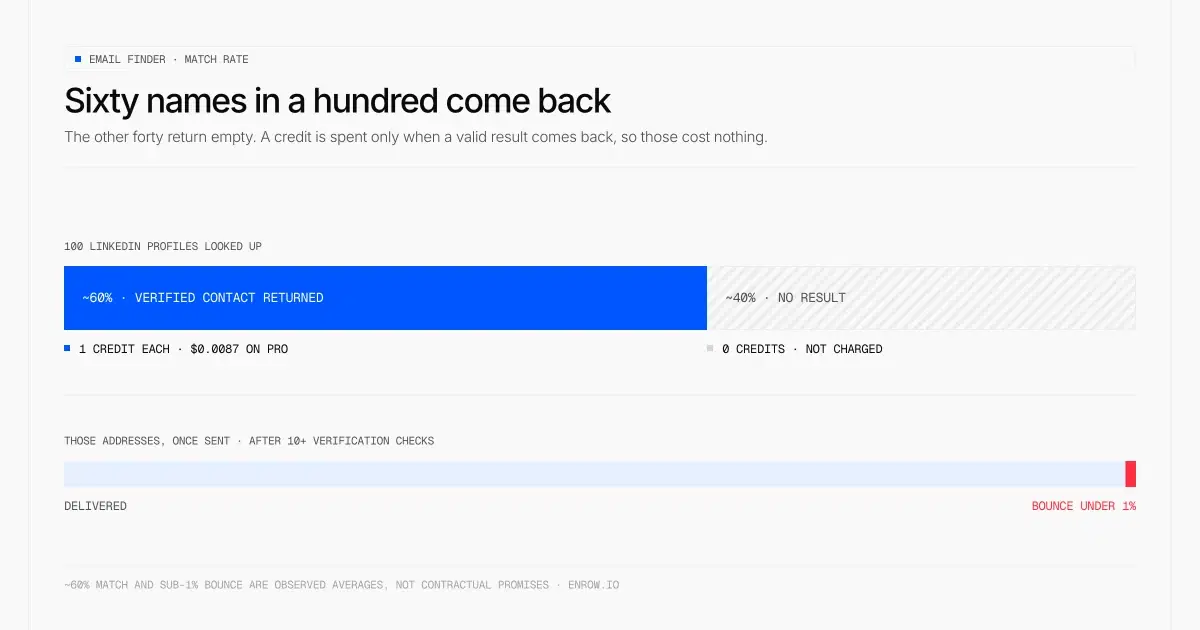
Six lookups in ten come back with a verified contact. The four that don't cost nothing, and what does come back bounces under 1%.
These are two different jobs and the vocabulary hides it.
Firmographic enrichment answers "what is this company". Headcount, revenue band, industry, website. It ages slowly, and getting it slightly wrong costs you a segment filter.
A personal email is a live routing question about one mailbox, on one server, today. The person may have left in March. The pattern you inferred may not be the company's. The domain may be catch-all, in which case the server says yes to every address you try and tells you nothing. Getting it wrong costs sender reputation, which outlives the campaign.
So the test isn't whether a field got populated. It's whether the value in it clears a send.
That's the layer Enrow works on. Every address runs through 10+ verification checks — multiple SMTP passes plus multiple catch-all checks from servers in different regions — before it's returned. Catch-alls come back as valid results instead of a "risky" label you're left to guess about. Across my own sends, bounce sits under 1%: an observed average, not a contractual promise, and I won't dress it up as one.
The honest counterpart to that number is the match rate, which runs around 60%. Four names in ten come back empty. You're not charged for those.
LinkedIn to Pipedrive, without the copy-paste
The workflow is four steps and none of them involve a spreadsheet.
- Source in LinkedIn or Sales Navigator: filters, a saved search, a lead list. Enrow keeps no database of its own to query, on purpose. More on that below.
- On the profile itself, run the Enrow Chrome extension. It looks up and verifies live, in roughly two to five seconds, at the moment you ask.
- One click sends the full verified contact card into Pipedrive, every field, no copy-paste. Pipedrive sits on Enrow's native list beside Clay, HubSpot, Salesforce and webhooks, so this isn't a Zapier chain you babysit.
- Open the deal against someone a rep can actually reach.
At volume the same thing runs without a browser: upload a CSV, call the API, or wire it through Make, Zapier or n8n. There's an official MCP server too, at github.com/EnrowAPI/enrow-mcp, so an AI assistant can call the finder and verifier directly.
Direct dials matter here too. A Person with an email and no number is half a contact. One phone costs 40 credits, so about $0.35 on Pro. EU direct dials are covered and GDPR-cleared.
About the "Pipedrive Chrome extension" search
Type that phrase into Google and you mostly get Gmail-side tooling and marketplace listings. Useful, some of them. But the inbox isn't where this problem starts. It opens earlier, on a LinkedIn profile, the moment you decide someone is worth a deal.
What it costs, and what I can't tell you
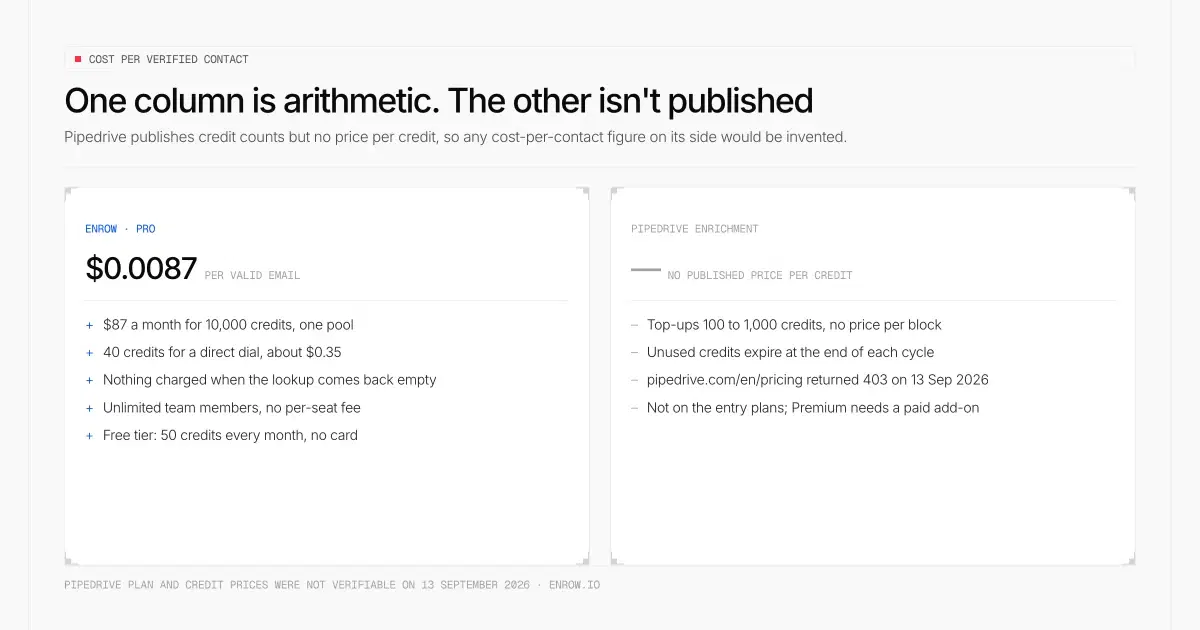
One column can be computed. Pipedrive publishes credit counts but no credit price, so its cost per contact would have to be invented.
Enrow's side is simple to state. Start is $17/month for 1,000 credits, which is $0.017 per valid email. Pro is $87 for 10,000, or $0.0087 each. Scale runs $397 for 50,000. Annual billing takes 10% off on Pro and Scale.
Credits are one pool, not separate email and phone buckets. Spend a Pro plan entirely on emails and you get 10,000 of them; spend it entirely on direct dials and you get 250. Most teams land somewhere in between.
One email is one credit. Verifying an address you already hold is 0.25. And credits are consumed only when a valid result comes back. No result, no charge. Enrow was the second tool in the world to bill per email found rather than per search.
No per-seat fee either. Pro carries up to 10 team members and Scale has no limit, so five reps cost what one does. The free tier is 50 credits every month, recurring, no card.
What I can't give you is the other column. Pipedrive publishes no price per enrichment credit anywhere I could reach, so any cost-per-contact figure for it would be invented. Its plan prices weren't verifiable either: pipedrive.com/en/pricing returned a 403 to every request on 13 September 2026.
Where Enrow stops
Three limits, all deliberate, and you should know them before you buy.
There's no searchable database. A choice, not a roadmap gap: bought databases refresh every three to nine months, so you prospect people who changed jobs two quarters ago. Real-time lookup is why the data holds up. The cost is that sourcing happens elsewhere — LinkedIn or Sales Navigator. For the list-building side, see exporting LinkedIn contacts.
And there's no sequencing. Enrow won't send the emails it finds, and we're not building that. It's a different craft and other people do it better. Push the data into Emelia, La Growth Machine or lemlist and let them handle the sending.
There are no technographics either. Company data is LinkedIn-level and stops there.
ready to stop wasting time?
Connected in minutes.
Verified data in seconds.
FAQ
How do I connect LinkedIn to Pipedrive?
Three routes. A marketplace connector syncs profile fields into a Person record. A Zapier or n8n flow does the same with more wiring. Or a Chrome extension does it from the profile in one click. Check one thing before picking: does the route bring a verified email and phone with it, or only the name and title LinkedIn already showed you?
Does Pipedrive find email addresses on its own?
Not from scratch. Its enrichment improves records you already hold and needs an input to work from: a website, a linked organization, or a LinkedIn URL. The older Smart Contact Data feature works from an address or domain you already possess, so it can't fill an empty email field. For an address that isn't in the CRM yet, you need a LinkedIn email finder upstream.
Does Pipedrive's data enrichment return a personal email and phone number?
It can. Person enrichment returns a phone number and an email, costing 5 and 2 credits. But it's gated: not available on the entry plans, and on Premium it requires a separate paid add-on. It fills empty fields only, and Pipedrive's documentation makes no claim that the returned address is verified or deliverable.
Do Pipedrive enrichment credits roll over?
No. Pipedrive states that unused monthly and top-up credits expire at the end of each billing cycle and don't carry over. Top-ups run 100 to 1,000 credits, with no published price per block. (HubSpot's pool expires the same way — see our HubSpot data enrichment breakdown.)
How much does it cost to get a verified contact into Pipedrive?
On Enrow's side: $0.017 per valid email on Start, $0.0087 on Pro, and around $0.35 for a valid direct dial on Pro. Nothing is charged when the lookup comes back empty. Pipedrive's side can't be computed honestly, since it publishes credit counts but no credit price.
Can Enrow send the outreach once contacts are in Pipedrive?
No, and it never will. Enrow finds and verifies; sending belongs to a sequencer. Emelia, La Growth Machine and lemlist all work with Enrow data, and any of them will do it better than a data company bolting on a feature it doesn't care about.
A Person record with no email is a deal you already lost and haven't noticed. Push the verified contact card straight from LinkedIn into Pipedrive with Enrow — 50 free credits every month, no card, and nothing billed unless the result is valid.